

2. Reference Information
2.1. Publications
This section contains FUN3D-related publications and presentations. The first section presents the publications in bibliography style. The titles are links to entries in a subsequent section that contains the publication title and the publication’s abstract.
Publication Citations
- Optimization of Ported CFD Kernels on Intel Data Center GPU Max 1550 using oneAPI ESIMD, Mohammad Zubair, Aaron Walden, Gabriel Nastac, Eric Nielsen, Christoph Bauinger, Xiao Zhu, SC-W’23: Proceedings of the SC’23 Workshops of The International Conference on High Performance Computing, Network, Storage, and Analysis, November 2023, pp. 1705-1712, (doi:10.1145/3624062.3624251).
- FUN3D Manual: 14.0.2, William K. Anderson, Robert T. Biedron, Jan-Renee Carlson, Joseph M. Derlaga, Boris Diskin, Cameron T. Druyor Jr., Peter A. Gnoffo, Dana P. Hammond, Kevin E. Jacobson, William T. Jones, Bil Kleb, Elizabeth M. Lee-Rausch, Yi Liu, Gabriel C. Nastac, Eric J. Nielsen, Emmett M. Padway, Michael A. Park, Christopher L. Rumsey, James L. Thomas, Kyle B. Thompson, Aaron C. Walden, Li Wang, Stephen L. Wood, William A. Wood, Xinyu Zhang, NASA TM 20230004211, 2023.
- FUN3D Manual: 14.0.1, William K. Anderson, Robert T. Biedron, Jan-Renee Carlson, Joseph M. Derlaga, Cameron T. Druyor Jr., Peter A. Gnoffo, Dana P. Hammond, Kevin E. Jacobson, William T. Jones, Bil Kleb, Elizabeth M. Lee-Rausch, Gabriel C. Nastac, Eric J. Nielsen, Michael A. Park, Christopher L. Rumsey, James L. Thomas, Kyle B. Thompson, Aaron C. Walden, Li Wang, Stephen L. Wood, William A. Wood, Boris Diskin, Yi Liu, Xinyu Zhang, NASA TM 20230004211, 2023.
- FUN3D Manual: 14.0, William K. Anderson, Robert T. Biedron, Jan-Renee Carlson, Joseph M. Derlaga, Cameron T. Druyor Jr., Peter A. Gnoffo, Dana P. Hammond, Kevin E. Jacobson, William T. Jones, Bil Kleb, Elizabeth M. Lee-Rausch, Gabriel C. Nastac, Eric J. Nielsen, Michael A. Park, Christopher L. Rumsey, James L. Thomas, Kyle B. Thompson, Aaron C. Walden, Li Wang, Stephen L. Wood, William A. Wood, Boris Diskin, Yi Liu, Xinyu Zhang, NASA TM 20220017743, 2022.
- Design and Evaluation of a GPU Streaming Framework for Visualizing Time-Varying AMR Data, Stefan Zellmann, Ingo Wald, Alper Sahistan, Matthias Hellmann, and Will Usher, Eurographics Symposium on Parallel Graphics and Visualization, edited by Roxana Bujack, Julien Tierny, and Filip Sadlo, The Eurographics Association, 2022.
- Hybrid Image-/Data-Parallel Rendering Using Island Parallelism, Stefan Zellmann, Ingo Wald, Joao Barbosa, Serkan Dermici, Alper Sahistan, and Ugur Gudukbay, 2022 IEEE 12th Symposium on Large Data Analysis and Visualization (LDAV), 2022, pp. 1-10.
- Quick Clusters: A GPU-Parallel Partitioning for Efficient Path Tracing of Unstructured Volumetric Grids, Nate Morrical, Alper Sahistan, U. Gudukbay, Ingo Wald, Valerio Pascucci, (doi:10.13140/RG.2.2.34351.20648).
- A Memory Efficient Encoding for Ray Tracing Large Unstructured Data, Ingo Wald, Nate Morrical, and Stefan Zellmann, Accepted at IEEE Visualization; to appear at IEEE Transactions on Visualization and Computer Graphics (TVCG), 2021.
- Accelerating Unstructured-grid CFD Algorithms on NVIDIA and AMD GPUs, Christopher P. Stone, Aaron Walden, Mohammad Zubair, Eric J. Nielsen, SC21, November 2021.
- Memory Optimizations for Sparse Linear Algebra on GPU Hardware, Aaron Walden, Mohammad Zubair, Christopher P. Stone, Eric J. Nielsen, SC21, November 2021.
- High-Fidelity Aero-Acoustic Optimization Tool for Flexible Rotors, Li Wang, Boris Diskin, Leonard V. Lopes, Eric J. Nielsen, Elizabeth Lee-Rausch, Robert T. Biedron, Journal of the American Helicopter Society, Vol. 66, No. 2, 2021, pp. 1-16, (doi:10.4050/JAHS.66.022005).
- Evaluation of CFD Predictions of Cobra-MRV Control Surface Effectiveness at the NASA Langley Unitary Plan Wind Tunnel, Marie Denison, Joseph Garcia, Ben Nikaido, Scott Murman, James C. Ross, Robert Childs, Paul Stremel, Bil Kleb, Stephen J. Alter, Thomas K. West and Phil Robinson, AIAA 2021-2965, AIAA Aviation 2021 Forum, August 2021.
- Edge Based Viscous Method for Node-Centered Formulations, Yi Liu, Boris Diskin, William K. Anderson, Eric Nielsen and Li Wang, AIAA 2021-2728, AIAA Aviation 2021 Forum, August 2021.
- Improvements in Iterative Convergence of FUN3D Solutions, Li Wang, Boris Diskin, Eric J. Nielsen and Yi Liu, AIAA 2021-0857, AIAA Scitech 2021 Forum, January 2021.
- Verification Test Suite for Spalart-Allmaras QCR2000 Turbulence Model, Boris Diskin, Nashat N. Ahmad, William K. Anderson, Joseph M. Derlaga, Mohagna J. Pandya, Christopher L. Rumsey, Li Wang, Stephen L. Wood, Yi Liu, Hiroaki Nishikawa and Marshall C. Galbraith, AIAA 2021-1552, AIAA Scitech 2021 Forum, January 2021.
- Analysis of Supersonic Jet Turbulence, Fine-Scale Noise, and Shock-Associated Noise from Characteristic, Bi-Conic, Faceted, and Fluidic Injection Nozzles, Trushant K. Patel and Steven A.E. Miller, Journal of the Acoustical Society of America, Vol. 150, No. 1, 2021, pp. 490-505, (doi:10.1121/10.0005626).
- Source of Fine-Scale Turbulent Mixing Noise using the Navier-Stokes Equations, Trushant K. Patel and Steven A.E. Miller, AIAA Journal, Vol. 59, No. 6, 2021. pp. 2333-2338, (doi:10.2514/1.J059647).
- Performance Portability of a Linear Solver Across Emerging Architectures, Aaron Walden, Mohammad Zubair, Eric J. Nielsen, SC20, November 2020.
- FUN3D Manual: 13.7, Robert T. Biedron, Jan-Renee Carlson, Joseph M. Derlaga, Peter A. Gnoffo, Dana P. Hammond, Kevin E. Jacobson, William T. Jones, Bil Kleb, Elizabeth M. Lee-Rausch, Eric J. Nielsen, Michael A. Park, Christopher L. Rumsey, James L. Thomas, Kyle B. Thompson, Aaron C. Walden, Li Wang, and William A. Wood, NASA TM 20205010139, 2020.
- Evaluation of High-Fidelity Multidisciplinary Sensitivity-Analysis Framework for Multipoint Rotorcraft Optimization, Li Wang, Boris Diskin, Robert T. Biedron, Eric J. Nielsen and Olivier A. Bauchau, AIAA Journal of Aircraft, Vol. 57, No. 5, 2020, pp.830-842.
- Node Numbering for Stabilizing Preconditioners Based on Incomplete LU Decomposition, William K. Anderson, Stephen L. Wood, and Kevin E. Jacobson, AIAA 2020-3022, AIAA Aviation 2020 Forum, June 2020.
- FUN3D Manual: 13.6, Robert T. Biedron, Jan-Renee Carlson, Joseph M. Derlaga, Peter A. Gnoffo, Dana P. Hammond, William T. Jones, Bil Kleb, Elizabeth M. Lee-Rausch, Eric J. Nielsen, Michael A. Park, Christopher L. Rumsey, James L. Thomas, Kyle B. Thompson, and William A. Wood, NASA TM 2019-220416, 2019.
- Statistical Sources for Broadband Shock-Associated Noise using the Navier-Stokes Equations, Trushant K. Patel and Steven A.E. Miller, Journal of the Acoustical Society of America, Vol. 146, No. 4339, 2020, pp. 4339-4351, (doi:10.1121/1.5139216).
- A Mixed Precision Multicolor Point-Implicit Solver for Unstructured Grids on GPUs, Aaron Walden, Eric Nielsen, Boris Diskin, and Mohammad Zubair, Ninth Workshop on Irregular Applications: Architectures and Algorithms, Supercomputing 2019, November 2019.
- FUN3D Manual: 13.5, Robert T. Biedron, Jan-Renee Carlson, Joseph M. Derlaga, Peter A. Gnoffo, Dana P. Hammond, William T. Jones, Bil Kleb, Elizabeth M. Lee-Rausch, Eric J. Nielsen, Michael A. Park, Christopher L. Rumsey, James L. Thomas, Kyle B. Thompson, and William A. Wood, NASA TM 2019-220271, 2019.
- High-Fidelity Multidisciplinary Design Optimization Methodology with Application to Rotor Blades, Li Wang, Boris Diskin, Robert Biedron, Eric J. Nielsen, Valentin Sonneville, Olivier A. Bauchau, Journal of the American Helicopter Society, Vol. 64, No. 3, 2019, pp. 1-11, (doi:10.4050/JAHS.64.032002).
- Adjoint-Based Design of a Distributed Propulsion Concept with a Power Objective, Orian Ordaz, Eric J. Nielsen, Sriram K. Rallabhandi, Boris Diskin, AIAA 2019-3681, 2019.
- High-Fidelity Multidisciplinary Design Optimization of Low-Noise Rotorcraft, Li Wang, Boris Diskin, Lenoard V. Lopes, Eric J. Nielsen, Elizabeth Lee-Rausch, Robert T. Biedron, Vertical Flight Society’s 75th Annual Forum, Philadelphia, PA, 2019.
- High-Fidelity Multidisciplinary Sensitivity Analysis Framework for Multipoint Rotorcraft Optimization, Li Wang, Boris Diskin, Robert Biedron, Eric J. Nielsen, Valentin Sonneville, Olivier A. Bauchau, AIAA 2019-1699, January 2019.
- Verification of Unstructured Grid Adaptation Components, Michael A. Park, Aravind Balan, William K. Anderson, Marshall C. Galbraith, Philip Caplan, Hugh A. Carson, Todd R. Michal, Joshua A. Krakos, Dmitry S. Kamenetskiy, Adrien Loseille, Frederic Alauzet, Loïc Frazza and Nicolas Barral, AIAA 2019-1723, January 2019.
- Aeroelastic Analysis Using FUN3D-Based ROM Simultaneously Subject to Gust and Control Surface Deflections, Zhicun Wang, Shuchi Yang and Ping-Chih Chen, AIAA 2019-1021, January 2019.
- Evaluation of Full Reynolds Stress Turbulence Models in FUN3D for Axisymmetric Jet Flow, Julianne Dudek, AIAA 2019-2332, January 2019.
- FUN3D-based Adjoint Sensitivity for Elastic Tandem Airfoils in Chaotic Flows, Zhichao Zhang, Shuchi Yang, Qiqi Wang and Philip S. Beran, AIAA 2019-0171, January 2019.
- FUN3D Juncture Flow Computations Compared with Experimental Data, Christopher L. Rumsey, Jan Carlson and Nashat Ahmad, AIAA 2019-0079, January 2019.
- Reacting Gas Adjoint-Based Grid Adaptation in FUN3D, Kevin D. Basore, AIAA 2019-1994, January 2019.
- High-Fidelity Multidisciplinary Sensitivity Analysis and Design Optimization for Rotorcraft Applications, Li Wang, Boris Diskin, Robert T. Biedron, Eric J. Nielsen, and Olivier A. Bauchau, AIAA Journal, Vol. 57, No. 8, 2019, pp. 3117-3131, (doi:10.2514/1.J056587).
- FUN3D Manual: 13.4, Robert T. Biedron, Jan-Renee Carlson, Joseph M. Derlaga, Peter A. Gnoffo, Dana P. Hammond, William T. Jones, Bil Kleb, Elizabeth M. Lee-Rausch, Eric J. Nielsen, Michael A. Park, Christopher L. Rumsey, James L. Thomas, Kyle B. Thompson, and William A. Wood, NASA TM 2018-220096, 2018.
- Sonic Boom Prediction Using FUN3D High-Order U-MUSCL Schemes, Simon Yang, Hong Q. Yang, Robert E. Harris, AIAA 2018-3457, 2018.
- Prediction of Dynamic Stability Derivatives for Flexible Aircraft using FUN3D, Michael D. Bozeman, Jimmy C. Tai, Bradford E. Robertson, Dimitri N. Mavris, AIAA 2018-2063, 2018.
- Sixth Drag Prediction Workshop Results Using FUN3D with k-kL-MEAH2015 Turbulence Model, K. S. Abdol-Hamid, Jan-Reneé Carlson, Christopher L. Rumsey, Elizabeth M. Lee-Rausch, Michael A. Park, Journal of Aircraft, Vol. 55, pp. 1458-1468, 2018.
- Nonlinear Gust Reduced Order Modeling Based On FUN3D and Volterra Theory, Zhicun Wang, Shuchi Yang, Ping-Chih Chen, AIAA 2018-1211, 2018.
- Large Eddy Simulation of Transition Flow Using High-Order Vertex-Centered U-MUSCL Schemes Implemented in FUN3D, Hong Q. Yang, Robert E. Harris, Simon S. Yang, AIAA 2018-1303, 2018.
- Sensitivity Study of High-Fidelity Hover Predictions on the Sikorsky S-76 Rotor, Rohit Jain, Journal of Aircraft, Vol. 55, pp. 78-88, 2018.
- Unsteady Fluid-Structure-Jet Interactions of Agile High-Speed Vehicles, Ryan C. Kitson and Carlos E. S. Cesnik, Journal of Spacecraft and Rockets, Vol. 55, pp. 1111-1124, 2018.
- Unstructured Grid Adaptation and Solver Technology for Turbulent Flows, Michael A. Park, Nicolas Barral, Daniel Ibanez, Dmitry S. Kamenetskiy, Joshua A. Krakos, Todd R. Michal, Adrien Loseille, AIAA 2018-1103, 2018.
- Comparison of Computational Fluid Dynamics Hover Predictions on the S-76 Rotor, Jennifer N. Abras and Nathan Hariharan, Journal of Aircraft, Vol. 56, pp. 12-22, 2018.
- Active Flutter Suppression Controllers Derived from Linear and Nonlinear Aerodynamics: Application to a Transport Aircraft Model, Josiah Waite, Bret Stanford, Robert E. Bartels, Walter A. Silva, Steven J. Massey, AIAA 2018-2836, 2018.
- Computational Component Build-up for the X-57 Maxwell Distributed Electric Propulsion Aircraft, Karen A. Deere, Sally Viken, Melissa B. Carter, Jeffrey K. Viken, David E. Cox, Michael R. Wiese, Norma L. Farr, AIAA 2018-1275, 2018.
- Comparison of Three Aerodynamic Analysis Software Packages Against the Army Navy Finner Projectile to Determine Fidelity Level, Henry D. Schwartz, Brett R. Hiller, Bradford E. Robertson, Dimitri N. Mavris, AIAA 2018-0292, 2018.
- Assessment of Rotorcraft Download Using Helios v8, Andrew M. Wissink, Buvaneswari Jayaraman, Steven A. Tran, Rohit Jain, Mark A. Potsdam, Jayanarayanan Sitaraman, Beatrice Roget, Vinod K. Lakshminarayan, AIAA 2018-0292, 2018.
- Reduced Order Modeling of the Pressure Distribution over the AGARD 445.6 Wing, Yanal Issac, Walter A. Silva, Dimitri N. Mavris, AIAA 2018-1760, 2018.
- Coupling Computational Fluid Dynamics with 6DOF Rigid Body Dynamics for Unsteady, Accelerated Flow Simulations, Zachary J. Ernst, Brett R. Hiller, Chelsea L. Johnson, Bradford E. Robertson, Dimitri N. Mavris, AIAA 2018-0291, 2018.
- Hover Prediction Assessment of CREATETM-AV Helios for Engineering Applications, Tin-Chee Wong and David M. O’Brien, AIAA 2018-1781, 2018.
- Stability Derivative Estimation: Methods and Practical Considerations for Conventional Transonic Aircraft, Steven M. Klausmeyer, AIAA 2018-2992, 2018.
- Model-Invariant Hybrid RANS-LES Computations on Unstructured Meshes, Sreekanth Ravindran and Stephen Woodruff, AIAA 2018-3408, 2018.
- Generating a Grid for Unstructured RANS Simulations of Jet Flows, Vance F. Dippold, AIAA 2018-3223, 2018.
- Implementation and Verification of a Transitional Unstructured Hybrid RANS-LES Closure, Amanda L. Grubb and Marilyn J. Smith, AIAA 2018-0539, 2018.
- Third-Order Edge-Based Scheme for Unsteady Problems, Hiroaki Nishikawa and Yi Liu, AIAA 2018-4166, 2018.
- Sensitivity Analysis for Multidisciplinary Systems, Robert T. Biedron, Kevin E. Jacobson, William T. Jones, Steven J. Massey, Eric J. Nielsen, William L. Kleb, Xinyu Zhang, NASA TM 2018-220089, 2018.
- Least Squares Shadowing Sensitivity Analysis of Chaotic Flow Around a Two-Dimensional Airfoil, Patrick J. Blonigan, Qiqi Wang, Eric J. Nielsen, Boris Diskin, AIAA Journal, Vol. 56, No. 2, 2018.
- Stabilized Finite Elements in FUN3D, William K. Anderson, James C. Newman, Steve L. Karman, Journal of Aircraft, Vol. 55, No. 2, pp. 696-714, March-April 2018.
- High-Fidelity Multidisciplinary Design Optimization Methodology with Application to Rotor Blades, Li Wang, Boris Diskin, Robert T. Biedron, Eric J. Nielsen, Valentin Sonneville, Olivier A. Bauchau, AHS International Technical Meeting, Aeromechanics Design for Transformative Vertical Flight, San Francisco, CA, January 16-19, 2018.
- Grid Convergence for Three Dimensional Benchmark Turbulent Flows, Boris Diskin, William K. Anderson, Mohagna J. Pandya, Christopher L. Rumsey, James Thomas, Yi Liu and Hiroaki Nishikawa, AIAA 2018-1102, 2018 AIAA Aerospace Sciences Meeting, January 2018.
- High-Order Stabilized Finite Elements on Dynamic Meshes, W. Kyle Anderson and James C. Newman III, AIAA 2018-1307, AIAA Aerospace Sciences Meeting, January 2018.
- FUN3D Manual: 13.3, Robert T. Biedron, Jan-Renee Carlson, Joseph M. Derlaga, Peter A. Gnoffo, Dana P. Hammond, William T. Jones, Bil Kleb, Elizabeth M. Lee-Rausch, Eric J. Nielsen, Michael A. Park, Christopher L. Rumsey, James L. Thomas, and William A. Wood, NASA TM 2018-219808, 2018.
- FUN3D Manual: 13.2, Robert T. Biedron, Jan-Renee Carlson, Joseph M. Derlaga, Peter A. Gnoffo, Dana P. Hammond, William T. Jones, Bil Kleb, Elizabeth M. Lee-Rausch, Eric J. Nielsen, Michael A. Park, Christopher L. Rumsey, James L. Thomas, and William A. Wood, NASA TM 2017-219661, 2017.
- Evaluation of Full Reynolds Stress Turbulence Models in Fun3D, Julianne Dudek and Jan-Renee Carlson, AIAA 2017-0541, 2017.
- IFCPT S-Duct Grid-Adapted FUN3D Computations for the Third Propulsion Aerodynamics Workshop, Zach Davis and Michael A. Park, AIAA 2017-4835, 2017.
- Aeroacoustic Simulations of a Nose Landing Gear with FUN3D: A Grid Refinement Study, Veer N. Vatsa, Mehdi R. Khorrami, David P. Lockard, AIAA 2017-3009, 2017.
- Uncertainty Quantification of the FUN3D-Predicted Flutter Boundary on the NASA CRM, Bret Stanford and Steven J. Massey, AIAA 2017-1816, 2017.
- DPW-6 Results Using FUN3D With Focus on k-kL-MEAH2015 Turbulence Model, Khaled S. Abdol-Hamid, Jan-Renee Carlson, Christopher L. Rumsey, Elizabeth M. Lee-Rausch, Michael A. Park, AIAA 2017-0962, 2017.
- Computational Fluid Dynamics Analyses for the High-Lift Common Research Model Using the USM3D and FUN3D Flow Solvers, Melissa S. Rivers, Craig Hunter, Veer N. Vatsa, AIAA 2017-0320, 2017.
- F-16XL Hybrid Reynolds-Averaged Navier–Stokes/Large-Eddy Simulation on Unstructured Grids, Michael A. Park, Khaled S. Abdol-Hamid, Alaa Elmiligui, Journal of Aircraft, Vol. 54, pp. 2027-2049, 2017.
- Wedge Shock and Nozzle Exhaust Plume Interaction in a Supersonic Jet Flow, Raymond Castner, Khairul Zaman, Amy Fagan, Christopher Heath, Journal of Aircraft, Vol. 54, pp. 125-134, 2017.
- Computational Analysis of a Wing Designed for the X-57 Distributed Electric Propulsion Aircraft, Karen A. Deere, Jeffrey K. Viken, Sally Viken, Melissa B. Carter, Michael Wiese, Norma Farr, AIAA 2017-3923, 2017.
- Heat-Shield Ablation Visualized Using Naphthalene Planar Laser-Induced Fluorescence, Christopher S. Combs, Noel T. Clemens, Paul M. Danehy, Scott M. Murman, Journal of Spacecraft and Rockets, Vol. 54, pp. 476-494, 2017.
- Summary of the 3rd Propulsion Aerodynamics Workshop: S-duct Results, Chad M. Winkler and Zach Davis, AIAA 2017-4912, 2017.
- Uncertainty Analysis and Robust Design of Low-Boom Concepts Using Atmospheric Adjoints, Sriram K. Rallabhandi, Thomas K. West, Eric J. Nielsen, Journal of Aircraft, Vol. 54, pp. 902-917, 2017.
- Near Field Summary and Statistical Analysis of the Second AIAA Sonic Boom Prediction Workshop, Michael A. Park and Marian Nemec, AIAA 2017-3256, 2017.
- Aeroelastic Analysis of a Distributed Electric Propulsion Wing, Steven J. Massey, Carol D. Wieseman, Bret Stanford, Jennifer Heeg, AIAA 2017-0413, 2017.
- Third-Order Edge-Based Hyperbolic Navier-Stokes Scheme for Three-Dimensional Viscous Flows, Yi Liu and Hiroaki Nishikawa, AIAA 2017-3443, 2017.
- Third-Order Inviscid and Second-Order Hyperbolic Navier-Stokes Solvers for Three-Dimensional Unsteady Inviscid and Viscous Flows, Yi Liu and Hiroaki Nishikawa, AIAA 2017-0738, 2017.
- Comparison of High-Fidelity Computational Tools for Wing Design of a Distributed Electric Propulsion Aircraft, Karen A. Deere, Sally Viken, Melissa Carter, Jeffrey K. Viken, Joseph M. Derlaga, Alex M. Stoll, AIAA 2017-3925, 2017.
- Numerical Investigations of the Benchmark Supercritical Wing in Transonic Flow, Pawel Chwalowski, Jennifer Heeg, Robert T. Biedron, AIAA 2017-0190, 2017.
- Sensitivity Analysis of Multidisciplinary Rotorcraft Simulations, Li Wang, Boris Diskin, Robert Biedron, Eric J. Nielsen, Olivier Bauchau, AIAA 2017-1670, 2017.
- Using Design-Parameter Sensitivities in Adjoint-Based Design Environments, John Dannenhoffer and Robert Haimes, AIAA 2017-0139, 2017.
- A Cross-Language Remote Procedure Call Framework, Richard D. Snyder, AIAA 2017-3822, 2017.
- Computational Results for the KTH-NASA Wind-Tunnel Model Used for Acquisition of Transonic Nonlinear Aeroelastic Data, Walter A. Silva, Pawel Chwalowski, Carol D. Wieseman, David Eller, Ulf Ringertz, AIAA 2017-1814, 2017.
- Application of Exact Error Transport Equations and Adjoint Error Estimation to AIAA Workshops, Joseph M. Derlaga and Michael A. Park, AIAA 2017-0076, 2017.
- Comparison of Navier-Stokes Flow Solvers to Falcon 9 Supersonic Retropropulsion Flight Data, Karl T. Edquist, Ashley M. Korzun, Karen Bibb, Daniel G. Schauerhamer, Edward C. Ma, Peter L. McCloud, Grant E. Palmer, Joshua D. Monk, AIAA 2017-5296, 2017.
- Impact of Aeroelastic Uncertainties on Sonic Boom Signature of a Commercial Supersonic Transport Configuration, Melike Nikbay, Bret Stanford, Thomas K. West, Sriram K. Rallabhandi, AIAA 2017-0040, 2017.
- Application of CREATE TM-AV Helios in Engineering Environment: Hover Prediction Assessment, Tin-Chee Wong, AIAA 2017-1667, 2017.
- Boundary Condition Study for the Juncture Flow Experiment in the NASA Langley 14×22-Foot Subsonic Wind Tunnel, Christopher L. Rumsey, Jan-Renee Carlson, Judith A. Hannon, Luther N. Jenkins, Scott M. Bartram, Thomas H. Pulliam, Henry C. Lee, AIAA 2017-4126, 2017.
- Comparisons of Measured and Modeled Aero-thermal Distributions for Complex Hypersonic Configurations, Denton G. Sagerman, Markus P. Rumpfkeil, Barry M. Hellman, Nastassja Dasque, AIAA 2017-0264, 2017.
- Framework for Multifidelity Aeroelastic Vehicle Design Optimization, Dean Bryson, Markus Rumpfkeil, Ryan Durscher, AIAA 2017-4322, 2017.
- A Robust and Flexible Coupling Framework for Aeroelastic Analysis and Optimization, Jan F. Kiviaho, Kevin Jacobson, Marilyn J. Smith, Graeme Kennedy, AIAA 2017-4144, 2017.
- An Assessment of the Dual Mesh Paradigm Using Different Near-Body Solvers in Helios, Andrew M. Wissink, Buvaneswari Jayaraman, Jayanarayanan Sitaraman, AIAA 2017-0287, 2017.
- Mitigation of Engine Inlet Distortion through Adjoint-Based Design, Irian Ordaz, Sriram K. Rallabhandi, Eric J. Nielsen, Boris Diskin, AIAA 2017-3410, 2017.
- CFD Performance and Turbulence Transition Predictions on an Installed Model-scale Rotor in Hover, Rohit Jain, AIAA 2017-1871, 2017.
- Computational Analysis of Powered Lift Augmentation for the LEAPTech Distributed Electric Propulsion Wing, Karen A. Deere, Sally Viken, Melissa Carter, Jeffrey K. Viken, Michael Wiese, Norma Farr, AIAA 2017-3921, 2017.
- Computational Optimization Under Uncertainty of an Active Flow Control Jet, Luke Welch, Jacob A. Freeman, Philip S. Beran, AIAA 2017-3913, 2017.
- Comparison of Aero-Propulsive Performance Predictions for Distributed Propulsion Configurations, Nicholas K. Borer, Joseph M. Derlaga, Karen A. Deere, Melissa B. Carter, Sally Viken, Michael D. Patterson, Brandon Litherland, Alex Stoll, AIAA 2017-0209, 2017.
- On the Importance of Spatial Resolution for Flap Side Edge Noise Prediction, Raymond E. Mineck, Mehdi R. Khorrami, AIAA 2017-3694, 2017.
- High-Lift Propeller Noise Prediction for a Distributed Electric Propulsion Flight Demonstrator, Douglas M. Nark, William T. Jones, Pieter G. Buning, Joseph M. Derlaga, AIAA 2017-3713, 2017.
- Design of the Cruise and Flap Airfoil for the X-57 Maxwell Distributed Electric Propulsion Aircraft, Jeffrey K. Viken, Sally Viken, Karen A. Deere, Melissa Carter, AIAA 2017-3922, 2017.
- Synthesis of Hybrid Computational Fluid Dynamics Results for F-16XL Aircraft Aerodynamics, James M. Luckring, Michael A. Park, Stephan M. Hitzel, Adam Jirásek, Andrew J. Lofthouse, Scott A. Morton, David R. McDaniel, Arthur Rizzi, Maximillian Tomac, Journal of Aircraft, Vol. 54, pp. 2100-2114, 2017.
- Viscous Aerodynamic Shape Optimization with Installed Propulsion Effects, Christopher Heath, Jonathan Seidel, Sriram K. Rallabhandi, AIAA 2017-3046, 2017.
- A Revised Validation Process for Ice Accretion Codes, William B. Wright, AIAA 2017-3415, 2017.
- Investigating the transonic flutter boundary of the Benchmark Supercritical Wing, Jennifer Heeg and Pawel Chwalowski, AIAA 2017-0191, 2017.
- Computational Aerodynamic Modeling Tools for Aircraft Loss of Control, Neal T. Frink, Patrick C. Murphy, Harold L. Atkins, Sally A. Viken, Justin L. Petrilli, Ashok Gopalarathnam, Ryan C. Paul, Journal of Guidance, Control, and Dynamics, Vol. 40, pp. 789-803, 2017.
- Unsteady Fluid-Structure-Jet Interactions of Agile High-Speed Vehicles, Ryan C. Kitson and Carlos E. Cesnik, AIAA 2017-3549, 2017.
- Design of an Axisymmetric Afterbody Test Case for CFD Validation, Kevin J. Disotell and Christopher L. Rumsey, AIAA 2017-3792, 2017.
- Parameter Studies on the S-76 Rotor Using HELIOS, Jennifer Abras and Nathan S. Hariharan, AIAA 2017-1431, 2017.
- Hyperbolic Navier-Stokes Method for High-Reynolds-Number Boundary Layer Flows, Hiroaki Nishikawa and Yi Liu, AIAA 2017-0081, 2017.
- Relating a Jet-Surface Interaction Experiment to a Commercial Supersonic Transport Aircraft Using Numerical Simulations, Vance F. Dippold and David J. Friedlander, AIAA 2017-1853, 2017.
- Safe Autonomous Flight Environment (SAFE50) for the Notional Last ‘50 ft’ of Operation of ‘55 lb’ Class of UAS, Kalmanje S. Krishnakumar, Parimal H. Kopardekar, Corey A. Ippolito, John Melton, Vahram Stepanyan, Shankar Sankararaman, Ben Nikaido, AIAA 2017-0445, 2017.
- An Evaluation of Multi-Fidelity Modeling Efficiency on a Parametric Study of NACA Airfoils, Ryan Skinner, Alireza Doostan, Eric Peters, John Evans, Kenneth E. Jansen, AIAA 2017-3260, 2017.
- Economical Unsteady High Fidelity Aerodynamics in a Structural Optimization with a Flutter Constraint, Robert E. Bartels and Bret Stanford, AIAA 2017-4358, 2017.
- A Review of Uncertainty Analysis for Hypersonic Inflatable Aerodynamic Decelerator Design, Andrew J. Brune, Thomas West, Serhat Hosder, Karl T. Edquist, AIAA 2017-2373, 2017.
- A non-intrusive algorithm for sensitivity analysis of chaotic flow simulations, Patrick J. Blonigan, Qiqi Wang, Eric J. Nielsen, Boris Diskin, AIAA 2017-0532, 2017.
- High-Performance Aerodynamic Computations for Aerospace Applications, Eric J. Nielsen and Boris Diskin, Parallel Computing (2017), Vol. 64, pp. 20-32, May 2017.
- FUN3D Manual: 13.1, Robert T. Biedron, Jan-Renee Carlson, Joseph M. Derlaga, Peter A. Gnoffo, Dana P. Hammond, William T. Jones, Bil Kleb, Elizabeth M. Lee-Rausch, Eric J. Nielsen, Michael A. Park, Christopher L. Rumsey, James L. Thomas, and William A. Wood, NASA TM 2017-219580, 2017.
- Unstructured Computational Aerodynamics on Many Integrated Core Architecture, Mohammed A. Al Farhan, Dinesh K. Kaushik, David E. Keyes, Parallel Computing (2016), Vol. 59, pp. 97-118, November 2016.
- FUN3D Analyses in Support of the Second Aeroelastic Prediction Workshop, Pawel Chwalowski and Jennifer Heeg, AIAA 2016-3122, 2016.
- Computational Analysis of the Transonic Dynamics Tunnel Using FUN3D, Pawel Chwalowski and Eliot W. Quon, AIAA 2016-1775, 2016.
- Prediction of Buffet Loads of F-15 with FUN3D Solver, Shuchi Yang, Ping-Chih Chen, Xiaoquan Wang, Marc P. Mignolet, Dale M. Pitt, Jessica Loyet AIAA 2016-0305, 2016.
- Development of Vertex-Centered High-Order Schemes and Implementation in FUN3D, H. Q. Yang and Robert E. Harris, AIAA Journal, Vol. 54, pp. 3742-3760, 2016.
- Verification and Validation of the k-kL Turbulence Model in FUN3D and CFL3D Codes, Khaled S. Abdol-Hamid, Jan-Renee Carlson, Christopher L. Rumsey, AIAA 2016-3941, 2016.
- Using FUN3D for Aeroelastic, Sonic Boom, and AeroPropulsoServoElastic (APSE) Analyses of a Supersonic Configuration, Walter A. Silva, Mark D. Sanetrik, Pawel Chwalowski, AIAA 2016-1319, 2016.
- Modularization and Validation of NASA FUN3D as a HPCMP CREATE-AV Helios Near-body Solver, Rohit Jain, Robert T. Biedron, William Jones, Elizabeth M. Lee-Rausch, AIAA 2017-1298, 2016.
- A Decoupled Method for the Roe FDS Scheme in the Reacting Gas Path of FUN3D, Kyle B. Thompson and Peter A. Gnoffo, AIAA 2016-2062, 2016.
- Grid-Convergence of Reynolds-Averaged Navier-Stokes Solutions for Benchmark Flows in Two Dimensions, Boris Diskin, James L. Thomas, Christopher L. Rumsey, Axel Schwöpp, AIAA Journal, Vol. 54, pp. 2563-2588, 2016.
- The Effect of Grid Topology and Flow Solver on Turbulence Model Closure Coefficient Uncertainties for a Transonic Airfoil, John A. Schaefer, Serhat Hosder, Mortaza Mani, Andrew W. Cary, Joshua Krakos, AIAA 2016-4400, 2016.
- Third-Order Inviscid and Second-Order Hyperbolic Navier-Stokes Schemes for Three-Dimensional Inviscid and Viscous Flows, Yi Liu and Hiroaki Nishikawa, AIAA 2016-3969, 2016.
- Reference Solutions for Benchmark Three Dimensional Turbulent Flows, Boris Diskin, James Thomas, Christopher L. Rumsey, Mohagna J. Pandyai, AIAA 2016-0858, 2016.
- Vertex-Centered, High-Order Schemes for Turbulent Flows, Hong Q. Yang, Robert E. Harris, AIAA 2016-1098, 2016.
- Towards an Aero-Propulso-Servo-Elasticity Analysis of a Commercial Supersonic Transport, Joseph W. Connolly, Pawel Chwalowski, Mark D. Sanetrik, Jan-renee Carlson, Walter A. Silva, Jack J. McNamara, George Kopasakis, AIAA 2016-1320, 2016.
- Application of a Full Reynolds Stress Model to High Lift Flows, Elizabeth M. Lee-Rausch, Christopher L. Rumsey, Vamshi K. Togiti, Bernhard Eisfeld, AIAA 2016-3944, 2016.
- NASA ERA Integrated CFD for Wind Tunnel Testing of Hybrid Wing-Body Configuration, Joseph A. Garcia, John Melton, Michael J. Schuh, Kevin James, Kurtis Long, Dan D. Vicroy, Karen A. Deere, James M. Luckring, Melissa B. Carter, Jeff D. Flamm, Paul M. Stremel, Ben E. Nikaido, Robert E. Childs, AIAA 2016-0262, 2016.
- Spatial Convergence of Three Dimensional Turbulent Flows, Michael A. Park and William K. Anderson, AIAA 2016-0859, 2016.
- A Status Review of the Commercial Supersonic Technology (CST) Aeroservoelasticity (ASE) Project, Walter A. Silva, Mark D. Sanetrik, Pawel Chwalowski, Christie J. Funk, AIAA 2016-3417, 2016.
- Isolated Open Rotor Noise Prediction Assessment Using the F31A31 Historical Blade Set, Douglas M. Nark, William Jones, David Boyd, Nikolas Zawodny, AIAA 2016-1271, 2016.
- Recent Advancements in the Helios Rotorcraft Simulation Code, Andrew M. Wissink, Jayanarayanan Sitaraman, Buvaneswari Jayaraman, Beatrice Roget, Vinod K. Lakshminarayan, Mark A. Potsdam, Rohit Jain, Andrew Bauer, Roger Strawn, AIAA 2016-0563, 2016
- A Comparison of CFD Hover Predictions for the Sikorsky S-76 Rotor, Rohit Jain, AIAA 2016-0032, 2016.
- “Introduction: Evaluation of RANS Solvers on Benchmark Aerodynamic Flows”, Boris Diskin, James L. Thomas, AIAA Journal, Vol. 54, pp. 2561-2562, 2016.
- Effect of Fuselage and Wind Tunnel Wall on Full-Scale UH-60A Rotor Tip Vortex Prediction, Buvaneswari Jayaraman and Mark Potsdam, AIAA 2016-3131, 2016.
- Force Measurements and Computational Validation of a Transonic Wing-Tip Flow, James R. Grisham, Michael G. Werling Jr., Eric M. Braun, Frank K. Lu, Journal of Aircraft, Vol. 53, pp. 1606-1613, 2016.
- A Computationally Efficient, Multi-fidelity Assessment of Jet Interactions for Highly Maneuverable Missiles, Anton Vanderwyst, Andrew Shelton, Christopher L. Martin, AIAA 2016-4333, 2016.
- Status of the KTH-NASA Wind-Tunnel Test for Acquisition of Transonic Nonlinear Aeroelastic Data, Walter A. Silva, Ulf Ringertz, David Eller, Donald Keller, AIAA 2016-2050, 2016.
- Verification and Validation of a Second-Moment-Closure Model, Bernhard Eisfeld, Chris Rumsey, Vamshi Togiti, AIAA Journal, Vol. 54, pp. 1524-1541, 2016.
- Tapping the Brake for Entry, Descent, and Landing, Peter A. Gnoffo, Kyle Thompson, Ashley Korzun, AIAA 2016-4277, 2016.
- The NASA Juncture Flow Experiment: Goals, Progress, and Preliminary Testing, Christopher L. Rumsey, Dan Neuhart, Michael A. Kegerise, AIAA 2016-1557, 2016.
- Inlet Trade Study for a Low Boom Aircraft Demonstrator, Christopher Heath, John W. Slater, Sriram K. Rallabhandi, AIAA 2016-4050, 2016.
- Status of Computational Aerodynamic Modeling Tools for Aircraft Loss-of-Control, Neal T. Frink, Patrick C. Murphy, Harold L. Atkins, Sally Viken, Justin L. Petrilli, Ashok Gopalarathnam, Ryan C. Paul, AIAA 2016-1041, 2016.
- Aerodynamic Models for the Low Density Supersonic Decelerator (LDSD) Test Vehicles, John W. Van Norman, Artem Dyakonov, Mark Schoenenberger, Jody Davis, Suman Muppidi, Chun Y. Tang, Deepak Bose, Brandon Mobley, Ian G. Clark, AIAA 2016-3883, 2016.
- Bioinspired Passive Control of Airfoil Radiated Noise, Man Zhang, Kader Frendi, AIAA 2016-2835, 2016.
- Application of Strand Grid Framework to Complex Rotorcraft Simulations, Vinod K. Lakshminarayan, Jayanarayanan Sitaraman, Andrew M. Wissink, AIAA 2016-3130, 2016.
- Overview and Data Comparisons from the 2nd Aeroelastic Prediction Workshop, Jennifer Heeg, Pawel Chwalowski, Daniella E. Raveh, Adam Jirasek, Mats Dalenbring, AIAA 2016-3121, 2016.
- An Optimized Multicolor Point-Implicit Solver for Unstructured Grid Applications on Graphics Processing Units, Mohammad Zubair, Eric Nielsen, Justin Luitjens, and Dana Hammond, Sixth Workshop on Irregular Applications: Architectures and Algorithms, Supercomputing 2016, November 2016.
- FUN3D Manual: 13.0, Robert T. Biedron, Jan-Renee Carlson, Joseph M. Derlaga, Peter A. Gnoffo, Dana P. Hammond, William T. Jones, Bil Kleb, Elizabeth M. Lee-Rausch, Eric J. Nielsen, Michael A. Park, Christopher L. Rumsey, James L. Thomas, and William A. Wood, NASA TM 2016-219330, 2016.
- Adjoint-Based Aerodynamic Design of Complex Aerospace Configurations, Eric J. Nielsen, ASME 2016-7573, 2016.
- Analysis Methods for Advanced V/STOL Configurations, Todd R. Quackenbush, Jeffrey D. Keller, and Glen R. Whitehouse, Presented at the 72nd AHS Annual Forum, West Palm Beach, FL, May 2016.
- FUN3D Manual: 12.9, Robert T. Biedron, Jan-Renee Carlson, Joseph M. Derlaga, Peter A. Gnoffo, Dana P. Hammond, William T. Jones, Bil Kleb, Elizabeth M. Lee-Rausch, Eric J. Nielsen, Michael A. Park, Christopher L. Rumsey, James L. Thomas, and William A. Wood, NASA TM 2016-219012, 2016.
- Least Squares Shadowing Sensitivity Analysis of Chaotic Flow around a Two-Dimensional Airfoil, Patrick J. Blonigan, Qiqi Wang, Eric J. Nielsen, and Boris Diskin, AIAA 2016-0296, 2016.
- Verification and Validation of the k-kL Turbulence Model in FUN3D and CFL3D Codes, Khaled S. Abdol-Hamid, Jan-Renee Carlson, Christopher L. Rumsey, NASA TM 2015-218968, 2015.
- FUN3D Manual: 12.8, Robert T. Biedron, Jan-Renee Carlson, Joseph M. Derlaga, Peter A. Gnoffo, Dana P. Hammond, William T. Jones, Bil Kleb, Elizabeth M. Lee-Rausch, Eric J. Nielsen, Michael A. Park, Christopher L. Rumsey, James L. Thomas, and William A. Wood, NASA TM 2015-218807, 2015.
- Sensitivity of Turbulence: Can Exascale Solve It?, Qiqi Wang, White paper for DoE workshop: “Turbulent Flow Simulation at the Exascale: Opportunities and Challenges”, Washington, DC, August 4-5, 2015.
- Prediction of Near-Field Jet Cross Spectra, Steven A. E. Miller, AIAA Journal, Vol. 53, No. 8, pp. 2130-2150, 2015.
- Advanced Computational Techniques for Unsteady Aerodynamic-Dynamic Interactions of Bluff Bodies, Daniel T. Prosser, PhD Thesis, Georgia Institute of Technology, August 2015.
- Simulation of a Variety of Wings Using a Reynolds Stress Model, K. B. Thompson and H. A. Hassan, AIAA Journal of Aircraft, Vol. 52, No. 5, pp. 1668-1680, 2015.
- Discrete-Roughness-Element-Enhanced Swept-Wing Natural Laminar Flow at High Reynolds Numbers, Mujeeb Malik, Wei Liao, Fei Li, and Meelan Choudhari, AIAA Journal, Vol. 53, No. 8, pp. 2321-2334, 2015.
- Nonlinear Dynamic Modeling of a Supersonic Commercial Transport Turbo-Machinery Propulsion System for Aero-Propulso-Servo-Elasticity Research, Joseph W. Connolly, George Kopasakis, Jan-Renee Carlson, Kyle Woolwine, AIAA 2015-4031, 2015, (doi:10.2514/6.2015-4031).
- Uncertainty Analysis of Fluid-Structure Interaction of a Deformable Hypersonic Inflatable Aerodynamic Decelerator, Andrew J. Brune, Serhat Hosder, and Karl T. Edquist, AIAA 2015-3581, 2015.
- Aeroacoustic Simulations of a Nose Landing Gear using FUN3D on Pointwise Unstructured Grids, Veer N. Vatsa, Mehdi R. Khorrami, John Rhoads, and David P. Lockard, AIAA 2015-3255, 2015.
- Development of Vertex-Centered, High-Order Schemes and Implementation in FUN3D, H. Q. Yang and Robert E. Harris, AIAA 2015-3192, 2015.
- Comparison of CFD and Experimental Results of the LEAPTech Distributed Electric Propulsion Blown Wing, Alex M. Stoll, AIAA 2015-3188, 2015.
- Time-Accurate Unsteady Pressure Loads Simulated for the Space Launch System at Wind Tunnel Conditions, Stephen J. Alter, Gregory J. Brauckmann, Bil Kleb, Christopher E. Glass, Craig L. Streett, and David M. Schuster, AIAA 2015-3149, 2015.
- Towards High-Fidelity Aerospace Design in the Age of Extreme Scale Supercomputing, Qiqi Wang, AIAA 2015-3051, 2015.
- Comparison of Computational and Experimental Microphone Array Results for an 18%-Scale Aircraft Model, David P. Lockard, William M. Humphreys, Mehdi R. Khorrami, Ehab Fares, Damiano Casalino, and Patricio A. Ravetta, AIAA 2015-2990, 2015.
- A Comparative Study of Simulated and Measured Gear-Flap Flow Interaction, Mehdi R. Khorrami, Raymond E. Mineck, Chungsheng Yao, and Luther N. Jenkins, AIAA 2015-2989, 2015.
- Second-Moment RANS Model Verification and Validation using the Turbulence Modeling Resource Website, Bernhard Eisfeld, Chris Rumsey, and Vamshi Togiti, AIAA 2015-2924, 2015.
- A Synthesis of Hybrid RANS/LES CFD Results for F-16XL Aircraft Aerodynamics, James M. Luckring, Michael A. Park, Stephan M. Hitzel, Adam Jirasek, Andrew J. Lofthouse, Scott A. Morton, David R. McDaniel, Arthur Rizzi, and Maximillian Tomac, AIAA 2015-2876, 2015.
- F-16XL Hybrid Reynolds-averaged Navier-Stokes/Large Eddy Simulation on Unstructured Grids, Michael A. Park, Alaa Elmiligui, and Khaled S. Abdol-Hamid, AIAA 2015-2872, 2015.
- Validation of a Node-Centered Wall Function Model for the Unstructured Flow Code FUN3D, Jan-Renee Carlson, Veer N. Vatsa, and Jeffery White, AIAA 2015-2758, 2015.
- Computational Aeroelastic Analyses of a Low-Boom Supersonic Configuration, Walter A. Silva, Mark D. Sanetrik, Pawel Chwalowski, and Joseph Connolly, AIAA 2015-2721, 2015.
- Ongoing Fixed Wing Research within the NASA Langley Aeroelasticity Branch, Robert Bartels, Pawel Chwalowski, Christie Funk, Jennifer Heeg, Jiyoung Hur, Mark Sanetrik, Robert Scott, Walter Silva, Bret Stanford, and Carol Wieseman, AIAA 2015-2719, 2015.
- Uncertainty Analysis and Robust Design of Low-Boom Concepts using Atmospheric Adjoints, Sriram K. Rallabhandi, Thomas K. West, and Eric J. Nielsen, AIAA 2015-2582, 2015.
- Uncertainty Quantification of Turbulence Model Closure Coefficients for Transonic Wall-Bounded Flows, John Schaefer, Thomas West, Serhat Hosder, Christopher Rumsey, Jan-Renee Carlson, and William Kleb, AIAA 2015-2461, 2015.
- Comparing Anisotropic Output-Based Grid Adaptation Methods by Decomposition, Michael A. Park, Adrien Loseille, Joshua A. Krakos, and Todd Michal, AIAA 2015-2292, 2015.
- Unstructured Grid Simulations of Transonic Shockwave-Boundary Layer Interaction-Induced Oscillations, Keerti K. Bhamidipati, Daniel A. Reasor Jr., Crystal L. Pasiliao, AIAA 2015-2287, 2015.
- FUN3D Manual: 12.7, Robert T. Biedron, Jan-Renee Carlson, Joseph M. Derlaga, Peter A. Gnoffo, Dana P. Hammond, William T. Jones, Bil Kleb, Elizabeth M. Lee-Rausch, Eric J. Nielsen, Michael A. Park, Christopher L. Rumsey, James L. Thomas, and William A. Wood, NASA TM 2015-218761, 2015.
- Exploring Shared-Memory Optimizations for an Unstructured Mesh CFD Application on Modern Parallel Systems, D. Mudigere, S. Sridharan, A. Deshpande, J. Park, A. Heinecke, M. Smelyanskiy, B. Kaul, D. K. Dubey, Pradeep Kaushik, D. E. Keyes, Presented at the IEEE International Parallel and Distributed Processing Symposium (IPDPS), Hyderabad, India, May 2015.
- Entropy Stable Wall Boundary Conditions for the Three-Dimensional Compressible Navier-Stokes Equations, Matteo Parsani, Mark H. Carpenter, and Eric J. Nielsen, Journal of Computational Physics, Vol. 292, pp. 88-113, 2015.
- Coupled CFD/CSD Analysis of an Active-Twist Rotor in a Wind Tunnel with Experimental Validation, Steven J. Massey, Andrew R. Kreshock, and Martin K. Sekula, Presented at the AHS 71st Annual Forum, Virginia Beach, VA, May 2015.
- FUN3D Manual: 12.6, Robert T. Biedron, Joseph M. Derlaga, Peter A. Gnoffo, Dana P. Hammond, William T. Jones, Bil Kleb, Elizabeth M. Lee-Rausch, Eric J. Nielsen, Michael A. Park, Christopher L. Rumsey, James L. Thomas, and William A. Wood, NASA TM 2015-218690, 2015.
- Entropy Stable Discontinuous Interfaces Coupling for the Three-Dimensional Compressible Navier-Stokes Equations, Matteo Parsani, Mark H. Carpenter, and Eric J. Nielsen, Journal of Computational Physics, Vol. 290, pp. 132-138, 2015.
- Advanced Data Transfer Strategies for Overset Computational Methods, Eliot W. Quon and Marilyn J. Smith, Computers and Fluids, Vol. 117, pp. 88-102, 2015.
- Adjoint-Based Airfoil Shape Optimization in Transonic Flow, Joe-Ray Gramanzini, MS Thesis, Missouri University of Science and Technology, May 2015.
- Investigation of Drag-Modulated Supersonic Inflatable Aerodynamic Decelerators for Sounding Rocket Payloads Model, Matthew J. Miller, Bradley A. Steinfeldt, and Robert D. Braun, AIAA Journal of Spacecraft and Rockets, Vol. 52, No. 2, pp. 383-392, 2015.
- Numerical Study of the High-Speed Leg of a Wind Tunnel, Sudheer N. Nayani, William L. Sellers, III, Scott E. Brynildsen, and Joel L. Everhart, AIAA 2015-2022, 2015.
- Aerodynamics of Finite Cylinders in Quasi-Steady Flow, Daniel T. Prosser and Marilyn J. Smith, AIAA 2015-1931, 2015.
- An Overview of Technology Investments in the NASA Entry Systems Modeling Project, Michael J. Wright, Monica Hughes, Anthony Calomino, and Michael D. Barnhardt, AIAA 2015-1892, 2015.
- Grid Convergence for Turbulent Flows, Boris Diskin, James L. Thomas, Christopher L. Rumsey, and Axel Schwoppe, AIAA 2015-1746, 2015.
- Comparison of CFD Hover Predictions on the S-76 Rotor, Jennifer N. Abras and Nathan Hariharan, AIAA 2015-1711, 2015.
- A Modification to the Enhanced Correction Factor Technique to Correlate With Experimental Data, R. Moreno, R. Narisetti, F. von Knoblauch, and P.F. Taylor, AIAA 2015-1421, 2015.
- Fluid-Structure Interaction of a Variable Camber Compliant Wing, Samuel C. Miller, Markus P. Rumpfkeil, and James J. Joo, AIAA 2015-1235, 2015.
- Aeroelastic Analysis of SUGAR Truss-Braced Wing Wind-Tunnel Model Using FUN3D and a Nonlinear Structural Model, Robert E. Bartels, Robert C. Scott, Timothy J. Allen, and Bradley W. Sexton, AIAA 2015-1174, 2015.
- Aerodynamic Shape Optimization of a Dual-Stream Supersonic Plug Nozzle, Christopher M. Heath, Justin S. Gray, Michael A. Park, Eric J. Nielsen, and Jan-Renee Carlson, AIAA 2015-1047, 2015.
- The Prediction of Scattered Broadband Shock-Associated Noise, Steven A. E. Miller, AIAA 2015-1003, 2015.
- An Overview of the NASA High Speed ASE Project: Aeroelastic Analyses of a Low-Boom Supersonic Configuration, Walter A. Silva, Antonio De La Garza, Scott Zink, Elias G. Bounajem, J. Christopher Johnson, Michael Buonanno, Mark D. Sanetrik, Pawel Chwalowski, Seung Y. Yoo, and Jiyoung Hur, AIAA 2015-0684, 2015.
- Advanced Data Transfer Strategies for Overset Computational Methods, Eliot W. Quon and Marilyn J. Smith, AIAA 2015-0566, 2015.
- Computational and Experimental Unsteady Pressures for Alternate SLS Booster Nose Shapes, Gregory J. Brauckmann, Craig L. Streett, William L. Kleb, Stephen J. Alter, Kelly J. Murphy, and Christopher E. Glass, AIAA 2015-0559, 2015.
- Aerodynamics of the F-15 at High Angle of Attack, Shuchi Yang, P.C. Chen, X.Q. Wang, Marc P. Mignolet, and Dale M. Pitt, AIAA 2015-0549, 2015.
- Plans and Example Results for the 2nd AIAA Aeroelastic Prediction Workshop, Jennifer Heeg, Pawel Chwalowski, David M. Schuster, Daniella Raveh, Adam Jirasek, and Mats Dalenbring, AIAA 2015-0437, 2015.
- Applicability of Hybrid RANS/LES Models in Predicting Separation Onset of the AVT-183 Diamond Wing, Daniel A. Reasor Jr., Donald J. Malloy, and Derick T. Daniel, AIAA 2015-0287, 2015.
- Application of Direct and Surrogate-Based Optimization to Two-Dimensional Benchmark Aerodynamic Problems: A Comparative Study, Yonatan A. Tesfahunegn, Slawomir Koziel, Joe-Ray Gramanzini, Serhat Hosder, Zhong-Hua Han, and Leifur Leifsson, AIAA 2015-0265, 2015.
- Boundary Layer Stability Analysis of the Mean Flows Obtained Using Unstructured Grids, Wei Liao, Mujeeb R. Malik, Elizabeth M. Lee-Rausch, Fei Li, Eric J. Nielsen, Pieter G. Buning, Meelan Choudhari, and Chau-Lyan Chang, AIAA Journal of Aircraft, Vol. 52, No. 1, pp. 49-63, 2015.
- Stability of Aeroelastic Airfoils with Camber Flexibility, James R. Cook and Marilyn J. Smith, AIAA Journal of Aircraft, Vol. 51, No. 6, pp. 2024-2027, 2014.
- Application of Adjoint Methodology to Supersonic Aircraft Design Using Reversed Equivalent Areas, Sriram K. Rallabhandi, AIAA Journal of Aircraft, Vol. 51, No. 6, pp. 1873-1882, 2014.
- Entropy Stable Spectral Collocation Schemes for the Navier-Stokes Equations: Discontinuous Interfaces, Mark H. Carpenter, Travis C. Fisher, Eric J. Nielsen, and Steven H. Frankel, SIAM Journal of Scientific Computing, Vol. 36, No. 5, pp. B835-B867, 2014.
- Toward a Comprehensive Model of Jet Noise Using an Acoustic Analogy, Steven A. Miller, AIAA Journal, Vol. 52, No. 10, pp. 2143-2164, 2014.
- FUN3D Manual: 12.5, Robert T. Biedron, Joseph M. Derlaga, Peter A. Gnoffo, Dana P. Hammond, William T. Jones, Bil Kleb, Elizabeth M. Lee-Rausch, Eric J. Nielsen, Michael A. Park, Christopher L. Rumsey, James L. Thomas, and William A. Wood, NASA TM 2014-218520, 2014.
- Three-Dimensional Bluff Body Aerodynamics and its Importance for Helicopter Sling Loads, Daniel T. Prosser and Marilyn J. Smith, 40th European Rotorcraft Forum, Southampton, UK, September, 2014.
- Evaluation of Linear, Inviscid, Viscous, and Reduced-Order Modeling Aeroelastic Solutions of the AGARD 445.6 Wing Using Root Locus Analysis, Walter A. Silva, Pawel Chwalowski, and Boyd Perry III, International Journal of Computational Fluid Dynamics, 2014.
- CFL3D, FUN3D, and NSU3D Contributions to the Fifth Drag Prediction Workshop, Michael A. Park, Kelly R. Laflin, Mark S. Chaffin, Nicholas Powell, and David W. Levy, AIAA Journal of Aircraft, Vol. 51, No. 4, pp. 1268-1283, 2014.
- Application of the FUN3D Solver to the 4th AIAA Drag Prediction Workshop, E. M. Lee-Rausch, D. P. Hammond, E. J. Nielsen, S. Z. Pirzadeh, and C. L. Rumsey, AIAA Journal of Aircraft, Vol. 51, No. 4, pp. 1149-1160, 2014.
- Entropy Stable Wall Boundary Conditions for the Compressible Navier-Stokes Equations, Matteo Parsani, Mark H. Carpenter, and Eric J. Nielsen, NASA TM 2014-218282, 2014.
- Feature-Based Grid Adaption for the Study of Dynamic Stall, Kyle Hord and Yongsheng Lian, AIAA 2014-2997, 2014.
- Aerodynamic Analysis of the Truss-Braced Wing Aircraft Using Vortex-Lattice Superposition Approach, Eric Ting, Kevin Reynolds, Nhan Nguyen, and Joseph Totah, AIAA 2014-2597, 2014.
- Towards Full Aircraft Airframe Noise Prediction: Detached Eddy Simulations, Mehdi R. Khorrami and Raymond E. Mineck, AIAA 2014-2480, 2014.
- Computed and Experimental Flutter/LCO Onset for the Boeing Truss-Braced Wing Wind-Tunnel Model, Robert E. Bartels, Robert C. Scott, Christie J. Funk, Timothy J. Allen, and Bradley W. Sexton, AIAA 2014-2446, 2014.
- Grid-Adapted FUN3D Computations for the Second High Lift Prediction Workshop, E.i M. Lee-Rausch, C. L. Rumsey, and M. A. Park, AIAA 2014-2395, 2014.
- Simulation of a Variety of Wings Using a Reynolds Stress Model, K. B. Thompson and H. A. Hassan, AIAA 2014-2192, 2014.
- Uncertainty Quantification and Certification Prediction of Low-Boom Supersonic Aircraft Configurations, Thomas K. West IV, Bryan W. Reuter, Eric L. Walker, Bil Kleb, and Michael A. Park, AIAA 2014-2139, 2014.
- Summary and Statistical Analysis of the First AIAA Sonic Boom Prediction Workshop, Michael A. Park and John M. Morgenstern, AIAA 2014-2006, 2014.
- Summary of the 2008 NASA Fundamental Aeronautics Program Sonic Boom Prediction Workshop, Michael A. Park, Michael J. Aftosmis, Richard L. Campbell, Melissa B. Carter, Susan E. Cliff, and Linda S. Bangert, AIAA Journal of Aircraft, Vol. 51, No. 3, pp. 987-1001, 2014.
- Supersonic Retropropulsion Computational Fluid Dynamics Validation with Ames 9 × 7 Foot Test Data, Daniel Guy Schauerhamer, Kerry A. Zarchi, William L. Kleb, and Karl T. Edquist, AIAA Journal of Spacecraft and Rockets, Vol. 51, No. 3, pp. 735-749, 2014.
- Supersonic Retropropulsion Computational Fluid Dynamics Validation with Langley 4 × 4 Foot Test Data, Daniel Guy Schauerhamer, Kerry A. Zarchi, William L. Kleb, Jan-Renee Carlson, and Karl T. Edquist, AIAA Journal of Spacecraft and Rockets, Vol. 51, No. 3, pp. 693-714, 2014.
- Analysis of Navier–Stokes Codes Applied to Supersonic Retropropulsion Wind-Tunnel Test, Kerry A. Zarchi, Daniel G. Schauerhamer, William L. Kleb, Jan-Renee Carlson, and Karl T. Edquist, AIAA Journal of Spacecraft and Rockets, Vol. 51, No. 3, pp. 680-692, 2014.
- Development of Supersonic Retropropulsion for Future Mars Entry, Descent, and Landing Systems, Karl T. Edquist, Ashley M. Korzun, Artem A. Dyakonov, Joseph W. Studak, Devin M. Kipp, and Ian C. Dupzyk, AIAA Journal of Spacecraft and Rockets, Vol. 51, No. 3, pp. 650-663, 2014.
- Advanced Methods for Dynamic Aeroelastic Analysis of Rotors, Nicolas Reveles, PhD Thesis, Georgia Institute of Technology, May 2014.
- Overset Adaptive Strategies for Complex Rotating Systems, Rajiv Shenoy, PhD Thesis, Georgia Institute of Technology, May 2014.
- A Novel, High Fidelity 6-DoF Simulation Model for Tethered Load Dynamics, Daniel T. Prosser and Marilyn J. Smith, Presented at the AHS 70th Annual Forum, Montreal, Quebec, Canada, May 2014.
- FUN3D Manual: 12.4, Robert T. Biedron, Joseph M. Derlaga, Peter A. Gnoffo, Dana P. Hammond, William T. Jones, Bil Kleb, Elizabeth M. Lee-Rausch, Eric J. Nielsen, Michael A. Park, Christopher L. Rumsey, James L. Thomas, and William A. Wood, NASA TM 2014-218179, 2014.
- Noise Generated by an Airfoil Located in the Wake of a Circular Cylinder, Man Zhang and Abdelkader Frendi, Presented at the 5th Symposium on Hybrid RANS-LES Methods, Texas A&M University, 19-21 March, 2014.
- Sonic Boom Mitigation Through Aircraft Design and Adjoint Methodology, Sriram K. Rallabhandi, Eric J. Nielsen, and Boris Diskin, AIAA Journal of Aircraft, Vol. 51, No. 2, pp. 502-510, 2014.
- An Efficient Actuating Blade Model for Unsteady Rotating System Wake Simulations,, C. E. Lynch, D. T. Prosser, and M. J. Smith, Computers and Fluids, Vol. 92, pp. 138-150, 2014.
- Unstructured Overset Mesh Adaptation with Turbulence Modeling for Unsteady Aerodynamic Interactions, Rajiv Shenoy, Marilyn J. Smith, and Michael A. Park, AIAA Journal of Aircraft, Vol. 51, No. 1, 2014.
- An Analytical Approach to Modeling Supersonic Retropropulsion Flow Field Components, Christopher E. Cordell Jr. and Robert D. Braun, AIAA 2014-1093, 2014.
- Supersonic Inflatable Aerodynamic Decelerators for use on Sounding Rocket Payloads, Matthew J. Miller, Bradley A. Steinfeldt, and Robert D. Braun, AIAA 2014-1092, 2014.
- CFD Solver Comparison of Low Mach Flow over the ROBIN Fuselage, Jennifer N. Abras and Nathan Hariharan, AIAA 2014-0752, 2014.
- Analytical Correlation of a Flexible Empennage Wind Tunnel Flutter Test at High Transonic Mach Number, F. von Knoblauch, R. Moreno, P. F. Taylor, and J. Newsom, AIAA 2014-0676, 2014.
- The NASA High Speed ASE Project: Computational Analyses of a Low-Boom Supersonic Configuration, Walter A. Silva, Antonio De La Garza, Scott Zink, Elias G. Bounajem, J. Christopher Johnson, Michael Buonanno, Mark D. Sanetrik, Seung Y. Yoo, George Kopasakis, David M. Christhilf, Pawel Chwalowski, AIAA 2014-0675, 2014.
- Evaluation of Linear, Inviscid, Viscous, and Reduced-Order Modeling Aeroelastic Solutions of the AGARD 445.6 Wing Using Root Locus Analysis, Walter A. Silva, Boyd Perry III, Pawel Chwalowski, AIAA 2014-0496, 2014.
- Multi-point Adjoint-Based Design of Tilt-Rotors in a Noninertial Reference Frame, William T. Jones, Eric J. Nielsen, Elizabeth M. Lee-Rausch, Cecil W. Acree, Jr., AIAA 2014-0290, 2014.
- Wedge Shock and Nozzle Exhaust Plume Interaction in a Supersonic Jet Flow, Raymond Castner, Khairul Zaman, Amy Fagan, and Christopher Heath, AIAA 2014-0232, 2014.
- Unsteady Aerodynamic Validation Experiences from the Aeroelastic Prediction Workshop, Jennifer Heeg and Pawel Chwalowski, AIAA 2014-0203, 2014.
- Specialized CFD Grid Generation Methods for Near-Field Sonic Boom Prediction, Michael A. Park, Richard L. Campbell, Alaa Elmiligui, Susan E. Cliff, Sudheer N. Nayani, AIAA 2014-0115, 2014.
- Evaluation of Multigrid Solutions for Turbulent Flows, Boris Diskin and Hiroaki Nishikawa, AIAA 2014-0082, 2014.
- Entropy Stable Spectral Collocation Schemes for the Navier-Stokes Equations: Discontinuous Interfaces, Mark H. Carpenter, Travis C. Fisher, Eric J. Nielsen, and Steven H. Frankel, NASA TM 2013-218039, 2013.
- CFD Analysis and Design Optimization of Flapping Wing Flows, Martin Jones, PhD Thesis, North Carolina A&T State University, Summer 2013.
- Coupled CFD/CSD Analysis of Rotor Blade Structural Loads with Experimental Validation, Steven J. Massey, Andrew R. Kreshock, Martin K. Sekula, AIAA 2013-3158, 2013.
- Developing an Accurate CFD Based Gust Model for the Truss Braced Wing Aircraft, Robert E. Bartels, AIAA 2013-3044, 2013.
- Application of Adjoint Methodology to Supersonic Aircraft Design Using Reversed Equivalent Areas, Sriram K. Rallabhandi, AIAA 2013-2663, 2013.
- Functional Equivalence Acceptance Testing of FUN3D for Entry, Descent, and Landing Applications, Peter A. Gnoffo, William A. Wood, Bil Kleb, Stephen J. Alter, Chris Glass, Jose Padilla, Dana Hammond, and Jeffery A. White, AIAA 2013-2558, 2013.
- Numerical Simulation of the Aircraft Wake Vortex Flowfield, Nash’at N. Ahmad, Fred H. Proctor, R. Brad Perry, AIAA 2013-2552, 2013.
- Adjoint-Based Shape and Kinematics Optimization of Flapping Wing Propulsive Efficiency, Martin Jones and Nail K. Yamaleev, AIAA 2013-2472, 2013.
- Discrete Adjoint-Based Design for Unsteady Turbulent Flows on Dynamic Overset Unstructured Grids, Eric J. Nielsen and Boris Diskin, AIAA Journal, Vol. 51, No. 6, pp. 1355-1373, 2013.
- Towards a Comprehensive Model of Jet Noise using an Acoustic Analogy and Steady RANS Solutions, Steven A. E. Miller, AIAA 2013-2278, 2013.
- Aeroacoustic Simulation of Nose Landing Gear on Adaptive Unstructured Grids with FUN3D, Veer N. Vatsa, Mehdi R. Khorrami, Michael A. Park, David P. Lockard, AIAA 2013-2071, 2013.
- The Effects of Surfaces on the Aerodynamics and Acoustics of Jet Flows, Matthew J. Smith and Steven A. E. Miller, AIAA 2013-2041, 2013.
- FUN3D Airload Predictions for the Full-Scale UH-60A Airloads Rotor in a Wind Tunnel, Elizabeth M. Lee-Rausch and Robert T. Biedron, Presented at the AHS 69th Annual Forum, Phoenix, AZ, May 2013.
- Navier-Stokes-Based Dynamic Simulations of Sling Loads, Daniel T. Prosser and Marilyn J. Smith, AIAA 2013-1922, 2013.
- Advanced Concept Studies for Supersonic Commercial Transports Entering Service in the 2018 to 2020 Period, John Morgenstern, Nicole Norstrud, Jack Sokhey, Steve Martens, and Juan J. Alonso, NASA CR 2013-217820, February 2013.
- FUN3D Analyses in Support of the First Aeroelastic Prediction Workshop, Pawel Chwalowski, Jennifer Heeg, Carol D. Wieseman, Jennifer P. Florance, AIAA 2013-0785, 2013.
- Summary of the 2008 NASA Fundamental Aeronautics Program Sonic Boom Prediction Workshop, Michael A. Park, Michael J. Aftosmis, Richard L. Campbell, Melissa B. Carter, Susan E. Cliff, Linda S. Bangert, AIAA 2013-649, 2013.
- Full Configuration Low Boom Model and Grids for 2014 Sonic Boom Prediction Workshop, John M. Morgenstern, Michael Buonanno, Frank Marconi, AIAA 2013-647, 2013.
- CFL3D, FUN3D, and NSU3D Contributions to the Fifth Drag Prediction Workshop, Michael A. Park, Kelly R. Laflin, Mark S. Chaffin, Nicholas Powell, David W. Levy, AIAA 2013-50, 2013.
- Directivity Effects of Shaped Plumes from Plug Nozzles, James D. Chase, G. Andres Garzon, D. Papamoschou AIAA 2013-0008, 2013.
- Recent Advances in Agglomerated Multigrid, Hiroaki Nishikawa, Boris Diskin, James L. Thomas, and Dana P. Hammond, AIAA 2013-863, 2013.
- Development, Verification and Use of Gust Modeling in the NASA Computational Fluid Dynamics Code FUN3D, Robert E. Bartels, NASA TM 2012-217771, October 2012.
- Production Level CFD Code Acceleration for Hybrid Many-Core Architectures, Austen C. Duffy, Dana P. Hammond, and Eric J. Nielsen, NASA TM 2012-217770, October 2012.
- Computational Aeroelastic Analysis of the Ares I Crew Launch Vehicle During Ascent, Robert E. Bartels, Pawel Chwalowski, Steven J. Massey, Jennifer Heeg, and Raymond E. Mineck, Journal of Spacecraft and Rockets, Vol. 49, No. 4, pp. 651-658, 2012.
- Flexible Launch Vehicle Stability Analysis Using Steady and Unsteady Computational Fluid Dynamics, Robert E. Bartels, Journal of Spacecraft and Rockets, Vol. 49, No. 4, pp. 644-650, 2012.
- Adjoint-Based Optimization of the Flapping Wing Performance, Martin Jones and Nail Yamaleev, ICCFD7-2403, 2012.
- Sonic Boom Mitigation Through Aircraft Design and Adjoint Methodology, Sriram K. Rallabhandi, Eric J. Nielsen, and Boris Diskin, AIAA 2012-3220, 2012.
- N+2 Low Boom Wind Tunnel Model Design and Validation, John M. Morgenstern, Michael Buonanno, and Nicole Nordstrud, AIAA 2012-3217, 2012.
- Aerodynamic Impacts of Helicopter Blade Erosion Coatings, Mark E. Calvert and Tin-Chee Wong, AIAA 2012-2914, 2012.
- NASA Trapezoidal Wing Computations Including Transition and Advanced Turbulence Modeling, C.L. Rumsey and E.M. Lee-Rausch, AIAA 2012-2843, 2012.
- Radiation Coupling with the FUN3D Unstructured-Grid CFD Code, William A. Wood, AIAA 2012-2741, 2012.
- Boundary Layer Stability Analysis of the Mean Flows Obtained Using Unstructured Grids, Wei Liao, Mujeeb R. Malik, Elizabeth M. Lee-Rausch, Fei Li, Eric J. Nielsen, Pieter G. Buning, Chau-Lyan Chang, and Meelan Choudhari, AIAA 2012-2690, 2012.
- Aeroacoustic Simulation of a Nose Landing Gear in an Open Jet Facility using FUN3D, Veer N. Vatsa, David P. Lockard, Mehdi R. Khorrami, and Jan-Renee Carlson, AIAA 2012-2280, 2012.
- Unsteady Reynolds-Averaged Navier-Stokes-Based Hybrid Methodologies for Rotor-Fuselage Interaction,, Eliot W. Quon, Marilyn J. Smith, Glen R. Whitehouse, and Dan Wachspress, AIAA Journal of Aircraft, Vol. 49, No. 3, pp. 961-965, 2012.
- An Assessment of CFD/CSD Prediction State-of-the-Art Using the HART II International Workshop Data, Marilyn Smith, Joon Lim, Berend van der Wall, James Baeder, Robert Biedron, D. Douglas Boyd Jr., Buvana Jayaraman, Sung Jung and Byung-Young Min, Presented at the AHS 68th Annual Forum, Fort Worth, TX, May 2012.
- An Examination of Unsteady Airloads on a UH-60A Rotor: Computation versus Measurement, Robert T. Biedron and Elizabeth M. Lee-Rausch, Presented at the AHS 68th Annual Forum, Fort Worth, TX, May 2012.
- Uncertainty Due to Unsteady Fluid/Structure Interaction for the Ares I Vehicle Traversing the Transonic Regime, Robert E. Bartels, AIAA 2012-1631, 2012.
- Rotating Hub Drag Prediction Methodology, Matthew J. Hill and Matthew E. Louis, Presented at the AHS Future Vertical Lift Aircraft Design Conference, San Francisco, CA, January 18-20, 2012.
- The Effect of a Gust on the Flapping Wing Performance, Martin Jones and Nail K. Yamaleev, AIAA 2012-1080, 2012.
- Exploration of the Physics of Hub Drag, Vrishank Raghav, Rajiv Shenoy, Felipe T. Ortega, Narayanan Komerath, and Marilyn Smith, AIAA 2012-1070, 2012.
- Continuing Validation of Computational Fluid Dynamics For Supersonic Retropropulsion, Daniel G. Schauerhamer, Kerry A. Trumble, Bil Kleb, Jan-Renee Carlson, and Karl T. Edquist, AIAA 2012-0864, 2012.
- Effects of Mesh Regularity on Accuracy of Finite-Volume Schemes, Boris Diskin and James L. Thomas, AIAA 2012-0609, 2012.
- Discrete Adjoint-Based Design for Unsteady Turbulent Flows on Dynamic Overset Unstructured Grids, Eric Nielsen and Boris Diskin, AIAA 2012-0554, 2012.
- Hybrid Programming Model for Implicit PDE Simulations on Multicore Architectures, D. Kaushik, D. Keyes, S. Balay, and B. Smith, OpenMP in the Petascale Era, Springer, pp. 12-21, 2011.
- Inflow/Outflow Boundary Conditions with Application to FUN3D, Jan-Renee Carlson, NASA TM 2011-217181, October 2011.
- Computational Investigation of Hub Drag Deconstruction from Model to Full Scale, Rajiv Shenoy, Marlin Holmes, Marilyn Smith, and Narayanan Komerath, Presented at the 37th European Rotorcraft Forum, Milan, Italy, September 13-15, 2011.
- A Kriging-Based Trim Algorithm for Rotor Aeroelasticity, Nicolas Reveles, Marilyn Smith, A. Zaki, and Olivier Bauchau, Presented at the 37th European Rotorcraft Forum, Milan, Italy, September 13-15, 2011.
- Extension and Exploration of a Hybrid Turbulence Model on Unstructured Grids, C. Eric Lynch and Marilyn J. Smith, AIAA Journal, Vol. 49, No. 11, pp. 2585-2590, 2011, (doi:10.2514/1.J051177).
- Analysis of Effectiveness of Phoenix Entry Reaction Control System, Artem A. Dyakonov, Christopher E. Glass, Prasun N. Desai, and John W. Van Norman, Journal of Spacecraft and Rockets, Vol. 48, No. 5, pp. 746-755, 2011.
- Computational Analysis of the G-III Laminar Flow Glove, Mujeeb Malik, Wei Liao, Elizabeth Lee-Rausch, Fei Li, Meelan Choudhari, and Chau-Lyan Chang, AIAA 2011-3525, 2011.
- Toward Supersonic Retropropulsion CFD Validation, Bil Kleb, D. Guy Schauerhamer, Kerry Trumble, Emre Sozer, Michael Barnhardt, Jan-Renee Carlson, and Karl Edquist, AIAA 2011-3490, 2011.
- Sonic Boom Adjoint Methodology and its Applications, Sriram K. Rallabhandi, AIAA 2011-3497, 2011.
- Low Boom Configuration Analysis with FUN3D Adjoint Simulation Framework, Michael A. Park, AIAA 2011-3337, 2011.
- Development and Application of Parallel Agglomerated Multigrid Methods for Complex Geometries, Hiroaki Nishikawa and Boris Diskin, AIAA 2011-3232, 2011.
- Code-to_Code Comparison of CFD/CSD Simulations for a Helicopter Rotor in Forward Flight, Jasim Ahmad and Robert T. Biedron, AIAA 2011-3819, 2011.
- Preliminary Computational Analysis of the HIRENASD Configuration in Preparation for the Aeroelastic Prediction Workshop, Pawel Chwalowski, Jennifer P. Florance, Jennifer Heeg, Carol D. Wieseman, and Boyd Perry III, IFASD-2011-108, Presented at the 2011 International Forum on Aeroelasticity and Structural Dynamics, June 2011.
- Application of FUN3D Solver for Aeroacoustics Simulation of a Nose Landing Gear Configuration, Veer N. Vatsa, David P. Lockard, and Mehdi R. Khorrami, AIAA 2011-2820, 2011.
- Integrated Design of an Active Flow Control System Using a Time-Dependent Adjoint Method, Eric J. Nielsen and W.T. Jones, Special thematic issue of Mathematical Modeling of Natural Phenomena devoted to modern trends in computational aerodynamics, Vol. 6, No. 3, pp. 141-165, 2011.
- Massively Parallel Algorithms for CFD Simulation and Optimization on Heterogeneous Many-Core Architectures, Austen C. Duffy, PhD Thesis, Florida State University, Spring 2011.
- Computation of UH-60A Airloads Using CFD/CSD Coupling on Unstructured Meshes, Robert T. Biedron and Elizabeth M. Lee-Rausch, Presented at the AHS 67th Annual Forum, Virginia Beach, VA, May 2011.
- Hierarchical Variable Fidelity Methods for Rotorcraft Aerodynamic Design and Analysis, Eliot W. Quon, Marilyn J. Smith, Glen R. Whitehouse, and Daniel A. Wachspress, Presented at the AHS 67th Annual Forum, Virginia Beach, VA, May 2011.
- Unstructured Overset Grid Adaptation for Rotorcraft Aerodynamic Interactions, Rajiv Shenoy and Marilyn J. Smith, Presented at the AHS 67th Annual Forum, Virginia Beach, VA, May 2011.
- Comparison of Node-Centered and Cell-Centered Unstructured Finite-Volume Discretizations: Inviscid Fluxes, Boris Diskin and James L. Thomas, AIAA Journal, Vol. 49, No. 4, pp. 836-854, 2011, (doi:10.2514/1.53963 see also AIAA 2010-1079. Note that published journal version has many incorrect equations. The preprint linked here on the FUN3D site is correct.
- Supersonic Retro-Propulsion Experimental Design for Computational Fluid Dynamics Model Validation, Scott A. Berry, Christopher T. Laws, William L. Kleb, Matthew N. Rhode, Courtney Spells, Andrew C. McCrea, Kerry A. Trumble, D. Guy Schauerhamer, and William L. Oberkampf, IEEE AC-1499, March 2011.
- Analysis of Navier-Stokes Codes Applied to Supersonic Retro-Propulsion Wind Tunnel Test, Kerry A. Trumble, Daniel G. Schauerhamer, William L. Kleb, Jan-Renee Carlson, and Karl T. Edquist, IEEE AC-1471, March 2011.
- CFD Verification of Supersonic Retropropulsion for a Central and Peripheral Configuration, Christopher E. Cordell, Jr., Ian G. Clark, and Robert D. Braun, IEEE AC-1190, March 2011.
- Advanced CFD Methods for Wind Turbine Analysis, C. Eric Lynch, PhD Thesis, Georgia Tech, January 2011.
- A Quasi-steady Flexible Launch Vehicle Stability Analysis Using Steady CFD with Unsteady Aerodynamic Enhancement, Robert E. Bartels, AIAA 2011-1114, 2011.
- Numerical Study Comparing RANS and LES Approaches on a Circulation Control Airfoil, Christopher L. Rumsey and Takafumi Nishino, AIAA 2011-1179, 2011.
- FUN3D and CFL3D Computations for the First High Lift Prediction Workshop, Michael A. Park, Elizabeth M. Lee-Rausch, and Christopher L. Rumsey, AIAA 2011-936, 2011.
- Optimization of a 2-D Flap Geometry Using Matlab and FUN3D, Gregory D. Howe, AIAA 2011-823, 2011.
- Application of CFD in the Design of Flow Control Concepts for a Ducted-Fan Configuration, W. Kelly Londenberg and O. John Ohanian III, Presented at the AHS International Powered Lift Conference, Philadelphia, PA, October 5-7, 2010.
- Feature-Based and Output-Based Grid Adaptation Study for Hypersonic Propulsive Deceleration Jet Flows, Hicham Alkandry, Michael A. Park, William L. Kleb, and Iain D. Boyd, Presented at the 19th International Meshing Roundtable, Chattanooga, Tennessee, October 4-6, 2010.
- A Critical Study of Agglomerated Multigrid Methods for Diffusion on Highly-Stretched Grids, James L. Thomas, Boris Diskin, and Hiroaki Nishikawa, Computers and Fluids, Vol. 41, 2010.
- Validation of an Output-Adaptive, Tetrahedral Cut-Cell Method for Sonic Boom Prediction, Michael A. Park and David L. Darmofal, AIAA Journal, Vol. 48, No. 9, pp. 1928-1945, 2010.
- Comparison of Node-Centered and Cell-Centered Unstructured Finite-Volume Discretizations: Viscous Fluxes, Boris Diskin, James L. Thomas, Eric J. Nielsen, Hiroaki Nishikawa, and Jeffrey A. White, AIAA Journal, Vol. 48, No. 7, 2010.
- Comparison of Inviscid and Viscous Aerodynamic Predictions of Supersonic Retropropulsion Flowfields, Ashley M. Korzun, Christopher E. Cordell, Jr., and Robert D. Braun, AIAA 2010-5048, 2010.
- An Initial Assessment of Navier-Stokes Codes Applied to Supersonic Retro-Propulsion, Kerry A. Trumble, D. Guy Schauerhamer, William Kleb, Jan-Renee Carlson, Pieter G. Buning, and Karl Edquist, AIAA 2010-5047, 2010.
- Application of the FUN3D Unstructured-Grid Navier-Stokes Solver to the 4th AIAA Drag Prediction Workshop Cases, Elizabeth M. Lee-Rausch, Dana P. Hammond, Eric J. Nielsen, Shahyar Z. Pirzadeh, and Christopher L. Rumsey, AIAA 2010-4551, 2010.
- Development and Application of Agglomerated Multigrid Methods for Complex Geometries, Hiroaki Nishikawa, Boris Diskin, and James L. Thomas, AIAA 2010-4731, 2010.
- Description of a Website Resource for Turbulence Modeling Verification and Validation, Christopher L. Rumsey, Brian R. Smith, and George P. Huang, AIAA 2010-4742, 2010.
- Reduced-Order Models for the Aeroelastic Analysis of Ares Launch Vehicles, Walter A. Silva, Veer N. Vatsa, and Robert T. Biedron, AIAA 2010-4375, 2010.
- Computational Aeroelastic Analysis of the Ares Launch Vehicle During Ascent, Robert E. Bartels, Pawel Chwalowski, Steven J. Massey, Jennifer Heeg, Carol D. Wieseman, and Raymond E. Mineck, AIAA 2010-4374, 2010.
- Computational Aeroelastic Analysis of Ares Crew Launch Vehicle Bi-Modal Loading, Steven J. Massey and Pawel Chwalowski, AIAA 2010-4373, 2010.
- FUN3D Grid Refinement and Adaptation Studies for the Ares Launch Vehicle, Robert E. Bartels, Veer Vatsa, Jan-Renee Carlson, Mike Park, and Raymond E. Mineck, AIAA 2010-4372, 2010.
- Assessment of Hybrid RANS/LES Turbulence Models for Aeroacoustics Applications, Veer N. Vatsa and David P. Lockard, AIAA 2010-4001, 2010.
- Discrete Adjoint-Based Design Optimization of Unsteady Turbulent Flows on Dynamic Unstructured Grids, Eric J. Nielsen, Boris Diskin, and Nail K. Yamaleev, AIAA Journal, Vol. 48, No. 6, pp. 1195-1206, 2010.
- Investigation of Mixed Element Hybrid Grid-Based CFD Methods for Rotorcraft Flow Analysis, Glen R. Whitehouse, Alexander H. Boschitsch, Marilyn J. Smith, C. Eric Lynch, and Richard E. Brown, Presented at the AHS 66th Annual Forum, Phoenix, AZ, May 2010.
- Analysis of CFD Modeling Techniques over the MV-22 Tiltrotor, Jennifer Abras and Robert Narducci, Presented at the AHS 66th Annual Forum, Phoenix, AZ, May 2010.
- Local-in-Time Adjoint-Based Method for Design Optimization of Unsteady Flows, Nail K. Yamaleev, Boris Diskin, and Eric Nielsen, Journal of Computational Physics, Vol. 229, pp. 5394-5407, 2010.
- Notes on Accuracy of Finite-Volume Discretization Schemes on Irregular Grids, Boris Diskin and James L. Thomas, Applied Numerical Mathematics, Vol. 60, pp. 224-226, 2010.
- Critical Study of Agglomerated Multigrid Methods for Diffusion, Hiroaki Nishikawa, Boris Diskin, and James L. Thomas, AIAA Journal, Vol. 48, No. 4, 2010.
- Adjoint-Based Design of Rotors in a Noninertial Reference Frame, Eric J. Nielsen, Elizabeth M. Lee-Rausch, and William T. Jones, AIAA Journal of Aircraft, Vol. 47 No. 2, 2010.
- Mitigation of Dynamic Stall Using Small Controllable Devices, Tin-Chee Wong, Presented at the AHS Aeromechanics Specialists Conference, San Francisco, CA, January 2010.
- Updates to Multi-Dimensional Flux Reconstruction for Hypersonic Simulations on Tetrahedral Grids, Peter A. Gnoffo, AIAA 2010-1271, 2010.
- Comparison of Node-Centered and Cell-Centered Unstructured Finite-Volume Discretizations: Inviscid Fluxes, Boris Diskin and James L. Thomas, AIAA 2010-1079, 2010.
- CFD Assessment of Aerodynamic Degradation of a Subsonic Transport Due to Airframe Damage, Neal T. Frink, Shahyar Z. Pirzadeh, Harold L. Atkins, Sally A. Viken, and Joseph H. Morrison, AIAA 2010-500, 2010.
- Re-evaluation of an Optimized Second Order Backward Difference (BDF2OPT) Scheme for Unsteady Flow Applications, Veer N. Vatsa, Mark H. Carpenter, and David P. Lockard, AIAA 2010-0122, 2010.
- Turbulent Output-Based Anisotropic Adaptation, Michael A. Park and Jan-Renee Carlson, AIAA 2010-0168, 2010.
- Output Based Grid Adaptation for Viscous Flow, Julie C. Andren and Michael A. Park, Presented at the 18th International Meshing Roundtable, Salt Lake City, Utah, October 25-28, 2009.
- A Critical Study of Agglomerated Multigrid Methods for Diffusion, Hiroaki Nishikawa, Boris Diskin, and James L. Thomas, AIAA 2009-4138, 2009.
- Development of Unsteady Aerodynamic and Aeroelastic Reduced-Order Models Using the FUN3D Code, Walter A. Silva, Veer N. Vatsa, and Robert T. Biedron, IFASD-2009-030, Presented at the 2009 International Forum on Aeroelasticity and Structural Dynamics, June 2009.
- Consistency, Verification, and Validation of Turbulence Models for Reynolds-Averaged Navier-Stokes Applications, Chris L. Rumsey, EUCASS2009-7, Presented at the 3rd European Conference for Aerospace Sciences, 2009.
- Discrete Adjoint-Based Design Optimization of Unsteady Turbulent Flows on Dynamic Unstructured Grids, Eric J. Nielsen, Boris Diskin, and Nail K. Yamaleev, AIAA 2009-3802, 2009. See also AIAA Journal, Vol. 48, No. 6, 2010.
- Aerodynamic Interference Due to MSL Reaction Control System, Artem A. Dyakonov, Mark Schoenenberger, William I. Scallion, John W. Van Norman, Luke A. Novak, and Chun Y. Tang, AIAA 2009-3915, 2009.
- Aerodynamic Challenges for the Mars Science Laboratory Entry, Descent and Landing, Mark Schoenenberger, Artem Dyakonov, Pieter Buning, William I. Scallion, and John W. Van Norman, AIAA 2009-3914, 2009.
- Ducted-Fan Force and Moment Control via Steady and Synthetic Jets, Osgar John Ohanian III, Etan D. Karni, W. Kelly Londenberg, Paul A. Gelhausen, and Daniel J. Inman, AIAA 2009-3622, 2009.
- Computational Fluid Dynamics Validation of a Single Central Nozzle Supersonic Retropropulsion Configuration, Christopher E. Cordell, Jr. and Robert D. Braun, Georgia Institute of Technology AE8900 Report, May 2009.
- Enhancement of Aeroelastic Rotor Airload Prediction Methods, Jennifer Abras, PhD Thesis, Georgia Tech, May 2009.
- Computational Aeroelasticity of Rotating Wings with Deformable Airfoils, Smith Thepvongs, James R. Cook, Carlos E. S. Cesnik, and Marilyn J. Smith, 65th Annual AHS Forum, May 2009.
- Simulation of an Isolated Tiltrotor in Hover with an Unstructured Overset-Grid RANS Solver, Elizabeth Lee-Rausch and Robert T. Biedron, 65th Annual AHS Forum, May 2009.
- Adjoint-Based Design of Rotors Using the Navier-Stokes Equations in a Noninertial Reference Frame, Eric J. Nielsen, Elizabeth Lee-Rausch, and William T. Jones, 65th Annual AHS Forum, May 2009. See also AIAA Journal of Aircraft, Vol. 47, No. 2, pp. 638-646, 2010.
- Calibration of a Unified Flux Limiter for Ares-Class Launch Vehicles from Subsonic to Supersonic Speeds, Veer N. Vatsa and Jeff A. White. Paper presented at 56th JANNAF Propulsion Meeting, Las Vegas, Nevada, April 14-17, 2009. (Note: This publication has security restrictions that preclude the manuscript from being included in full here.)
- Recent Enhancements to the FUN3D Flow Solver for Moving-Mesh Applications, Robert T. Biedron and James L. Thomas, AIAA 2009-1360, 2009.
- Local-in-time Adjoint-based Method for Design Optimization of Unsteady Compressible Flows, N. K. Yamaleev, B. Diskin, and E. J. Nielsen, AIAA 2009-1169, 2009.
- Multi-Dimensional, Inviscid Flux Reconstruction for Simulation of Hypersonic Heating on Tetrahedral Grids, Peter A. Gnoffo, AIAA 2009-599, 2009.
- Comparison of Node-Centered and Cell-Centered Unstructured Finite-Volume Discretizations. Part I: Viscous Fluxes, Boris Diskin, James L. Thomas, Eric J. Nielsen, Hiroaki Nishikawa, and Jeffrey A. White, AIAA 2009-0597, 2009.
- A Computational Study of the Aerodynamics and Aeroacoustics of a Flatback Airfoil Using Hybrid RANS-LES, Christopher Stone, Matthew Barone, C. Eric Lynch, and Marilyn J. Smith, AIAA 2009-0273, 2009.
- Analysis of Effectiveness of Phoenix Entry Reaction Control System, Artem A. Dyakonov, Christopher E. Glass, Prasun N. Desai, and John W. Van Norman, AIAA 2008-7220, 2008.
- Hybrid RANS-LES Turbulence Models on Unstructured Grids, C. Eric Lynch and Marilyn J. Smith, AIAA 2008-3854, 2008.
- Application of FUN3D and CFL3D to the Third Workshop on CFD Uncertainty Analysis, Chris L. Rumsey and James L. Thomas, NASA TM 2008-215537, November 2008.
- Uncertainty Analysis of Computational Fluid Dynamics via Polynomial Chaos, Rafael A. Perez, PhD Thesis, Virginia Tech, September 2008.
- Anisotropic Output-Based Adaptation with Tetrahedral Cut Cells for Compressible Flows, Michael A. Park, PhD Thesis, Massachusetts Institute of Technology, September 2008.
- Output-Adaptive Tetrahedral Cut-Cell Validation for Sonic Boom Prediction, Michael A. Park and David L. Darmofal, AIAA 2008-6594, 2008.
- The Impact of Advanced Airfoils on Rotor Hover Performance, Tin-Chee Wong, AIAA 2008-7342, 2008.
- Rotor Airloads Prediction Using Unstructured Meshes and Loose CFD/CSD Coupling, Robert T. Biedron and Elizabeth Lee-Rausch, AIAA 2008-7341, 2008.
- Application of the FUN3D CFD Code to ARES I, ADAC2 Configurations, Veer N. Vatsa, Raymond E. Mineck, and Robert T. Biedron. Paper presented at 55th JANNAF Propulsion Meeting, Newton, Massachusetts, May 12-16, 2008. (Note: This publication has security restrictions that preclude the manuscript from being included in full here.)
- Prediction of Launch Vehicle Aerodynamics Using a Node Based Unstructured Grid Solver, Veer N. Vatsa, Robert T. Biedron, and Raymond E. Mineck. Paper presented at 55th JANNAF Propulsion Meeting, Newton, Massachusetts, May 12-16, 2008. (Note: This publication has security restrictions that preclude the manuscript from being included in full here.)
- Development of Advanced Computational Aeroelasticity Tools at NASA Langley Research Center, R. E. Bartels, NATO RTO Specialists Meeting on Advanced Aeroelasticity AVT-154, Paper 003, May 3-6, 2008.
- An Examination of Engine Effects on Helicopter Aeromechanics, David M. O’Brien, Jr., Mark E. Calvert, Steven L. Butler, Presented at AHS Specialists’ Conference on Aeromechanics, January 2008.
- Parallel Anisotropic Tetrahedral Adaptation, Michael A. Park and David L. Darmofal, AIAA 2008-917, 2008.
- Towards Verification of Unstructured-Grid Solvers, James L. Thomas, Boris Diskin, Christopher L. Rumsey, AIAA Journal, Vol. 46, No. 12, pp. 3070-3079, 2008. See also AIAA 2008-666, 2008.
- Simulation of Stagnation Region Heating in Hypersonic Flow on Tetrahedral Grids, Peter A. Gnoffo, AIAA 2007-3960, 2007.
- Advances in Rotorcraft Simulations with Unstructured CFD, Jennifer N. Abras, C. Eric Lynch, and Marilyn J. Smith, Presented at the AHS 63rd Annual Forum, Virginia Beach, VA, May 2007.
- Accuracy Analysis for Mixed-Element Finite-Volume Discretization Schemes, Boris Diskin, James Thomas, NIA Report No. 2007-08.
- Breakthrough Advantage in Computational Fluid Dynamics with the IBM System Blue Gene Solution, IBM white paper by Srini Chari, September 2006.
- Semi-Analytic Reconstruction of Flux in Finite Volume Formulations, Peter A. Gnoffo, AIAA 2006-1090, 2006.
- Aerothermodynamic Analyses of Towed Ballutes, Peter A. Gnoffo, Greg Buck, James N. Moss, Rena Rudavsky, Eric Nielsen, Karen Berger, William T. Jones, AIAA 2006-3771, 2006.
- Parallel, Gradient-Based Anisotropic Mesh Adaptation for Re-entry Vehicle Configurations, Karen L. Bibb, Peter A. Gnoffo, Michael A. Park, William T. Jones, AIAA 2006-3579, 2006.
- Blade Contour Deformation and Helicopter Performance, Mark E. Calvert, Tin-Chee Wong, James A. O’ Malley III, AIAA 2006-3167, 2006.
- Computational Analysis of Dual Radius Circulation Control Airfoils, E.M. Lee-Rausch, V.N. Vatsa, C.L. Rumsey, AIAA 2006-3012, 2006.
- Computational Simulations and the Scientific Method, Bil Kleb and Bill Wood, Journal of Aerospace Computing, Information, and Communication, Vol. 3, pp. 244-250, 2006.
- Investigation of Effect of Dynamic Stall and Its Alleviation on Helicopter Performance and Loads, T.-C. Wong, J. A. O’Malley III, D. M. O’Brien Jr., Presented at 62nd Annual AHS Forum, Phoenix, AZ, May 2006.
- Analysis of Computational Modeling Techniques for Complete Rotorcraft Configurations, Dave O’Brien, PhD Thesis, Georgia Tech, May 2006.
- Using An Adjoint Approach to Eliminate Mesh Sensitivities in Computational Design, Eric J. Nielsen and Michael A. Park, AIAA Journal, Vol. 44, No. 5, pp. 948-953, 2006.
- Validation of 3D Adjoint Based Error Estimation and Mesh Adaptation for Sonic Boom Prediction, William T. Jones, Eric J. Nielsen, Michael A. Park, AIAA 2006-1150, 2006.
- Sonic Boom Computations for Double-Cone Configuration Using CFL3D, FUN3D and Full-Potential Codes, Osama Kandil and Isik A. Ozcer, AIAA 2006-0414, 2006.
- Adjoint-Based Algorithms for Adaptation and Design Optimization on Unstructured Grids, Eric J. Nielsen, Invited Lecture at 3rd East-West High-Speed Flowfield Conference, Beijing, China, October 2005.
- Computational Methods for Stability and Control (COMSAC): The Time Has Come, Robert M. Hall, Robert T. Biedron, Douglas N. Ball, David R. Bogue, James Chung, Bradford E. Green, Matthew J. Grismer, Gregory P. Brooks, and Joseph R. Chambers, AIAA 2005-6121, 2005.
- Simulation of Unsteady Flows Using an Unstructured Navier-Stokes Solver on Moving and Stationary Grids, Robert T. Biedron, Veer N. Vatsa, and Harold L. Atkins, AIAA 2005-5093, 2005.
- Computational Simulations and the Scientific Method, Bil Kleb and Bill Wood, AIAA 2005-4873, 2005.
- Application of Parallel Adjoint-Based Error Estimation and Anisotropic Grid Adaptation for Three-Dimensional Aerospace Configurations, Elizabeth M. Lee-Rausch, Michael A. Park, William T. Jones, Dana P. Hammond, Eric J. Nielsen, AIAA 2005-4842, 2005.
- Parallel Adaptive Solvers in Compressible PETSc-FUN3D Simulations, Sanjukta Bhowmick, Dinesh K. Kaushik, Lois C. McInnes, Boyana Norris, and Padma Raghavan, Proceedings of the Parallel CFD 2005 Conference, Baltimore, May 2005.
- Analysis of Rotor-Fuselage Interactions Using Various Rotor Models, David M. O’Brien, Jr. and Marilyn J. Smith, AIAA 2005-0468, 2005.
- Using An Adjoint Approach to Eliminate Mesh Sensitivities in Computational Design, Eric J. Nielsen and Michael A. Park, AIAA 2005-0491, 2005.
- Efficient Construction of Discrete Adjoint Operators on Unstructured Grids by Using Complex Variables, Eric J. Nielsen and William L. Kleb, AIAA Journal, Vol. 44, No. 4, pp. 827-836, 2006. See also AIAA 2005-0324, 2005.
- Navier-Stokes Computations of Longitudinal Forces and Moments for a Blended Wing Body, S. Paul Pao, Robert T. Biedron, Michael A. Park, C. Michael Fremaux, and Dan D. Vicroy, AIAA 2005-0045, 2005.
- Adjoint-Based, Three-Dimensional Error Prediction and Grid Adaptation, Michael A. Park, AIAA Journal, Vol. 42, No. 9, pp. 1854-1862, 2004.
- Aerodynamic Shape Optimization Based on Free-Form Deformation, Jamshid A. Samareh, AIAA 2004-4630, 2004.
- Evaluation of Isolated Fuselage and Rotor-Fuselage Interaction Using CFD, Thomas Renaud, David O’Brien, Marilyn Smith, and Mark Potsdam, American Helicopter Society 60th Annual Forum, Baltimore, MD, June 7-10, 2004.
- CFD: A Castle in the Sand?, Bil Kleb and Bill Wood, AIAA 2004-2627, 2004.
- Computational Aerothermodynamic Simulation Issues on Unstructured Grids, Peter A. Gnoffo and Jeffery A. White, AIAA 2004-2371, 2004.
- An Implicit, Exact Dual Adjoint Solution Method for Turbulent Flows on Unstructured Grids, Eric J. Nielsen, James Lu, Michael A. Park, and David L. Darmofal, Computers and Fluids, Vol. 33, No. 9, pp. 1131-1155, 2004.
- Transonic Drag Prediction on a DLR-F6 Transport Configuration Using Unstructured Grid Solvers, Elizabeth M. Lee-Rausch, Neal T. Frink, Dimitri J. Mavriplis, Russ D. Rausch and William E. Milholen, AIAA 2004-0554, 2004.
- Team Software Development for Aerothermodynamic and Aerodynamic Analysis and Design, N. M. Alexandrov, H. L. Atkins, K. L. Bibb, R. T. Biedron, M. H. Carpenter, P. A. Gnoffo, D. P. Hammond, W. T. Jones, W. L. Kleb, E. M. Lee-Rausch, E. J. Nielsen, M. A. Park, V. V. Raman, T. W. Roberts, J. L. Thomas, V. N. Vatsa, S. A. Viken, J. A. White, W. A. Wood, NASA TM 2003-212421, November 2003.
- Computational Fluid Dynamics Technology for Hypersonic Applications, Peter A. Gnoffo, AIAA/ICAS International Air & Space Symposium and Exposition, Dayton, Ohio, AIAA 2003-3259, 2003.
- Anisotropic Grid Adaptation for Functional Outputs: Application to Two-Dimensional Viscous Flows, David Venditti and David Darmofal, Journal of Computational Physics, Vol. 187, pp. 22-46, 2003. (preprint form)
- Collaborative Software Development in Support of Fast Adaptive AeroSpace Tools, William L. Kleb, Eric J. Nielsen, Peter A. Gnoffo, Michael A. Park, William A. Wood, AIAA 2003-3978, 2003.
- Three-Dimensional Turbulent RANS Adjoint-Based Error Correction, Michael A. Park, AIAA 2003-3849, 2003.
- CFD Sensitivity Analysis of a Drag Prediction Workshop Wing/Body Transport Configuration, E. M. Lee-Rausch, P. G. Buning, J. H. Morrison, M. A. Park, S. M. Rivers, C. L. Rumsey, AIAA 2003-3400, 2003.
- Exploring XP for Scientific Research, Willam A. Wood and William L. Kleb, IEEE Software, Vol. 20, No. 3, 2003.
- An Implicit, Exact Dual Adjoint Solution Method for Turbulent Flows on Unstructured Grids, Eric Nielsen, James Lu, Mike Park, and Dave Darmofal, Computers and Fluids, Vol. 33, No. 9, pp. 1131-1155, 2004. See also AIAA 03-0272.
- The Efficiency of High Order Temporal Schemes, Mark Carpenter, Sally Viken, and Eric Nielsen, AIAA 03-0086, 2003.
- Flow Control Analysis on the Hump Model with RANS Tools, Sally Viken, Veer Vatsa, Chris Rumsey, and Mark Carpenter, AIAA 03-0218, 2003.
- Grid Adaptation for Functional Outputs of Compressible Flow Simulations, David A. Venditti, PhD. Dissertation, Massachusetts Institute of Technology, June, 2002.
- Opportunities for Breakthroughs in Large-Scale Computational Simulation and Design, Langley FAAST Team, NASA TM 211747, 2002.
- Adjoint-Based, Three-Dimensional Error Prediction and Grid Adaptation, Michael A. Park, AIAA 2002-3286, 2002.
- Three-Dimensional Effects on Multi-Element High Lift Computations, Christopher L. Rumsey, Elizabeth M. Lee-Rausch, Ralph D. Watson, AIAA 02-0845, 2002.
- Isolating Curvature Effects in Computing Wall-Bounded Turbulent Flows, Christopher L. Rumsey, Thomas B. Gatski, W. Kyle Anderson, and Eric J. Nielsen, Int. J. Heat and Fluid Flow, Vol 22, pp.573-582, 2001.
- Factorizable Upwind Schemes: The Triangular Unstructured Grid Formulation, David Sidilkover and Eric J. Nielsen, AIAA 01-2575, 2001.
- Latency, Bandwidth, and Concurrent Issue Limitations in High-Performance CFD, William D. Gropp, Dinesh K. Kaushik, David E. Keyes, and Barry F. Smith. Proceedings of the First MIT Conference on Computational Fluid and Solid Mechanics, Cambridge, MA, June 2001.
- A Scientific Data Management System for Irregular Applications, Jaechun No, Rajeev Thakur, Dinesh Kaushik, Lori Freitag, and Alok Choudhary, Proceedings of the Eighth International Workshop on Solving Irregular Problems in Parallel (Irregular 2001), April 2001.
- High-Performance Parallel Implicit CFD, William D. Gropp, Dinesh K. Kaushik, David E. Keyes, and Barry F. Smith. Parallel Computing, Vol. 27, No. 4, March 2001.
- Isolating Curvature Effects in Computing Wall-Bounded Turbulent Flows, Christopher L. Rumsey and Thomas B. Gatski, AIAA 2001-0725, 2001.
- Recent Improvements in Aerodynamic Design Optimization on Unstructured Meshes, Eric J. Nielsen and W. Kyle Anderson, AIAA Journal, Vol. 40, No. 6, pp. 1155-1163. See also AIAA 01-0596, 2001.
- Understanding the Parallel Scalability of an Implicit Unstructured Mesh CFD Code, William D. Gropp, Dinesh K. Kaushik, David E. Keyes, and Barry F. Smith, Proceedings of the 7th International Conference on High Performance Computing (HiPC ‘2000), pp. 395-404, Bangalore, India, December, 2000.
- Performance Modeling and Tuning of an Unstructured Mesh CFD Application, William D. Gropp, Dinesh K. Kaushik, David E. Keyes, and Barry F. Smith, Proceedings of SC 2000, IEEE Computer Society, 2000.
- First-Order Model Management with Variable-Fidelity Physics Applied to Multi-Element Airfoil Optimization, N. M. Alexandrov, E. J. Nielsen, R. M. Lewis, and W. K. Anderson, AIAA 00-4886, September 2000.
- Application of Adjoint Optimization Method to Multi-Element Rotorcraft Airfoils, Mark S. Chaffin, Presented at the American Helicopter Society Vertical Lift Aircraft Design Conference, San Francisco, CA, 2000.
- Numerical Prediction of the Interference Drag of a Streamlined Strut Intersecting a Surface in Transonic Flow, P. A. Tetrault, PhD. Dissertation, Virginia Polytechnic Institute and State University, January, 2000.
- Efficient Parallelization of an Unstructured Grid Solver: A Memory-Centric Approach, Dinesh K. Kaushik and David E. Keyes, Proceedings of the International Conference on Parallel CFD, Istanbul, Turkey, June 1999.
- Implementation of a Parallel Framework for Aerodynamic Design Optimization on Unstructured Meshes, E. J. Nielsen, W. K. Anderson, and D. K. Kaushik, Presented at the 11th International Parallel CFD Conference, Williamsburg, Virginia, May 1999.
- Sensitivity Analysis for the Navier-Stokes Equations on Unstructured Meshes Using Complex Variables, W. Kyle Anderson, James C. Newman, David L. Whitfield, and Eric J. Nielsen, AIAA 99-3294, June, 1999. See also AIAA Journal, Vol. 39, No. 1, pp. 56-63, 2001.
- Towards Realistic Performance Bounds for Implicit CFD Codes, William D. Gropp, Dinesh K. Kaushik, David E. Keyes, and Barry F. Smith, Proceedings of the Parallel CFD ‘99 Conference, pp. 241-248, Williamsburg, May 1999.
- Aerodynamic Design Optimization on Unstructured Grids with a Continuous Adjoint Formulation, W. Kyle Anderson and V. Venkatakrishnan, Computers and Fluids, Vol. 28, Nos. 4-5, pp. 443-480.
- Multiblock Approach for Calculating Incompressible Fluid Flows on Unstructured Grids, C. Sheng, D.L. Whitfield, and W. K. Anderson, AIAA Journal, Vol. 37, No. 2, pp. 169-176, 1999.
- An O(Nm2) Plane Solver for the Compressible Navier-Stokes Equations, J. L. Thomas, D. L. Bonhaus, W. K. Anderson, C. L. Rumsey, and R. T. Biedron, AIAA 99-0785, 1999.
- Three-Dimensional Incompressible Navier-Stokes Flow Computations About Complete Configurations Using a Multiblock Unstructured Grid Approach, C. Sheng, D. Hyams, K. Sreenivas, A. Gaither, D. Marcum, D. Whitfield, and W. K. Anderson, AIAA 99-0778, 1999.
- Achieving High Sustained Performance in an Unstructured Mesh CFD Application, W. K. Anderson, W. D. Gropp, D. K. Kaushik, D. E. Keyes, and B. F. Smith, Bell Prize Award Paper, Special Category, in Proceedings of SC’99, 1999.
- Prospects for CFD on Petaflops Systems, David E. Keyes, Dinesh K. Kaushik, and Barry F. Smith, in CFD Review 1998, M. Hafez, et al. eds., World Scientific, Singapore, pp. 1079-1096. Also published as ICASE Report Number 97-93, December, 1997 and in the IMA Lecture Series on ‘Parallel Solution of Partial Differential Equations,’ edited by Peter Bjorstad and Mitchell Luskin, Vol. 120, Springer, pages 247-277, 2000.
- A Higher Order Accurate Finite Element Method for Viscous Compressible Flows, D. L. Bonhaus, PhD. Dissertation, Virginia Polytechnic Institute and State University, December, 1998.
- Aerodynamic Design Sensitivities on an Unstructured Mesh Using the Navier-Stokes Equations and a Discrete Adjoint Formulation, E. J. Nielsen, PhD. Dissertation, Virginia Polytechnic Institute and State University, December, 1998.
- Multidisciplinary Sensitivity Derivatives Using Complex Variables, J. C. Newman, W. K. Anderson, and D. L. Whitfield, MSSU-COE-ERC-98-08 (Mississippi State University), July 1998.
- Newton-Krylov-Schwarz Methods for Aerodynamics Problems: Compressible and Incompressible Flows on Unstructured Grids, Dinesh K. Kaushik, David E. Keyes, and Barry F. Smith. Submitted to Proceedings of the Eleventh International Conference on Domain Decomposition Methods, Greenwich, July 1998.
- Aerodynamic Design Optimization on Unstructured Meshes Using the Navier-Stokes Equations, Eric J. Nielsen and W. Kyle Anderson, AIAA 98-4809, 1998. See also AIAA Journal Vol. 37, No. 11, pp. 1411-1419, 1999.
- The Use of Heavy Gas for Increased Reynolds Numbers in Transonic Wind Tunnels, J. B. Anders, W. K. Anderson, and A. V. Murthy. AIAA 98-2882, 1998.
- Porting FUN3D to Distributed Memory Parallelism, David E. Keyes, Dinesh K. Kaushik, Barry F. Smith, and W. Kyle Anderson. Parallel Computing Research, Vol. 5, No. 4, CRPC, 1997.
- On the Interaction of Architecture and Algorithm in the Domain-Based Parallelization of an Unstructured Grid Incompressible Flow Code, Dinesh K. Kaushik, David E. Keyes, and Barry F. Smith. Proceedings of the Tenth International Conference on Domain Decomposition Methods, pp. 311-319., Boulder, CO, August 1997.
- Airfoil Design on Unstructured Grids for Turbulent Flows, W. Kyle Anderson and Daryl L. Bonhaus, Submitted for Publication June, 1997.
- Aerodynamic Design on Unstructured Grids for Turbulent Flows, W. Kyle Anderson and Daryl L. Bonhaus, NASA TM 112867, June 1997.
- A Multiblock Approach for Calculating Incompressible Fluid Flows on Unstructured Grids, Chunhua Sheng, David L. Whitfield, and W. Kyle. Anderson, AIAA 97-1866, 1997.
- Aerodynamic Design Optimization on Unstructured Grids with a Continuous Adjoint Formulation, W. Kyle. Anderson, and V. Venkatakrishnan, AIAA 97-0643, 1997.
- Navier-Stokes Computations and Experimental Comparisons for Multielement Airfoil Configurations, W. K. Anderson, and Daryl L. Bonhaus, J. Aircraft, Vol. 32, No. 6, pp. 1246-1253, 1995. See also AIAA 93-0645.
- Application of Newton-Krylov Methodology to a Three Dimensional Unstructured Euler Code, E. Nielsen, W. K. Anderson, R. Walters, and D. Keyes, AIAA 95-1733, 1995.
- Parallel Algorithms of Newton-Krylov-Schwarz Type, David E. Keyes, ICASE Research Quarterly, Vol. 4, No. 1, March 1995.
- An Upwind Multigrid Method for Solving Viscous Flows on Unstructured Triangular Meshes, Daryl L. Bonhaus, M.S. Thesis, George Washington University, August 1993.
- Implicit/Multigrid Algorithms for Incompressible Turbulent Flows on Unstructured Grids, W. K. Anderson, Russ D. Rausch, and Daryl L. Bonhaus, AIAA 95-1740 See also Journal of Computational Physics, Vol. 128, pp. 391-408, 1996.
- An Implicit Upwind Algorithm for Computing Turbulent Flows on Unstructured Grids, W. K. Anderson, and Daryl L. Bonhaus, Computers and Fluids, Vol. 23, No. 1. pp. 1-21, 1994.
- Grid Generation and Flow Solution Method for Euler Equations on Unstructured Grids, W. K. Anderson, NASA TM 4295, April 1992.
Publication Abstracts and Documents
Optimization of Ported CFD Kernels on Intel Data Center GPU Max 1550 using oneAPI ESIMD (doi:10.1145/3624062.3624251)
We describe our experience porting FUN3D’s CUDA-optimized kernels to Intel oneAPI SYCL. We faced several challenges, including foremost the suboptimal performance of the oneAPI code on Intel’s new data center GPU. Suboptimal performance of the oneAPI code was due primarily to high register spills, memory latency, and poor vectorization. We addressed these issues by implementing the kernels using Intel oneAPI’s Explicit SIMD SYCL extension (ESIMD) API. The ESIMD API enables the writing of explicitly vectorized kernel code, gives more precise control over register usage and prefetching, and better handles thread divergence compared to SYCL. The ESIMD code outperforms the optimized SYCL code by up to a factor of 3.6, depending on the kernel. We also compared the performance of three ESIMD kernels on the Intel Data Center Max 1550 GPU with the CUDA-optimized versions on NVIDIA V100 and A100 GPUs. We found the performance of a single tile of the Intel GPU using ESIMD greater than NVIDIA V100 and similar to NVIDIA A100.
FUN3D Manual: 14.0.2 (4.4 MB PDF)
This manual describes the installation and execution of FUN3D version 14.0.2, including optional dependent packages. FUN3D is a suite of computational fluid dynamics simulation and design tools that uses mixed-element unstructured grids in a large number of formats, including structured multiblock and overset grid systems. A discretely-exact adjoint solver may be used for formal design optimization, error estimation, and mesh adaptation. FUN3D also offers a reacting, real-gas capability and provides GPU acceleration of many common simulation options.
FUN3D Manual: 14.0.1 (4.4 MB PDF)
This manual describes the installation and execution of FUN3D version 14.0.1, including optional dependent packages. FUN3D is a suite of computational fluid dynamics simulation and design tools that uses mixed-element unstructured grids in a large number of formats, including structured multiblock and overset grid systems. A discretely-exact adjoint solver may be used for formal design optimization, error estimation, and mesh adaptation. FUN3D also offers a reacting, real-gas capability and provides GPU acceleration of many common simulation options.
FUN3D Manual: 14.0 (4.2 MB PDF)
This manual describes the installation and execution of FUN3D version 14.0, including optional dependent packages. FUN3D is a suite of computational fluid dynamics simulation and design tools that uses mixed-element unstructured grids in a large number of formats, including structured multiblock and overset grid systems. A discretely-exact adjoint solver may be used for formal design optimization, error estimation, and mesh adaptation. FUN3D also offers a reacting, real-gas capability and provides GPU acceleration of many common simulation options.
Design and Evaluation of a GPU Streaming Framework for Visualizing Time-Varying AMR Data
We describe a systematic approach for rendering time-varying simulation data produced by exa-scale simulations, using GPU workstations. The data sets we focus on use adaptive mesh refinement (AMR) to overcome memory bandwidth limitations by representing interesting regions in space with high detail. Particularly, our focus is on data sets where the AMR hierarchy is fixed and does not change over time. Our study is motivated by the NASA Exajet, a large computational fluid dynamics simulation of a civilian cargo aircraft that consists of 423 simulation time steps, each storing 2.5 GB of data per scalar field, amounting to a total of 4 TB. We present strategies for rendering this time series data set with smooth animation and at interactive rates using current generation GPUs. We start with an unoptimized baseline and step by step extend that to support fast streaming updates. Our approach demonstrates how to push current visualization workstations and modern visualization APIs to their limits to achieve interactive visualization of exa-scale time series data sets.
Hybrid Image-/Data-Parallel Rendering Using Island Parallelism
In parallel ray tracing, techniques fall into one of two camps: image-parallel techniques aim at increasing frame rate by replicating scene data across nodes and splitting the rendering work across different ranks, and data-parallel techniques aim at increasing the size of the model that can be rendered by splitting the model across multiple ranks, but typically cannot scale much in frame rate. We propose and evaluate a hybrid approach that combines the advantages of both by splitting a set of N x M ranks into M islands of N ranks each and using data-parallel rendering within each island and image parallelism across islands. We discuss the integration of this concept into four wildly different parallel renderers and evaluate the efficacy of this approach based on multiple different data sets.
Quick Clusters: A GPU-Parallel Partitioning for Efficient Path Tracing of Unstructured Volumetric Grids
We propose a simple, yet effective method for clustering finite elements in order to improve preprocessing times and rendering performance of unstructured volumetric grids. Rather than building bounding volume hierarchies (BVHs) over individual elements, we sort elements along a Hilbert curve and aggregate neighboring elements together, significantly improving BVH memory consumption. Then to further reduce memory consumption, we cluster the mesh on the fly into sub-meshes with smaller indices using series of efficient parallel mesh re-indexing operations. These clusters are then passed to a highly optimized ray tracing API for both point containment queries and ray-cluster intersection testing. Each cluster is assigned a maximum extinction value for adaptive sampling, which we rasterize into non-overlapping view-aligned bins allocated along the ray. These maximum extinction bins are then used to guide the placement of samples along the ray during visualization, significantly reducing the number of samples required and greatly improving overall visualization interactivity. Using our approach, we improve rendering performance over a competitive baseline on the NASA Mars Lander dataset by 6x(1FPS up to 6FPS including volumetric shadows) while simultaneously reducing memory consumption by 3x(33GB down to 11GB) and avoiding any offline preprocessing steps, enabling high quality interactive visualization on consumer graphics cards. By utilizing the full 48 GB of an RTX 8000, we improve performance of Lander by 17x(1FPS up to 17FPS), enabling new possibilities for large data exploration.
A Memory Efficient Encoding for Ray Tracing Large Unstructured Data (PDF)
In theory, efficient and high-quality rendering of unstructured data should greatly benefit from modern GPUs, but in practice, GPUs are often limited by the large amount of memory that large meshes require for element representation and for sample reconstruction acceleration structures. We describe a memory-optimized encoding for large unstructured meshes that efficiently encodes both the unstructured mesh and corresponding sample reconstruction acceleration structure, while still allowing for fast random-access sampling as required for rendering. We demonstrate that for large data our encoding allows for rendering even the 2.9 billion element Mars Lander on a single off-the-shelf GPU–and the largest 6.3 billion version on a pair of such GPUs.
Accelerating Unstructured-grid CFD Algorithms on NVIDIA and AMD GPUs (PDF)
Computational performance of the FUN3D unstructured-grid computational fluid dynamics (CFD) application on GPUs is highly dependent on the efficiency of floating-point atomic updates needed to support the irregular cell-, edge-, and node-based data access patterns in massively parallel GPU environments. We examine several optimization methods to improve GPU efficiency of performance-critical kernels that are dominated by atomic update costs on NVIDIA V100/A100 and AMD CDNA MI100 GPUs. Optimization on the AMD MI100 GPU was of primary interest since similar hardware will be used in the upcoming Frontier supercomputer. Techniques combining register shuffling and on-chip shared memory were used to transpose and/or aggregate results amongst collaborating GPU threads before atomically updating global memory. These techniques, along with algorithmic optimizations to reduce the update frequency, reduced the run-time of select kernels on the MI100 GPU by a factor of between 2.5 and 6.0 over atomically updating global memory directly. Performance impact on the NVIDIA GPUs was mixed with the performance of the V100 often degraded when using register-based aggregation/transposition techniques while the A100 generally benefited from these methods, though to a lesser extent than measured on the MI100 GPU. Overall, both V100 and A100 GPUs outperformed the MI100 GPU on kernels dominated by double-precision atomic updates; however, the techniques demonstrated here reduced the performance gap and improved the MI100 performance.
Memory Optimizations for Sparse Linear Algebra on GPU Hardware (PDF)
An effort to maximize memory bandwidth utilization for a sparse linear algebra kernel executing on NVIDIA Tesla V100 and A100 Graphics Processing Units (GPUs) is described. The kernel consists of a block-sparse matrix-vector product and a series of forward/backward triangular solves. The computation is memory-bound and exhibits low arithmetic intensity. Along with a relatively small block size, the data layout poses a challenge to effectively utilize the available memory bandwidth on common GPU architectures. An earlier implementation using a warp to process a single row of the matrix was found to yield good memory performance on the V100 architecture. However, a new approach, which assigns a warp to six rows of the matrix, is proposed for the A100. In addition, two new features offered by the A100 architecture are explored. L2 residency control enables a portion of the L2 cache to be used for persistent data access, and the asynchronous copy instruction allows data to be loaded directly from main memory into shared memory. Demonstrations show that the new implementation improves memory bandwidth utilization from 71.5% to 81.2% of the peak available on the A100 architecture
High-Fidelity Aero-Acoustic Optimization Tool for Flexible Rotors
A high-fidelity multidisciplinary analysis and gradient-based optimization tool for rotorcraft aero-acoustics is presented. Tightly coupled discipline models include physics-based computational fluid dynamics, rotorcraft comprehensive analysis, and noise prediction and propagation. A discretely consistent adjoint methodology accounts for sensitivities of unsteady flows and unstructured, dynamically deforming, overset grids. The sensitivities of structural responses to blade aerodynamic loads are computed using a complex-variable approach. Sensitivities of acoustic metrics are computed by chain-rule differentiation. Interfaces are developed for interactions between the discipline models for rotorcraft aeroacoustic analysis and the integrated sensitivity analysis. The multidisciplinary sensitivity analysis is verified through a complex-variable approach. To verify functionality of the multidisciplinary analysis and optimization tool, an optimization problem for a 40% Mach-scaled HART-II rotor-and-fuselage configuration is crafted with the objective of reducing thickness noise subject to aerodynamic and geometric constraints. The optimized configuration achieves a noticeable noise reduction, satisfies all required constraints, and produces thinner blades as expected. Computational cost of the optimization cycle is assessed in a high-performance computing environment and found to be acceptable for design of rotorcraft in general level-flight conditions.
Evaluation of CFD Predictions of Cobra-MRV Control Surface Effectiveness at the NASA Langley Unitary Plan Wind Tunnel
The ability of CFD simulations to serve as a surrogate for wind tunnel testing at high supersonic speeds has been evaluated for a sub-scale model of the Co-Optimization Blunt-body Re-entry Analysis-Mid-lift-to-drag Rigid Vehicle (CobraMRV) human Mars entry vehicle concept. The vehicle was tested at the Unitary Plan Wind Tunnel (UPWT) at the NASA Langley Research Center under flow conditions and surface control configurations relevant to the entry stage of a flight mission. The CFD simulations were performed prior to gaining access to test results in order to assess how blind predictions obtained using best practices compare to experiments. Solutions of empty tunnel simulations were used as inflow boundary condition for the CobraMRV simulations in a truncated portion of the test section. Different solvers and turbulence models were used by separate teams to assess sensitivity to numerical methods, physics, and users. After release of the test results, the pre-test computations were compared to the experimental results, and additional analyses have been conducted to explain observed discrepancies. The amount of time and resources dedicated to each phase of the computational work was logged for comparison to that required for wind tunnel tests, and to inform planning of future CFD data base development projects.
Edge Based Viscous Method for Node-Centered Formulations
This paper presents a novel, efficient, conservative, edge-based method for evaluation of meanflow viscous fluxes and turbulence-model diffusion terms of the Reynolds-averaged Navier-Stokes equations on tetrahedral grids. The new method is implemented in a practical, node-centered, finite-volume computational fluid dynamics solver. The baseline finite-volume scheme that is equivalent to a second-order accurate finite-element Galerkin approximation of viscous stresses is reformulated. The order of operations to compute the cell-based Green-Gauss gradients is changed to combine the operations by edge, which leads to an equivalent formulation on tetrahedral grids, improves efficiency, and preserves the compact discretization stencil based on the nearest neighbors. The computational results presented in this paper verify the implementation of this edge-based method by comparing its accuracy and iterative convergence with those of the well verified and validated baseline formulation. Efficiency gains for residual and Jacobian evaluations result in significant reduction of time to solution. This novel edge-based formulation on tetrahedra can be seamlessly combined with the baseline formulation on cells of other types for computing solutions on mixed-element grids.
Improvements in Iterative Convergence of FUN3D Solutions
This paper presents a hierarchical adaptive nonlinear iteration method (HANIM) implemented in the NASA computational fluid dynamics code, FUN3D, to improve robustness and computational efficiency. In contrast to the legacy FUN3D iterative solver that relies on an approximate Jacobian, a simple multicolor Gauss-Seidel point-implicit iteration scheme, and linear Courant-Friedrichs-Lewy number (CFL) ramping, HANIM is based upon a hierarchy of modules including preconditioner, generalized conjugate residual, realizability check, nonlinear control, and CFL adaption modules. HANIM performance is systematically compared with the performance of the legacy solver of FUN3D and a baseline solver based on a preconditioner alone. Iterative solutions are compared for three benchmark cases: a subsonic separated flow around a hemisphere cylinder, a supersonic flow through a long duct, and a subsonic flow over the NASA wing-fuselage juncture model. Two Reynolds-averaged Navier-Stokes turbulence models are used in these computations, namely, the negative variant of the linear one-equation Spalart-Allmaras model and its nonlinear extension based on quadratic constitutive relations.
Verification Test Suite for Spalart-Allmaras QCR2000 Turbulence Model
This is an invited paper for the SciTech 2021 special session, High-Fidelity CFD Preworkshop. The paper presents three benchmark cases for verification of Reynolds-averaged Navier-Stokes solvers. The verification studies focus on a one-equation Spalart-Allmaras model, SA-[neg]-QCR2000, that uses a version of quadratic constitutive relations. The benchmark cases are a two-dimensional subsonic flow around a Joukowski airfoil, a three-dimensional supersonic flow through a square duct, and a three-dimensional flow over a wing-fuselage configuration. The turbulence-model formulation, geometry, flow conditions, grids, and the expected output are described in detail. Reference solutions computed by several established codes are shown.
Analysis of Supersonic Jet Turbulence, Fine-Scale Noise, and Shock-Associated Noise from Characteristic, Bi-Conic, Faceted, and Fluidic Injection Nozzles
Fine-scale mixing noise (FSMN) and broadband shock-associated noise (BBSAN) are the dominant components of supersonic jet noise in the sideline and upstream directions. We use the previously developed statistical FSMN and BBSAN models to compare the noise radiated from three different nozzles, i.e., a method of characteristics nozzle, a bi-conic nozzle, and a faceted nozzle at different operating conditions. A numerical sensitivity analysis is performed using the models by perturbing various model parameters and conditions such as nozzle pressure ratio (NPR), total temperature ratio, area ratio, and boundary layer thickness. We observed that FSMN is most sensitive to NPR and BBSAN is most sensitive to area ratio. We also examine the changes in source statistics and corresponding correlations of the radiated noise using the fluidic injection noise reduction technique. Noise reduction predictions relative to the baseline cases are compared at different operating conditions and similar reduction as the experimental measurements were obtained at over-expanded conditions. Finally, we analyze the noise source locations for both components of jet noise in the sideline direction. The trends predicted in this study increase understanding of the changes in source statistics and radiated noise for different nozzles over a range of operating conditions.
Source of Fine-Scale Turbulent Mixing Noise Using the Navier-Stokes Equations
High-speed jet turbulence generates noise. Jet noise due to turbulence has been categorized into fine-scale mixing noise and large-scale mixing noise. The former radiates from the fine-scale turbulent structures and the latter from large-scale turbulent structures. The fine-scale turbulent mixing noise is the dominant component in the sideline and upstream directions. Large-scale turbulent mixing noise radiates predominantly in the downstream jet direction. This technical Note aims to identify the statistical source term for the fine-scale turbulent mixing noise.
Performance Portability of a Linear Solver Across Emerging Architectures (1.1 MB PDF)
A linear solver algorithm used by a large-scale unstructured-grid computational fluid dynamics application is examined for a broad range of familiar and emerging architectures. Efficient implementation of a linear solver is challenging on recent CPUs offering vector architectures. Vector loads and stores are essential to effectively utilize available memory bandwidth on CPUs, and maintaining performance across different CPUs can be difficult in the face of varying vector lengths offered by each. A similar challenge occurs on GPU architectures, where it is essential to have coalesced memory accesses to utilize memory bandwidth effectively. In this work, we demonstrate that restructuring a computation, and possibly data layout, with regard to architecture is essential to achieve optimal performance by establishing a performance benchmark for each target architecture in a low level language such as vector intrinsics or CUDA. In doing so, we demonstrate how a linear solver kernel can be mapped to Intel Xeon and Xeon Phi, Marvell ThunderX2, NEC SX-Aurora TSUBASA Vector Engine, and NVIDIA and AMD GPUs. We further demonstrate that the required code restructuring can be achieved in higher level programming environments such as OpenACC, OCCA, and Intel OneAPI/SYCL, and that each generally results in optimal performance on the target architecture. Relative performance metrics for all implementations are shown, and subjective ratings for ease of implementation and optimization are suggested.
FUN3D Manual: 13.7 (4.0 MB PDF)
This manual describes the installation and execution of FUN3D version 13.7, including optional dependent packages. FUN3D is a suite of computational fluid dynamics simulation and design tools that uses mixed-element unstructured grids in a large number of formats, including structured multiblock and overset grid systems. A discretely-exact adjoint solver may be used for formal design optimization, error estimation, and mesh adaptation. FUN3D also offers a reacting, real-gas capability and provides GPU acceleration of many common simulation options.
Evaluation of High-Fidelity Multidisciplinary Sensitivity-Analysis Framework for Multipoint Rotorcraft Optimization
A multidisciplinary gradient-based sensitivity-analysis methodology is evaluated for optimization of rotorcraft configurations. The tightly coupled discipline models include physics-based fluid dynamics and rotorcraft comprehensive analysis. A discretely consistent adjoint method accounts for sensitivities of the unsteady flow and unstructured, dynamic, overset grids; whereas sensitivities of structural responses to aerodynamic loads are computed using a complex-variable method. The methodology is applied to optimize the shape of UH-60A Blackhawk helicopter blades for hover and forward-flight conditions. The objective of the multipoint design is to simultaneously increase the rotorcraft figure of merit in hover flight and reduce the rotor power in forward flight. Trimmed loose-coupling solutions for the baseline configuration are used to initiate the tight-coupling multidisciplinary analysis. The target thrust, rolling moment, and pitching moment are enforced as optimization constraints. The optimized configuration improves the optimization metrics at both design points. The improved performance and all constraints are maintained over many revolutions beyond the optimization interval, satisfying the required flight conditions. The computational cost of the optimization cycle is assessed in a high-performance computing environment and found affordable for design of rotorcraft in general level-flight conditions.
Node Numbering for Stabilizing Preconditioners Based on Incomplete LU Decomposition (5.4 MB PDF)
Matrix-reordering strategies that reduce the occurrence of instabilities often associated with preconditioners based on incomplete LU decomposition are presented. Several example matrices, extracted from turbulent-flow simulations, and from structural mechanics, are used to demonstrate the occurrence of instabilities and to investigate the underlying cause. The current work demonstrates that appropriate schemes for reordering unknowns can provide a very effective strategy for stabilizing the preconditioner, thereby enabling a Krylov-subspace method to solve linear systems that were heretofore unsolvable. Several new numbering strategies are presented, one of which provides a tunable parameter to control the bandwidth of the renumbered matrix. Using the discussed methodology greatly increases the robustness and reliability of the simulations.
FUN3D Manual: 13.6 (3.3 MB PDF)
This manual describes the installation and execution of FUN3D version 13.6, including optional dependent packages. FUN3D is a suite of computational fluid dynamics simulation and design tools that uses mixed-element unstructured grids in a large number of formats, including structured multiblock and overset grid systems. A discretely-exact adjoint solver enables efficient gradient-based design and grid adaptation to reduce estimated discretization error. FUN3D is available with and without a reacting, real-gas capability. This generic gas option is available only for those persons that qualify for its beta release status.
Statistical Sources for Broadband Shock-Associated Noise Using the Navier-Stokes Equations
A decomposition of the Navier-Stokes equations is used to identify the equivalent source term for broadband shock-associated noise (BBSAN). An analytical closed-form model to predict BBSAN is developed using an acoustic analogy based on the Navier-Stokes equations. The field-variables are decomposed into the base flow, aerodynamic fluctuations, and acoustic fluctuations. The spectral densities of fluctuating acoustic quantities are obtained by convolving the vector Green’s function with the source terms involving the two-point cross-correlation of the aerodynamic quantities. The scaling of the source term with the off-design parameter is compared with experimental results. The base flow is obtained using a Reynolds-averaged Navier-Stokes solution, while the fluctuating statistical quantities are obtained using theoretical and experimental results. This paper identifies the equivalent source of BBSAN based on the scaling analysis and the physical mechanism of shock-associated noise. The identified source term resides within the Navier-Stokes equations without further rearrangement and correlates very highly with BBSAN. Predictions for BBSAN are made at multiple observer angles and nozzle pressure ratios using the identified source term, and these predictions compare favorably with the experimental results. Finally, identification of the source locations in the jet exhaust responsible for BBSAN at different Strouhal numbers is performed.
A Mixed Precision Multicolor Point-Implicit Solver for Unstructured Grids on GPUs (3.1 MB PDF)
This paper presents a new mixed-precision implementation of a linear-solver kernel used in practical large-scale CFD simulations to improve GPU performance. The new implementation reduces memory traffic by using the half-precision format for some critical computations while maintaining double-precision solution accuracy. As the linear-solver kernel is memory bound on GPUs for practical CFD applications, a reduction in memory traffic directly translates to improved performance. The performance of the new implementation is assessed for a benchmark steady flow simulation and a large-scale unsteady turbulent flow application. Both studies were conducted using NVIDIA® Tesla V100 GPUs on the Summit system at the Oak Ridge Leadership Computing Facility.
FUN3D Manual: 13.5 (3.4 MB PDF)
This manual describes the installation and execution of FUN3D version 13.5, including optional dependent packages. FUN3D is a suite of computational fluid dynamics simulation and design tools that uses mixed-element unstructured grids in a large number of formats, including structured multiblock and overset grid systems. A discretely-exact adjoint solver enables efficient gradient-based design and grid adaptation to reduce estimated discretization error. FUN3D is available with and without a reacting, real-gas capability. This generic gas option is available only for those persons that qualify for its beta release status.
Adjoint-Based Design of a Distributed Propulsion Concept with a Power Objective
The adjoint-based design capability in FUN3D is extended to allow efficient gradient-based optimization and design of concepts with highly integrated and distributed aero-propulsive systems. Calculations of propulsive power, along with the derivatives needed to perform adjoint-based design, have been implemented in FUN3D. The design capability is demonstrated by the shape optimization and propulsor sizing of NASA’s PEGASUS aircraft concept. The optimization objective is the minimization of flow power at the aerodynamic interface planes for the wing-mounted propulsors, as well as the tail-cone boundary layer ingestion propulsor, subject to vehicle performance and propulsive constraints.
High-Fidelity Multidisciplinary Design Optimization Methodology with Application to Rotor Blades
A multidisciplinary design optimization procedure has been developed and applied to rotorcraft simulations involving tightly-coupled, high-fidelity computational fluid dynamics and comprehensive analysis. A discretely-consistent, adjoint-based sensitivity analysis available in the fluid dynamics solver provides sensitivities arising from unsteady turbulent flows on unstructured, dynamic, overset meshes, while a complex-variable approach is used to compute structural sensitivities with respect to aerodynamic loads. The multidisciplinary sensitivity analysis is conducted through integrating the sensitivity components from each discipline of the coupled system. Accuracy of the coupled system for high-fidelity rotorcraft analysis is verified; simulation results exhibit good agreement with established solutions. A constrained gradient-based design optimization for a HART-II rotorcraft configuration is demonstrated. The computational cost for individual components of the multidisciplinary sensitivity analysis is assessed and improved.
High-Fidelity Multidisciplinary Design Optimization of Low-Noise Rotorcraft
A high-fidelity multidisciplinary analysis and optimization methodology is presented for low-noise rotorcraft design. Tightly coupled discipline models include physics-based computational fluid dynamics, rotorcraft comprehensive analysis, and acoustic-noise prediction and propagation. A discretely-consistent adjoint methodology accounts for sensitivities of the unsteady flow and unstructured, dynamically deforming, overset grids. The sensitivities of structural responses to blade aerodynamic loads are computed using a complex- variable approach. Sensitivities of the acoustic metrics are computed by manual differentiation. Interfaces are developed to enable interactions between the coupled discipline models for rotorcraft aeroelastic and aeroacoustic analysis and the integrated sensitivity analysis. The multidisciplinary sensitivity analysis is verified through a complex-variable perturbation approach. A gradient-based optimization for a HART-II rotorcraft configuration in a forward- flight condition is demonstrated with the objective of reducing a rotorcraft noise metric of interest, subject to aerodynamic and geometric constraints. The optimized configuration achieves a notable noise reduction and satisfies all required constraints. Computational cost of the optimization cycle is assessed in a high-performance computing environment and found to be acceptable for design of rotorcraft in general level-flight conditions.
High-Fidelity Multidisciplinary Sensitivity Analysis Framework for Multipoint Rotorcraft Optimization
A multidisciplinary, gradient-based sensitivity-analysis methodology is evaluated for optimization of rotor-craft configurations. The tightly coupled discipline models include physics-based fluid dynamics and rotorcraft comprehensive analysis. A discretely-consistent adjoint method accounts for sensitivities of the unsteady flow and unstructured, dynamic, overset grids, while sensitivities of structural responses to aerodynamic loads are computed using a complex-variable method. The methodology is applied to optimize the shape of UH-60A Blackhawk helicopter blades for hover and forward flight conditions. The objective of the multipoint de-sign is to simultaneously increase the rotorcraft figure of merit in a hover flight and reduce the rotor powering a forward flight. Trimmed loose-coupling solutions for the baseline configuration are used to initiate the tight-coupling multidisciplinary analysis. Target thrust and rolling and pitching moments are enforced as op-timization constraints. The optimized configuration improves the optimization metrics at both design points.The improved performance and all constraints are maintained over many revolutions beyond the optimization interval, satisfying the required flight conditions. Computational cost of the optimization cycle is assessed in a high-performance computing environment and found affordable for design of rotorcraft in general level-flight condition.
Verification of Unstructured Grid Adaptation Components
Adaptive unstructured grid techniques have made limited impact on production analysis workflows where the control of discretization error is critical to obtaining reliable simulation results. Recent progress has matured a number of independent implementations of flow solvers, error estimation methods, and anisotropic grid adaptation mechanics. Known differences and previously unknown differences in grid adaptation components and their integrated processes are identified here for study. Unstructured grid adaptation tools are verified using analytic functions and the Code Comparison Principle. Three analytic functions with different smoothness properties are adapted to show the impact of smoothness on implementation differences. A scalar advection-diffusion problem with an analytic solution that models a boundary layer is adapted to test individual grid adaptation components. Laminar flow over a delta wing and turbulent flow over an ONERA M6 wing are verified with multiple, independent grid adaptation procedures to show consistent convergence to fine-grid forces and a moment. The scalar problems illustrate known differences in a grid adaptation component implementation and a previously unknown interaction between components. The wing adaptation cases in the current study document a clear improvement to existing grid adaptation procedures. The stage is set for the infusion of verified grid adaptation into production fluid flow simulations.
Aeroelastic Analysis Using FUN3D-Based ROM Simultaneously Subject to Gust and Control Surface Deflections
A wrapper program called OVERFUN has been further developed allowing us conveniently identify the Volterra kernels based on FUN3D solutions under step function excitations for three types of aerodynamics, namely, due to elastic structural deformations, discrete gust, and control surface deflections. A continuous “blended mesh” concept is incorporated to deal with the deflection of a control surface. By treating the control surface kinematic modes as nominal structural modes in addition to the elastic structural modes, FUN3D is enabled with the consideration of control surface deflections. Combining with the Proper-Orthogonal-Decomposition (POD) method, the Volterra theory also allows us rapidly predict the pressure coefficient solutions on the aerodynamic surface which consequently can be used to compute incremental forces and moments in the framework of a Dynamic Flight Simulation (DFS) tool which combines a flight dynamics model with an add-on aeroelastic solver in a Matlab/Simulink environment. The equations of motion for the aeroelastic system (represented in the reduced modal space) once coupled with the aerodynamic reduced order models can efficiently yield ROM-ROM solutions subject to various gust profiles and/or control surface deflection commands. The Goland wing configuration is used as a numerical example to demonstrate the present ROM methodology. The ROM-ROM solutions of modal coordinates agree well with the direct FUN3D solutions. The numerical results clearly show that the inclusion of second order gust and control surface Volterra kernels improves the ROM-ROM simulation accuracy particularly at a transonic Mach number.
Evaluation of Full Reynolds Stress Turbulence Models in FUN3D for Axisymmetric Jet Flow
Two full seven-equation turbulence models available in the FUN3D code are evaluated for their ability to improve the computation of challenging mixing flows encountered in aerospace propulsion. These models are the SSG/LRR and Wilcox full second-moment Reynolds stress models. They solve equations for the six components of the Reynolds stress and a seventh equation for the turbulent length scale. Two standard eddy viscosity models are also evaluated for comparison, the Spalart-Allmaras (SA) one-equation model and the Menter Shear Stress Transport (SST-V) two-equation turbulence model. Flow through an axisymmetric reference nozzle is examined at three flow conditions: subsonic unheated, subsonic heated, and near sonic unheated. Centerline profiles of velocity and turbulent kinetic energy and radial profiles of velocity, turbulent kinetic energy and turbulent stresses are examined. Results showed that the SA model did well at predicting the jet potential core length, but over-mixed the downstream flow, whereas the SST-V model over-predicted the potential core length. The Wilcox-model significantly over-predicted the potential core length and under-predicted the mixing and was not well-suited for the jet flows evaluated, however the SSG/LRR Reynolds stress model did well at predicting the mixing rate and mean velocity for all cases examined.
FUN3D-based Adjoint Sensitivity for Elastic Tandem Airfoils in Chaotic Flows
In this paper, we present a FUN3D-based adjoint framework for sensitivity analysis of an aeroelastic system in a chaotic flow using the Non-Intrusive Least Squares Shadowing (NI-LSS) method. An aero-structure coupled adjoint capability has been added in FUN3D as well as the implementation of a FUN3D interface with the NI-LSS algorithm to establish the FUN3D-based adjoint framework. Using the Elastic Tandem Airfoils in Chaotic flows (ETAC) model as the test bed, the FUN3D-based adjoint framework has been validated with the trend of primal solution statistics of both aerodynamic and structural design variables. The results generated by the FUN3D-based adjoint framework for the ETAC model demonstrate that the NI-LSS method can provide accurate sensitivities for chaotic flow conditions in which the results computed by the finite difference (FD) method could be utterly unacceptable.
FUN3D Juncture Flow Computations Compared with Experimental Data
The first phase of the NASA Juncture Flow experiment, designed to experimentally investigate flowfield details in the wing-body junction region of an aircraft configuration, has been completed. The current configuration was designed to have separated flow in the corner at the wing trailing edge; the separation size varies with angle of attack. Two different angles of attack are considered. This type of junction separation has traditionally been difficult for CFD to consistently and accurately predict. This paper is one of two whose purpose is to document initial CFD efforts computing this flow, and to compare with the newly acquired experimental data. We investigate CFD’s ability to predict the flowfield details leading up to separation, including progression of separation size with angle of attack. As part of this effort, a grid sensitivity study is conducted and CFD uncertainties due to discretization error are estimated. Three different Reynolds-averaged Navier-Stokes turbulence models are compared, including a linear eddy viscosity one-equation model, a nonlinear version of the same model, and a full second-moment seven-equation model.
Reacting Gas Adjoint-Based Grid Adaptation in FUN3D
Unstructured grid adaptation was recently stressed as a critical bottleneck in achieving the CFD 2030 vision. Of particular interest in this field is the adjoint-based grid adaptation method. This form of grid adaptation has been shown to be an effective tool for reducing the discretization error in nonreacting, perfect gas simulations. This method is used to construct a metric for the adaptation algorithm to modify the computational mesh. Formulated using a discrete adjoint, this adaption metric algorithm was implemented into the Computational Fluid Dynamics (CFD) code FUN3D in the hypersonic, inviscid flow module (hereafter referred to as the “generic-gas-path”. This newly implemented adjoint solver is compared against the previously used, heuristic, multi-scale metric adaptation technique in this paper.
FUN3D Manual: 13.4 (3.2 MB PDF)
This manual describes the installation and execution of FUN3D version 13.4, including optional dependent packages. FUN3D is a suite of computational fluid dynamics simulation and design tools that uses mixed-element unstructured grids in a large number of formats, including structured multiblock and overset grid systems. A discretely-exact adjoint solver enables efficient gradient-based design and grid adaptation to reduce estimated discretization error. FUN3D is available with and without a reacting, real-gas capability. This generic gas option is available only for those persons that qualify for its beta release status.
Sonic Boom Prediction Using FUN3D High-Order U-MUSCL Schemes
Many production and commercial unstructured CFD codes provide no better than 2nd-order spatial accuracy. Unlike structured grid procedures where there is an implied structured connectivity between neighboring grid points, for unstructured grids it is more difficult to compute higher derivatives due to a lack of explicit connectivity beyond the first neighboring cells. A modular high-order U-MUSCL scheme with low-dissipation flux difference splitting has been developed and implemented into the FUN3D solver. The modular U-MUSCL scheme can be integrated into existing CFD codes for use in improving the solution accuracy and to enable better prediction of complex physics including noise source mechanisms and propagation. Verification studies of acoustic benchmark problems show that the new scheme can achieve up to 4th-order accuracy. Application of the high-order scheme to acoustic transport and transition-to-turbulence problems shows that with just 10% overhead, the solution accuracy in terms of resolvable scales can be dramatically increased by as much as a factor of eight. In this paper, systematic grid resolution and time step resolution studies are made using the high-order scheme for supersonic flows and for sonic boom prediction problems, and considerable improvements in accuracy are found when using the new 3rd-order U-MUSCL scheme.
Prediction of Dynamic Stability Derivatives for Flexible Aircraft using FUN3D
The present work develops a capability to predict longitudinal stability derivatives for flexible aircraft using high fidelity CFD. Several new aircraft configurations have been proposed that rely on highly flexible vehicles to achieve improvements in fuel burn, noise, or low boom supersonic flight. Improved predictions are required to accurately design these vehicles as there are no existing aircraft with those characteristics. This is one of the main objectives of the NASA Langley Comprehensive Digital Transformation (CDT) initiative. In support of the CDT initiative, the work performed here demonstrates the use of NASA’s FUN3D for calculating stability derivatives of a flexible vehicle. The selected aircraft for this work was the Lockheed Martin N+2 low-boom demonstrator, a highly-flexible, supersonic transport concept. The analyses employed mode shapes obtained from an eigenvalue analysis of the FEM to simulate structural dynamics. This allows for the effects of vehicle flexibility to be included without the requirement of coupling with a FEA solver, which is computationally expensive. The simulation consisted of applying a harmonic pitching motion to the N+2 concept while at a supersonic cruise condition. The static analyses showed that the structural deflection experienced by the flexible vehicle had the effect of reducing the magnitude of the aerodynamic coefficients. The results of the dynamic analyses showed that the computed stability derivatives for the flexible vehicle were reduced in magnitude relative to the rigid vehicle. Future work will aim to validate this methodology for computing dynamic stability derivatives of a flexible vehicle through comparison to experimental data.
Sixth Drag Prediction Workshop Results Using FUN3D with k-kL-MEAH2015 Turbulence Model
The Common Research Model wing/body configuration is investigated with the k-kL-MEAH2015 turbulence model implemented in FUN3D. This includes results presented at the Sixth Drag Prediction Workshop and additional results generated after the workshop with a nonlinear quadratic constitutive relation variant of the same turbulence model. The workshop-provided grids are used, and a uniform grid refinement study is performed at the design condition. A large variation between results with and without a reconstruction limiter is exhibited on “medium” grid sizes, indicating that the medium grid size is too coarse for drawing conclusions in comparison with experiment. This variation is reduced with grid refinement. At a fixed angle of attack near design conditions, the quadratic constitutive relation variant yielded decreased lift and drag compared with the linear eddy-viscosity model by an amount that was approximately constant with grid refinement. The k-kL-MEAH2015 turbulence model produced wing–root junction flow behavior consistent with wind-tunnel observations.
Nonlinear Gust Reduced Order Modeling Based on FUN3D and Volterra Theory
A wrapper program called OVERFUN has been developed to drive the execution of the high fidelity Navier-Stokes solver, FUN3D. OVERFUN automatically prepares the necessary input files for FUN3D, particularly the structural mode shapes’ projections into the wetted surface from the CFD grid. All the conventional types of spline techniques such as rigid body attachment, infinite/thin plate spline methods as well as Wendland Radial-Basis-Function based spline method are available at user’s disposal in OVERFUN. OVERFUN drives FUN3D gust analyses under sharp edge gust, staggered sharp edge and double strength sharp edge gust, which leads to the identification of the first and second order Volterra kernels. Volterra kernels combined with the Proper-Orthogonal-Decomposition (POD) method allows us develop a compact and efficient reduced-order model (ROM), which can be used to rapidly predict the generalized aerodynamic forces and pressure coefficient solutions on the aerodynamic surface under any type of discrete gust profile other than the sharp edge gust. The gust ROMs are readily applicable for the framework of Dynamic Flight Simulation (DFS) tool which combines a flight dynamics model with an add-on aeroelastic model in a Matlab/Simulink environment. The Goland wing configuration is used as a numerical example to demonstrate the present gust ROM methodology. The numerical results clearly shown that the inclusion of second order Volterra kernels picks up the nonlinearity on the generalized aerodynamic forces under various gust profiles and Mach numbers.
Large Eddy Simulation of Transition Flow Using High-Order Vertex-Centered U-MUSCL Schemes Implemented in FUN3D
Many production and commercial unstructured CFD codes provide no better than 2nd-order spatial accuracy. Unlike structured grid procedures where there is an implied structured connectivity between neighboring grid points, for unstructured grids, it is more difficult to compute higher derivatives due to a lack of explicit connectivity beyond the first neighboring cells. A modular high-order U-MUSCL scheme with low dissipation flux difference splitting has been developed and implemented into the NASA flagship unstructured CFD solver, FUN3D. Verification studies for acoustic benchmark problems showed that the new scheme can achieve up to 4th-order accuracy on regular grids. In this paper, systematic grid resolution studies on 3D unstructured grids are conducted for transitional flows. Application of the new scheme shows up to an 8-fold increase in resolution for the Taylor-Green transition-to-turbulence problem with only 10% overhead. For turbulent transitional flow over a 3D cylinder at Re=3900, considerably better agreement with experimental data is observed when using the new 3rd-order U-MUSCL scheme. It is suggested that the modular U-MUSCL scheme can be integrated into existing unstructured CFD codes for use in improving the solution accuracy and to enable better prediction of complex physics including noise mechanisms and propagation.
Sensitivity Study of High-Fidelity Hover Predictions on the Sikorsky S-76 Rotor
Hover performance calculations are performed for a 9.34 ft, four-blade,Mach-scaled, S-76 rotor with an anhedral tip using different computational-fluid-dynamics approaches to assess the variability in predictions. Time-accurate Navier–Stokes calculations are performed using the High Performance Computing Modernization Program Computational Research and Engineering Acquisition Tools and Environments Air Vehicles Helios software suite with OVERFLOW and FUN3D as near-body solvers, and the standalone OVERFLOW solver. Different modeling options exercised include structured and unstructured meshes for the blades, adaptive mesh refinement in the blade mesh, adaptive mesh refinement in the wake mesh, and inviscid and detached-eddy simulation modeling in the wake. Rotor performance, blade airloads, and wake geometry from the different calculations show consistent predictions. The agreement between computed figure of merit and test data is good at high-thrust conditions but only fair at lower thrust.
Unsteady Fluid–Structure–Jet Interactions of Agile High-Speed Vehicles
This paper considers the nonlinear and unsteady loads environment of an agile high-speed vehicle with reaction control jets and structural degrees of freedom to account for the flexibility of the slender vehicle. At supersonic flow conditions, the jet flow interacts with the external flow and induces a complex pressure distribution on the vehicle surface. This interaction has been well documented in the literature for jets mounted on rigid structures and considering steady-state flow. However, the fluid–structure interaction must be considered for a slender vehicle due to increased flexibility. Static and dynamic aeroelastic analyses using direct and reduced-order modeling based on the aeroelastic capability of the FUN3D computational fluid dynamics code are presented. The results show that dynamic rigid-body motion, structural deformation, and pulsating jets lead to variations in the applied loads up to 50% compared to the equivalent conditions with a rigid vehicle without jet interaction. A modeling approach for the unsteady loads is compared against the dynamic aeroelastic solution. The model-predicted results capture some of the unsteady effects, and the results show good correlation with the computational fluid dynamics solution for low-frequency inputs.
Unstructured Grid Adaptation and Solver Technology for Turbulent Flows
Unstructured grid adaptation is a tool to control Computational Fluid Dynamics (CFD) discretization error. However, adaptive grid techniques have made limited impact on production analysis workflows where the control of discretization error is critical to obtaining reliable simulation results. Issues that prevent the use of adaptive grid methods are identified by applying unstructured grid adaptation methods to a series of benchmark cases. Once identified, these challenges to existing adaptive workflows can be addressed. Unstructured grid adaptation is evaluated for test cases described on the Turbulence Modeling Resource (TMR) web site, which documents uniform grid refinement of multiple schemes. The cases are turbulent flow over a Hemisphere Cylinder and an ONERA M6 Wing. Adaptive grid force and moment trajectories are shown for three integrated grid adaptation processes with Mach interpolation control and output error based metrics. The integrated grid adaptation process with a finite element (FE) discretization produced results consistent with uniform grid refinement of fixed grids. The integrated grid adaptation processes with finite volume schemes were slower to converge to the reference solution than the FE method. Metric conformity is documented on grid/metric snapshots for five grid adaptation mechanics implementations. These tools produce anisotropic boundary conforming grids requested by the adaptation process.
Comparison of Computational Fluid Dynamics Hover Predictions on the S-76 Rotor
The S-76 rotor is used as a baseline case to assess the isolated rotor hover predictions of different computational fluid dynamics solvers. These predictions are compared to the available test data as well as to one another. Both grid and parametric studies of the options available within each code are included. The grid studies look into not only blade grid density but also Cartesian and unstructured far-field grid computations and the use of adaptive mesh refinement. A study examining the impact of the hub on the performance predictions is also included. The results show that, in addition to blade-tip grid refinement, leading-edge and trailing-edge grid refinement are important to compute the hover performance. The dual-mesh methodology is shown to preserve the wake for a longer distance when compared to the fully unstructured methodology. This has some impact on the final wake structure. The presence of the hub is found to have a small impact on the final integrated performance parameters. However, there is a greater impact on the convergence rate of these performance parameters as well as the magnitude of the 4/rev time history characteristics. The final integrated performance results obtained from each solver using the “best” set of grid and input parameters are found to be comparable to one another.
Active Flutter Suppression Controllers Derived from Linear and Nonlinear Aerodynamics: Application to a Transport Aircraft Model
Active flutter suppression has been demonstrated in simulation by many researchers, generally using methods based on linear aerodynamics and often with simplistic geometries. In this paper, active flutter suppression is demonstrated in a simulation using a Navier-Stokes aerodynamics code, FUN3D, and a realistic transport aircraft configuration. This is accomplished using simple observer-feedback controllers derived from linear aeroelastic models, including reduced order models built via FUN3D data. The development of these reduced order models is described here. It is shown that controllers derived from reduced order models of the nonlinear aerodynamics outperform controllers based on linear aerodynamics.
Computational Component Build-up for the X-57 Maxwell Distributed Electric Propulsion Aircraft
A computational study of the wing for the distributed electric propulsion X-57 Maxwell airplane configuration at cruise and takeoff/landing conditions was completed. Three unstructured-mesh, Navier-Stokes computational fluid dynamics methods, FUN3D, USM3D and Kestrel, were used to predict the performance buildup of components to the full X-57 configuration. The goal of the X-57 wing and distributed electric propulsion system design was to meet or exceed the required lift coefficient of 3.95 for a stall speed of 58 knots. The X-57 Maxwell airplane was designed with a small, high aspect ratio cruise wing that was designed for a high cruise lift coefficient of 0.75 at a cruise speed of 150 knots and altitude of 8,000 ft, with an angle of attack of approximately 0°. The computational data indicates that the X-57 full aircraft drag would meet the cruise drag goal with a 25 count drag margin. The cruise configuration maximum lift coefficient is 2.07 and without including the stabilator is 1.86 at an angle of attack of 14°, predicted with the USM3D flow solver using the Spalart-Allmaras turbulence model. The maximum lift coefficient for the high-lift wing (with the 30° flap deflection) without the stabilator contribution is 2.60 at an angle of attack of 13°. For high-lift blowing conditions with 13.7 hp/prop, the maximum lift coefficient excluding the stabilator is 4.426 at � = 13°. Therefore, the lift augmentation from the high-lift propellers is 1.7 and the total lift augmentation from the high-lift system (30° flap deflection and the high-lift blowing) is 2.38. The drag for the high-lift wing with 30° flap deflection is much higher than the cruise wing configuration, but the high-lift system is used only during a small portion of the flight envelope. The pitching moment is relatively constant for both blown and unblown conditions when the stabilator is excluded. Modeling the full geometry has indicated some adverse effects from the fuselage on the wing and stabilator. At high angles of attack, the solutions with the USM3D flow solver using the Spalart-Allmaras turbulence model indicates large flow separation on the wing upper surface between the two high-lift nacelles near the fuselage, and also a reduction in sectional lift on the stabilator in the first 50 percent of the stabilator semispan. However, the large flow separation near the fuselage is mostly eliminated in the solutions predicted with two codes, USM3D and Kestrel, using Hybrid Reynolds-averaged Navier Stokes/Large Eddy Simulation turbulence models.
Comparison of Three Aerodynamic Analysis Software Packages Against the Army Navy Finner Projectile to Determine Fidelity Level
Multifidelity analysis methods allow engineers to predict the performance of an advanced concept with a high level of accuracy throughout large areas of the design space without the expense of running numerous high fidelity simulations. However, a thorough understanding of the fidelity level of each analysis tool used by the multifidelity method is required. CBAERO, Cart3D, and FUN3D are three NASA developed aerodynamics analysis tools commonly used by the aerospace industry. This research benchmarks the analysis tools against a common reference projectile called the Army Navy Finner projectile. Steady-state comparisons are made for Mach numbers ranging from 0.8 up to 3.0. The results from this research show strong agreement between FUN3D and previously conducted aeroballistic tests of the Army Navy Finner projectile. Cart3D did not agree as well as FUN3D, and it had convergence issues in the transonic region. CBAERO did not agree as well as the other two analysis tools; however, the execution time is orders of magnitude faster.
Assessment of Rotorcraft Download Using Helios v8
Rotorcraft download is an important design consideration for the design of hovering vehicles. High fidelity Computational Fluid Dynamics (CFD) predictions of download are time consuming to compute and the presence of unsteady bluff-body flow shedding over the helicopter fuselage challenges CFD’s ability to predict correct drag. This paper investigates the application of HPCMP CREATETM-AV Helios Version 8 for download prediction. In particular the application of the automated runtime strand mesh generation that is a new feature of the mStrand solver in Hv8 is investigated and compared to results obtained with the Unstructured FUN3D and Structured curvilinear OVERFLOW solvers that have been used for download calculations in the past. Results are presented for the JVX model-test which includes both isolated rotor calculations as well as rotor/wing interactions.
Reduced Order Modeling of the Pressure Distribution over the AGARD 445.6 Wing
A reduced order model (ROM) has been developed for the pressure distribution over the AGARD 445.6 wing using a computational fluid dynamics (CFD) code, FUN3D version 12.9. Modal step responses of the inviscid, unsteady aerodynamic system are computed using the FUN3D code. Using proper orthogonal decomposition (POD), the modal step responses are decomposed into a set of pressure modes and a set of generalized coordinates associated with every pressure mode. An appropriate subset of the generalized coordinates is then transformed into state-space form. The unsteady aerodynamic state-space ROM could then be combined with a state-space model of the structure to create an aeroelastic simulation in MATLAB. The aerodynamic model is orders of magnitude faster than the high-order solution procedure developed by the use of traditional fluid and structural solvers enabling flutter, aeroservoelasticity analysis, and optimization at an earlier stage of the fixed wing aircraft design process.
Coupling Computational Fluid Dynamics with 6DOF Rigid Body Dynamics for Unsteady, Accelerated Flow Simulations
An accurate understanding of the complex aerodynamic phenomena encountered throughout the operational envelope of flight vehicles is critical to the identification of performance and stability problems in the aircraft design cycle. These phenomena are characterized by nonlinear, unsteady flow phenomena that require time-dependent, physics-based numerical simulation. A trajectory propagation environment is constructed to link disciplinary models, using robust data-handling to allow coupling between multiple models within each time step, giving added capability over existing tools. A preliminary capability is demonstrated by coupling a Python-based six degree-of-freedom trajectory integration code with the NASA FUN3D computational fluid dynamics flow solver. Cross-code verification is performed against NASA FUN3D’s internal 6DOF library by simulating the supersonic flight of the Army-Navy Finner projectile through unsteady, accelerated flow. Initial results indicate close agreement for linear behavior, but some differences in angular behavior.
Hover Prediction Assessment of CREATETM-AV Helios for Engineering Applications
Computational fluid dynamics based hover performance validations of the Caradonna and Tung twobladed rotor and model-scale S-76 four-bladed rotor were performed using the HPCMP CREATETM-AV Helios software suite. Time-accurate simulations were performed over a range of collective angles at different blade tip Mach numbers. This effort focused on the use of an overset structured approach for the near-body blade grids and an adaptive Cartesian approach for the off-body grids. Particular emphasis was placed on developing best practices for solver parameters and grid development strategies for daily engineering applications. Quantitative surface pressure tap correlations and qualitative rotor wake visualizations are presented and discussed for the Caradonna and Tung configuration. Computed results of the S-76 with three tip shapes are compared with available rotor force measurements and previously computed unstructured blade grid results. Aeroelastic effects on the S-76 hover prediction are also investigated using RCAS. Several best practices for grid requirements and numerical options to achieve reasonable turnaround time in an engineering environment are presented.
Stability Derivative Estimation: Methods and Practical Considerations for Conventional Transonic Aircraft
An assessment of various stability derivative prediction methods is presented and comparisons are made to flight derived static and dynamic stability derivatives for a transonic business jet and the Douglas D558-II research aircraft. Prediction methods include the forced oscillation method using FUN3D, the vortex lattice code AVL, and handbook methods. Flight-based stability derivatives were extracted through analysis of aircraft response to control surface doublets. A second component of this paper discusses the accuracy requirements for stability and control derivatives, their effect on the basic aircraft lateral/directional and longitudinal modes, and subsequent impact on aircraft design.
Model-Invariant Hybrid RANS-LES Computations on Unstructured Meshes
Hybrid RANS-LES computations combine the benefits of RANS and LES so that LES is used in regions where the accuracy of RANS deteriorates. The numerous hybrid approaches are limited by the specification of the LES-RANS interface, which can cause nonphysical results such as log-layer mismatch and low shear stress. The hybrid RANS-LES approach based on the concept of model invariance, mitigates these problems, enabling seamless blending of the RANS and LES regions while forming the basis for interpreting the results in the interface region. This hybrid formulation was implemented in the NASA FUN3D unstructured code and computations for flow in a channel at Reynolds number of 3300 (based on the channel half width h and the centerline inflow velocity u∞) were carried out. An isotropic stochastic turbulence generator was implemented to generate inflow turbulence. The present approach was able to eliminate the log-layer mismatch and predict the shear stress fairly well. Thus, the model-invariant hybrid formulation coupled with the isotropic turbulence inflow generation serves as a physically meaningful way of performing hybrid RANS-LES computations.
Generating a Grid for Unstructured RANS Simulations of Jet Flows
A study has been performed to determine best practices for generating unstructured grids for Reynolds-Averaged Navier-Stokes (RANS) simulations of jet flows. The “Axisymmetric Near-Sonic Jet” Case from the Turbulence Modeling Resource was used for this study: a Mach 0.985 flow through the two-inch diameter Acoustic Reference Nozzle (ARN2). Simulations were run with FUN3D and used the Menter Shear Stress Transport (SST-V), Spalart-Allmaras (S-A), and k-kL turbulence models. The axial velocity and turbulent kinetic energy fields in the jet plume of the unstructured grid solutions were compared to those of the baseline structured grid solution provided by the Turbulence Modeling Resource. Only solutions using grids with structured-like elements in the jet plume showed good agreement with the baseline structured grid solution. Using the SST-V turbulence model, the fully unstructured grid solutions predicted the jet potential core to decay upstream of the baseline solution. With the S-A turbulence model, the unstructured grid solutions predicted the jet potential core to decay upstream of the baseline solution. The solutions using the k-kL turbulence model seemed less sensitive to grid topology. Nozzle massflow and thrust performance were also compared for all simulations. Based on the results of this study, it is currently recommended that structured-like grid elements are used in the plumes of jet flows; unstructured grid elements can be used elsewhere.
Implementation and Verification of a Transitional Unstructured Hybrid RANS-LES Closure
Computational fluid dynamics (CFD) provides a medium through which engineers can study aerodynamics without performing expensive wind tunnel and flight tests. Many modernday and next-generation aircraft are associated with complex flowfields dominated by separated flows and transitional boundary layers. Direct numerical simulation (DNS) and large eddy simulation (LES) have the ability to capture the physics of both separation and transition; however, the computational time required for these simulations is too great for engineering applications. Thus, turbulence and transition models must be applied for engineering applications. Until recently, no model existed that could accurately capture both separation and transition effects. In 2016, the Langtry-Menter transition model, coupled with a one-equation large eddy simulation (LES) closure, including full derivation and assessment of the importance of the cross-coupling terms, was implemented into a structured code. This paper documents the model’s implementation into FUN3D so that the model may also be used for unstructured applications, which are often required for complex aircraft configurations. Results for the new model applied to standard cases for the 2018 AIAA Applied Aerodynamics CFD Transition Modeling and Predictive Capabilities Special Session are presented.
Third-Order Edge-Based Scheme for Unsteady Problems
In this paper, we discuss third-order edge-based schemes for unsteady problems. Secondand third-order unconditionally-stable implicit time-integration schemes, BDF2 and ESDIRK3, are compared, and effects of different orders of time accuracy are examined. Numerical results indicate that the orders of accuracy in time and space need to match to fully take advantage of the low-dispersive feature of third-order edge-based schemes. Furthermore, the third-order scheme combined with a low-dissipation numerical flux is shown to serve as a simple and economical scheme for high-resolution simulations. The third-order low-dissipation edge-based scheme has been implemented in NASA’s FUN3D with a low-dissipative Roe flux, and demonstrated for a three-dimensional unsteady viscous flow over a cylinder. Results indicate that the third-order time-accurate edge-based scheme with a low-dissipation Roe flux is a practical approach to high-fidelity unstructured-grid simulations over complex geometries.
Sensitivity Analysis for Multidisciplinary Systems (SAMS) (3.2 MB PDF)
This report describes the research conducted under an interagency collaboration agreement between the Aerospace Systems Directorate of the Air Force Research Laboratory (AFRL/RQ) and the Computational AeroSciences Branch of NASA Langley (NASA LaRC). Both organizations have a long-term goal of developing a modular computational system for coupling fluids and structures to enable both analysis and optimization of aerospace vehicles. Ultimately, the system should support multiple solvers within the fluid and structure domains to allow the best combination for the task at hand, as well as to allow for institutional preferences of specific software components. Towards this goal, the current research was focused on enhancing the existing modal aeroelastic analysis in the NASA FUN3D software (Biedron et al. 2018), as well as developing new aeroelastic analysis and optimization capabilities based on a non-linear finite-element method. The methods and enhancements described in this document pertain to FUN3D Version 13.4.
Least Squares Shadowing Sensitivity Analysis of Chaotic Flow around a Two-Dimensional Airfoil
Gradient-based sensitivity analysis has proven to be an enabling technology for many applications, includingdesign of aerospace vehicles. However, conventional sensitivity analysis methods break down when applied to long-time averages of chaotic systems. This breakdown is a serious limitation because many aerospace applications involvephysical phenomena that exhibit chaotic dynamics: most notably high-resolution large-eddy and direct numericalsimulations of turbulent aerodynamic flows. A recently proposed methodology, called least-squares shadowing,avoids this breakdown and advances the state of the art in sensitivity analysis for chaotic flows. The first application ofleast-squares shadowing to a chaotic flow simulated with a large-scale computational fluid dynamics solver ispresented. The least-squares shadowing sensitivity computed for this chaotic flow is verified and shown to be accurate,but the computational cost of the current least-squares shadowing implementation is high.
High-Fidelity Multidisciplinary Sensitivity Analysis and Design Optimization for Rotorcraft Applications
A multidisciplinary sensitivity analysis of rotorcraft simulations involving tightly coupled high-fidelity computational fluid dynamics and comprehensive analysis solvers is presented and evaluated. A sensitivity-enabled fluid-dynamics solver and a nonlinear flexible multibody-dynamics solver are coupled to predict aerodynamic loads and structural responses of helicopter rotor blades. A discretely consistent adjoint-based sensitivity analysis available in the fluid-dynamics solver provides sensitivities arising from unsteady turbulent flows and unstructured dynamic overset meshes, whereas a complex-variable approach is used to compute structural sensitivities with respect to aerodynamic loads. The multidisciplinary sensitivity analysis is conducted through integrating the sensitivity components from each discipline of the coupled system. Sensitivities of lift computed by the multidisciplinary sensitivity analysis are verified by comparison with the sensitivities obtained by complex-variable simulations. The multidisciplinary sensitivity analysis is applied to a constrained gradient-based design optimization for a HART-II rotorcraft configuration.
High-Fidelity Multidisciplinary Design Optimization Methodology with Application to Rotor Blades
A multidisciplinary design optimization procedure has been developed and applied to rotorcraft simulations involving tightly-coupled, high-fidelity computational fluid dynamics and comprehensive analysis. A discretely-consistent, adjoint-based sensitivity analysis available in the fluid dynamics solver provides sensitivities arising from unsteady turbulent flows on unstructured, dynamic, overset meshes, while a complex-variable approach is used to compute structural sensitivities with respect to aerodynamic loads. The multidisciplinary sensitivity analysis is conducted through integrating the sensitivity components from each discipline of the coupled system. Accuracy of the coupled system for high-fidelity rotorcraft analysis is verified; simulation results exhibit good agreement with established solutions. A constrained gradient-based design optimization for a HART-II rotorcraft configuration is demonstrated. The computational cost for individual components of the multidisciplinary sensitivity analysis is assessed and improved.
Grid Convergence for Three Dimensional Benchmark Turbulent Flows
Grid convergence studies are performed to establish reference solutions for benchmark three dimensional turbulent flows in support of the ongoing turbulence model verification and validation effort at the Turbulence Modeling Resource website curated by NASA. The benchmark cases are a subsonic flow around a hemisphere cylinder and a transonic flow around the ONERA M6 wing with a sharp trailing edge. The study applies widely-used computational fluid dynamics codes developed and supported at the NASA Langley Research Center: FUN3D, USM3D, and CFL3D. Reference steady-state solutions are computed for the Reynolds-Averaged Navier-Stokes equations with the Spalart-Allmaras turbulence model on families of consistently-refined grids composed of different types of cells. Coarse-to-fine and code-to-code solution variation is described in detail.
High-Order Stabilized Finite Elements on Dynamic Meshes (1 MB PDF)
The development of dynamic mesh capability for turbulent flow simulations using the Streamlined Upwind Petrov-Galerkin (SUPG) discretization is described. The current work extends previous research to include high-order spatial accuracy, including the satisfaction of the discrete geometric conservation law (GCL) on curved elements. Two closely- related schemes are described and the ability of these schemes to satisfy the GCL, while also maintaining temporal accuracy and conservation, is assessed. Studies indicate that although one scheme discretizes the time derivative in conservative form, both schemes exhibit temporal conservation errors that decrease according to the expected design order of accuracy. The source of the temporal conservation errors is examined, and it is demonstrated that many finite-volume and finite-element schemes can also be expected to have difficulty strictly satisfying conservation in time. The effects on conservation are examined and, while present in the simulations, are seen to be negligible for the problems considered.
FUN3D Manual: 13.3 (3.2 MB PDF)
This manual describes the installation and execution of FUN3D version 13.3, including optional dependent packages. FUN3D is a suite of computational fluid dynamics simulation and design tools that uses mixed-element unstructured grids in a large number of formats, including structured multiblock and overset grid systems. A discretely-exact adjoint solver enables efficient gradient-based design and grid adaptation to reduce estimated discretization error. FUN3D is available with and without a reacting, real-gas capability. This generic gas option is available only for those persons that qualify for its beta release status.
FUN3D Manual: 13.2 (3.2 MB PDF)
This manual describes the installation and execution of FUN3D version 13.2, including optional dependent packages. FUN3D is a suite of computational fluid dynamics simulation and design tools that uses mixed-element unstructured grids in a large number of formats, including structured multiblock and overset grid systems. A discretely-exact adjoint solver enables efficient gradient-based design and grid adaptation to reduce estimated discretization error. FUN3D is available with and without a reacting, real-gas capability. This generic gas option is available only for those persons that qualify for its beta release status.
Stabilized Finite Elements in FUN3D (1.5 MB PDF)
A Streamlined Upwind Petrov-Galerkin (SUPG) stabilized finite-element discretization has been implemented as a library into the FUN3D unstructured-grid flow solver. Motivation for the selection of this methodology is given, details of the implementation are provided, and the discretization for the interior scheme is verified for linear and quadratic elements by using the method of manufactured solutions. A methodology is also described for capturing shocks, and simulation results are compared to the finite-volume formulation that is currently the primary method employed for routine engineering applications. The finite-element methodology is demonstrated to be more accurate than the finite-volume technology, particularly on tetrahedral meshes where the solutions obtained using the finite-volume scheme can suffer from adverse effects caused by bias in the grid. Although no effort has been made to date to optimize computational efficiency, the finite-element scheme is competitive with the finite-volume scheme in terms of computer time to reach convergence.
Evaluation of Full Reynolds Stress Turbulence Models in Fun3D
Full seven-equation Reynolds stress turbulence models are promising tools for today’s aerospace technology challenges. This paper examines two such models for computing challenging turbulent flows including shock-wave boundary layer interactions, separation and mixing layers. The Wilcox and the SSG/LRR full second-moment Reynolds stress models have been implemented into the FUN3D unstructured Navier-Stokes code and were evaluated for four problems: a transonic two-dimensional diffuser, a supersonic axisymmetric compression corner, a compressible planar shear layer, and a subsonic axisymmetric jet. Simulation results are compared with experimental data and results computed using the more commonly used Spalart-Allmaras (SA) one-equation and the Menter Shear Stress Transport (SST-V) twoequation turbulence mode.
IFCPT S-Duct Grid-Adapted FUN3D Computations for the Third Propulsion Aerodynamics Workshop
Contributions of the unstructured Reynolds-averaged Navier-Stokes code, FUN3D, to the 3rd AIAA Propulsion Aerodynamics Workshop are described for three diffusing IFCPT S-Duct configurations. Using workshop-supplied grids, results for the baseline S-Duct, SDuct with Aerodynamic Interface Plane (AIP) rake assembly, and S-Duct with flow control devices are compared with experimental data and results computed with output-based, offbody grid adaptation in FUN3D. Due to the absence of influential geometry components, total pressure recovery is overpredicted on the baseline S-Duct and S-Duct with flow control vanes configurations when compared to experimental values. An estimate for the exact value of total pressure recovery is derived for these cases given an infinitely refined mesh. When results from output-based mesh adaptation are compared with those computed on workshop-supplied grids, a considerable improvement in predicting total pressure recovery is observed. By including more representative geometry, output-based mesh adaptation compares very favorably with experimental data in terms of predicting the total pressure recovery cost-function; whereas, results computed using the workshop-supplied grids are underpredicted.
Aeroacoustic Simulations of a Nose Landing Gear with FUN3D: A Grid Refinement Study
A systematic grid refinement study is presented for numerical simulations of a partially-dressed, cavity-closed (PDCC) nose landing gear configuration that was tested in the University of Florida’s open-jet acoustic facility known as the UFAFF. The unstructured-grid flow solver FUN3D is used to compute the unsteady flow field for this configuration. Mixed-element grids generated using the Pointwise R grid generation software are used for numerical simulations. Particular care is taken to ensure quality cells and proper resolution in critical areas of interest in an effort to minimize errors introduced by numerical artifacts. A set of grids was generated in this manner to create a family of uniformly refined grids. The finest grid was then modified to coarsen the wall-normal spacing to create a grid suitable for the wall-function implementation in FUN3D code. A hybrid Reynolds-averaged Navier-Stokes/large eddy simulation (RANS/LES) turbulence modeling approach is used for these simulations. Time-averaged and instantaneous solutions obtained on these grids are compared with the measured data. These CFD solutions are used as input to a Ffowcs Williams-Hawkings (FW-H) noise propagation code to compute the farfield noise levels. The agreement of the computed results with the experimental data improves as the grid is refined.
Uncertainty Quantification of the FUN3D-Predicted Flutter Boundary on the NASA CRM
A nonintrusive point collocation method is used to propagate parametric uncertainties of the flexible Common Research Model, a generic transport configuration, through the unsteady aeroelastic CFD solver FUN3D. A range of random input variables are considered, including atmospheric flow variables, structural variables, and inertial (lumped mass) variables. UQ results are explored for a range of output metrics (with a focus on dynamic flutter stability), for both subsonic and transonic Mach numbers, for two different CFD mesh refinements. A particular focus is placed on computing failure probabilities: the probability that the wing will flutter within the flight envelope.
DPW-6 Results Using FUN3D With Focus on k-kL-MEAH2015 Turbulence Model
The Common Research Model wing-body configuration is investigated with the k-kL-MEAH2015 turbulence model implemented in FUN3D. This includes results presented at the Sixth Drag Prediction Workshop and additional results generated after the workshop with a nonlinear Quadratic Constitutive Relation (QCR) variant of the same turbulence model. The workshop provided grids are used, and a uniform grid refinement study is performed at the design condition. A large variation between results with and without a reconstruction limiter is exhibited on “medium” grid sizes, indicating that the medium grid size is too coarse for drawing conclusions in comparison with experiment. This variation is reduced with grid refinement. At a fixed angle of attack near design conditions, the QCR variant yielded decreased lift and drag compared with the linear eddyviscosity model by an amount that was approximately constant with grid refinement. The k-kL-MEAH2015 turbulence model produced wing root junction flow behavior consistent with wind tunnel observations.
Computational Fluid Dynamics Analyses for the High-Lift Common Research Model Using the USM3D and FUN3D Flow Solvers
Two Navier-Stokes codes were used to compute flow over the High-Lift Common Research Model (HL-CRM) in preparation for a wind tunnel test to be performed at the NASA Langley Research Center 14-by-22-Foot Subsonic Tunnel in fiscal year 2018. Both flight and wind tunnel conditions were simulated by the two codes at set Mach numbers and Reynolds numbers over a full angle-of-attack range for three configurations: cruise, landing and takeoff. Force curves, drag polars and surface pressure contour comparisons are shown for the two codes. The lift and drag curves compare well for the cruise configuration up to 10° angle of attack but not as well for the other two configurations. The drag polars compare reasonably well for all three configurations. The surface pressure contours compare well for some of the conditions modeled but not as well for others.
F-16XL Hybrid Reynolds-Averaged Navier–Stokes/Large-Eddy Simulation on Unstructured Grids
The Cranked-Arrow Wing Aerodynamics Project International investigation is continued with the FUN3D and USM3D flow solvers to fuse flight test, wind-tunnel test, and simulation of swept-wing aerodynamic features. Simulations of a low-speed, high-angle-of-attack condition are compared: detached-eddy simulation, modified delayed detached-eddy simulation, and the Spalart–Allmaras Reynolds-averaged Navier–Stokes model. Isosurfaces of Q criterion show the development of coherent primary and secondary vortices on the upper surface of the wing that spiral, burst, and commingle. Mean detached-eddy simulation and modified delayed detached-eddy simulation pressures better predict the flight-test measurements than Spalart–Allmaras model predictions, especially on the outer-wing section. The USM3D simulations predicted many sharp tones in volume point pressure spectra with low broadband noise, and the FUN3D simulations predicted more broadband noise with weaker tones. Spectra of the volume points near the outer-wing leading edge were primarily broadband for both codes. Timeaveraged forces are very similar between FUN3D simulations and between USM3D simulations, but FUN3D predicts slightly higher lift and lower drag than USM3D. There is more variation in the pitching moment predictions. Spectra of the unsteady forces and moment are mostly broadband for FUN3D and tonal for USM3D simulations.
Wedge Shock and Nozzle Exhaust Plume Interaction in a Supersonic Jet Flow
Fundamental research for sonic boom reduction is needed to quantify the interaction of shock waves generated from the aircraft wing or tail surfaces with a nozzle exhaust plume. Aftbody shock waves that interact with the exhaust plume contribute to the near-field pressure signature of a vehicle. The plume and shock interaction is studied using computational fluid dynamics and compared with experimental data from a coaxial convergent–divergent nozzle flow in an open jet facility. A simple diamond-shaped wedge is used to generate the shock in the outer flow to study its impact on the inner jet flow. Results show that the compression from the wedge deflects both the nozzle plume and the shocks on the opposite side of the plume. The sonic boom pressure signature of the nozzle exhaust plume is modified by the presence of the wedge. Both the experimental results and computational predictions show changes in plume deflection and location of the shock from the wedge.
Computational Analysis of a Wing Designed for the X-57 Distributed Electric Propulsion Aircraft
A computational study of the wing for the distributed electric propulsion X-57 Maxwell airplane configuration at cruise and takeoff/landing conditions was completed. Two unstructured-mesh, Navier-Stokes computational fluid dynamics methods, FUN3D and USM3D, were used to predict the wing performance. The goal of the X-57 wing and distributed electric propulsion system design was to meet or exceed the required lift coefficient 3.95 for a stall speed of 58 knots, with a cruise speed of 150 knots at an altitude of 8,000 ft. The X-57 Maxwell airplane was designed with a small, high aspect ratio cruise wing that was designed for a high cruise lift coefficient (0.75) at angle of attack of 0°. The cruise propulsors at the wingtip rotate counter to the wingtip vortex and reduce induced drag by 7.5 percent at an angle of attack of 0.6°. The unblown maximum lift coefficient of the high-lift wing (with the 30° flap setting) is 2.439. The stall speed goal performance metric was confirmed with a blown wing computed effective lift coefficient of 4.202. The lift augmentation from the high-lift, distributed electric propulsion system is 1.7. The predicted cruise wing drag coefficient of 0.02191 is 0.00076 above the drag allotted for the wing in the original estimate. However, the predicted drag overage for the wing would only use 10.1 percent of the original estimated drag margin, which is 0.00749.
Heat-Shield Ablation Visualized Using Naphthalene Planar Laser-Induced Fluorescence
A combined experimental and computational study is conducted of heat-shield ablation from a scaled model of NASA’s Orion Multi-Purpose Crew Vehicle in aMach 5 wind tunnel. The ablating heat shield is made of naphthalene, which sublimates at room temperature and below, and thus is suitable for ablation studies in low-enthalpy supersonic wind tunnels. Naphthalene has the added advantage that the dispersion of the ablation products can be visualized by planar laser-induced fluorescence. Planar laser-induced fluorescence imaging of the gas-phase naphthalene reveals the distribution of the ablation products as they are transported into the heat-shield boundary layer, over the capsule shoulder, and into the separated shear layer and backshell recirculation region. High concentrations of naphthalene in the capsule separated flow region, intermittent turbulent structures on the heat-shield surface, and interesting details of the capsule shear-layer structure are observed by using the naphthalene planar laser-induced fluorescence technique. Numerical simulations of the capsule flowfield temperature and pressure fields at 0, 12, and 24 deg angles of attack are then used to compute naphthalene mole fraction from the planar laser-induced fluorescence images.
Summary of the 3rd Propulsion Aerodynamics Workshop: S-duct Results
Computational Fluid Dynamics (CFD) data from the 3rd AIAA Propulsion Aerodynamics Workshop (PAW-3), held in Salt Lake City, UT in July of 2016, are presented for the S-duct test case. These results were generated by a wide range of participants using various flow solvers, models, and grids. Cases with flow control devices, an aerodynamic interface plane (AIP) rake, and a clean duct are examined. This paper documents the simulations submitted to the workshop committee. The effects of grid refinement, turbulence models, and topology are discussed. The CFD data are compared to the available data from an experiment conducted at Georgia Tech. In addition to steady state computations, a limited number of unsteady simulations were submitted and will be discussed. Recommendations for future work are provided. This paper also describes the common grids used in the workshop study. Pointwise, Inc. provided a set of standard computational S-duct grids for workshop participants to use at the 3rd Propulsion Aerodynamics Workshop. An overview of these grids and some of the techniques used in their creation is provided. Grid independence is evaluated using steady state Reynolds Averaged Navier-Stokes (RANS) results obtained from NASA’s FUN3D solver, and lessons learned are highlighted.
Uncertainty Analysis and Robust Design of Low-Boom Concepts Using Atmospheric Adjoints
This paper seeks to quantify the uncertainty associated with atmospheric conditions when propagating shaped pressure disturbances from a vehicle flying at supersonic speeds. A discrete adjoint formulation is used to obtain sensitivities of boom metrics to atmospheric inputs such as temperature, wind, and relative humidity profiles in addition to deterministic inputs such as the near-field pressure distribution. This study uses a polynomial chaos theory approach to couple these adjoint-derived gradients with uncertainty quantification to enable robust design by using gradient-based optimization techniques. The effectiveness of this approach is demonstrated over an axisymmetric body of revolution and a low-boom concept. Results show that the mean and standard deviation of sonic-boom loudness are simultaneously reduced using robust optimization. Unlike the conventional optimization approaches, the robust optimization approach has the added benefit of generating probability distributions of the sonic-boom metrics under atmospheric uncertainty.
Near Field Summary and Statistical Analysis of the Second AIAA Sonic Boom Prediction Workshop
A summary is provided for the Second AIAA Sonic Boom Workshop held 8–9 January 2017 in conjunction with AIAA SciTech 2017. The workshop used three required models of increasing complexity: an axisymmetric body, a wing body, and a complete configuration with flow-through nacelle. An optional complete configuration with propulsion boundary conditions is also provided. These models are designed with similar nearfield signatures to isolate geometry and shock/expansion interaction effects. Eleven international participant groups submitted nearfield signatures with forces, pitching moment, and iterative convergence norms. Statistics and grid convergence of these nearfield signatures are presented. These submissions are propagated to the ground, and noise levels are computed. This allows the grid convergence and the statistical distribution of a noise level to be computed. While progress is documented since the first workshop, improvement to the analysis methods for a possible subsequent workshop are provided. The complete configuration with flow-through nacelle showed the most dramatic improvement between the two workshops. The current workshop cases are more relevant to vehicles with lower loudness and have the potential for lower annoyance than the first workshop cases. The models for this workshop with quieter ground noise levels than the first workshop exposed weaknesses in analysis, particularly in convective discretization.
Aeroelastic Analysis of a Distributed Electric Propulsion Wing
An aeroelastic analysis of a prototype distributed electric propulsion wing is presented. Results using MSC Nastran™ doublet lattice aerodynamics are compared to those based on FUN3D Reynolds Averaged NavierStokes aerodynamics and are seen to be in good agreement. Four levels of grid refinement were examined for the FUN3D solutions and solutions were seen to be well converged. It was found that no oscillatory instability existed, only that of divergence, which occurred in the first bending mode at a dynamic pressure of over three times the flutter clearance condition.
Third-Order Edge-Based Hyperbolic Navier-Stokes Scheme for Three-Dimensional Viscous Flows
In this paper, we present a third-order edge-based scheme for the three-dimensional NavierStokes equations. The node-centered edge-based scheme is known to achieve third-order accuracy on tetrahedral grids with quadratic least-squares gradients and linear flux reconstruction for first-order hyperbolic systems. It is extended to the viscous terms by the hyperbolic Navier-Stokes method, in which the viscous terms are written as a first-order hyperbolic system with source terms. The source terms introduced by the hyperbolic formulation are discretized by a new formula recently discovered, which does not require second derivatives. The developed scheme is implemented in NASA’s FUN3D code, and tested for three-dimensional laminar flow problems.
Third-Order Inviscid and Second-Order Hyperbolic Navier-Stokes Solvers for Three-Dimensional Unsteady Inviscid and Viscous Flows
This paper presents third-order-inviscid implicit edge-based solvers for unsteady inviscid and viscous flows on unstructured tetrahedral grids. Steady third-order-inviscid solvers recently developed in NASA’s FUN3D code are extended to unsteady computations with implicit time-stepping schemes. The physical time derivative is discretized by a backward-difference formula, and incorporated into the third-order edge-base scheme as a source term. In the third-order edge-based scheme, the source term needs to be discretized in space by a special formula to preserve third-order accuracy. A very economical source discretization formula is derived, and the resulting unsteady third-order unstructured-grid scheme is made completely free from second derivative computations. Developed unsteady schemes are investigated and compared for some representative test cases for unsteady inviscid and viscous flows.
Comparison of High-Fidelity Computational Tools for Wing Design of a Distributed Electric Propulsion Aircraft
A variety of tools, from fundamental to high order, have been used to better understand applications of distributed electric propulsion to aid the wing and propulsion system design of the Leading Edge Asynchronous Propulsion Technology (LEAPTech) project and the X-57 Maxwell airplane. Three highfidelity, Navier-Stokes computational fluid dynamics codes used during the project with results presented here are FUN3D, STAR-CCM+, and OVERFLOW. These codes employ various turbulence models to predict fully turbulent and transitional flow. Results from these codes are compared for two distributed electric propulsion configurations: the wing tested at NASA Armstrong on the Hybrid-Electric Integrated Systems Testbed truck, and the wing designed for the X-57 Maxwell airplane. Results from these computational tools for the high-lift wing tested on the Hybrid-Electric Integrated Systems Testbed truck and the X-57 high-lift wing presented compare reasonably well. The goal of the X-57 wing and distributed electric propulsion system design achieving or exceeding the required !” = 3.95 for stall speed was confirmed with all of the computational codes.
Numerical Investigations of the Benchmark Supercritical Wing in Transonic Flow
This paper builds on the computational aeroelastic results published previously and generated in support of the second Aeroelastic Prediction Workshop for the NASA Benchmark Supercritical Wing (BSCW) configuration. The computational results are obtained using FUN3D, an unstructured grid Reynolds-Averaged Navier-Stokes solver developed at the NASA Langley Research Center. The analysis results show the effects of the temporal and spatial resolution, the coupling scheme between the flow and the structural solvers, and the initial excitation conditions on the numerical flutter onset. Depending on the free stream condition and the angle of attack, the above parameters do affect the flutter onset. Two conditions are analyzed: Mach 0.74 with angle of attack 0◦ and Mach 0.85 with angle of attack 5◦ . The results are presented in the form of the damping values computed from the wing pitch angle response as a function of the dynamic pressure or in the form of dynamic pressure as a function of the Mach number.
Sensitivity Analysis of Multidisciplinary Rotorcraft Simulations
A multidisciplinary sensitivity analysis of rotorcraft simulations involving tightly coupled high-fidelity computational fluid dynamics and comprehensive analysis solvers is presented and evaluated. An unstructured sensitivity-enabled Navier-Stokes solver, FUN3D, and a nonlinear flexible multibody dynamics solver, DYMORE, are coupled to predict the aerodynamic loads and structural responses of helicopter rotor blades. A discretely-consistent adjoint-based sensitivity analysis available in FUN3D provides sensitivities arising from unsteady turbulent flows and unstructured dynamic overset meshes, while a complex-variable approach is used to compute DYMORE structural sensitivities with respect to aerodynamic loads. The multidisciplinary sensitivity analysis is conducted through integrating the sensitivity components from each discipline of the coupled system. Numerical results verify accuracy of the FUN3D/DYMORE system by conducting simulations for a benchmark rotorcraft test model and comparing solutions with established analyses and experimental data. Complex-variable implementation of sensitivity analysis of DYMORE and the coupled FUN3D/DYMORE system is verified by comparing with real-valued analysis and sensitivities. Correctness of adjoint formulations for FUN3D/DYMORE interfaces is verified by comparing adjoint-based and complex-variable sensitivities. Finally, sensitivities of the lift and drag functions obtained by complex-variable FUN3D/DYMORE simulations are compared with sensitivities computed by the multidisciplinary sensitivity analysis, which couples adjoint-based flow and grid sensitivities of FUN3D and FUN3D/DYMORE interfaces with complex-variable sensitivities of DYMORE structural responses.
Using Design-Parameter Sensitivities in Adjoint-Based Design Environments
Over the past several years, considerable progress has been made in aerodynamic design through the use of adjoint-based solution technologies. These design systems allow one to change the surfaces of a configuration so that some objective function, such as lift-todrag ratio or sonic boom strength, is optimized. Unfortunately, these systems change the configuration surfaces on a point-by-point basis, instead of by changing the design parameters that were used to generate the original configuration; this limitation arose from the lack of good sensitivity calculations through the geometric design process. The objective of this paper is to demonstrate the coupling of recently developed configuration sensitivity calculations with the adjoint-based optimization frameworks. In particular, a wing is optimized to minimize the induced drag (for a fixed lift) through both the CART3D and FUN3D design frameworks. Several methods for propagating sensitivity information into the interior of Faces were investigated. The optimized results, both for sensitivities computed by finite differences (which are nearly identical to the predicted displacement field but expensive to compute) and for sensitivities computed analytically (which disagree with the predicted displacements but are inexpensive to compute), are nearly identical.
A Cross-Language Remote Procedure Call Framework
This paper describes a framework for cross-language remote procedure calls. While the framework was designed to integrate the components of an evolving software suite for CFD-based static and dynamic aeroelasticity with sensitivity analysis, its generality and native support for C++, Fortran, and Python make it suitable for a wide range of multidisciplinary analysis and design optimization problems. The paper covers key aspects of the framework’s design and implementation as well as basic measures of performance and scalability. The paper also describes an application to an aeroelastic benchmark problem that required integration of a CFD code with structural, mesh deformation, and fluidstructure interpolation components.
Computational Results for the KTH-NASA Wind-Tunnel Model Used for Acquisition of Transonic Nonlinear Aeroelastic Data
A status report is provided on the collaboration between the Royal Institute of Technology (KTH) in Sweden and the NASA Langley Research Center regarding the aeroelastic analyses of a full-span fighter configuration wind-tunnel model. This wind-tunnel model was tested in the Transonic Dynamics Tunnel (TDT) in the summer of 2016. Large amounts of data were acquired including steady/unsteady pressures, accelerations, strains, and measured dynamic deformations. The aeroelastic analyses presented include linear aeroelastic analyses, CFD steady analyses, and analyses using CFD-based reduced-order models (ROMs).
Application of Exact Error Transport Equations and Adjoint Error Estimation to AIAA Workshops
The computational fluid dynamics (CFD) prediction workshops sponsored by the AIAA have created invaluable opportunities in which to discuss the predictive capabilities of CFD in areas in which it has struggled, e.g., cruise drag, high-lift, and sonic boom prediction. While there are many factors that contribute to disagreement between simulated and experimental results, such as modeling or discretization error, quantifying the errors contained in a simulation is important for those who make decisions based on the computational results. The linearized error transport equations (ETE) combined with a truncation error estimate is a method to quantify one source of errors. The ETE are implemented with a complex-step method to provide an exact linearization with minimal source code modifications to CFD and multidisciplinary analysis methods. The equivalency of adjoint and linearized ETE functional error correction is demonstrated. Uniformly refined grids from a series of AIAA prediction workshops demonstrate the utility of ETE for multidisciplinary analysis with a connection between estimated discretization error and (resolved or under-resolved) flow features.
Comparison of Navier-Stokes Flow Solvers to Falcon 9 Supersonic Retropropulsion Flight Data
NASA analysts completed Reynolds-Averaged Navier-Stokes flowfield simulations of a Falcon 9 launch vehicle first stage re-entry to further mature supersonic retropropulsion (SRP) aerosciences computational capabilities. This exercise was conducted under the framework of a public-private partnership between NASA and SpaceX. A critical aspect of the SRP technology maturation is calibrating and advancing computational methods to predict the complex flowfield, and the resulting aerodynamic-propulsive heat flux, forces, and moments. SpaceX uses SRP at Mars-relevant conditions (Mach number and dynamic pressure) to decelerate its Falcon 9 first stage in Earth0 s atmosphere in preparation for landing and reuse. Despite differences in geometry and engine configuration compared to current NASA Mars concepts, the Falcon 9 flight data provided a valuable opportunity for NASA to compare four Navier-Stokes codes against flight data at Mars-relevant conditions. This paper covers NASA0 s analysis of one Falcon 9 first stage flight and comparisons between each code and the flight data, focusing on total forces and moments. NASA used this calibration activity to establish best practices for Mars SRP simulations, to help develop insight that can inform future ground-based testing efforts, and to assist in characterizing the current risks in light of successful demonstration flights and operational reuse capability achieved by SpaceX with the Falcon 9. The results to date will be discussed and will cover the approach and differences between computational models and the flight data. The computational prediction capabilities are encouraging in the context of unknown data uncertainties, and they also suggest value in future efforts to better quantify aerodynamic interference uncertainties through focused ground-based testing and computational analysis.
Impact of Aeroelastic Uncertainties on Sonic Boom Signature of a Commercial Supersonic Transport Configuration
The sonic boom signature and loudness values of a supersonic vehicle depend on its flight shape. In this study, we investigate how the aeroelastic deformations and the aeroelastic uncertainties arising from structural parameter variations can affect the sonic boom response. A high fidelity aeroelastic framework based on viscous flow solutions and modal aeroelastic coupling is employed using FUN3D, and the near-pressure distribution is propagated to the ground using sBOOM, an augmented Burger’s equation-based aeroacoustic solver. The current work is carried out under NASA’s Commercial Supersonic Technology Project, and the analyses are focused on the LM-1044 aircraft configuration as a low boom N+2 supersonic vehicle design. Results obtained from a rigid mesh and an aeroelastically deformed mesh are compared to understand the impact of wing deformation on sonic boom. An uncertainty quantification study is then conducted using a non-intrusive polynomial chaos expansion, by propagating a set of random material variables through the complete analysis process, in order to compute random fluctuations in the sonic boom signature.
Application of CREATE TM-AV Helios in Engineering Environment: Hover Prediction Assessment
Computational Fluid Dynamics validation of the S-76 and Pressure Sensitive Paint (PSP) model-scaled rotors in hover was performed using the HPCMP CREATETM-AV Helios software suite. Steady and timeaccurate simulations were performed for a range of collective angles for two blade tip Mach numbers. Effects of blade grid sensitivity on hover performance of the S-76 rotor were performed and compared against available test data. The same gridding strategy was applied to the PSP rotor and hover performance was computed and analyzed. Several best practices of grid requirements and numerical options to achieve reasonable turnaround time in an engineering environment are presented.
Boundary Condition Study for the Juncture Flow Experiment in the NASA Langley 14×22-Foot Subsonic Wind Tunnel
Because future wind tunnel tests associated with the NASA Juncture Flow project are being designed for the purpose of CFD validation, considerable effort is going into the characterization of the wind tunnel boundary conditions, particularly at inflow. This is important not only because wind tunnel flowfield nonuniformities can play a role in integrated testing uncertainties, but also because the better the boundary conditions are known, the better CFD can accurately represent the experiment. This paper describes recent investigative wind tunnel tests involving two methods to measure and characterize the oncoming flow in the NASA Langley 14- by 22-Foot Subsonic Tunnel. The features of each method, as well as some of their pros and cons, are highlighted. Boundary conditions and modeling tactics currently used by CFD for empty-tunnel simulations are also described, and some results using three different CFD codes are shown. Preliminary CFD parametric studies associated with the Juncture Flow model are summarized, to determine sensitivities of the flow near the wing-body juncture region of the model to a variety of modeling decisions.
Comparisons of Measured and Modeled Aero-thermal Distributions for Complex Hypersonic Configurations
The ability to quickly and accurately predict the thermal signature of a complex geometry is important in the early design stages for any aircraft. Due to the lack of hypersonic facilities with this capability, a recent effort has been made to quantify the ability of the Mach 6 tunnel at Wright-Patterson Air Force Base (WPAFB) for this task. The Mach 6 High Reynolds Number Facility at WPAFB in Dayton, Ohio, has been non-operational for the past twenty years, but a recent resurgence in the need for hypersonic test facilities has led to the reactivation of the tunnel. With its restoration, the facility is to include new capabilities to assess hypersonic aero-thermodynamic effects on bodies in Mach 6 flow. Using temperature sensitive paint (TSP) and three complex geometries commonly used in the hypersonic community, experimental tests were conducted inside the Mach 6 tunnel to capture the temperature contours and some pressure data for these geometries at various angles of attack. These results were then compared to numerical analyses conducted using the panel code CBAero, the Euler code Cart3D, the coupled Euler/Boundary layer solver UNLATCH, and Navier-Stokes solutions from FUN3D. Due to the experiments in the tunnel never reaching steady state since paint adherence was affected after about 10 seconds in the high-speed flow, the comparison to steady numerical analysis proved difficult. As a result, the capabilities of the Mach 6 tunnel, in terms of having a quantifiable measure between the experimental and numerical temperature distributions, could not be assessed and instead general qualitative comparisons were made.
Framework for Multifidelity Aeroelastic Vehicle Design Optimization
A multifidelity aeroelastic analysis has been implemented for design optimization of a lambda wing vehicle. The goal of the multifidelity, multidisciplinary approach is to capture the effects of nonlinear, coupled phenomena on vehicle performance at a cost amenable to conceptual and preliminary design. The goal of the optimization is to maximize range at a supersonic flight condition under constraints on trim, wing deformation, and structural stresses. The design variables include planform shape, material gauges, and cruise angle of attack. The low-fidelity model couples linear, finite-element structural analysis with linear panel aerodynamics. The high-fidelity model couples structural modes with Euler computational fluid dynamics. A single, unified geometric representation is central to the multifidelity, multidisciplinary process, ensuring compatibility between disciplines and fidelities. Finite differences are used to calculate coupled, aeroelastic gradients. Good sensitivities are obtained for the low-fidelity model. However, noise in the high-fidelity response is found to dominate some derivatives, and is an area for further work. The optimization is demonstrated using the low-fidelity simulation, motivating the use of multifidelity techniques to reduce the cost of high-fidelity optimization.
A Robust and Flexible Coupling Framework for Aeroelastic Analysis and Optimization
Novel aircraft configurations and advanced materials are enabling the use of slender, flexible wings and lifting surfaces that improve the performance of next-generation aircraft. These slender structures, however, are more susceptible to adverse aeroelastic phenomena. To avoid excessive weight penalties, aeroelastic effects must be considered early in the design process. This paper presents a coupled high-fidelity aeroelastic framework for analysis and design optimization that can be used to address this design challenge. The framework implements two novel features that increase its flexibility and robustness compared with previous work. First, the governing equations are coupled using a load and displacement transfer scheme that is independent of the underlying finite-element mesh and is accurate and robust for large deflections and rotations. Second, the analysis and adjoint method are formulated in a way that simplifies the introduction of new disciplines in the optimization problem. The implementation of the discrete adjoint method is verified for aerodynamic, geometric, and structural design variables using the complex-step method. The results from a preliminary design optimization of the Common Research Model wing geometry are used to demonstrate the flexibility of the proposed framework.
An Assessment of the Dual Mesh Paradigm Using Different Near-Body Solvers in Helios
The HPCMP CREATETM-AV Helios Version 7 code introduces a new strand near-body solver mStrand along with support for two new unstructured solvers, FUN3D and kCFD. Combined with the solvers enabled in previous versions, this brings to five the number of near-body solvers that can be run under Helios. Invocation of the different near-body solvers is enabled by a newly-designed GUI which enables users to more readily utilize the multi-solver capability of Helios. This paper shows provides further details of this capability and presents validations for all five solvers running under Helios on two rotor cases; rigid TRAM rotor in hover and elastic UH-60A rotor blade in high-speed forward flight.
Mitigation of Engine Inlet Distortion through Adjoint-Based Design
The adjoint-based design capability in FUN3D is extended to allow efficient gradientbased optimization and design of concepts with highly integrated aero-propulsive systems. A circumferential distortion calculation, along with the derivatives needed to perform adjoint-based design, have been implemented in FUN3D. This newly implemented distortion calculation can be used not only for design but also to drive the existing mesh adaptation process and reduce the error associated with the fan distortion calculation. The design capability is demonstrated by the shape optimization of an in-house aircraft concept equipped with an aft fuselage propulsor. The optimization objective is the minimization of flow distortion at the aerodynamic interface plane of this aft fuselage propulsor.
CFD Performance and Turbulence Transition Predictions on an Installed Model-scale Rotor in Hover
High-resolution Computational Fluid Dynamics (CFD) free-transition and fullyturbulent simulations are performed for a 11.08 ft, 4-blade, Mach-scaled, Pressure Sensitive Paint (PSP) rotor installed on a modified Rotor Body Interaction (ROBIN Mod7) fuselage. CFD predictions are obtained using High Performance Computing Modernization Program Computational Research and Engineering Acquisition Tools and Environments – Air Vehicles (CREATETM-AV) Helios with the NASA OVERFLOW and NASA FUN3D solver modules. The predictions are compared with the measurements obtained in Rotor Test Cell (RTC) at NASA Langley Research Center. In general, good agreement is obtained between the predicted and measured performance, fuselage download, and turbulence transition locations. CFD predictions are also obtained for the isolated rotor (no fuselage) ahead of the planned hover tests in the US Air Force Full-Scale Aerodynamics Complex (NFAC) 80- by 120-Foot Wind Tunnel at NASA Ames Research Center, using Helios/OVERFLOW, Helios/FUN3D, and standalone OVERFLOW solvers. The computed rotor performance, tip-vortex core size, strength, and position, and blade airloads are presented for pre-test comparison with predictions from other tools.
Computational Analysis of Powered Lift Augmentation for the LEAPTech Distributed Electric Propulsion Wing
A computational study of a distributed electric propulsion wing with a 40° flap deflection has been completed using FUN3D. Two lift-augmentation power conditions were compared with the power-off configuration on the high-lift wing (40° flap) at a 73 mph freestream flow and for a range of angles of attack from -5 degrees to 14 degrees. The computational study also included investigating the benefit of corotating versus counter-rotating propeller spin direction to powered-lift performance. The results indicate a large benefit in lift coefficient, over the entire range of angle of attack studied, by using corotating propellers that all spin counter to the wingtip vortex. For the landing condition, 73 mph, the unpowered 40° flap configuration achieved a maximum lift coefficient of 2.3. With high-lift blowing the maximum lift coefficient increased to 5.61. Therefore, the lift augmentation is a factor of 2.4. Taking advantage of the fullspan lift augmentation at similar performance means that a wing powered with the distributed electric propulsion system requires only 42 percent of the wing area of the unpowered wing. This technology will allow wings to be ‘cruise optimized’, meaning that they will be able to fly closer to maximum lift over drag conditions at the design cruise speed of the aircraft.
Computational Optimization Under Uncertainty of an Active Flow Control Jet
Optimization under uncertainty is performed to determine the optimal parameters of an active flow control jet to impart robust control during transonic cruise. A steady blowing jet is optimized on an NACA 64A-010 airfoil to impart a change in lift greater than or equal to that generated by traditional control surfaces. The design candidates are computationally evaluated using the NASA flow solver, FUN3D, under 20 unique combinations of angle of attack, Reynolds number, and Mach number in order to propagate model input uncertainty. The mean change in lift and the associated standard deviation are included in the optimization framework to help ensure a robust solution. The mass flow rate required to achieve robust control is minimized. Due to time constraints, the optimization failed to produce an optimum solution. However, a number of designs produced an acceptable change in lift to theoretically control an aircraft. One design required a coefficient of mass flow rate of just 1.76 × 10⁻³ . Translated to a Being 747, this is approximately 7.136 kg/s or just 1.14% of the mass flowing through one of its four CF6 engines. The uncertainty associated with that design is quantified in the form of a probability box. Total predictive uncertainty is estimated as ±40.9%, of which ±8.8% is attributed to input uncertainty, ±13.8% to numerical uncertainty, and ±18.3% to model form uncertainty. The input uncertainty results from the fluctuating inputs and is included in the optimization under uncertainty. Further analysis with a refined mesh could greatly decrease numerical uncertainty and a validation experiment could reduce model form uncertainty.
Comparison of Aero-Propulsive Performance Predictions for Distributed Propulsion Configurations
NASA’s X-57 “Maxwell” flight demonstrator incorporates distributed electric propulsion technologies in a design that will achieve a significant reduction in energy used in cruise flight. A substantial portion of these energy savings come from beneficial aerodynamicpropulsion interaction. Previous research has shown the benefits of particular instantiations of distributed propulsion, such as the use of wingtip-mounted cruise propellers and leading edge high-lift propellers. However, these benefits have not been reduced to a generalized design or analysis approach suitable for large-scale design exploration. This paper discusses the rapid, “design-order” toolchains developed to investigate the large, complex tradespace of candidate geometries for the X-57. Due to the lack of an appropriate, rigorous set of validation data, the results of these tools were compared to three different computational flow solvers for selected wing and propulsion geometries. The comparisons were conducted using a common input geometry, but otherwise different input grids and, when appropriate, different flow assumptions to bound the comparisons. The results of these studies showed that the X-57 distributed propulsion wing should be able to meet the as-designed performance in cruise flight, while also meeting or exceeding targets for high-lift generation in low-speed flight.
On the Importance of Spatial Resolution for Flap Side Edge Noise Prediction
A spatial resolution study of flap tip flow and the effects on the farfield noise signature for an 18%-scale, semispan Gulfstream aircraft model are presented. The NASA FUN3D unstructured, compressible NavierStokes solver was used to perform the highly resolved, time-dependent, detached eddy simulations of the flow field associated with the flap for this high-fidelity aircraft model. Following our previous work on the same model, the latest computations were undertaken to determine the causes of deficiencies observed in our earlier predictions of the steady and unsteady surface pressures and off-surface flow field at the flap tip regions, in particular the outboard tip area, where the presence of a cavity at the side-edge produces very complex flow features and interactions. The present results show gradual improvement in steady loading at the outboard flap edge region with increasing spatial resolution, yielding more accurate fluctuating surface pressures, off-surface flow field, and farfield noise with improved high-frequency content when compared with wind tunnel measurements. The spatial resolution trends observed in the present study demonstrate that the deficiencies reported in our previous computations are mostly caused by inadequate spatial resolution and are not related to the turbulence model.
High-Lift Propeller Noise Prediction for a Distributed Electric Propulsion Flight Demonstrator
Over the past several years, the use of electric propulsion technologies within aircraft design has received increased attention. The characteristics of electric propulsion systems open up new areas of the aircraft design space, such as the use of distributed electric propulsion (DEP). In this approach, electric motors are placed in many different locations to achieve increased efficiency through integration of the propulsion system with the airframe. Under a project called Scalable Convergent Electric Propulsion Technology Operations Research (SCEPTOR), NASA is designing a flight demonstrator aircraft that employs many “high-lift propellers” distributed upstream of the wing leading edge and two cruise propellers (one at each wingtip). As the high-lift propellers are operational at low flight speeds (take-off/approach flight conditions), the impact of the DEP configuration on the aircraft noise signature is an important design consideration. This paper describes efforts toward the development of a mulitfidelity aerodynamic and acoustic methodology for DEP high-lift propeller aeroacoustic modeling. Specifically, the PAS, OVERFLOW2, and FUN3D codes are used to predict the aerodynamic performance of a baseline high-lift propeller blade set. Blade surface pressure results from the aerodynamic predictions are then used with PSU-WOPWOP and the F1A module of the NASA second generation Aircraft NOise Prediction Program to predict the isolated high-lift propeller noise source. Comparisons of predictions indicate that general trends related to angle of attack effects at the blade passage frequency are captured well with the various codes. Results for higher harmonics of the blade passage frequency appear consistent for the CFD based methods. Conversely, evidence of the need for a study of the effects of increased azimuthal grid resolution on the PAS based results is indicated and will be pursued in future work. Overall, the results indicate that the computational approach is acceptable for fundamental assessment of low-noise highlift propeller designs. The extent to which the various approaches may be used in a complementary manner will be further established as measured data becomes available for validation. Ultimately, it is anticipated that this combined approach may be used to provide realistic incident source fields for acoustic shielding/scattering studies on various aircraft configurations.
Design of the Cruise and Flap Airfoil for the X-57 Maxwell Distributed Electric Propulsion Aircraft
A computational and design study on an airfoil and high-lift flap for the X-57 Maxwell Distributed Electric Propulsion (DEP) testbed aircraft was conducted. The aircraft wing sizing study resulted in a wing area of 66.67 ft2 and aspect ratio of 15 with a design requirement of Vstall = 58 KEAS, at a gross weight of 3,000 lb. To meet this goal an aircraft CL,max of 4.0 was required. The design cruise condition is 150 KTAS at 8,000 ft. This resulted in airfoil requirements of cl ~ 0.90 for the cruise condition at Re = 2.35×10⁶ . A flapped airfoil with a cl,max of approximately 2.5 or greater, at Re ~ 1.3 x 10⁶ , was needed to have enough lift to meet the stall requirement with the DEP system. MSES computational analyses were conducted on the GAW-1, GAW-2, and the NACA 5415 airfoil sections, however they had limitations in either high drag or low cl,max on the cruise airfoil, which was the impetus for a new design. A design was conducted to develop a low drag airfoil for the X-57 cruise condition and with a high cl,max. The final design was the GNEW5BP93B airfoil with a minimum drag coefficient of cd = 0.0053 at cl = 0.90 and achieved laminar flow back to 69% chord on the upper surface and 62% chord on the lower surface. With fully turbulent flow, the drag increases to cd = 0.0120. The predicted maximum lift with turbulent flow is a cl,max of 1.95 at a = 19°. The airfoil is characterized by relatively flat pressure gradient regions on both surfaces at a = 0°, and aft camber to get extra lift out of the lower surface concave region. A 25% chord slotted flap was designed and analyzed with MSES for a 30° flap deflection. Additional 30° and 40° flap deflection analyses for two flap positions were conducted with USM3D using several turbulence models, for two angles of attack, to assess near cl,max with varied flap position. The maximum cl varied between 2.41 and 3.35. An infinite-span powered high-lift study was conducted on a GAW-1 constant chord 40° flapped airfoil section with FUN3D to quantify the airfoil lift increment that can be expected from a DEP system. The 16.7 hp/propeller blown wing increases the maximum CL from 3.45 to CL = 6.43, which is an effective q ratio of 1.86. This indicates that if the unblown high-lift flapped airfoil of the X-57 airplane achieves a cl,max of 2.78, then the high-lift augmentation blowing could yield a sectional lift coefficient of approximately 4.95 at cl,max. Finally, a computational study was conducted with FUN3D on an infinite-span constant chord GAW-1 cruise airfoil to determine the impact of high-lift propeller diameter to wing chord ratio on the lift increment of the DEP system. A constant diameter propeller and nacelle size were used in the study. Three computational grids were made with airfoil chords of 0.5 chord, 1.0 chord, and 2.0 chord. Results of the propeller diameter to wing chord ratio study indicated that the blown to unblown CL ratio increased as the chord was decreased. However, because of the increase in relative size of the high-lift nacelle to the wing, which impacted wing lift performance, the study indicated that a propeller diameter to wing chord ratio of 1.0 gives the overall best maximum lift on the wing with the DEP system.
Synthesis of Hybrid Computational Fluid Dynamics Results for F-16XL Aircraft Aerodynamics
A synthesis is presented of recent numerical predictions for the F-16XL aircraft flowfields and aerodynamics. The computational analyses were all performed with hybrid Reynolds-averaged Navier–Stokes/large-eddy simulation formulations, with an emphasis on unsteady flows and associated aerodynamics, and results from five computational methods are included. The work focused on one particular low-speed high angle-of-attack flight-test condition, and comparisons against flight-test data are included. This work represents the third coordinated effort using the F-16XL aircraft, and a unique flight-test dataset, to advance the knowledge of slender airframe aerodynamics as well as the capability for predicting these aerodynamics with advanced computational fluid dynamics formulations. The prior efforts were identified as the Cranked-Arrow Wing Aerodynamics Project International.
Viscous Aerodynamic Shape Optimization with Installed Propulsion Effects
Aerodynamic shape optimization is demonstrated to tailor the under-track pressure signature of a conceptual low-boom supersonic aircraft. Primarily, the optimization matches the near-field pressure disturbances induced by propulsion integration effects to a prescribed low-boom target. For computational efficiency, gradient-based optimization is used and coupled to the discrete adjoint formulation of the Reynolds-averaged Navier Stokes equations. The engine outer nacelle, nozzle, and vertical tail fairing are axi-symmetrically parameterized, while the horizontal tail is shaped using a wing-based parameterization. Overall, 48 design variables are coupled to the geometry and used to deform the outer mold line. During the design process, an inequality drag constraint is enforced to avoid major compromise in aerodynamic performance. Linear elastic mesh morphing is used to deform the volume grid between design iterations. The optimization is performed at Mach 1.6 cruise, assuming standard day altitude conditions at 51,707-ft. To reduce uncertainty, a coupled thermodynamic engine cycle model is employed that captures installed inlet performance effects on engine operation.
A Revised Validation Process for Ice Accretion Codes
A research project is underway at NASA Glenn to produce computer software that can accurately predict ice growth under any meteorological conditions for any aircraft surface. This report will present results from the newest LEWICE, version 3.5. This program differs from previous releases in its ability to model mixed phase and ice crystal conditions such as those encountered inside an engine. It also has expanded capability to use structured grids and a new capability to use results from unstructured grid flow solvers. A quantitative comparison of the results against a database of ice shapes that have been generated in the NASA Glenn Icing Research Tunnel (IRT) has also been performed. This paper will extend the comparison of ice shapes between LEWICE 3.5 and experimental data from a previous paper. Comparisons of lift and drag are made between experimentally collected data from experimentally obtained ice shapes and simulated (CFD) data on simulated (LEWICE) ice shapes. Comparisons are also made between experimentally collected and simulated performance data on select experimental ice shapes to ensure the CFD solver, FUN3D, is valid within the flight regime. The results show that the predicted results are within the accuracy limits of the experimental data for the majority of cases.
Investigating the transonic flutter boundary of the Benchmark Supercritical Wing
This paper builds on the computational aeroelastic results published previously and generated in support of the second Aeroelastic Prediction Workshop for the NASA Benchmark Supercritical Wing configuration. The computational results are obtained using FUN3D, an unstructured grid Reynolds-Averaged Navier-Stokes solver developed at the NASA Langley Research Center. The analysis results focus on understanding the dip in the transonic flutter boundary at a single Mach number (0.74), exploring an angle of attack range of −1 ◦ to 8 ◦ and dynamic pressures from wind off to beyond flutter onset. The rigid analysis results are examined for insights into the behavior of the aeroelastic system. Both static and dynamic aeroelastic simulation results are also examined.
Computational Aerodynamic Modeling Tools for Aircraft Loss of Control
This paper summarizes the status of ongoing NASA research supported over the past eight years to advance computational capabilities for modeling civil aircraft loss of control due to airframe damage or wing stall. The research is motivated by a desire to exploit the capabilities of computational methods to create augmented flight simulation models that improve pilot training for such loss-of-control scenarios. Flight of aircraft with either airframe damage or operating near and beyond the stall boundary encounters additional nonlinear aerodynamic influences on stability and control from dynamic motions that, if not included in flight simulation models, may lead to incorrect pilot responses. In the present work, both low- and high-fidelity computational methods are explored for analyzing such nonlinearities. The challenge of creating nonlinear reduced-order models from high-fidelity computational data is also addressed. At the beginning, few guidelines were available for computing or modeling the dynamic stability characteristics of civil aircraft in nonlinear stalled flight regimes. To accelerate progress, additional resources were leveraged through participation in two NATO task groups consisting of a diverse international body of computational aerodynamicists and flight simulation experts. As a result, a large body of knowledge has been generated, documenting the state of the art for computing and modeling the highly nonlinear stability characteristics of an unmanned air combat vehicle. This knowledge was infused directly into the NASA loss-of-control work through parallel application studies with the NASA Generic Transport Model. From this, it is concluded that the Reynoldsaveraged Navier–Stokes formulation should suffice for capturing the representative behavior of civil aircraft stall for training purposes. Furthermore, promising approaches have been identified for creating nonlinear reduced-order models from computational data that can potentially augment flight simulation models for loss-of-control scenarios.
Unsteady Fluid-Structure-Jet Interactions of Agile High-Speed Vehicles
This work provides insight to the challenges that should be considered for using attitude control jets with a slender high-speed vehicle and a path forward to modeling the unsteady interaction. At supersonic flow conditions the jet flow interacts with the external flow and induces a complex pressure distribution on the vehicle surface. This interaction has been well documented in the literature for jets mounted on rigid structures and considering steady-state flow. However, the fluid-structure interaction must be considered for a slender vehicle due to increased flexibility. Static and dynamic aeroelastic analysis using the aeroelastic capability of the FUN3D CFD code is presented. The results show that dynamic rigid-body motion and structural deformation have a significant effect on the applied loads. A modeling approach for the unsteady loads is compared against the dynamic aeroelastic solution and the results show good correlation with the CFD solution.
Design of an Axisymmetric Afterbody Test Case for CFD Validation
As identified in the CFD Vision 2030 Study commissioned by NASA, validation of advanced RANS models and scale-resolving methods for computing turbulent flow fields must be supported by continuous improvements in fundamental, high-fidelity experiments designed specifically for CFD implementation. In accordance with this effort, the underpinnings of a new test platform referred to herein as the NASA Axisymmetric Afterbody are presented. The devised body-of-revolution is a modular platform consisting of a forebody section and afterbody section, allowing for a range of flow behaviors to be studied on interchangeable afterbody geometries. A body-of-revolution offers advantages in shape definition and fabrication, in avoiding direct contact with wind tunnel sidewalls, and in tail-sting integration to facilitate access to higher Reynolds number tunnels. The current work is focused on validation of smooth-body turbulent flow separation, for which a sixparameter body has been developed. A priori RANS computations are reported for a riskreduction test configuration in order to demonstrate critical variation among turbulence model results for a given afterbody, ranging from barely-attached to mild separated flow. RANS studies of the effects of forebody nose (with/without) and wind tunnel boundary (slip/no-slip) on the selected afterbody are presented. Representative modeling issues that can be explored with this configuration are the effect of higher Reynolds number on separation behavior, flow physics of the progression from attached to increasingly-separated afterbody flows, and the effect of embedded longitudinal vortices on turbulence structure.
Parameter Studies on the S-76 Rotor Using HELIOS
The S-76 rotor is used as a baseline case to assess the isolated rotor hover predictions of the HELIOS CFD solver. These predictions are compared to the available test data as well as to one another. This paper focuses on parametric studies of the options available within HELIOS. These parameter studies include a study examining the impact of the hub and root region grid structure on the performance predictions as well as a trim distance study examining the impact of the position of the interpolation boundary on the rotor performance. The results show that, in addition to blade tip grid refinement, leading edge and trailing edge grid refinement are important to compute the hover performance. The dual mesh methodology is shown to preserve the wake for a longer distance when compared to the fully unstructured methodology. This has some impact on the final wake structure. The presence of the hub is found to have a small impact on the final integrated performance parameters. However, there is a greater impact on the convergence rate of these performance parameters as well as the magnitude of the 4/rev time history characteristics. The study concludes with an evaluation of this case using the mStrand solver. This analysis examines the unsteady data, both integrated and distributed, in more detail. Overall it was found that the mStrand solver provides results comparable to NSU3D, but with greater efficiency.
Hyperbolic Navier-Stokes Method for High-Reynolds-Number Boundary Layer Flows
In this paper, we discuss issues and resolutions concerning the hyperbolic Navier-Stokes method for high-Reynolds-number flows. Implicit hyperbolic Navier-Stokes solvers have been found to encounter significant convergence deterioration and robustness issues for high-Reynoldsnumber boundary layer flows. The problem is examined in details for a one-dimensional advectiondiffusion model, and resolutions are discussed. One of the major findings is that the relaxation length scale needs to be inversely proportional to the Reynolds number for boundary layer flows. Accurate, robust, and efficient boundary-layer calculations by hyperbolic schemes are demonstrated for advection-diffusion equations in one and two dimensions, and the Navier-Stokes equations.
Relating a Jet-Surface Interaction Experiment to a Commercial Supersonic Transport Aircraft Using Numerical Simulations
Reynolds-Averaged Navier-Stokes (RANS) simulations were performed for a commercial supersonic transport aircraft concept. RANS simulations were also performed for hardware models designed to represent the installed propulsion system of the conceptual aircraft in an experimental test campaign. The purpose of the experiment was to determine the effects of jet-surface interactions from supersonic aircraft on airport community noise. RANS simulations of the commercial supersonic transport aircraft concept were performed to relate the representative experimental hardware to the actual aircraft. RANS screening simulations were performed on the proposed test hardware to verify that the two models would be free from potential noise sources not observed on the aircraft and to predict the aerodynamic forces on the model hardware to assist with structural design. The simulations of the concept aircraft showed that the junction regions near the engine nacelles were free from significant areas of separated flow (a potential noise source), even at representative take-off and climb angles of attack. The full-aircraft simulations also showed that the inlet performance was not significantly impacted as the angle of attack was increased. The simulations of the proposed experimental hardware showed that a large region of separated flow formed in a junction region of the center engine configuration. As this was dissimilar to the simulations of the aircraft, the large region of flow separation could invalidate the noise measurements. The center engine configuration was modified and a subsequent RANS simulation showed that the size of the flow separation was greatly reduced. The aerodynamic forces on the experimental models were found to be relatively small when compared to the expected loads from the model’s own weight.
Safe Autonomous Flight Environment (SAFE50) for the Notional Last “50 ft” of Operation of “55 lb” Class of UAS
The most difficult phase of small Unmanned Aerial System (sUAS) deployment is autonomous operations below the notional 50 ft in urban landscapes. Understanding the feasibility of safely flying sUAS autonomously below 50 ft is a game changer for many civilian applications. This paper outlines three areas of research currently underway which address key challenges for flight in the urban landscape. These are: (1) Off-line and On-board wind estimation and accommodation; (2) Real-time trajectory planning via characterization of obstacles using a LIDAR; (3) On-board information fusion for real-time decision-making and safe trajectory generation.
An Evaluation of Multi-Fidelity Modeling Efficiency on a Parametric Study of NACA Airfoils
This multi-fidelity investigation explores the effect of ±20% variation in geometry and 0–6◦ angle of attack on the Cp response of a 2-D NACA 4412 airfoil. The flow is steady, incompressible, and is characterized by a Reynolds number of 1.52 million. Two low-fidelity simulations use (a) Euler flow and (b) coarse-mesh Spalart-Allmaras RANS with unresolved boundary layers. Coupled with high-fidelity grid-independent RANS simulations, two bi-fidelity models are constructed that approximate the high-fidelity response associated with parametric realizations. Predictive capacity and efficiency of both bi-fidelity models are analyzed and found to be comparable for this combination of aerodynamic system and parameter space. In particular, the bi-fidelity model based on coarse-mesh RANS achieves accuracy close to the best achievable for a given number of high-fidelity simulations at a cost that is up to 50 times less.
Economical Unsteady High Fidelity Aerodynamics in a Structural Optimization with a Flutter Constraint
Structural optimization with a flutter constraint for a vehicle designed to fly in the transonic regime is a particularly difficult task. In this speed range, the flutter boundary is very sensitive to aerodynamic nonlinearities, typically requiring high-fidelity Navier-Stokes simulations. However, the repeated application of unsteady computational fluid dynamics to guide an aeroelastic optimization process is very computationally expensive. This expense has motivated the development of methods that incorporate aspects of the aerodynamic nonlinearity, classical tools of flutter analysis, and more recent methods of optimization. While it is possible to use doublet lattice method aerodynamics, this paper focuses on the use of an unsteady high-fidelity aerodynamic reduced order model combined with successive transformations that allows for an economical way of utilizing high-fidelity aerodynamics in the optimization process. This approach is applied to the common research model wing structural design. As might be expected, the high-fidelity aerodynamics produces a heavier wing than that optimized with doublet lattice aerodynamics. It is found that the optimized lower skin of the wing using high-fidelity aerodynamics differs significantly from that using doublet lattice aerodynamics.
A Review of Uncertainty Analysis for Hypersonic Inflatable Aerodynamic Decelerator Design
The objective of this paper is to provide an uncertainty analysis review of the multidisciplinary response of a Hypersonic Inflatable Aerodynamic Decelerator configuration for ballistic Mars entry. The uncertainty sources considered in this study are the high-fidelity computational model parameters and the inherent variations in the operating conditions. Efficient uncertainty quantification methods based on stochastic expansions are reviewed and applied to the high-fidelity flowfield, fluid-structure interaction, and flexible thermal protection system modeling of a deformable inflatable decelerator. A global nonlinear sensitivity analysis study of the inflatable decelerator is performed for the high-fidelity hypersonic flowfield and fluid-structure interaction modeling of the inflatable decelerator. The freestream conditions (density and velocity) and the CO2-CO2 collision interaction are shown to be significant contributors to the surface pressure and convective heat flux and are applied to the fluid-structure interaction sensitivity study. Approximately half of flowfield and structural uncertain variables contribute to approximately 90% of the deflection uncertainty, which include the inflatable structure’s axial cords, radial straps, inflation pressure, and torus tensile stiffnesses. The uncertainty in the deflection angle is shown to be insignificant in the resulting surface heat flux and pressure uncertainty and was eliminated as a potential source for uncertainty analysis of the flexible thermal protection system response. The uncertainty in the bondline temperature within the flexible thermal protection system varies as much as 125% above the nominal temperature level and exceeds the 400°C temperature limit of the gas barrier layer. The uncertainty in the bondline temperature is primarily driven by the uncertainty in the thermal properties of the insulator and outer fabric layers and the freestream density.
A non-intrusive algorithm for sensitivity analysis of chaotic flow simulations
We demonstrate a novel algorithm for computing the sensitivity of statistics in chaotic flow simulations to parameter perturbations. The algorithm is non-intrusive but requires exposing an interface. Based on the principle of shadowing in dynamical systems, this algorithm is designed to reduce the effect of the sampling error in computing sensitivity of statistics in chaotic simulations. We compare the effectiveness of this method to that of the conventional finite difference method.
High-performance aerodynamic computations for aerospace applications
Computational fluid dynamics (CFD) plays a critical role in aerospace applications. A recent study outlining a NASA vision for CFD development emphasizes the importance of high-performance computing (HPC) in increasing the impact of CFD on design and certification of aerospace vehicles. Advanced CFD capabilities have already led to significant reduction of wind tunnel and flight test campaigns as well as important physical insights. However, broader use of CFD in aerospace applications has been limited by its inability to accurately predict turbulent separated flows. This paper presents recent experiences with the development, implementation, and application of a large-scale solver for turbulent flow simulations in HPC environments and discusses computational challenges and opportunities pertaining to aerospace computations.
FUN3D Manual: 13.1 (3.2 MB PDF)
This manual describes the installation and execution of FUN3D version 13.1, including optional dependent packages. FUN3D is a suite of computational fluid dynamics simulation and design tools that uses mixed-element unstructured grids in a large number of formats, including structured multiblock and overset grid systems. A discretely-exact adjoint solver enables efficient gradient-based design and grid adaptation to reduce estimated discretization error. FUN3D is available with and without a reacting, real-gas capability. This generic gas option is available only for those persons that qualify for its beta release status.
Unstructured Computational Aerodynamics on Many Integrated Core Architecture
Shared memory parallelization of the flux kernel of PETSc-FUN3D, an unstructured tetrahedral mesh Euler flow code previously studied for distributed memory and multi-core shared memory, is evaluated on up to 61 cores per node and up to 4 threads per core. We explore several thread-level optimizations to improve flux kernel performance on the state-of-the-art many integrated core (MIC) Intel processor Xeon Phi Knights Corner, with a focus on strong thread scaling. While the linear algebraic kernel is bottlenecked by memory bandwidth for even modest numbers of cores sharing a common memory, the flux kernel, which arises in the control volume discretization of the conservation law residuals and in the formation of the preconditioner for the Jacobian by finite-differencing the conservation law residuals, is compute-intensive and is known to exploit effectively contemporary multi-core hardware. We extend study of the performance of the flux kernel to the Xeon Phi in three thread affinity modes, namely scatter, compact, and balanced, in both offload and native mode, with and without various code optimizations to improve alignment and reduce cache coherency penalties. Relative to baseline out-of-the-box optimized compilation, code restructuring optimizations provide about 3.8x speedup using the offload mode and about 5x speedup using the native mode. Even with these gains for the flux kernel, with respect to execution time the MIC simply achieves par with optimized compilation on a contemporary multi-core Intel CPU, the 16-core Sandy Bridge E5 2670. Nevertheless, the optimizations employed to reduce the data motion and cache coherency protocol penalties of the MIC are expected to be of value for CFD and many other unstructured applications as many-core architecture evolves. We explore large-scale distributed-shared memory performance on the Cray XC40 supercomputer, to demonstrate that optimizations employed on Phi hybridize to this context, where each of thousands of nodes are comprised of two sockets of Intel Xeon Haswell CPUs with 32 cores per node.
FUN3D Analyses in Support of the Second Aeroelastic Prediction Workshop
This paper presents the computational aeroelastic results generated in support of the second Aeroelastic Prediction Workshop for the Benchmark Supercritical Wing (BSCW) configurations and compares them to the experimental data. The computational results are obtained using FUN3D, an unstructured grid ReynoldsAveraged Navier-Stokes solver developed at the NASA Langley Research Center. The analysis results include aerodynamic coefficients and surface pressures obtained for steady-state, static aeroelastic equilibrium, and unsteady flow due to a pitching wing or flutter prediction. Frequency response functions of the pressure coefficients with respect to the angular displacement are computed and compared with the experimental data. The effects of spatial and temporal convergence on the computational results are examined.
Computational Analysis of the Transonic Dynamics Tunnel Using FUN3D
This paper presents results from an exploratory two-year effort of applying Computational Fluid Dynamics (CFD) to analyze the empty-tunnel flow in the NASA Langley Research Center Transonic Dynamics Tunnel (TDT). The TDT is a continuous-flow, closed circuit, 16- x 16-foot slotted-test-section wind tunnel, with capabilities to use air or heavy gas as a working fluid. In this study, experimental data acquired in the empty tunnel using the R-134a test medium was used to calibrate the computational data. The experimental calibration data includes wall pressures, boundary-layer profiles, and the tunnel centerline Mach number profiles. Subsonic and supersonic flow regimes were considered, focusing on Mach 0.5, 0.7 and Mach 1.1 in the TDT test section. This study discusses the computational domain, boundary conditions, and initial conditions selected and the resulting steady-state analyses using NASA’s FUN3D CFD software.
Prediction of Buffet Loads of F-15 with FUN3D Solver
In this paper, a computational methodology for buffet loads prediction has been developed and validated with wind tunnel and flight test data. A key component of this computational methodology is the generalized aerodynamic forces due to buffet computed by the FUN3D code with Detached Eddy Simulation (DES) developed by NASA Langley. By comparing the FUN3D DES results with other computational solutions and wind tunnel measurements on rigid F-15 models, it is verified that FUN3D DES can provide the accurate random pressure fields occurring in massively separated flow creating buffet. The flight test data of an F-15 at 6 high angle-of-attack flight conditions are selected to validate the computational methodology for buffet loads prediction. Several key findings of this investigation are that the majority of the damping in the system originates from the aerodynamic feedback forces to reduce the magnitude of the response; the structural damping has a smaller effect on the structural response amplitudes. The power spectral densities of the structural response predicted by this computational methodology at the 6 flight conditions correlate reasonably well with the flight test data; showing that this computational methodology is a viable tool for the prediction of the structural response to buffet loads.
Development of Vertex-Centered High-Order Schemes and Implementation in FUN3D
Many production and commercial unstructured computational fluid dynamics codes provide no better than second-order spatial accuracy. Unlike structured-grid procedures, in which there is an implied structured connectivity between the neighboring grid points, for unstructured grids, it is more difficult to compute higher derivatives due to a lack of explicit connectivity beyond the first neighboring cells. In this study, a modular high-order scheme with low-dissipation flux-difference splitting is developed that can be integrated into the existing computational fluid dynamics codes for use in improving the solution accuracy and to enable better prediction of complex physics and noise mechanisms and propagation. The salient features of the present approach include 1) high-resolution schemes with physics-based low-dissipation flux-difference splitting, 2)low-memory requirements and small overhead, and 3) modular structure for easy integration into an existing computational fluid dynamics code. Initially, four different aeroacoustic benchmark problems are investigated to assess the accuracy of existing convective schemes in FUN3D. A third-order U-MUSCL scheme using a successive-differentiation method is derived and implemented in FUN3D. Verification studies of the acoustic benchmark problems show that the new scheme can achieve up to fourth-order accuracy. Application of the high-order scheme to several acoustic transport and transition-to-turbulence problems demonstrates that, with just 10% overhead, the solution accuracy can be dramatically improved by as much as a factor of 8. Studies also demonstrate a considerably better agreement with experimental data when using the new third-order U-MUSCL scheme.
Verification and Validation of the k-kL Turbulence Model in FUN3D and CFL3D Codes
The implementation of the k-kL turbulence model using two computational fluid dynamics (CFD) codes is reported herein. The k-kL model is a two-equation turbulence model based on Abdol-Hamid’s closure and Menter’s modification to Rotta’s two-equation model. Rotta shows that a reliable transport equation can be formed from the turbulent length scale L, and the turbulent kinetic energy k. Rotta’s equation is well suited for term-by-term modeling and displays useful features compared to other two-equation models. An important difference is that this formulation leads to the inclusion of higher-order velocity derivatives in the source terms of the scale equations. This can enhance the ability of the Reynolds-averaged Navier-Stokes (RANS) solvers to simulate unsteady flows. The present report documents the formulation of the model as implemented in the CFD codes FUN3D and CFL3D. Methodology, verification and validation examples are shown. Attached, separated, and shear flow cases are documented and compared with experimental data. The results show generally very good comparisons with canonical and experimental data, as well as matching results code-tocode. The results from this formulation are similar or better than results using the SST turbulence model.
Using FUN3D for Aeroelastic, Sonic Boom, and AeroPropulsoServoElastic (APSE) Analyses of a Supersonic Configuration
An overview of recent applications of the FUN3D CFD code to computational aeroelastic, sonic boom, and aeropropulsoservoelasticity (APSE) analyses of a low-boom supersonic configuration is presented. The overview includes details of the computational models developed including multiple unstructured CFD grids suitable for aeroelastic and sonic boom analyses. In addition, aeroelastic Reduced-Order Models (ROMs) are generated and used to rapidly compute the aeroelastic response and flutter boundaries at multiple flight conditions.
Modularization and Validation of NASA FUN3D as a HPCMP CREATE-AV Helios Near-body Solver
Under a recent collaborative effort between the US Army Aeroflightdynamics Directorate (AFDD) and NASA Langley, NASA’s general unstructured CFD solver, FUN3D, was modularized as a HPCMP CREATETM-AV Helios near-body unstructured grid solver. The strategies adopted in Helios/FUN3D integration effort are described. A validation study of the new capability is performed for rotorcraft cases spanning hover prediction, airloads prediction, coupling with computational structural dynamics, counter-rotating dual-rotor configurations, and free-flight trim. The integration of FUN3D, along with the previously integrated NASA OVERFLOW solver, lays the groundwork for future interaction opportunities where capabilities of one component could be leveraged with those of others in a relatively seamless fashion within Helios.
A Decoupled Method for the Roe FDS Scheme in the Reacting Gas Path of FUN3D
An approach is described to decouple the species continuity equations from the mixture continuity, momentum, and total energy equations for the Roe flux difference splitting scheme. This decoupling simplifies the implicit system, so that the flow solver can be made significantly more efficient, with very little penalty on overall scheme robustness. Most importantly, the computational cost of the point implicit relaxation is shown to scale linearly with the number of species for the decoupled system, whereas the fully coupled approach scales quadratically. Also, the decoupled method significantly reduces the cost in wall time and memory in comparison to the fully coupled approach. This work lays the foundation for development of an efficient adjoint solution procedure for high speed reacting flow.
Grid-Convergence of Reynolds-Averaged Navier-Stokes Solutions for Benchmark Flows in Two Dimensions
A detailed grid-convergence study has been conducted to establish reference solutions corresponding to the oneequation linear eddy-viscosity Spalart-Allmaras turbulence model for two-dimensional turbulent flows around the NACA 0012 airfoil and a flat plate. The study involved the three widely used codes CFL3D (NASA), FUN3D (NASA), and TAU (DLR, The German Aerospace Center), as well as families of uniformly refined structured grids that differed in the grid density patterns. Solutions computed by different codes on different grid families appeared to converge to the same continuous limit but exhibited strikingly different convergence characteristics. The grid resolution in the vicinity of geometric singularities, such as a sharp trailing edge, was found to be the major factor affecting accuracy and convergence of discrete solutions; the effects of this local grid resolution were more prominent than differences in discretization schemes and/or grid elements. The results reported for these relatively simple turbulent flows demonstrated that CFL3D, FUN3D, and TAU solutions were very similar on the finest grids used in the study, but even those grids were not sufficient to conclusively establish an asymptotic convergence order.
The Effect of Grid Topology and Flow Solver on Turbulence Model Closure Coefficient Uncertainties for a Transonic Airfoil
The goal of this work was to determine the effect of grid topology and flow solver on the quantification of uncertainty and sensitivity of commonly used turbulence models in Reynolds-Averaged Navier-Stokes codes due to uncertainty in the values of closure coefficients, and to rank the contribution of each coefficient to uncertainty in various output flow quantities of interest for the RAE 2822 transonic airfoil. Three turbulence models were considered: the Spalart-Allmaras Model, Wilcox (2006) k-ω Model, and the Menter Shear-Stress Transport Model. Several structured and unstructured grid topologies were employed in the analysis. The Fun3D code, developed by NASA Langley Research Center, and the BCFD code, developed by The Boeing Company, were used as the flow solvers. The uncertainty quantification analysis employed stochastic expansions based on non-intrusive polynomial chaos as an efficient means of uncertainty propagation. Sobol indices were used to rank the relative contributions of each closure coefficient to the total uncertainty in the output flow quantities of interest. The results of this study are in good agreement with previously published results.
Third-Order Inviscid and Second-Order Hyperbolic Navier-Stokes Schemes for Three-Dimensional Inviscid and Viscous Flows
This paper presents third-order-inviscid implicit edge-based solvers for three-dimensional inviscid and viscous flows on unstructured tetrahedral grids. Third-order edge-based scheme has been implemented into NASA’s FUN3D code for inviscid terms. Second-order edge-based hyperbolic Navier-Stokes schemes, which achieve third-order accuracy in the inviscid terms, have also been implemented. Some key improvements are reported for the hyperbolic NavierStokes schemes. Third-order accuracy is verified by the method of manufactured solutions for unstructured tetrahedral grids. Developed schemes are compared for some representative test cases for three-dimensional inviscid and viscous flows.
Reference Solutions for Benchmark Three Dimensional Turbulent Flows
A grid convergence study is performed to establish reference solutions for three dimensional (3D) turbulent flows in support of the ongoing turbulence-model verification and validation effort at the Turbulence Modeling Resource website. The three benchmark cases are a low-speed subsonic flow over a 3D bump in a channel, a high-speed subsonic flow around a hemisphere-cylinder configuration, and a supersonic flow through a square duct. Reference solutions are computed for the Reynolds-Averaged-Navier-Stokes equations with the SpalartAllmaras turbulence model. For the external flow cases, a linear eddy-viscosity model is used. For the internal flow case, a nonlinear eddy-viscosity model based on a quadratic constitutive relation is used. The study involves three computational fluid dynamics codes developed and supported at NASA Langley Research Center: FUN3D, USM3D, and CFL3D. Reference steady-state solutions computed with these three codes on families of consistently-refined grids are presented. Grid-to-grid and code-to-code variations are described in detail.
Vertex-Centered, High-Order Schemes for Turbulent Flows
Many production and commercial unstructured CFD codes provide no better than 2nd-order spatial accuracy. Unlike structured grid procedures where there is an implied structured connectivity between neighboring grid points, for unstructured grids it is more difficult to compute higher derivatives due to a lack of explicit connectivity beyond the first neighboring cells. Our goal is to develop a modular high-order scheme with low dissipation flux difference splitting that can be integrated into existing CFD codes for use in improving the solution accuracy and to enable better prediction of complex physics and noise mechanisms and propagation. In a previous study, a 3rd-order U-MUSCL scheme using a successive differentiation method was derived and implemented in FUN3D. Verification studies of the acoustic benchmark problems showed that the new scheme can achieve up to 4th-order accuracy. Application of the high-order scheme to acoustic transport and transition-to-turbulence problems demonstrated that with just 10% overhead, the solution accuracy can be dramatically improved by as much as a factor of eight. This paper examines the accuracy of the high-order scheme for turbulent flow over single and tandem cylinders. Considerably better agreement with experimental data is observed when using the new 3rd-order U-MUSCL scheme.
Towards an Aero-Propulso-Servo-Elasticity Analysis of a Commercial Supersonic Transport
This paper covers the development of an aero-propulso-servo-elastic (APSE) model using computational fluid dynamics (CFD) and linear structural deformations. The APSE model provides the integration of the following two previously developed nonlinear dynamic simulations: a variable cycle turbofan engine and an elastic supersonic commercial transport vehicle. The primary focus of this study is to provide a means to include relevant dynamics of a turbomachinery propulsion system into the aeroelastic studies conducted during a vehicle design, which have historically neglected propulsion effects. A high fidelity CFD tool is used here for the integration platform. The elastic vehicle neglecting the propulsion system serves as a comparison of traditional approaches to the APSE results. An overview of the methodology is presented for integrating the propulsion system and elastic vehicle. Static aeroelastic analysis comparisons between the traditional and developed APSE models for a wing tip deflection indicate that the propulsion system impact on the vehicle elastic response could increase the deflection by approximately ten percent.
Application of a Full Reynolds Stress Model to High Lift Flows
A recently developed second-moment Reynolds stress model was applied to two challenging high-lift flows: (1) transonic flow over the ONERA M6 wing, and (2) subsonic flow over the DLR-F11 wing-body configuration from the second AIAA High Lift Prediction Workshop. In this study, the Reynolds stress model results were contrasted with those obtained from one- and two-equation turbulence models, and were found to be competitive in terms of the prediction of shock location and separation. For an ONERA M6 case, results from multiple codes, grids, and models were compared, with the Reynolds stress model tending to yield a slightly smaller shock-induced separation bubble near the wing tip than the simpler models, but all models were fairly close to the limited experimental surface pressure data. For a series of high-lift DLR-F11 cases, the range of results was more limited, but there was indication that the Reynolds stress model yielded less-separated results than the one-equation model near maximum lift. These less-separated results were similar to results from the one-equation model with a quadratic constitutive relation. Additional computations need to be performed before a more definitive assessment of the Reynolds stress model can be made.
NASA ERA Integrated CFD for Wind Tunnel Testing of Hybrid Wing-Body Configuration (Invited)
The NASA Environmentally Responsible Aviation (ERA) Project explored enabling technologies to reduce impact of aviation on the environment. One project research challenge area was the study of advanced airframe and engine integration concepts to reduce community noise and fuel burn. To address this challenge, complex wind tunnel experiments at both the NASA Langley Research Center’s (LaRC) 14’x22’ and the Ames Research Center’s 40’x80’ low-speed wind tunnel facilities were conducted on a BOEING Hybrid Wing Body (HWB) configuration. These wind tunnel tests entailed various entries to evaluate the propulsion-airframe interference effects, including aerodynamic performance and aeroacoustics. In order to assist these tests in producing high quality data with minimal hardware interference, extensive Computational Fluid Dynamic (CFD) simulations were performed for everything from sting design and placement for both the wing body and powered ejector nacelle systems to the placement of aeroacoustic arrays to minimize its impact on vehicle aerodynamics. This paper presents a high-level summary of the CFD simulations that NASA performed in support of the model integration hardware design as well as the development of some CFD simulation guidelines based on post-test aerodynamic data. In addition, the paper includes details on how multiple CFD codes (OVERFLOW, STAR-CCM+, USM3D, and FUN3D) were efficiently used to provide timely insight into the wind tunnel experimental setup and execution.
Spatial Convergence of Three Dimensional Turbulent Flows
Finite-volume and finite-element schemes, both implemented within the FUN3D flow solver, are evaluated for several test cases described on the Turbulence-Modeling Resource (TMR) web site to study the impact of grid construction and uniform refinement on these different schemes. The cases include subsonic flow over a hemisphere cylinder, subsonic flow over a swept bump configuration, and supersonic flow in a square duct. The finitevolume and finite-element schemes are both used to obtain solutions for the first two cases, whereas only the finite-volume scheme is used for the supersonic duct. For the hemisphere cylinder and the swept bump, solutions are obtained on a series of meshes with varying grid density and comparisons are made between drag coefficients, pressure distributions, velocity profiles, and profiles of the turbulence working variable. For the hemisphere cylinder, finite-element solutions obtained on tetrahedral meshes are similar to finite-volume solutions on mixed-element meshes. For the swept bump, finite-volume and finite-element solutions have been obtained for both hexahedral and tetrahedral meshes and there is a large difference in results for the tetrahedral meshes. The square duct shows small variations due to element type or the spatial accuracy of turbulence model convection. The finite-element scheme on tetrahedral meshes yields similar accuracy as the finite-volume scheme on mixed-element and hexahedral grids. The finite-element scheme produces results on biased tetrahedral mesh topology that are closer to the reference solution than the finitevolume scheme.
A Status Review of the Commercial Supersonic Technology (CST) Aeroservoelasticity (ASE) Project
An overview of recent progress regarding the computational aeroelastic and aeroservoelastic (ASE) analyses of a low-boom supersonic configuration is presented. The overview includes details of the computational models developed to date with a focus on unstructured CFD grids, computational aeroelastic analyses, sonic boom propagation studies that include static aeroelastic effects, and gust loads analyses. In addition, flutter boundaries using aeroelastic Reduced-Order Models (ROMs) are presented at various Mach numbers of interest. Details regarding a collaboration with the Royal Institute of Technology (KTH, Stockholm, Sweden) to design, fabricate, and test a full-span aeroelastic wind-tunnel model are also presented.
Isolated Open Rotor Noise Prediction Assessment Using the F31A31 Historical Blade Set
In an effort to mitigate next-generation fuel efficiency and environmental impact concerns for aviation, open rotor propulsion systems have received renewed interest. However, maintaining the high propulsive efficiency while simultaneously meeting noise goals has been one of the challenges in making open rotor propulsion a viable option. Improvements in prediction tools and design methodologies have opened the design space for next generation open rotor designs that satisfy these challenging objectives. As such, validation of aerodynamic and acoustic prediction tools has been an important aspect of open rotor research efforts. This paper describes validation efforts of a combined computational fluid dynamics and Ffowcs Williams and Hawkings equation methodology for open rotor aeroacoustic modeling. Performance and acoustic predictions were made for a benchmark open rotor blade set and compared with measurements over a range of rotor speeds and observer angles. Overall, the results indicate that the computational approach is acceptable for assessing low-noise open rotor designs. Additionally, this approach may be used to provide realistic incident source fields for acoustic shielding/scattering studies on various aircraft configurations.
Recent Advancements in the Helios Rotorcraft Simulation Code
An overview of new capabilities recently included in the HPCMP CREATETM-AV Helios high-fidelity rotorcraft simulation code is presented. These include a new implicit offbody Cartesian solver to support both steady solutions and time-accurate RANS/DES in the wake, a new body hierarchy formulation to support coupled wing/rotor aeroelastics and maneuvering flight, a new strand-based near-body solver intended to support enhanced automation and accuracy, the inclusion of two new unstructured near-body solvers—-FUN3D from NASA and kCFD from CREATE-AV Kestrel. New unsteady particle tracing and moving contour plane capability have been added to runtime-based in situ visualization. Example application of these capabilities are presented.
A Comparison of CFD Hover Predictions for the Sikorsky S-76 Rotor
Hover performance calculations are performed for the S-76 model-scale rotor using different Computational Fluid Dynamics solvers to assess the variability in predictions. Time-accurate Navier-Stokes calculations are performed using HPCMP CREATETM-AV Helios with OVERFLOW and FUN3D as near-body solvers, and using the standalone OVERFLOW solver. Different modeling options are exercised including structured and unstructured meshes for the blades, adaptive mesh refinement (AMR) in the blade mesh, AMR in the wake mesh, and inviscid and detached eddy simulation (DES) modeling in the wake. Rotor performance, blade airloads, and wake geometry from the different calculations are compared to assess the variability.
Effect of Fuselage and Wind Tunnel Wall on Full-Scale UH-60A Rotor Tip Vortex Prediction
An investigation of the effect of the fuselage and the wind tunnel wall on the prediction of rotor tip vortices is carried out for the full scale UH-60A rotor in the 40- by 80-foot National Full-scale Aerodynamic Complex (NFAC) wind tunnel. A coupled Computational Fluid Dynamics (CFD) and Computational Structural Dynamics(CSD) simulation is carried out using the US Army and HPCMP CREATE-AVTM Helios flow solver. The rotor blades are modeled using structured grids and the NFAC Large Rotor Test Apparatus (LRTA) fuselage is modeled using an unstructured grid. OVERFLOW is used for the structured grids and FUN3D is used for the unstructured grids. A higher order adaptive Cartesian solver is used in the off-body to model the rotor tip vortices. Helios predictions for the isolated rotor and rotor-fuselage configurations in free air and wind tunnel are compared to the reprocessed PIV data for the low-speed descending flight condition (µ = 0.15). Overall the vortex properties (core radius, circulation, and location) predicted by Helios are in good agreement with the data. Inclusion of wind tunnel walls significantly improved the vortex trajectory predictions, particularly in the later delayed azimuth locations, resulting in a close agreement with measured data. Inclusion of the LRTA fuselage changed the blade loading characteristics that lead to weaker circulation prediction compared to the isolated rotor case. No significant differences were noticed in the prediction of core radius. Rotor wake and vortex properties, but not vortex location, can be predicted with reasonable accuracy using the isolated rotor model in free air with corrected shaft angle.
Force Measurements and Computational Validation of a Transonic Wing-Tip Flow
A NACA 0012 wing tip was tested at Mach 0.75 and chord Reynolds number of 3 million at incidences from -4 to 7 deg in a transonic Ludwieg tube. The Mach and Reynolds numbers are representative of full-scale rotorcraft blades. Because of the short test time of 0.1 s and high impulse loads, a dynamic calibration was applied to a conventional sidewall force balance to compensate for stress waves propagating within the force balance and test article. Numerical simulations of the entire test section were accomplished to provide data for comparison. The compensated, experimental lift and drag data compared well with the numerical results. This suggests that dynamic calibration improved the experimental data. This comparison demonstrates the feasibility of using complex models for calibrating short-duration wind tunnels in concert with numerical simulation.
A Computationally Efficient, Multi-fidelity Assessment of Jet Interactions for Highly Maneuverable Missiles
Accurately modeling and simulating the variation on missile lateral jets due to a seven dimensional input dataset has traditionally been computationally prohibitive. The use of reduced order modeling allows the incorporation of many differing-fidelity toolsets into a single system model. The combination of iterative applications of data estimation (design of experiments and Kriging) and point-ranking methodologies (next best point) provides the ability to bootstrap numerous low-fidelity predictions with selected and carefully chosen moderate and high fidelity computational fluid dynamics simulations. Scripting providing semi-automatic, arbitrary per-fin articulation and on-the-fly boundary condition manipulation in order to simulate reaction jet duty cycles on high performance computing systems makes thousands of moderate runs possible. The combination of state-of-the-art tools of various fidelity levels, advanced mathematical point selection, and comprehensive automated job submission make it possible to perform component-
-or system—level characterizations (such as proper orthogonal decomposition) that are both effective at capturing essential physics and computationally efficient. This workflow enables the creation of a database which characterizes the quasi-steady state response the missile body-jet-missle fin system and which encompasses a high number of input variables with moderate physics fidelity in two percent of the time as conventional methods. As a final step, the use of system identification techniques in tandem with unsteady computational fluid dynamics (CFD) tools capable of handling arbitrary prescribed body motion may be employed to augment this quasi-steady characterization with estimates of the aerodynamic response of the rigid-body missile body-jet-missile fin system under operationally representative translational and rotational states.
Status of the KTH-NASA Wind-Tunnel Test for Acquisition of Transonic Nonlinear Aeroelastic Data
This paper presents a status report on the collaboration between the Royal Institute of Technology (KTH) in Sweden and the NASA Langley Research Center regarding the design, fabrication, modeling, and testing of a full-span fighter configuration in the Transonic Dynamics Tunnel (TDT). The goal of the test is to acquire transonic limit-cycleoscillation (LCO) data, including accelerations, strains, and unsteady pressures. Finite element models (FEMs) and aerodynamic models are presented and discussed along with results obtained to date.
Verification and Validation of a Second-Moment-Closure Model
The implementation of the combined Speziale-Sarkar-Gatski/Launder-Reece-Rodi differential Reynolds-stress model into different flow solvers is verified by studying the grid convergence of test cases from the Turbulence Modeling Resource Web site. The model’s predictive capabilities are also assessed based on four basic and three extended validation cases, involving attached and separated boundary-layer flows, effects of streamline curvature, and secondary flow. Simulation results are compared against experimental data and predictions by the eddy-viscosity models of Spalart-Allmaras and Menter’s shear-stress transport.
Tapping the Brake for Entry, Descent, and Landing
A matrix of simulations of hypersonic flow over blunt entry vehicles with steady and pulsing retropropulsion jets is presented. Retropropulsion in the supersonic domain is primarily designed to reduce vehicle velocity directly with thrust. Retropropulsion in the hypersonic domain may enable significant pressure recovery through unsteady, oblique shocks while providing a buffer of reactant gases with relatively low total temperature. Improved pressure recovery, a function of Mach number squared and oblique shock angle, could potentially serve to increase aerodynamic drag in this domain. Pulsing jets are studied to include an additional degree of freedom to search for resonances in an already unsteady flow domain with an objective to maximize the time-averaged drag coefficient. In this paradigm, small jets with minimal footprints of the nozzle exit on the vehicle forebody may be capable of delivering the requisite perturbations to the flow. Simulations are executed assuming inviscid, symmetric flow of a perfect gas to enable a rapid assessment of the parameter space (nozzle geometry, plenum conditions, jet pulse frequency). The pulsedjet configuration produces moderately larger drag than the constant jet configuration but smaller drag than the jet-off case in this preliminary examination of a single design point. The fundamentals of a new algorithm for this challenging application with time dependent, interacting discontinuities using the feature detection capabilities of Walsh functions are introduced.
The NASA Juncture Flow Experiment: Goals, Progress, and Preliminary Testing (Invited)
NASA has been working toward designing and conducting a juncture flow experiment on a wing-body aircraft configuration. The experiment is planned to provide validation-quality data for CFD that focuses on the onset and progression of a separation bubble near the wing-body juncture trailing edge region. This paper describes the goals and purpose of the experiment. Although currently considered uncertain, preliminary CFD analyses of several different configurations are shown. These configurations have been subsequently tested in a series of risk-reduction wind tunnel tests, in order to help down-select to a final configuration that will attain the desired flow behavior. The risk-reduction testing at the higher Reynolds number has not yet been completed (at the time of this writing), but some results from one of the low-Reynolds-number experiments are shown.
Inlet Trade Study for a Low Boom Aircraft Demonstrator
Propulsion integration for low-boom supersonic aircraft requires careful inlet selection, placement, and tailoring to achieve acceptable propulsive and aerodynamic performance, without compromising vehicle sonic boom loudness levels. In this investigation, an inward turning streamline-traced and an axisymmetric spike inlet were designed and independently installed on a conceptual low-boom supersonic demonstrator aircraft. The airframe was pre-shaped to achieve a target ground under-track loudness of 76.4 PLdB at cruise using an adjoint-based design optimization process. Aircraft and inlet performance characteristics were obtained by solution of the steadystate Reynolds-averaged Navier-Stokes equations. Isolated inlet cruise performance including total pressure recovery and distortion were computed and compared against installed inlet performance metrics. Vehicle near-field pressure signatures, along with under- and off-track propagated loudness levels are also reported. Results indicate the integrated axisymmetric spike design offers higher inlet pressure recovery, lower fan distortion, and reduced sonic boom. The vehicle with streamline-traced inlet exhibits lower external wave drag, which translates to a higher lift-to-drag ratio and increased range capability.
Status of Computational Aerodynamic Modeling Tools for Aircraft Loss-of-Control (Invited)
A concerted effort has been underway over the past several years to evolve computational capabilities for modeling aircraft loss-of-control under the NASA Aviation Safety Program. A principal goal has been to develop reliable computational tools for predicting and analyzing the non-linear stability & control characteristics of aircraft near stall boundaries affecting safe flight, and for utilizing those predictions for creating augmented flight simulation models that improve pilot training. Pursuing such an ambitious task with limited resources required the forging of close collaborative relationships with a diverse body of computational aerodynamicists and flight simulation experts to leverage their respective research efforts into the creation of NASA tools to meet this goal. Considerable progress has been made and work remains to be done. This paper summarizes the status of the NASA effort to establish computational capabilities for modeling aircraft loss-of-control and offers recommendations for future work.
Aerodynamic Models for the Low Density Supersonic Decelerator (LDSD) Test Vehicles
An overview of aerodynamic models for the Low Density Supersonic Decelerator (LDSD) Supersonic Flight Dynamics Test (SFDT) campaign test vehicle is presented, with comparisons to reconstructed flight data and discussion of model updates. The SFDT campaign objective is to test Supersonic Inflatable Aerodynamic Decelerator (SIAD) and large supersonic parachute technologies at high altitude Earth conditions relevant to entry, descent, and landing (EDL) at Mars. Nominal SIAD test conditions are attained by lifting a test vehicle (TV) to 36 km altitude with a helium balloon, then accelerating the TV to Mach 4 and 53 km altitude with a solid rocket motor. Test flights conducted in June of 2014 (SFDT1) and 2015 (SFDT-2) each successfully delivered a 6 meter diameter decelerator (SIAD-R) to test conditions and several seconds of flight, and were successful in demonstrating the SFDT flight system concept and SIAD-R technology. Aerodynamic models and uncertainties developed for the SFDT campaign are presented, including the methods used to generate them and their implementation within an aerodynamic database (ADB) routine for flight simulations. Pre- and post-flight aerodynamic models are compared against reconstructed flight data and model changes based upon knowledge gained from the flights are discussed. The pre-flight powered phase model is shown to have a significant contribution to offnominal SFDT trajectory lofting, while coast and SIAD phase models behaved much as predicted.
Bioinspired Passive Control of Airfoil Radiated Noise
The tubercles at the leading edge of Humpback Whale flippers have been shown to increase aerodynamic efficiency. In this paper, the flow structures and noise signature of a NACA0012 airfoil with and without leading edge waviness, and located in the wake of a cylinder, is computed using the hybrid RANS-LES method. The mean flow Mach number is 0.2 and the angle of attack used is 2 degree. After benchmarking the method using existing experimental results, unsteady computations were then carried-out on both airfoil geometries and for a 2 degree angle of attack. Results from these computations confirmed the aerodynamic benefits of the leading edge waviness. Moreover, the wavy leading edge airfoil was found to be at least 4 dB quieter than its non-wavy counterpart. In-depth analysis of the computational results revealed that the wavy leading edge airfoil breaks up the large coherent structures which are then convected at higher speeds down the trough region of the waviness in agreement with previous experimental observations. This result is supported by both the two-point and space-time correlations of the wall pressure.
Application of Strand Grid Framework to Complex Rotorcraft Simulations
The strand grid approach is a flow solution method where a prismatic-like grid using “strands” is grown to a short distance from the body surface to capture the viscous boundary layer and the rest of the domain is covered using an adaptive Cartesian grid. The approach offers several advantages in terms of nearly automatic grid generation and adaptation, ability to implement fast and efficient flow solvers that use structured data in both the strand and Cartesian grids, and the development of an efficient and highly scalable domain connectivity algorithm. An earlier work by the authors introduced a strand grid solver called mStrand, which will appear in future versions of the HPCMP CREATETM-AV Helios framework. This paper presents application of mStrand/Helios strand grid framework for complex rotorcraft problems. The test cases presented are the UH-60A high speed forward flight and high altitude stall problems as well as the HART II blade-vortex interaction problem. The results show that the solution obtained using the strand grid framework is as good as that obtained using well-established structured and unstructured solution methodologies.
Overview and Data Comparisons from the 2nd Aeroelastic Prediction Workshop
This paper presents the computational results generated by participating teams of the second Aeroelastic Prediction Workshop and compare them with experimental data. Aeroelastic and rigid configurations of the Benchmark Supercritical Wing (BSCW) wind tunnel model served as the focus for the workshop. The comparison data sets include unforced (“steady”) system responses, forced pitch oscillations and coupled fluidstructure responses. Integrated coefficients, frequency response functions, and flutter onset conditions are compared. The flow conditions studied were in the transonic range, including both attached and separated flow conditions. Some of the technical discussions that took place at the workshop are summarized.
An Optimized Multicolor Point-Implicit Solver for Unstructured Grid Applications on Graphics Processing Units (1.0 MB PDF)
In the field of computational fluid dynamics, the Navier-Stokes equations are often solved using an unstructured- grid approach to accommodate geometric complexity. Implicit solution methodologies for such spatial discretizations generally require frequent solution of large tightly-coupled systems of block-sparse linear equations. The multicolor point-implicit solver used in the current work typically requires a significant fraction of the overall application run time. In this work, an efficient implementation of the solver for graphics processing units is proposed. Several factors present unique challenges to achieving an efficient implementation in this environment. These include the variable amount of parallelism available in different kernel calls, indirect memory access patterns, low arithmetic intensity, and the requirement to support variable block sizes. In this work, the solver is reformulated to use standard sparse and dense Basic Linear Algebra Subprograms (BLAS) functions. However, experiments show that the performance of the BLAS functions available in existing CUDA libraries is suboptimal for matrices representative of those encountered in actual simulations. Instead, optimized versions of these functions are developed. Depending on block size, the new implementations show performance gains of up to 7x over the existing CUDA library functions.
FUN3D Manual: 13.0 (1.8 MB PDF)
This manual describes the installation and execution of FUN3D version 13.0, including optional dependent packages. FUN3D is a suite of computational fluid dynamics simulation and design tools that uses mixed-element unstructured grids in a large number of formats, including structured multiblock and overset grid systems. A discretely-exact adjoint solver enables efficient gradient-based design and grid adaptation to reduce estimated discretization error. FUN3D is available with and without a reacting, real-gas capability. This generic gas option is available only for those persons that qualify for its beta release status.
Adjoint-Based Aerodynamic Design of Complex Aerospace Configurations (8.0 MB PDF)
An overview of twenty years of adjoint-based aerodynamic design research at NASA Langley Research Center is presented. Adjoint-based algorithms provide a powerful tool for efficient sensitivity analysis of complex large-scale computational fluid dynamics (CFD) simulations. Unlike alternative approaches for which computational expense generally scales with the number of design parameters, adjoint techniques yield sensitivity derivatives of a simulation output with respect to all input parameters at the cost of a single additional simulation. With modern large-scale CFD applications often requiring millions of compute hours for a single analysis, the efficiency afforded by adjoint methods is critical in realizing a computationally tractable design optimization capability for such applications.
Analysis Methods for Advanced V/STOL Configurations (2.0 MB PDF)
This paper features an assessment the capabilities of several advanced analysis tools for addressing key aerodynamic design issues faced by several prominent classes of VTOL vehicles currently under study. The assessment summarizes the strengths and limitations of a suite of modeling tools—-a comprehensive rotorcraft model, a Cartesian grid Euler model, and an unstructured URANS analysis—-in matching available data involving ducted propeller and proprotor/wing interactions representative of those faced by candidate compound, tiltrotor/tiltwing, and tailsitter configurations. The intent is to provide insight into the analysis challenges for vehicles involving such design features, the potential of these classes of tools for addressing them, and to motivate possible method upgrades. While the primary application for these methods likely will be for advanced vehicles of the type sought by the U.S. Army Future Vertical Lift program and/or the DARPA V/STOL X-Plane and TERN programs, they could be applicable to a wide range of current and future advanced VTOL vehicles, including unmanned aircraft systems.
FUN3D Manual: 12.9 (1.8 MB PDF)
This manual describes the installation and execution of FUN3D version 12.9, including optional dependent packages. FUN3D is a suite of computational fluid dynamics simulation and design tools that uses mixed-element unstructured grids in a large number of formats, including structured multiblock and overset grid systems. A discretely-exact adjoint solver enables efficient gradient-based design and grid adaptation to reduce estimated discretization error. FUN3D is available with and without a reacting, real-gas capability. This generic gas option is available only for those persons that qualify for its beta release status.
Least Squares Shadowing Sensitivity Analysis of Chaotic Flow around a Two-Dimensional Airfoil
Gradient-based sensitivity analysis has proven to be an enabling technology for many applications, including design of aerospace vehicles. However, conventional sensitivity analysis methods break down when applied to long-time averages of chaotic systems. This breakdown is a serious limitation because many aerospace applications involve physical phenomena that exhibit chaotic dynamics, most notably high-resolution large-eddy and direct numerical simulations of turbulent aerodynamic flows. A recently proposed methodology, Least Squares Shadowing (LSS), avoids this breakdown and advances the state of the art in sensitivity analysis for chaotic flows. The first application of LSS to a chaotic flow simulated with a large-scale computational fluid dynamics solver is presented. The LSS sensitivity computed for this chaotic flow is verified and shown to be accurate, but the computational cost of the current LSS implementation is high.
Verification and Validation of the k-kL Turbulence Model in FUN3D and CFL3D Codes (1.1 MB PDF)
The implementation of the k-kL turbulence model using multiple computational uid dynamics (CFD) codes is reported herein. The k-kL model is a two-equation turbulence model based on Abdol-Hamid’s closure and Menter’s modi cation to Rotta’s two-equation model. Rotta shows that a reliable transport equation can be formed from the turbulent length scale L, and the turbulent kinetic energy k. Rotta’s equation is well suited for term-by-term modeling and displays useful features compared to other two-equation models. An important difference is that this formulation leads to the inclusion of higher-order velocity derivatives in the source terms of the scale equations. This can enhance the ability of the Reynolds-averaged Navier-Stokes (RANS) solvers to simulate unsteady flows. The present report documents the formulation of the model as implemented in the CFD codes Fun3D and CFL3D. Methodology, veri cation and validation examples are shown. Attached and separated ow cases are documented and compared with experimental data. The results show generally very good comparisons with canonical and experimental data, as well as matching results code-to-code. The results from this formulation are similar or better than results using the SST turbulence model.
FUN3D Manual: 12.8 (1.8 MB PDF)
This manual describes the installation and execution of FUN3D version 12.8, including optional dependent packages. FUN3D is a suite of computational fluid dynamics simulation and design tools that uses mixed-element unstructured grids in a large number of formats, including structured multiblock and overset grid systems. A discretely-exact adjoint solver enables efficient gradient-based design and grid adaptation to reduce estimated discretization error. FUN3D is available with and without a reacting, real-gas capability. This generic gas option is available only for those persons that qualify for its beta release status.
Sensitivity of Turbulence: Can Exascale Solve It? (0.2 MB PDF)
Exascale can potentially enable a previously impossible aspect of turbulent flow simulation: high fidelity sensitivity analysis. Sensitivity analysis are invaluable tools for fluid mechanics research and engineering design. These methods compute derivatives of outputs with respect to inputs in computer simulations. As many key scientific and engineering quantities of interest in turbulent flows are long-time averaged quantities, methods of computing their sensitivities are useful in design optimization, data assimilation, and flow control and uncertainty quantification of turbulent flows. These sensitivity-based techniques have major applications both in science and in engineering.
Prediction of Near-Field Jet Cross Spectra
A prediction method is developed based on the acoustic analogy for the cross-power spectral density in the convecting near field of compressible fluid turbulence. Equivalent source near-field, midfield, and far-field terms within the model integrand create corresponding near-field, midfield, and far-field radiating waves. These equivalent sources are modeled with a single equation for the two-point cross correlation of the Lighthill stress tensor that is dependent on the jet operating conditions. An alternative equivalent source model based on steady Reynolds-averaged Navier-Stokes solutions is proposed. The cross-power spectral density model automatically reduces to a traditional autopower spectral density model when observers are at the same location. Predictions of radiation intensity and coherence compare favorably with measurements in the near field, midfield, and far field for a wide range of jet Mach numbers and temperature ratios
Advanced Computational Techniques for Unsteady Aerodynamic-Dynamic Interactions of Bluff Bodies (hdl.handle.net/1853/53899)
Interactions between the aerodynamics and dynamics of bluff bodies are important in many engineering applications, including suspension bridges, tall buildings, oil platforms, wind turbine towers, air drops, and construction with cranes. In the rotorcraft field, bluff bodies are commonly suspended underneath the vehicle by tethers. This approach is often the only practical way to deliver a payload in a reasonable amount of time in disaster relief efforts, search-and-rescue operations, and military operations. However, currently a fundamental understanding of the aerodynamics of these bluff bodies is lacking, and accurate dynamic simulation models for predicting the safe flying speed are not available. In order to address these shortcomings, two main advancements are presented in this thesis. The aerodynamics of several three-dimensional canonical bluff bodies are examined over a range of Reynolds numbers representative of wind-tunnel-scale to full-scale models. Numerical experiments are utilized, with a focus on uncertainty analysis and validation of the computations. Mean and unsteady forces and moments for these bluff bodies have been evaluated, and empirical models of the shear layer characteristics have been extracted to quantify the behaviors and provide predictive capability. In addition, a physics-based reduced-order simulation model has been developed for bluff bodies. The physics-based approach is necessary to ensure that the predicted behavior of new configurations is accurate, and it is made possible by the breakthroughs in three-dimensional bluff body aerodynamics presented in this thesis. The integrated aerodynamic forces and moments and dynamic behavior predicted by model are extensively validated with data from wind tunnels, flight tests, and high-fidelity computations. Furthermore, successful stability predictions for tethered loads are demonstrated. The model is applicable to the simulation of any generic bluff body configuration, is readily extensible, and has low computational cost.
Simulation of a Variety of Wings Using a Reynolds Stress Model
The Wilcox 2006 stress-w model, a Reynolds stress model, implemented in both the NASA Langley codes FUN3D and CFL3D, has been used to study a number of 2-D and 3-D cases. This study continues the assessments of the stress-w model by simulating the flow over two wings: the DPW-W1 and the DLR-F11 wings. Using FUN3D, which uses unstructured grids, and CFL3D, which uses structured grids, the results were compared to solvers employing one- and two-equation turbulence models and experimental data. In general, in situations where experimental data is available, the stress-w model performs as well or better than one- and two-equation models.
Discrete-Roughness-Element-Enhanced Swept-Wing Natural Laminar Flow at High Reynolds Numbers
Nonlinear parabolized stability equations and secondary-instability analyses are used to provide a computational assessment of the potential use of the discrete-roughness-element technology for extending swept-wing natural laminar flow at chord Reynolds numbers relevant to transport aircraft. Computations performed for the boundary layer on a natural-laminar-flow airfoil with a leading-edge sweep angle of 34.6 deg, freestream Mach number of 0.75, and chord Reynolds numbers of 17 × 106, 24 × 106, and 30 × 106 suggest that discrete roughness elements could delay laminar–turbulent transition by about 20% when transition is caused by stationary crossflow disturbances. Computations show that the introduction of small-wavelength stationary crossflow disturbances (i.e., discrete roughness element) also suppresses the growth of most amplified traveling crossflow disturbances.
Nonlinear Dynamic Modeling of a Supersonic Commercial Transport Turbo-Machinery Propulsion System for Aero-Propulso-Servo-Elasticity Research (AIAA 2015-4031)
This paper covers the development of an integrated nonlinear dynamic model for a variable cycle turbofan engine, supersonic inlet, and convergent-divergent nozzle that can be integrated with an aeroelastic vehicle model to create an overall Aero-Propulso-Servo-Elastic (APSE) modeling tool. The primary focus of this study is to provide a means to capture relevant thrust dynamics of a full supersonic propulsion system by using relatively simple quasi-one dimensional computational fluid dynamics (CFD) methods that will allow for accurate control algorithm development and capture the key aspects of the thrust to feed into an APSE model. Previously, propulsion system component models have been developed and are used for this study of the fully integrated propulsion system. An overview of the methodology is presented for the modeling of each propulsion component, with a focus on its associated coupling for the overall model. To conduct APSE studies the described dynamic propulsion system model is integrated into a high fidelity CFD model of the full vehicle capable of conducting aero-elastic studies. Dynamic thrust analysis for the quasi-one dimensional dynamic propulsion system model is presented along with an initial three dimensional flow field model of the engine integrated into a supersonic commercial transport.
Uncertainty Analysis of Fluid-Structure Interaction of a Deformable Hypersonic Inflatable Aerodynamic Decelerator
The objective of this paper is to present the results of a detailed uncertainty analysis for high-fidelity fluid-structure interaction modeling over a deformable Hypersonic Inflatable Aerodynamic Decelerator configuration at peak heating conditions for a ballistic Mars entry. Uncertainty results are presented for the structural response (deflection) and surface conditions (pressure, convective heat transfer, and shear stress) of the deformable inflatable decelerator with an efficient polynomial chaos expansion approach with sparse approximation. Approximately half of the uncertain flowfield and structural modeling parameters showed significant contribution to the inflatable decelerator deflection and resulting surface uncertainties, subject to a number of epistemic and aleatory uncertainties associated with the structure and flowfield. Global nonlinear sensitivity analysis shows that the tensile stiffnesses of the inflatable torus structure, cords, and straps, and the inflation pressure are the main contributors to the uncertainty in the inflatable decelerator deflection. The freestream density and shape deformation significantly contribute to the uncertainty in the aerodynamic heating, wall pressure, and shear stress. The CO2-CO2 binary collision interaction is also shown to be a significant contributor to aerodynamic heating and shear stress uncertainty.
Aeroacoustic Simulations of a Nose Landing Gear using FUN3D on Pointwise Unstructured Grids
Numerical simulations have been performed for a partially-dressed, cavity-closed (PDCC) nose landing gear configuration that was tested in the University of Florida’s open-jet acoustic facility known as the UFAFF. The unstructured-grid flow solver FUN3D is used to compute the unsteady flow field for this configuration. Mixedelement grids generated using the Pointwise grid generation software are used for these simulations. Particular care is taken to ensure quality cells and proper resolution in critical areas of interest in an effort to minimize errors introduced by numerical artifacts. A hybrid Reynolds-averaged Navier-Stokes/large eddy simulation (RANS/LES) turbulence model is used for these simulations. Solutions are also presented for a wall function model coupled to the standard turbulence model. Time-averaged and instantaneous solutions obtained on these Pointwise grids are compared with the measured data and previous numerical solutions. The resulting CFD solutions are used as input to a Ffowcs Williams-Hawkings noise propagation code to compute the farfield noise levels in the flyover and sideline directions. The computed noise levels compare well with previous CFD solutions and experimental data.
Development of Vertex–Centered, High-Order Schemes and Implementation in FUN3D
Many production and commercial unstructured CFD codes provide no better than 2nd-order spatial accuracy. Unlike structured grid procedures where there is an implied structured connectivity between neighboring grid points, for unstructured grids it is more difficult to compute higher derivatives due to a lack of explicit connectivity beyond the first neighboring cells. In this study, we have embarked on development of a modular high-order scheme with low dissipation flux difference splitting that can be integrated into existing CFD codes for use in improving the solution accuracy and to enable better prediction of complex physics and noise mechanisms and propagation. The salient features of our approach include: (1) high-resolution schemes with physics-based low dissipation flux-difference splitting; (2) low memory requirements and small overhead; and (3) modular structure for easy integration into an existing CFD code. Initially, four different aeroacoustic benchmark problems are investigated to assess the accuracy of existing convective schemes in FUN3D. A 3rd-order U-MUSCL scheme using a successive differentiation method is derived and implemented in FUN3D. Verification studies of the acoustic benchmark problems show that the new scheme can achieve up to 4th-order accuracy. Application of the high-order scheme to several acoustic transport and transition-to-turbulence problems demonstrates that with just 10% overhead, the solution accuracy can be dramatically improved by as much as a factor of eight. Studies also demonstrate considerably better agreement with experimental data when using the new 3rd-order U-MUSCL scheme.
Comparison of CFD and Experimental Results of the LEAPTech Distributed Electric Propulsion Blown Wing (doi:10.2514/6.2015-3188)
The Leading Edge Asynchronous Propeller Technology (LEAPTech) demonstrator is a wing design for a four-place general aviation aircraft with high wing loading to reduce cruise drag and improve ride quality. Takeoánd landing performance is maintained by distributing 18 small propellers across the leading edge of the wing that blow the wing and increase the dynamic pressure during takeoánd landing. This configuration presented a complicated aerodynamic design problem because the relationship of design variables such as propeller tip speed and diameter to the realized blown wing performance (most importantly, lift) is directionscult to accurately predict using low-order models such as momentum theory. Therefore, the design process involved the use of various higher-order aerodynamic simulation tools, particularly the STAR-CCM+ and FUN3D RANS codes and the VSPAERO vortex lattice code. The propellers are modeled with actuator disks, although the details of these actuator disk models differ. Experimental results were then obtained by constructing the wing at full scale, mounting it above a truck on a vibration-damping frame, and driving it along a runway at the design stall speed. A comparison of these experimental test results with computational results from these analysis tools is presented.
Time-Accurate Unsteady Pressure Loads Simulated for the Space Launch System at Wind Tunnel Conditions
A transonic flowfield about a Space Launch System (SLS) configuration was simulated with the Fully Unstructured Three-Dimensional (FUN3D) computational fluid dynamics (CFD) code at wind tunnel conditions. Unsteady, time-accurate computations were performed using second-order Delayed Detached Eddy Simulation (DDES) for up to 1.5 physical seconds. The surface pressure time history was collected at 619 locations, 169 of which matched locations on a 2.5 percent wind tunnel model that was tested in the 11×11 ft. test section of the NASA Ames Research Center’s Unitary Plan Wind Tunnel. Comparisons between computations and experiments showed that the peak surface pressure RMS level occurs behind the forward attach hardware, and good agreement for frequency and power was obtained in this region. Computational domain, grid resolution, and time step sensitivity studies were performed. These included an investigation of pseudo-time sub-iteration convergence. Using these sensitivity studies and experimental data comparisons, a set of best practices to date have been established for FUN3D simulations for SLS launch vehicle analysis. To the author’s knowledge, this is the first time DDES has been used in a systematic approach and establish simulation time needed, to analyze unsteady pressure loads on a space launch vehicle such as the NASA SLS.
Towards High-Fidelity Aerospace Design in the Age of Extreme Scale Supercomputing
This paper describes the prospect of high-fidelity simulation and design. We argue that high-fidelity design must be significantly faster, preferably real-time, for it to reach its full potential. This paper describes two relatively new research directions that can contribute to this goal.
Comparison of Computational and Experimental Microphone Array Results for an 18%-Scale Aircraft Model
An 18%-scale, semi-span model is used as a platform for examining the efficacy of microphone array processing using synthetic data from numerical simulations. Two hybrid RANS/LES codes coupled with Ffowcs Williams-Hawkings solvers are used to calculate 97 microphone signals at the locations of an array employed in the NASA LaRC 14×22 tunnel. Conventional, DAMAS, and CLEAN-SC array processing is applied in an identical fashion to the experimental and computational results for three different configurations involving deploying and retracting the main landing gear and a part span flap. Despite the short time records of the numerical signals, the beamform maps are able to isolate the noise sources, and the appearance of the DAMAS synthetic array maps is generally better than those from the experimental data. The experimental CLEAN-SC maps are similar in quality to those from the simulations indicating that CLEAN-SC may have less sensitivity to background noise. The spectrum obtained from DAMAS processing of synthetic array data is nearly identical to the spectrum of the center microphone of the array, indicating that for this problem array processing of synthetic data does not improve spectral comparisons with experiment. However, the beamform maps do provide an additional means of comparison that can reveal differences that cannot be ascertained from spectra alone.
A Comparative Study of Simulated and Measured Gear-Flap Flow Interaction
The ability of two CFD solvers to accurately characterize the transient, complex, interacting flowfield associated with a realistic gear-flap configuration is assessed via comparison of simulated flow with experimental measurements. The simulated results, obtained with NASA’s FUN3D and Exa’s PowerFLOW for a high-fidelity, 18% scale semi-span model of a Gulfstream aircraft in landing configuration (39° flap deflection, main landing gear on and off) are compared to two-dimensional and stereo particle image velocimetry measurements taken within the gear-flap flow interaction region during wind tunnel tests of the model. As part of the bench-marking process, direct comparisons of the mean and fluctuating velocity fields are presented in the form of planar contour plots and extracted line profiles at measurement planes in various orientations stationed in the main gear wake. The measurement planes in the vicinity of the flap side edge and downstream of the flap trailing edge are used to highlight the effects of gear presence on tip vortex development and the ability of the computational tools to accurately capture such effects. The present study indicates that both computed datasets contain enough detail to construct a relatively accurate depiction of gear-flap flow interaction. Such a finding increases confidence in using the simulated volumetric flow solutions to examine the behavior of pertinent aerodynamic mechanisms within the gear-flap interaction zone.
Second-Moment RANS Model Verification and Validation using the Turbulence Modeling Resource Website (Invited)
The implementation of the SSG/LRR-w differential Reynolds stress model into the NASA flow solvers CFL3D and FUN3D and the DLR flow solver TAU is verified by studying the grid convergence of the solution of three different test cases from the Turbulence Modeling Resource Website. The model’s predictive capabilities are assessed based on four basic and four extended validation cases also provided on this website, involving attached and separated boundary layer flows, effects of streamline curvature and secondary flow. Simulation results are compared against experimental data and predictions by the eddy viscosity models of Spalart-Allmaras (SA) and Menter’s Shear Stress Transport (SST).
“A Synthesis of Hybrid RANS/LES CFD Results for F-16XL Aircraft Aerodynamics
A synthesis is presented of recent numerical predictions for the F-16XL aircraft flow fields and aerodynamics. The computational results were all performed with hybrid RANS/LES formulations, with an emphasis on unsteady flows and subsequent aerodynamics, and results from five computational methods are included. The work was focused on one particular low-speed, high angle-of-attack flight test condition, and comparisons against flight-test data are included.
F-16XL Hybrid Reynolds-averaged Navier-Stokes/Large Eddy Simulation on Unstructured Grids
This study continues the Cranked Arrow Wing Aerodynamics Program, International (CAWAPI) investigation with the FUN3D and USM3D flow solvers. CAWAPI was established to study the F-16XL, because it provides a unique opportunity to fuse flight test, wind tunnel test, and simulation to understand the aerodynamic features of swept wings. The high-lift performance of the cranked-arrow wing planform is critical for recent and past supersonic transport design concepts. Simulations of the low speed high angle of attack Flight Condition 25 are compared: Detached Eddy Simulation (DES), Modified Delayed Detached Eddy Simulation (MDDES), and the Spalart-Allmaras (SA) RANS model. Isosurfaces of Q criterion show the development of coherent primary and secondary vortices on the upper surface of the wing that spiral, burst, and commingle. SA produces higher pressure peaks nearer to the leading-edge of the wing than flight test measurements. Mean DES and MDDES pressures better predict the flight test measurements, especially on the outer wing section. Vortices and vortex-vortex interaction impact unsteady surface pressures. USM3D showed many sharp tones in volume points spectra near the wing apex with low broadband noise and FUN3D showed more broadband noise with weaker tones. Spectra of the volume points near the outer wing leading-edge was primarily broadband for both codes. Without unsteady flight measurements, the flight pressure environment can not be used to validate the simulations containing tonal or broadband spectra. Mean forces and moment are very similar between FUN3D models and between USM3D models. Spectra of the unsteady forces and moment are broadband with a few sharp peaks for USM3D.
Validation of a Node-Centered Wall Function Model for the Unstructured Flow Code FUN3D
In this paper, the implementation of two wall function models in the Reynolds averaged Navier-Stokes (RANS) computational fluid dynamics (CFD) code FUN3D is described. FUN3D is a node centered method for solving the three-dimensional Navier-Stokes equations on unstructured computational grids. The first wall function model, based on the work of Knopp et al., is used in conjunction with the one-equation turbulence model of Spalart-Allmaras. The second wall function model, also based on the work of Knopp, is used in conjunction with the two-equation k-w turbulence model of Menter. The wall function models compute the wall momentum and energy flux, which are used to weakly enforce the wall velocity and pressure flux boundary conditions in the mean flow momentum and energy equations. These wall conditions are implemented in an implicit form where the contribution of the wall function model to the Jacobian are also included. The boundary conditions of the turbulence transport equations are enforced explicitly (strongly) on all solid boundaries. The use of the wall function models is demonstrated on four test cases: a flat plate boundary layer, a subsonic diffuser, a 2D airfoil, and a 3D semi-span wing. Where possible, different near-wall viscous spacing tactics are examined. Iterative residual convergence was obtained in most cases. Solution results are compared with theoretical and experimental data for several variations of grid spacing. In general, very good comparisons with data were achieved.
Computational Aeroelastic Analyses of a Low-Boom Supersonic Configuration
An overview of NASA’s Commercial Supersonic Technology (CST) Aeroservoelasticity (ASE) element is provided with a focus on recent computational aeroelastic analyses of a low-boom supersonic configuration developed by Lockheed-Martin and referred to as the N+2 configuration. The overview includes details of the computational models developed to date including a linear finite element model (FEM), linear unsteady aerodynamic models, unstructured CFD grids, and CFD-based aeroelastic analyses. In addition, a summary of the work involving the development of aeroelastic reduced-order models (ROMs) and the development of an aero-propulso-servo-elastic (APSE) model is provided.
Ongoing Fixed Wing Research within the NASA Langley Aeroelasticity Branch
The NASA Langley Aeroelasticity Branch is involved in a number of research programs related to fixed wing aeroelasticity and aeroservoelasticity. These ongoing efforts are summarized here, and include aeroelastic tailoring of subsonic transport wing structures, experimental and numerical assessment of truss-braced wing flutter and limit cycle oscillations, and numerical modeling of high speed civil transport configurations. Efforts devoted to verification, validation, and uncertainty quantification of aeroelastic physics in a workshop setting are also discussed. The feasibility of certain future civil transport configurations will depend on the ability to understand and control complex aeroelastic phenomena, a goal that the Aeroelasticity Branch is well-positioned to contribute through these programs.
Uncertainty Analysis and Robust Design of Low-Boom Concepts using Atmospheric Adjoints
This paper seeks to quantify the uncertainty associated with atmospheric conditions when propagating shaped pressure disturbances due to a low-boom supersonic aircraft. A discrete adjoint formulation is used to obtain sensitivities of the boom metrics to atmospheric inputs such as temperature, wind, and relative humidity distributions in addition to deterministic inputs such as the near-field pressure distribution. This study uses a polynomial chaos theory approach to couple these adjoint-derived gradients with uncertainty quantification to enable robust design by using gradient-based optimization techniques. The effectiveness of this approach is demonstrated over an axisymmetric body of revolution. Results show that the mean and standard deviation of sonic boom loudness are simultaneously reduced using robust optimization. Unlike the conventional optimization approaches, the robust optimization approach has the added benefit of generating probability distributions of the sonic boom metrics.
Uncertainty Quantification of Turbulence Model Closure Coefficients for Transonic Wall-Bounded Flows
The goal of this work was to quantify the uncertainty and sensitivity of commonly used turbulence models in Reynolds-Averaged Navier-Stokes codes due to uncertainty in the values of closure coefficients for transonic, wall-bounded flows and to rank the contribution of each coefficient to uncertainty in various output flow quantities of interest. Specifically, uncertainty quantification of turbulence model closure coefficients was performed for transonic flow over an axisymmetric bump at zero degrees angle of attack and the RAE 2822 transonic airfoil at a lift coefficient of 0.744. Three turbulence models were considered: the Spalart-Allmaras Model, Wilcox (2006) k-w Model, and the Menter Shear-Stress Transport Model. The FUN3D code developed by NASA Langley Research Center was used as the flow solver. The uncertainty quantification analysis employed stochastic expansions based on non-intrusive polynomial chaos as an examined means of uncertainty propagation. Several integrated and point-quantities are considered as uncertain outputs for both CFD problems. All closure coefficients were treated as epistemic uncertain variables represented with intervals. Sobol indices were used to rank the relative contributions of each closure coefficient to the total uncertainty in the output quantities of interest. This study identified a number of closure coefficients for each turbulence model for which more information will reduce the amount of uncertainty in the output significantly for transonic, wall-bounded flows.
Comparing Anisotropic Output-Based Grid Adaptation Methods by Decomposition
Anisotropic grid adaptation is examined by decomposing the steps of flow solution, adjoint solution, error estimation, metric construction, and simplex grid adaptation. Multiple implementations of each of these steps are evaluated by comparison to each other and expected analytic results when available. For example, grids are adapted to analytic metric fields and grid measures are computed to illustrate the properties of multiple independent implementations of grid adaptation mechanics. Different implementations of each step in the adaptation process can be evaluated in a system where the other components of the adaptive cycle are fixed. Detailed examination of these properties allows comparison of different methods to identify the current state of the art and where further development should be targeted.
Unstructured Grid Simulations of Transonic Shockwave-Boundary Layer Interaction-Induced Oscillations
Shockwave oscillations at transonic freestream conditions on airfoil and wing models were simulated using unstructured computational fluid dynamics techniques. The models utilized either the OAT15A or NACA 64A204 airfoil profile. The node-based finite-volume solver developed by NASA’s Langley Research Center, FUN3D version 12.4, was employed. Mixed element type grids were constructed using the AFLR libraries integrated into the CREATE-MG Capstone mesh generation software. The grids contained triangle elements on the airfoil/wing surface, prismatic elements in the boundary layer, and tetrahedral elements in the fluid domain. The work presented herein demonstrates that while unstructured grid URANS simulations are capable of predicting shockwave oscillations, frequency and damping of the oscillations are sensitive to numerous grid characteristics. Furthermore, results show that the inclusion of non-airfoil geometries in models does not significantly alter the primary shockwave oscillation frequency.
FUN3D Manual: 12.7 (1.7 MB PDF)
This manual describes the installation and execution of FUN3D version 12.7, including optional dependent packages. FUN3D is a suite of computational fluid dynamics simulation and design tools that uses mixed-element unstructured grids in a large number of formats, including structured multiblock and overset grid systems. A discretely-exact adjoint solver enables efficient gradient-based design and grid adaptation to reduce estimated discretization error. FUN3D is available with and without a reacting, real-gas capability. This generic gas option is available only for those persons that qualify for its beta release status.
Exploring Shared-Memory Optimizations for an Unstructured Mesh CFD Application on Modern Parallel Systems (0.7 MB PDF)
In this work, we revisit the 1999 Gordon Bell Prize winning PETSc-FUN3D aerodynamics code, extending it with highly-tuned shared-memory parallelization and detailed performance analysis on modern highly parallel architectures. An unstructured-grid implicit flow solver, which forms the backbone of computational aerodynamics, poses particular challenges due to its large irregular working sets, unstructured memory accesses, and variable/limited amount of parallelism. This code, based on a domain decomposition approach, exposes tradeoffs between the number of threads assigned to each MPI-rank sub domain, and the total number of domains. By applying several algorithm- and architecture-aware optimization techniques for unstructured grids, we show a 6.9X speed-up in performance on a single-node Intel® XeonTM1 E5 2690 v2 processor relative to the out-of-the-box compilation. Our scaling studies on TACC Stampede supercomputer show that our optimizations continue to provide performance benefits over baseline implementation as we scale up to 256 nodes.
Entropy Stable Wall Boundary Conditions for the Three-Dimensional Compressible Navier-Stokes Equations (2.4 MB PDF)
Non-linear entropy stability and a summation-by-parts framework are used to derive entropy stable wall boundary conditions for the three-dimensional compressible Navier-Stokes equations. A semi-discrete entropy estimate for the entire domain is achieved when the new boundary conditions are coupled with an entropy stable discrete interior operator. The data at the boundary are weakly imposed using a penalty flux approach and a simultaneous-approximation-term penalty technique. Although discontinuous spectral collocation operators on unstructured grids are used herein for the purpose of demonstrating their robustness and efficacy, the new boundary conditions are compatible with any diagonal norm summation-by-parts spatial operator, including finite element, finite difference, finite volume, discontinuous Galerkin, and flux reconstruction/correction procedure via reconstruction schemes. The proposed boundary treatment is tested for three-dimensional subsonic and supersonic flows. The numerical computations corroborate the non-linear stability (entropy stability) and accuracy of the boundary conditions.
Coupled CFD/CSD Analysis of an Active-Twist Rotor in a Wind Tunnel with Experimental Validation (8.9 MB PDF)
An unsteady Reynolds averaged Navier-Stokes analysis loosely coupled with a comprehensive rotorcraft code is presented for a second-generation active-twist rotor. High fidelity Navier-Stokes results for three configurations: an isolated rotor, a rotor with fuselage, and a rotor with fuselage mounted in a wind tunnel, are compared to lifting-line theory based comprehensive rotorcraft code calculations and wind tunnel data. Results indicate that CFD/CSD predictions of flapwise bending moments are in good agreement with wind tunnel measurements for configurations with a fuselage, and that modeling the wind tunnel environment does not significantly enhance computed results. Actuated rotor results for the rotor with fuselage configuration are also validated for predictions of vibratory blade loads and fixed-system vibratory loads. Varying levels of agreement with wind tunnel measurements are observed for blade vibratory loads, depending on the load component (flap, lag, or torsion) and the harmonic being examined. Predicted trends in fixed-system vibratory loads are in good agreement with wind tunnel measurements.
FUN3D Manual: 12.6 (1.5 MB PDF)
This manual describes the installation and execution of FUN3D version 12.6, including optional dependent packages. FUN3D is a suite of computational fluid dynamics simulation and design tools that uses mixed-element unstructured grids in a large number of formats, including structured multiblock and overset grid systems. A discretely-exact adjoint solver enables efficient gradient-based design and grid adaptation to reduce estimated discretization error. FUN3D is available with and without a reacting, real-gas capability. This generic gas option is available only for those persons that qualify for its beta release status.
Entropy Stable Discontinuous Interfaces Coupling for the Three-Dimensional Compressible Navier-Stokes Equations (0.3 MB PDF)
Non-linear entropy stability and a summation-by-parts (SBP) framework are used to derive entropy stable interior interface coupling for the semi-discretized three-dimensional (3D) compressible Navier–Stokes equations. A complete semi-discrete entropy estimate for the interior domain is achieved combining a discontinuous entropy conservative operator of any order with an entropy stable coupling condition for the inviscid terms, and a local discontinuous Galerkin (LDG) approach with an interior penalty (IP) procedure for the viscous terms. The viscous penalty contributions scale with the inverse of the Reynolds number so that for Re their contributions vanish and only the entropy stable inviscid interface penalty term is recovered. This paper extends the interface couplings presented and provides a simple and automatic way to compute the magnitude of the viscous IP term. The approach presented herein is compatible with any diagonal norm summation-by-parts (SBP) spatial operator, including finite element, finite volume, finite difference schemes and the class of high-order accurate methods which include the large family of discontinuous Galerkin discretizations and flux reconstruction schemes. This short note relies on the formalism introduced in and complements the new class of interior entropy stable SBP operators of any order for the 3D compressible Navier–Stokes equations on unstructured grids that was proposed in . To keep the notation as simple as possible, a uniform Cartesian grid is considered in the derivation. However, the extension to generalized curvilinear coordinates and unstructured grids follows immediately if the transformation from computational to physical space preserves the semi-discrete geometric conservation. The proposed interface coupling technique has been successfully combined with a high order entropy stable discretization for the simulation of 2D and 3D viscous subsonic and supersonic flows presented in .
Advanced Data Transfer Strategies for Overset Computational Methods (3.5 MB PDF)
A data transfer strategy applicable to overset grid configurations has been developed that improves interpolation and extrapolation accuracy and eliminates orphan points. Traditional trilinear mappings based on interpolation stencils are replaced with a ‘cloud’-based algorithm which retains no dependence on grid connectivity. A variable number of donor points was sourced from a single grid in the vicinity of a receptor point, permitting consistent treatment of orphan points in the data transfer method. This cloud-based interpolation methodology demonstrates the ability to preserve flow-field features for configurations both with and without adequate mesh overlap. The approach eliminates problems associated with orphan points and reduces transient conservation errors by an order of magnitude.
Adjoint-Based Airfoil Shape Optimization in Transonic Flow (0.8 MB PDF)
The primary focus of this work is efficient aerodynamic shape optimization in transonic flow. Adjoint-based optimization techniques are employed on airfoil sections and evaluated in terms of computational accuracy as well as efficiency. This study examines two test cases proposed by the AIAA Aerodynamic Design Optimization Discussion Group. The first is a two-dimensional, transonic, inviscid, non-lifting optimization of a Modified-NACA 0012 airfoil. The second is a two-dimensional, transonic, viscous optimization problem using a RAE 2822 airfoil. The FUN3D CFD code of NASA Langley Research Center is used as the flow solver for the gradient-based optimization cases. Two shape parameterization techniques are employed to study their effect and the number of design variables on the final optimized shape: Multidisciplinary Aerodynamic-Structural Shape Optimization Using Deformation (MASSOUD) and the BandAids free-form deformation technique. For the two airfoil cases, angle of attack is treated as a global design variable. The thickness and camber distributions are the local design variables for MASSOUD, and selected airfoil surface grid points are the local design variables for BandAids. Using the MASSOUD technique, a drag reduction of 72.14% is achieved for the NACA 0012 case, reducing the total number of drag counts from 473.91 to 130.59. Employing the BandAids technique yields a 78.67% drag reduction, from 473.91 to 99.98. The RAE 2822 case exhibited a drag reduction from 217.79 to 132.79 counts, a 39.05% decrease using BandAids.
Investigation of Drag-Modulated Supersonic Inflatable Aerodynamic Decelerators for Sounding Rocket Payloads Model
The goal of this investigation is to understand the sizing and performance of supersonic inflatable aerodynamic decelerators for Earth-based sounding rocket applications. The recovery system under examination is composed of a supersonic inflatable aerodynamic decelerator and a guided parafoil system to achieve sub-100 m miss distances. Three supersonic inflatable aerodynamic decelerator configurations (tension cone, attached isotensoid, and trailing isotensoid) are examined using the metrics of decelerator mass, aerodynamic performance, and vehicle integration. In terms of aerodynamic performance, the tension cone is the preferred choice for the sizes investigated. The attached isotensoid was shown to be the most mass efficient decelerator, whereas the trailing isotensoid was found to be the more ideal decelerator for vehicle integration.Athree-degree-of-freedom trajectory simulation is used in conjunction with Monte Carlo uncertainty analysis to assess the landed accuracy capability of the proposed architectures. In 95% of the cases examined, the drag-modulated inflatable aerodynamic decelerator provides arrivals within the 10 km parafoil capability region, meeting the sub-100 m landed recovery goals. In 76% of the cases examined, the drag modulated inflatable aerodynamic decelerator arrives within 5 km of this target zone.
Numerical Study of the High-Speed Leg of a Wind Tunnel
The paper describes a numerical study of the high-speed leg of the NASA Langley 14×22-ft Low-Speed Wind Tunnel. The high-speed leg consists of the settling chamber, contraction, test section, and first diffuser. Results are shown comparing two different sources of surface geometry, and two different unstructured grid solvers for the flow characteristics. Numerical simulations of the flow on the tunnel centerline, boundary layer profiles on the floor, and wall static pressures have been compared with experiment. Flow angularities along the test section length have also been determined.
Aerodynamics of Finite Cylinders in Quasi-Steady Flow (3 MB PDF)
The aerodynamics of finite circular cylinders are important across a broad range of engineering disciplines. However, there currently exists a significant gap in the literature on such bluff bodies, particularly at orientations other than the typical normal and axial flow conditions. This work addresses that gap through high-fidelity numerical experiments, employing large-eddy simulation in the wake, of finite cylinders over a broad range of yaw angles and Reynolds numbers. Though the approach is already well-validated for bluff body flows, additional validation is performed for those cases in which experimental data are available, and sensitivity analysis of the results is also presented. Empirical modeling of the aerodynamics is performed to aid in the development of reduced-order models for pilot training, stability analysis, and flight certification. Key results include quantification of mean and fluctuating force and moment coefficients and shedding frequencies, empirical models of trends in shear layer behavior, and analysis of the sensitivity of these behaviors with respect to surface type, aspect ratio, and Reynolds number.
An Overview of Technology Investments in the NASA Entry Systems Modeling Project
The Entry Systems Modeling Project, within the NASA Game Changing Development Program, is in its third year conducting mid-TRL research in the disciplines of entry aerosciences and entry thermal protection materials. The Project team is working a variety of challenging problems ranging from the delivery of new aerothermal CFD codes, to the development of the first truly new ablation material response model in more than 40 years, to new conformal and truly flexible thermal protection materials, using novel polymer resins and advanced multi-layered concepts, that will revolutionize entry system designs for future NASA missions. This paper briefly summarizes the achievements to date of the ESM project and provides a full bibliography of papers published by the project over its first two years for the interested reader.
Grid Convergence for Turbulent Flows
A detailed grid convergence study has been conducted to establish accurate reference solutions corresponding to the one-equation linear eddy-viscosity Spalart-Allmaras turbulence model for two dimensional turbulent flows around the NACA 0012 airfoil and a flat plate. The study involved three widely used codes, CFL3D (NASA), FUN3D (NASA), and TAU (DLR), and families of uniformly refined structured grids that differ in the grid density patterns. Solutions computed by different codes on different grid families appear to converge to the same continuous limit, but exhibit different convergence characteristics. The grid resolution in the vicinity of geometric singularities, such as a sharp trailing edge, is found to be the major factor affecting accuracy and convergence of discrete solutions; the effects of this local grid resolution are more prominent than differences in discretization schemes and/or grid elements. The results reported for these relatively simple turbulent flows demonstrate that CFL3D, FUN3D, and TAU solutions are very accurate on the finest grids used in the study, but even those grids are not sufficient to conclusively establish an asymptotic convergence order.
Comparison of CFD Hover Predictions on the S-76 Rotor
The S-76 rotor is used as a baseline case to assess predictions made by different CFD solvers. These predictions are compared to the available test data as well as to one another. Both grid and parametric studies of the options available within each code are included. The grid studies look into not only blade grid density, but also Cartesian and unstructured far field grid computations, and the use of AMR. The results show that, in addition to blade tip grid refinement, leading edge and trailing edge grid refinement are important to compute the hover performance. The dual mesh methodology is shown to preserve the wake for a longer distance when compared to the fully unstructured methodology. This has some impact on the final wake structure.
A Modification to the Enhanced Correction Factor Technique to Correlate With Experimental Data
The current paper presents an extension to the Enhanced Correction Factor Technique for correcting unsteady lifting surface pressure coefficients used in flutter and dynamic aeroelastic loads analyses to produce realistic pressure distributions and correlate more closely to experimental unsteady aerodynamic pressures and wind tunnel flutter test results.
Fluid-Structure Interaction of a Variable Camber Compliant Wing
This paper presents results for a loosely-coupled fluid-structure interaction (FSI) of a flexible wing using FUN3D to compute the aerodynamic flow-field and Abaqus to calculate the structural deformation. NASA Langley also provides a general 3D algorithm to interpolate between dissimilar meshes which is used here to map pressures and displacements between the aerodynamic and structural codes. This method is applied to the AFRL-developed Variable Camber Compliant Wing (VCCW), which is an adaptable wing designed target airfoil shapes between a NACA 2410 and 8410. Results will be compared to experiments conducted in the AFRL Vertical Wind Tunnel.
Aeroelastic Analysis of SUGAR Truss-Braced Wing Wind-Tunnel Model Using FUN3D and a Nonlinear Structural Model
Considerable attention has been given in recent years to the design of highly flexible aircraft. The results of numerous studies demonstrate the significant performance benefits of strut-braced wing (SBW) and truss-braced wing (TBW) configurations. Critical aspects of the TBW configuration are its larger aspect ratio, wing span and thinner wings. These aspects increase the importance of considering fluid/structure and control system coupling. This paper presents high-fidelity Navier-Stokes simulations of the dynamic response of the flexible Boeing Subsonic Ultra Green Aircraft Research (SUGAR) truss-braced wing wind-tunnel model. The latest version of the SUGAR TBW finite element model (FEM), v.20, is used in the present simulations. Limit cycle oscillations (LCOs) of the TBW wing/strut/nacelle are simulated at angle-of-attack (AoA) values of -1, 0 and +1 degree. The modal data derived from nonlinear static aeroelastic MSC.Nastran solutions are used at AoAs of -1 and +1 degrees. The LCO amplitude is observed to be dependent on AoA. LCO amplitudes at -1 degree are larger than those at +1 degree. The LCO amplitude at zero degrees is larger than either -1 or +1 degrees. These results correlate well with both wind-tunnel data and the behavior observed in previous studies using linear aerodynamics. The LCO onset at zero degrees AoA has also been computed using unloaded v.20 FEM modes. While the v.20 model increases the dynamic pressure at which LCO onset is observed, it is found that the LCO onset at and above Mach 0.82 is much different than that produced by an earlier version of the FEM, v. 19.
Aerodynamic Shape Optimization of a Dual-Stream Supersonic Plug Nozzle
Aerodynamic shape optimization was performed on an isolated axisymmetric plug nozzle sized for a supersonic business jet. The dual-stream concept was tailored to attenuate nearfield pressure disturbances without compromising nozzle performance. Adjoint-based anisotropic mesh refinement was applied to resolve nearfield compression and expansion features in the baseline viscous grid. Deformed versions of the adapted grid were used for subsequent adjoint-driven shape optimization. For design, a nonlinear gradient-based optimizer was coupled to the discrete adjoint formulation of the Reynolds-averaged Navier- Stokes equations. All nozzle surfaces were parameterized using 3rd order B-spline interpolants and perturbed axisymmetrically via free-form deformation. Geometry deformations were performed using 20 design variables shared between the outer cowl, shroud and centerbody nozzle surfaces. Interior volume grid deformation during design was accomplished using linear elastic mesh morphing. The nozzle optimization was performed at a design cruise speed of Mach 1.6, assuming core and bypass pressure ratios of 6.19 and 3.24, respectively. Ambient flight conditions at design were commensurate with 45,000-ft standard day atmosphere.
The Prediction of Scattered Broadband Shock-Associated Noise
A mathematical model is developed for the prediction of scattered broadband shock-associated noise. Model arguments are dependent on the vector Green’s function of the linearized Euler equations, steady Reynolds-averaged Navier-Stokes solutions, and the two-point cross-correlation of the equivalent source. The equivalent source is dependent on steady Reynolds-averaged Navier-Stokes solutions of the jet ow, that capture the nozzle geometry and airframe surface. Contours of the time-averaged streamwise velocity component and turbulent kinetic energy are examined with varying airframe position relative to the nozzle exit. Propagation effects are incorporated by approximating the vector Green’s function of the linearized Euler equations. This approximation involves the use of ray theory and an assumption that broadband shock-associated noise is relatively unaffected by the refraction of the jet shear layer. A non-dimensional parameter is proposed that quantifies the changes of the broadband shock-associated noise source with varying jet operating condition and airframe position. Scattered broadband shock-associated noise possesses a second set of broadband lobes that are due to the effect of scattering. Presented predictions demonstrate relatively good agreement compared to a wide variety of measurements.
An Overview of the NASA High Speed ASE Project: Aeroelastic Analyses of a Low-Boom Supersonic Configuration
An overview of NASA’s High Speed Aeroservoelasticity (ASE) project is provided with a focus on recent computational aeroelastic analyses of a low-boom supersonic configuration developed by Lockheed-Martin and referred to as the N+2 configuration. The overview includes details of the computational models developed to date including a linear finite element model (FEM), linear unsteady aerodynamic models, structured/unstructured CFD grids, and CFD-based aeroelastic analyses. In addition, a summary of the work involving the development of aeroelastic Reduced-Order Models (ROMs) and the application of the CFL3D-ASE code that enables the inclusion of a control system within the CFL3Dv6 CFD code is presented.
Advanced Data Transfer Strategies for Overset Computational Methods
A data transfer strategy applicable to overset simulations has been developed with scattered data interpolation techniques. This approach applies a “cloud”-based radial basis function algorithm in lieu of traditional trilinear mappings and the resulting data transfer has no dependence on grid connectivity. Therefore it is ideally suited for the resolution of general grid configurations and eliminates problems associated with orphan points. The effectiveness of the data transfer methodology has also been demonstrated for application with hybrid approaches involving multiple solvers operating on overlapping computational domains. A diverse set of applications have been considered including a convecting vortex, a turbulent ship airwake, and a wind turbine rotor in axial flow.
Computational and Experimental Unsteady Pressures for Alternate SLS Booster Nose Shapes
Delayed Detached Eddy Simulation (DDES) predictions of the unsteady transonic flow about a Space Launch System (SLS) configuration were made with the Fully UNstructured Three-Dimensional (FUN3D) flow solver. The computational predictions were validated against results from a 2.5% model tested in the NASA Ames 11-Foot Transonic Unitary Plan Facility. The peak Cp,rms value was under-predicted for the baseline, Mach 0.9 case, but the general trends of high Cp,rms levels behind the forward attach hardware, reducing as one moves away both streamwise and circumferentially, were captured. Frequency of the peak power in power spectral density estimates was consistently under-predicted. Five alternate booster nose shapes were assessed, and several were shown to reduce the surface pressure fluctuations, both as predicted by the computations and verified by the wind tunnel results.
Aerodynamics of the F-15 at High Angle of Attack
In this paper, the unstructured-grid flow solver, FUN3D, is used to compute the aerodynamic performance of F-15. A half model of F-15 with 14 million grid points is used for both steady and unsteady computations. The Detached Eddy Simulation (DES) method based on the Spalart-Allmaras (SA) turbulence model is used in the unsteady computation of the F-15 with high angle of attack. Computational results for the transonic steady cases of the F-15 vertical tail and the benchmark case of a cylinder in a cross flow are presented, showing excellent agreement with other numerical results and experimental measurements in the literature. Furthermore, unsteady pressure fluctuations on the F-15 vertical tail at a high angle of attack (22) are computed. The effect of the far field turbulence on the power spectrum of the pressure is studied, and the optimal turbulence level is determined to capture the dominant regime of the power spectrum of the pressure measured in wind tunnel tests. The FUN3D computation is thus expected to provide reliable pressure data for the prediction of the buffeting response of the F-15 vertical tail.
Plans and Example Results for the 2nd AIAA Aeroelastic Prediction Workshop
This paper summarizes the plans for the second AIAA Aeroelastic Prediction Workshop. The workshop is designed to assess the state-of-the-art of computational methods for predicting unsteady flow fields and aeroelastic response. The goals are to provide an impartial forum to evaluate the effectiveness of existing computer codes and modeling techniques, and to identify computational and experimental areas needing additional research and development. This paper provides guidelines and instructions for participants including the computational aerodynamic model, the structural dynamic properties, the experimental comparison data and the expected output data from simulations. The Benchmark Supercritical Wing (BSCW) has been chosen as the configuration for this workshop. The analyses to be performed will include aeroelastic flutter solutions of the wing mounted on a pitch-and-plunge apparatus.
Applicability of Hybrid RANS/LES Models in Predicting Separation Onset of the AVT-183 Diamond Wing
This effort contributes to the understanding of hybrid RANS/LES turbulence model behavior for prediction of separation onset via an investigation of the accuracy and predictions of the SARC-DDES variant. The focus is not to interrogate the underlying assumptions of the turbulence model or flow solver employed, but to report the accuracy of flowfield and surface quantity predictions given the choices for grid topology, spatial and temporal resolution, and numerical schemes used. Grid convergence is shown to be difficult to demonstrate for flows of this type. Steady state SARC and unsteady SARC-DDES simulation results demonstrate utility for pre-test predictions, but fail to resolve relevant physics in some instances.
Application of Direct and Surrogate-Based Optimization to Two-Dimensional Benchmark Aerodynamic Problems: A Comparative Study
This paper presents the results of applying direct and surrogate-based optimization (SBO) algorithms to two-dimensional aerodynamic benchmark problems, both involving transonic flow, one inviscid and the other viscous. The direct optimization methods used in this study are the adjoint-based FUN3D and Stanford University Unstructured solvers. The SBO algorithms include the SurroOpt framework, which exploits approximation-based models, the multi-level optimization (MLO) algorithm, which relies on physics-based models, as well as the adjoint-enhanced MLO algorithm. The results demonstrate that direct optimization and the approximation-based methods are able to yield designs that are comparable to those obtained with high-dimensional shape parameterization methods. Physics-based SBO shows a rapid design improvement at a low computational cost compared to the direct and the approximation-based SBO techniques, which indicates that—for certain problems—derivative-free methods may be competitive to adjoint-based algorithms when embedded in surrogate-assisted frameworks. On the other hand, global search approaches, while more expensive, exhibit the potential to produce the best quality results.
Boundary Layer Stability Analysis of the Mean Flows Obtained Using Unstructured Grids
Boundary-layer stability analyses of mean flows extracted from unstructured-grid Navier–Stokes solutions have been performed. A procedure has been developed to extract mean flow profiles from the FUN3D unstructured-grid solutions for the purpose of stability analysis. Extensive code-to-code validations were performed by comparing the extracted mean flows as well as the corresponding stability characteristics to the predictions based on structured-grid mean flow solutions. Comparisons were made for a set of progressively complex geometric configurations ranging from a simple flat plate to a full aircraft configuration: a modified Gulfstream III with a natural laminar-flow glove. The results for the swept wing flow over the wing–glove assembly point to the need for stability analysis based on Navier–Stokes solutions or possibly fully three-dimensional boundary-layer codes when the underlying flow develops strong three-dimensionality. The effect of grid resolution, mean flow convergence, and low-order interpolation to a stability grid on metrics relevant to linear stability of the boundary-layer flow are also examined to provide guidelines for the use of both structured and unstructured grids in practical applications related to transition prediction for swept wing boundary layers.
Stability of Aeroelastic Airfoils with Camber Flexibility
Two-dimensional aeroelastic analyses of a flexible symmetric airfoil in incompressible and compressible flow have been performed using a CSD solver, with aerodynamics based on finite-state flexible thin airfoil theory and a coupled URANS CFD/CSD methodology. In the incompressible cases, the CFD/CSD methodology is verified through comparison to analytical solutions for camber stability based on finite-state theory.
Application of Adjoint Methodology to Supersonic Aircraft Design Using Reversed Equivalent Areas
This paper presents an approach to shape an aircraft to equivalent-area-based objectives using the discrete adjoint approach. Equivalent areas can be obtained either using reversed the augmented Burgers equation or direct conversion of off-body pressures into equivalent areas. Formal coupling with computational fluid dynamics allows computation of sensitivities of equivalent-area objectives with respect to aircraft shape parameters. The exactness of the adjoint sensitivities is verified against derivatives obtained using the complex step approach. This methodology has the benefit of using designer-friendly equivalent areas in the shape design of low-boom aircraft. Shape optimization results with equivalent-area cost functionals are discussed and further refined using ground loudness-based objectives.
Entropy Stable Spectral Collocation Schemes for the Navier-Stokes Equations: Discontinuous Interfaces (0.6 MB PDF)
Nonlinear entropy stability and a summation-by-parts framework are used to derive provably stable, polynomial-based spectral collocation element methods of arbitrary order, for the compressible Navier-Stokes equations. The new methods are similar to strong form, nodal discontinuous Galerkin spectral elements, but conserve entropy for the Euler equations and are entropy stable for the Navier-Stokes equations. Shock capturing follows immediately by combining them with a dissipative companion operator via a comparison approach. Smooth and discontinuous test cases are presented that demonstrate their efficacy.
Toward a Comprehensive Model of Jet Noise Using an Acoustic Analogy
An acoustic analogy is developed to predict the noise from jet flows. It contains two source models that independently predict the noise from turbulence and shock wave shear layer interactions. The acoustic analogy is based on the Euler equations and separates the sources from propagation. Propagation effects are taken into account by approximating the vector Green’s function of the linearized Euler equations with the use of a locally parallel mean flow assumption. A statistical model of the two-point cross correlation of the velocity fluctuations is used to describe the turbulence. The acoustic analogy attempts to take into account the correct scaling of the sources for a wide range of nozzle pressures and temperature ratios. It does not make assumptions regarding fine- or large-scale turbulent noise sources, self- or shear-noise, or convective amplification. The acoustic analogy is partially informed by three-dimensional steady Reynolds-averaged Navier–Stokes solutions that include the nozzle geometry. The predictions are compared with experiments of jets operating subsonically through supersonically and at unheated and heated temperatures. Predictions generally capture the scaling of both mixing noise and broadband shock-associated noise for the conditions examined, but some discrepancies remain, which are due to the accuracy of the steady Reynolds-averaged Navier–Stokes turbulence model closure, the equivalent sources, and the use of a simplified vector Green’s function solver of the linearized Euler equations using a locally parallel mean flow.
FUN3D Manual: 12.5 (1.6 MB PDF)
This manual describes the installation and execution of FUN3D version 12.5, including optional dependent packages. FUN3D is a suite of computational fluid dynamics simulation and design tools that uses mixed-element unstructured grids in a large number of formats, including structured multiblock and overset grid systems. A discretely-exact adjoint solver enables efficient gradient-based design and grid adaptation to reduce estimated discretization error. FUN3D is available with and without a reacting, real-gas capability. This generic gas option is available only for those persons that qualify for its beta release status.
Three-Dimensional Bluff Body Aerodynamics and its Importance for Helicopter Sling Loads (7.8 MB PDF)
Fundamental three-dimensional aerodynamic phenomena have been investigated for small-aspect-ratio rectangular prisms and circular cylinders, canonical bluff body geometries representative of typical helicopter sling loads. A detailed identification and quantification of the unsteady aerodynamic phenomena at differing orientation angles associated with instabilities has been undertaken. The numerical experiments indicate that shear layer reattachment is the primary factor in determining the mean forces and moments of the bluff bodies. Many characteristics of the shear layer behavior are similar for the three-dimensional bluff bodies and, in some cases, similar to two-dimensional behavior extant in the literature. Differences in the canonical shape and aspect ratios occur and are quantified with varying reattachment distances as the orientation changes. Strouhal numbers vary in the range from 0.15-0.3 and exhibited a highly three-dimensional, multimodal nature at the Reynolds numbers investigated. These findings are significant for the development of reduced-order aerodynamic modeling of sling loads.
Evaluation of Linear, Inviscid, Viscous, and Reduced-Order Modeling Aeroelastic Solutions of the AGARD 445.6 Wing Using Root Locus Analysis (3.4 MB PDF)
Reduced-order modeling (ROM) methods are applied to the Computational Fluid Dynamics (CFD)-based aeroelastic analysis of the AGARD 445.6 wing in order to gain insight regarding well-known discrepancies between the aeroelastic analyses and the experimental results. The results presented include aeroelastic solutions using the inviscid Computational Aeroelasticity Programme–Transonic Small Disturbance (CAP-TSD) code and the FUN3D code (Euler and Navier–Stokes). Full CFD aeroelastic solutions and ROM aeroelastic solutions, computed at several Mach numbers, are presented in the form of root locus plots in order to better reveal the aeroelastic root migrations with increasing dynamic pressure. Important conclusions are drawn from these results including the ability of the linear CAP-TSD code to accurately predict the entire experimental flutter boundary (repeat of analyses performed in the 1980s), that the Euler solutions at supersonic conditions indicate that the third mode is always unstable, and that the FUN3D Navier–Stokes solutions stabilize the unstable third mode seen in the Euler solutions.
CFL3D, FUN3D, and NSU3D Contributions to the Fifth Drag Prediction Workshop
Results presented at the Fifth Drag Prediction Workshop using CFL3D, FUN3D, and NSU3D are described. These are calculations on the workshop-provided grids and drag-adapted grids. The NSU3D results have been updated to reflect an improvement to skin-friction calculation on skewed grids. FUN3D results generated after the workshop are included for custom participant-generated grids, as well as a grid from a previous workshop. Uniform grid refinement at the design condition shows a tight grouping in calculated drag, where the variation in the pressure component of drag is larger than the skin-friction component. At this design condition, a fine-grid drag value was predicted with a smaller drag adjoint adapted grid via tetrahedral adaption to a metric and mixed-element subdivision. The buffet study produced a larger variation than the design case, which is attributed to large differences in the predicted side-of-body separation extent. Various modeling and discretization approaches had a strong impact on predicted side-of-body separation. A summary of similar published studies is provided to place these observations in context. This large wing-root separation bubble was not observed in wind-tunnel tests, indicating that more work is necessary in modeling wing-root juncture flows to consistently predict experiments.
Application of the FUN3D Solver to the 4th AIAA Drag Prediction Workshop
FUN3D Navier–Stokes solutions were computed for the 4th AIAA Drag Prediction Workshop grid-convergence study, downwash study, and Reynolds-number study on a set of node-based mixed-element grids. All of the baseline tetrahedral grids were generated with the VGRID (developmental) advancing-layer and advancing-front grid-generation software package following the gridding guidelines developed for the workshop. With maximum grid sizes exceeding 100 million nodes, the grid-convergence study was particularly challenging for the node-based unstructured grid generators and flow solvers. At the time of the workshop, the super-fine grid with 105 million nodes and 600 million tetrahedral elements was the largest grid known to have been generated using VGRID. FUN3D Version 11.0 has a completely new pre- and post-processing paradigm that has been incorporated directly into the solver and functions entirely in a parallel, distributed-memory environment. This feature allowed for practical preprocessing and solution times on the largest unstructured-grid size requested for the workshop. For the constant-lift grid-convergence case, the convergence of total drag is approximately second-order on the finest three grids. The variation in total drag between the finest two grids is only two counts. At the finest grid levels, only small variations in wing and tail pressure distributions are seen with grid refinement. Similarly, a small wing side-of-body separation also shows little variation at the finest grid levels. Overall, the FUN3D results compare well with the structured-grid code CFL3D. For the grid-convergence case, the FUN3D total and component forces/moments are within one standard deviation of the workshop core solution medians and are very close to the median values especially at the finest grid levels. The FUN3D downwash study and Reynolds-number study results also compare well with the range of results shown in the workshop presentations.
Entropy Stable Wall Boundary Conditions for the Compressible Navier-Stokes Equations (1.1 MB PDF)
Non-linear entropy stability and a summation-by-parts framework are used to derive entropy stable wall boundary conditions for the compressible Navier–Stokes equations. A semi-discrete entropy estimate for the entire domain is achieved when the new boundary conditions are coupled with an entropy stable discrete interior operator. The data at the boundary are weakly imposed using a penalty flux approach and a simultaneous-approximation-term penalty technique. Although discontinuous spectral collocation operators are used herein for the purpose of demonstrating their robustness and efficacy, the new boundary conditions are compatible with any diagonal norm summation-by-parts spatial operator, including finite element, finite volume, finite difference, discontinuous Galerkin, and flux reconstruction schemes. The proposed boundary treatment is tested for three-dimensional subsonic and supersonic flows. The numerical computations corroborate the non-linear stability (entropy stability) and accuracy of the boundary conditions.
Feature-Based Grid Adaption for the Study of Dynamic Stall
In this paper we study dynamic stall phenomenon of a pitching NACA0015 airfoil using feature based grid adaption technique. The fluid solver is based on FUN3D which solves the three-dimensional, compressible, unsteady Reynolds-Averaged Naiver-Stokes equations. The one equation Spalart-Allmaras is used a the turbulence closure. The governing equations are discretized spatially using second-order finite volume methods and temporally using an optimized second order backward difference scheme. The grid adaption is based the anisotropic tetrahedral adaptation approach in which grid is adapted to match a desired quality via an anisotropic metric calculated throughout the simulation. Particularly we track vorticity throughout the pitching cycle and adapt the grid in areas where vorticity is damped. Comparisons are also made with results using uniformly refined grids. Results suggest feature-based adaptation has potential in refining the mesh in the wake of the airfoil, allowing vorticity to be carried out several chords behind the airfoil without excessive dissipation. Our study also shows that great care must be placed in allowing the grid to be adapted in the vicinity of the airfoil as grid resolution can be lost.
Aerodynamic Analysis of the Truss-Braced Wing Aircraft Using Vortex-Lattice Superposition Approach
The SUGAR Truss-Braced Wing (TBW) aircraft concept is a Boeing-developed N+3 aircraft configuration funded by NASA ARMD Fixed Wing Project. This future generation transport aircraft concept is designed to be aerodynamically efficient by employing a high aspect ratio wing design. The aspect ratio of the TBW is on the order of 14 which is significantly greater than those of current generation transport aircraft. This paper presents a recent aerodynamic analysis of the TBW aircraft using a conceptual vortex-lattice aerodynamic tool VORLAX and an aerodynamic superposition approach. Based on the underlying linear potential flow theory, the principle of aerodynamic superposition is leveraged to deal with the complex aerodynamic configuration of the TBW. By decomposing the full configuration of the TBW into individual aerodynamic lifting components, the total aerodynamic characteristics of the full configuration can be estimated from the contributions of the individual components. The aerodynamic superposition approach shows excellent agreement with CFD results computed by FUN3D, USM3D, and STAR-CCM+.
Towards Full Aircraft Airframe Noise Prediction: Detached Eddy Simulations
Results from a computational study on the aeroacoustic characteristics of an 18%-scale, semi-span Gulfstream aircraft model are presented in this paper. NASA’s FUN3D unstructured compressible Navier-Stokes solver was used to perform steady and unsteady simulations of the flow field associated with this high-fidelity aircraft model. Solutions were obtained for free-air at a Mach number of 0.2 with the flap deflected at 39o, with the main gear off and on (the two baseline configurations). Initially, the study focused on accurately predicting the prominent noise sources at both flap tips for the baseline configuration with deployed flap only. Building upon the experience gained from this initial effort, subsequent work involved the full landing configuration with both flap and main landing gear deployed. For the unsteady computations, we capitalized on the Detached Eddy Simulation capability of FUN3D to capture the complex time-dependent flow features associated with the flap and main gear. To resolve the noise sources over a broad frequency range, the tailored grid was very dense near the flap inboard and outboard tips and the region surrounding the gear. Extensive comparison of the computed steady and unsteady surface pressures with wind tunnel measurements showed good agreement for the global aerodynamic characteristics and the local flow field at the flap inboard tip. However, the computed pressure coefficients indicated that a zone of separated flow that forms in the vicinity of the outboard tip is larger in extent along the flap span and chord than measurements suggest. Computed farfield acoustic characteristics from a FW-H integral approach that used the simulated pressures on the model solid surface were in excellent agreement with corresponding measurements.
Computed and Experimental Flutter/LCO Onset for the Boeing Truss-Braced Wing Wind-Tunnel Model
This paper presents high fidelity Navier-Stokes simulations of the Boeing Subsonic Ultra Green Aircraft Research truss-braced wing wind-tunnel model and compares the results to linear MSC.Nastran flutter analysis and preliminary data from a recent wind-tunnel test of that model at the NASA Langley Research Center Transonic Dynamics Tunnel. The simulated conditions under consideration are zero angle of attack, so that structural nonlinearity can be neglected. It is found that, for Mach numbers greater than 0.78, the linear flutter analysis predicts flutter onset dynamic pressure below that of the Navier-Stokes analysis and significantly below that found in the wind tunnel test. Furthermore, the wind-tunnel test revealed that the majority of the high structural dynamics cases were wing limit cycle oscillation (LCO) rather than flutter. Most Navier-Stokes simulated cases were also LCO rather than hard flutter. There is dip in the wind-tunnel test flutter/LCO onset in the Mach 0.76 − 0.80 range. Conditions tested above that Mach number exhibited no aeroelastic instability at the dynamic pressures reached in the tunnel. The linear flutter analyses do not show a flutter/LCO dip. The Navier-Stokes simulations reveal a slight dip in onset at Mach 0.82, then a significantly higher onset dynamic pressure at Mach 0.90. The Navier-Stokes simulations indicate a mild LCO onset at Mach 0.82, then a more rapidly growing instability at Mach 0.86 and 0.90. Finally, the modeling issues and their solution related to the use of a beam and pod finite element model to generate the Navier-Stokes structure mode shapes are discussed.
Grid-Adapted FUN3D Computations for the Second High Lift Prediction Workshop
Contributions of the unstructured Reynolds-averaged Navier-Stokes code FUN3D to the 2nd AIAA CFD High Lift Prediction Workshop are described, and detailed comparisons are made with experimental data. Using workshop-supplied grids, results for the clean wing configuration are compared with results from the structured code CFL3D Using the same turbulence model, both codes compare reasonably well in terms of total forces and moments, and the maximum lift is similarly over-predicted for both codes compared to experiment. By including more representative geometry features such as slat and flap brackets and slat pressure tube bundles, FUN3D captures the general effects of the Reynolds number variation, but under-predicts maximum lift on workshop-supplied grids in comparison with the experimental data, due to excessive separation. However, when output-based, off-body grid adaptation in FUN3D is employed, results improve considerably. In particular, when the geometry includes both brackets and the pressure tube bundles, grid adaptation results in a more accurate prediction of lift near stall in comparison with the wind-tunnel data. Furthermore, a rotation-corrected turbulence model shows improved pressure predictions on the outboard span when using adapted grids.
Simulation of a Variety of Wings Using a Reynolds Stress Model
The Wilcox 2006 stress-ω model, a Reynolds stress model (RSM), implemented in both the NASA Langley codes FUN3D and CFL3D have been used to study a number of 2-D and 3-D cases. This study continues the assessments of the stress-ω model by simulating the flow over two wings: the DPW-W1 and the DLR-F11 wings. Using FUN3D, which uses unstructured grids, and CFL3D, which uses structured grid, the results were compared to solvers employing one- and two-equation turbulence models and experimental data. In general, in situations where experimental data is available, the stress-ω model performs as well or better than one- and two-equation models.
Uncertainty Quantification and Certification Prediction of Low-Boom Supersonic Aircraft Configurations
The primary objective of this work was to develop and demonstrate a process for accurate and efficient uncertainty quantification and certification prediction of low-boom, supersonic, transport aircraft. High-fidelity computational fluid dynamics models of multiple low-boom configurations were investigated including the Lockheed Martin SEEB-ALR body of revolution, the NASA 69◦ Delta Wing, and the Lockheed Martin 1021-01 configuration. A nonintrusive polynomial chaos surrogate modeling approach was used for reduced computational cost of propagating mixed, inherent (aleatory) and model-form (epistemic) uncertainty from both the computation fluid dynamics model and the near-field to ground level propagation model. A methodology has also been introduced to quantify the plausibility of a design to pass a certification under uncertainty. Results of this study include the analysis of each of the three configurations of interest under inviscid and fully turbulent flow assumptions. A comparison of the uncertainty outputs and sensitivity analyses between the configurations is also given. The results of this study illustrate the flexibility and robustness of the developed framework as a tool for uncertainty quantification and certification prediction of low-boom, supersonic aircraft.
Summary and Statistical Analysis of the First AIAA Sonic Boom Prediction Workshop
A summary is provided for the First AIAA Sonic Boom Workshop held 11 January 2014 in conjunction with AIAA SciTech 2014. Near-field pressure signatures extracted from computational fluid dynamics solutions are gathered from nineteen participants representing three countries for the two required cases, an axisymmetric body and simple delta wing body. Structured multiblock, unstructured mixed-element, unstructured tetrahedral, overset, and Cartesian cut-cell methods are used by the participants. Participants provided signatures computed on participant generated and solution adapted grids. Signatures are also provided for a series of uniformly refined workshop provided grids. These submissions are propagated to the ground and noise measures are computed. This allows the grid convergence of a noise measure and a validation metric (difference norm between computed and wind tunnel measured near-field signatures) to be studied for the first time. A statistical analysis is also presented for these measures. An optional configuration includes fuselage, wing, tail, flow-through nacelles, and blade sting. This full configuration exhibits more variation in eleven submissions than the sixty submissions provided for each required case. Recommendations are provided for potential improvements to the analysis methods and a possible subsequent workshop.
Summary of the 2008 NASA Fundamental Aeronautics Program Sonic Boom Prediction Workshop
The Supersonics Project of the NASA Fundamental Aeronautics Program organized an internal sonic boom workshop to evaluate near-field sonic-boom prediction capability at the Fundamental Aeronautics Annual Meeting in Atlanta, Georgia, on 8 October 2008. Workshop participants computed sonic-boom signatures for three nonlifting bodies and two lifting configurations. Cone–cylinder, parabolic, and quartic bodies of revolution comprised the nonlifting cases. The lifting configurations were a simple 69 deg delta-wing–body and a complete low-boom transport configuration designed during the High Speed Research Project in the 1990s with wing, body, tail, nacelle, and boundary-layer diverter components. The AIRPLANE, Cart3D, FUN3D, and USM3D flow solvers were employed with the ANET signature propagation tool, output-based adaptation, and a priori adaptation based on freestream Mach number and angle of attack. Results were presented orally at the workshop. This article documents the workshop and results and provides context on previously available and recently developed methods.
Supersonic Retropropulsion Computational Fluid Dynamics Validation with Ames 9 × 7 Foot Test Data
A validation study of computational fluid dynamics for supersonic retropropulsion was conducted using three Navier–Stokes flow solvers. The study compared results from the computational-fluid-dynamics codes to each other and to wind-tunnel test data obtained in the NASA Ames Research Center 9 × 7 ft Unitary Plan Wind Tunnel. Comparisons include surface pressure coefficient as well as unsteady plume effects and cover a range of Mach numbers, levels of thrust, and angles of orientation for zero-, one-, three-, and four-nozzle configurations. Flow-structure behavior changed with thrust and angle of orientation for all nozzle configurations. In general, the solvers compared best with the test data for the steadier cases of the one-nozzle and high-thrust three-nozzle configurations. Deviation in surface pressure was noted for the more unsteady cases and near transitions in behavioral modes. Strengths and weaknesses of the solvers are identified, and possible error sources are discussed.
Supersonic Retropropulsion Computational Fluid Dynamics Validation with Langley 4 × 4 Foot Test Data
Validation of computational fluid dynamics for supersonic retropropulsion is shown through the comparison of three Navier–Stokes solvers and wind-tunnel test results. The test was designed specifically for computational fluid dynamics validation and was conducted in the NASA Langley Research Center supersonic 4 × 4 foot Unitary Plan Wind Tunnel. The test includes variations in the number of nozzles, Mach and Reynolds numbers, thrust coefficient, and angles of orientation. Code-to-code and code-to-test comparisons are encouraging, and possible error sources are discussed.
Analysis of Navier–Stokes Codes Applied to Supersonic Retropropulsion Wind-Tunnel Test
Advancement of supersonic retropropulsion as a technology will rely heavily on the ability of computational methods to accurately predict vehicle aerodynamics during atmospheric descent, where supersonic retropropulsion will be employed. A wind-tunnel test at the NASA Langley Unitary Plan Wind Tunnel was specifically designed to aid in the support of Navier–Stokes codes for supersonic retropropulsion applications. Three computational fluid dynamics codes [data parallel line relaxation, fully unstructured Navier–Stokes three-dimensional, and overset grid flow solver] were exercised for multiple nozzle configurations for a range of freestream Mach numbers and nozzle thrust coefficients. The computational fluid dynamics pretest analysis of this wind-tunnel test aided in the test model design process by identifying the potential for tunnel blockage or unstart, of liquefaction within the plume, and of separation occurring at the internal fingers of the nozzles. This analysis led to a reduced model diameter, heating of the plenum, and reducing the nozzle area ratio, and the requirement to radius the corners at the fingers, to counter these potentials, respectively. Comparisons to test data were used to determine the existing capability of the codes to accurately model this complex flow, identify modeling shortcomings, and gain insight into the computational requirements necessary for correctly computing these flows. All three codes predict similar surface pressure coefficients and flowfield structures, such as jet termination shock, interface, bow shocks, and recirculation regions. However, the codes differ on the level of unsteadiness predicted.
Development of Supersonic Retropropulsion for Future Mars Entry, Descent, and Landing Systems
Recent studies have concluded that Viking-era entry system deceleration technologies are extremely difficult to scale for progressively larger payloads (tens of metric tons) required for human Mars exploration. Supersonic retropropulsion is one of a few developing technologies that may enable future human-scale Mars entry systems. However, in order to be considered as a viable technology for future missions, supersonic retropropulsion will require significant maturation beyond its current state. This paper proposes major milestones for advancing the component technologies of supersonic retropropulsion such that it can be reliably used on Mars technology demonstration missions to land larger payloads than are currently possible using Viking-based systems. The development roadmap includes technology gates that are achieved through ground-based testing and high-fidelity analysis, culminating with subscale flight testing in Earth’s atmosphere that demonstrates stable and controlled flight. The component technologies requiring advancement include large engines (100s of kilonewtons of thrust) capable of throttling and gimbaling, entry vehicle aerodynamics and aerothermodynamics modeling, entry vehicle stability and control methods, reference vehicle systems engineering and analyses, and high-fidelity models for entry trajectory simulations. Finally, a notional schedule is proposed for advancing the technology from suborbital free-flight tests at Earth through larger and more complex system-level technology demonstrations and precursor missions at Mars.
Advanced Methods for Dynamic Aeroelastic Analysis of Rotors
Simulations play an integral role in the understanding and development of rotorcraft aeromechanics. Computational Fluid Dynamics coupled with Computational Structural Dynamics (CFD/CSD) offers an excellent approach to analyzing rotors. These methods have been traditionally “loosely-coupled” where data are exchanged periodically, motion is prescribed for CFD, and the updated loads have a static component for CSD. Loosely-coupled CFD/CSD assumes the solution to be periodic, which may not be true for some simulations. “Tightly-coupled” CFD/CSD, where loads and motion are exchanged at each time step, does not make this periodic assumption and opens up new avenues of simulation to research. A major drawback to tightly-coupled CFD/CSD is an increase in computational cost. Different approaches are explored to reduce this cost as well as examine numerical implications in solutions from tightly and loosely-coupled CFD/CSD. A trim methodology optimized for tightly-coupled simulations is developed and found to bring trim costs within parity of loosely-coupled CFD/CSD simulations. Aerodynamic loading is found to be nearly similar for fixed controls. However, the lead-lag blade motion is determined to contain a harmonic in the tightly-coupled analysis that is not an integer multiple of the rotor speed. A hybrid CFD/CSD methodology employing the use of a free-wake code to model the far-field ects of the rotor wake is developed to aid in computational cost reduction. Investigation of this approach reveals that computational costs may be reduced while preserving solution accuracy. This work’s contributions to the community include the development of a trim algorithm appropriate for use in tightly-coupled CFD/CSD simulations along with a detailed examination of the physics predicted by loose and tight coupling for quasi-steady level flight conditions. The influence of the wake in such cases is directly examined using a modular hybrid coupling to a free-wake code that is capable of reduced cost computations.
Overset Adaptive Strategies for Complex Rotating Systems (22.3 MB PDF)
The resolution of the complex physics of rotating configurations is critical for any engineering analysis that requires multiple frames of reference. Two well-known applications are in the rotorcraft and wind energy industries. Rotor wake impingement from rotor-fuselage and wind turbine-tower interactions impact structural and acoustic characteristics. Additionally, parasite drag resulting from rotorcraft hubs may result in severe limitations on forward flight vehicle performance. Complex turbulent wakes from rotors and hubs impinging on downstream empennage can create adverse aeroelastic behavior and can affect handling qualities. Numerical simulations of these flows require state-of-the-art Navier Stokes methods using dynamic overset grids. However, many current methods typically used in industry result in wakes that dissipate essential features. In order to address these concerns, two advancements are introduced in this thesis.
Feature-based grid adaptation on dynamic overset grids has been developed and demonstrated with an unstructured Navier Stokes solver. The unique feature of the adaptation technique is that it is applied globally on the overset grid system except within the boundary layer. In concert with grid adaptation, an efficient parallelized search algorithm for solution interpolation over massively distributed systems has been created. This results in cost-effective interpolation that retains the numerical order of accuracy and has been verified in both space and time. The improvements have been demonstrated for rotor-fuselage interaction and a generic rotating hub. Detailed analysis of convergence of the methodology and sensitivity of the results to relevant parameters have also been included.
A Novel, High Fidelity 6-DoF Simulation Model for Tethered Load Dynamics (1.6 MB PDF)
A novel, physics-based reduced-order model for the simulation of tethered loads and other dynamic bluff bodies in six-degree-of-freedom motion has been developed. The reduced-order aerodynamic model is founded on physical insights and supporting data from quasi-steady computational fluid dynamics simulations, experiments, or flight tests. The reduced-order model incorporates quasi-steady aerodynamics, unsteady vortex shedding phenomena, and unsteady aerodynamic effects of body motion. The reduced-order model accurately reproduces dynamics predicted by computational fluid dynamics simulations, while computational cost is reduced by more than five orders of magnitude. The methodology can readily be applied or extended to any bluff body geometry beyond those demonstrated in this work. Guidance is provided for the relatively minor modifications to include rotor downwash, atmospheric turbulence, and wind tunnel walls.
FUN3D Manual: 12.4 (1.4 MB PDF)
This manual describes the installation and execution of FUN3D version 12.4, including optional dependent packages. FUN3D is a suite of computational fluid dynamics simulation and design tools that uses mixed-element unstructured grids in a large number of formats, including structured multiblock and overset grid systems. A discretely-exact adjoint solver enables efficient gradient-based design and grid adaptation to reduce estimated discretization error. FUN3D is available with and without a reacting, real-gas capability. This generic gas option is available only for those persons that qualify for its beta release status.
Noise Generated by an Airfoil Located in the Wake of a Circular Cylinder (0.5 MB PDF)
In this paper, a problem involving noise radiation from a bluff body is solved numerically using a hybrid RANS-LES method. In particular the problem of noise radiated by an airfoil leading edge located in the wake of a circular cylinder is addressed. Our results compare well to experimental measurements and other CFD computations. It is found that the hybrid RANS-LES method is able to resolve enough turbulent scales to compute the nearfield noise spectra and the directivity pattern. Our CFD results indicate that the coherent structures are responsible for the peak Strouhal number in the spectra.
Sonic Boom Mitigation Through Aircraft Design and Adjoint Methodology
This paper presents a novel approach to design of the supersonic aircraft outer mold line by optimizing a Aweighted loudness-based objective of the sonic-boom signature predicted on the ground. The optimization process uses the sensitivity information obtained by coupling the discrete adjoint formulations for the augmented Burgers equation and computational-fluid-dynamics equations. This coupled formulation links the loudness of the ground boom signature to the aircraft geometry, thus allowing efficient shape optimization for the purpose of minimizing the loudness. The accuracy of the adjoint-based sensitivities is verified against sensitivities obtained using an independent complex-variable approach. The adjoint-based optimization methodology is applied to a configuration previously optimized using alternative state-of-the-art optimization methods and produces additional loudness reduction. The results of the optimizations are reported and discussed.
An Efficient Actuating Blade Model for Unsteady Rotating System Wake Simulations (3.2 MB PDF)
This paper describes an innovative, efficient actuating blade model to capture the unsteady motion of a rotating system within Computational Fluid Dynamics (CFD) methods, with application to wind turbine blades. Each blade planform is modeled via a cloud of sources that move independently during the simulation to provide rotation of the blade as well as optional motion such as blade flexibility (aeroelasticity) and active controls (flaps, morphing, adaptive shapes). The model can be implemented into structured or unstructured methods that span the gamut from full potential to large eddy simulations (LES), and it does not require the use of overset grids. A key feature of this model is the development of a highly efficient parallelized kd-tree algorithm to determine the interactions between actuator sources and grid nodes. Computational evaluation of the method successfully demonstrates its capability to predict root and tip vortex location and strength compared to an overset Navier-Stokes methodology on an identical background grid, and further improvements in the solution are shown by the use of grid adaptation.
Unstructured Overset Mesh Adaptation with Turbulence Modeling for Unsteady Aerodynamic Interactions
Schemes for anisotropic grid adaptation for dynamic overset simulations are presented. These approaches permit adaptation over a periodic time window in a dynamic flowfield so that an accurate evolution of the unsteady wake may be obtained, as demonstrated on an unstructured flow solver. Unlike prior adaptive schemes, this approach permits grid adaptation to occur seamlessly across any number of grids that are overset, excluding only the boundary layer to avoid surface manipulations. A demonstration on a rotor/fuselage-interaction configuration includes correlations with time-averaged and instantaneous fuselage pressures, and wake trajectories. Additionally, the effects of modeling the flow as inviscid and turbulent are reported. The ability of the methodology to improve these predictions is confirmed, including a vortex/fuselage-impingement phenomenon that has before now not been captured by computational simulations. The adapted solutions exhibit dependency based on the choice of the feature to form the adaptation indicator, indicating that there is no single best practice for feature-based adaptation across the spectrum of rotorcraft applications.
An Analytical Approach to Modeling Supersonic Retropropulsion Flow Field Components
The propulsive-aerodynamic interaction created by a vehicle employing supersonic retropropulsion results in a complex flow field where the bow shock forms in response to the effective obstruction created by the vehicle and the nozzle exhaust plumes. Wind tunnel and computational efforts provide high fidelity insight into these flow structures at the expense of a significant time investment for running simulations. Leveraging analytical techniques to model this flow field allows for more efficient exploration of the effects of supersonic retropropulsion and provides more information on expected interactions prior to utilizing higher fidelity approaches. This paper proposes a method for analytically determining plume structure and the resulting bow shock structure for single and three nozzle supersonic retropropulsion configurations. The single nozzle model is used to validate plume generation methods, and the three nozzle models are used to validate the full flow field structure, including both plumes and the bow shock. Computational simulations at zero angle of attack with a freestream Mach number of 2 show favorable correlation with the developed model.
Supersonic Inflatable Aerodynamic Decelerators for use on Sounding Rocket Payloads
This paper presents an assessment of a supersonic inflatable aerodynamic decelerator for use on a sounding rocket payload bus structure for a high-altitude sample return mission. Three decelerator configurations, the tension cone, attached isotensoid, and the trailing isotensoid, were examined on the metrics of decelerator mass, aerodynamic performance, and vehicle integration. The attached isotensoid configuration is shown to be the least mass solution. Aerodynamic analysis shows that a drag performance degradation of up to 40% for the attached decelerators results when the attachment point is recessed from the forebody of the bus structure. Vehicle integration mechanisms are identified and examined for each decelerator configuration. Using multiattribute decision making techniques, the trailing isotensoid is identified to be the most advantageous decelerator option for use in this application.
CFD Solver Comparison of Low Mach Flow over the ROBIN Fuselage
The ROtor Body INteraction (ROBIN) fuselage is used as a baseline test case for a computational fluid dynamic (CFD) study of solver drag prediction results for low Mach flow. All of the predictions are compared not only to one another, but also to available wind tunnel data. Comparisons of integrated viscous and pressure drag, flow separation point, and centerline pressure distributions are analyzed. Parametric studies of the independent options available within each code for low Mach flow conditions are investigated. Grid studies are also presented. The final comparisons reveal that for the attached flow regions all of the CFD codes predict approximately the same result. The differences occur when the flow begins to separate aft of the fuselage. Benefits are gained when the viscous grid layers are merged from tetrahedrons into prisms, and when the incompressible option is employed. Higher spatial order of accuracy in the separated region is found to slightly improve the results.
Analytical Correlation of a Flexible Empennage Wind Tunnel Flutter Test at High Transonic Mach Number
The current paper presents the correlation of a high fidelity computational aeroelastic analysis of a flexible empennage model at high transonic Mach number to wind tunnel flutter test data acquired from NASA Langley Research Center’s Transonic Dynamics Tunnel (TDT).
The NASA High Speed ASE Project: Computational Analyses of a Low-Boom Supersonic Configuration
A summary of NASA’s High Speed Aeroservoelasticity (ASE) project is provided with a focus on a low-boom supersonic configuration developed by Lockheed-Martin and referred to as the N+2 configuration. The summary includes details of the computational models developed to date including a linear finite element model (FEM), linear unsteady aerodynamic models, structured and unstructured CFD grids, and discussion of the FEM development including sizing and structural constraints applied to the N+2 configuration. Linear results obtained to date include linear mode shapes and linear utter boundaries. In addition to the tasks associated with the N+2 configuration, a summary of the work involving the development of AeroPropulsoServoElasticity (APSE) models is also discussed.
Evaluation of Linear, Inviscid, Viscous, and Reduced-Order Modeling Aeroelastic Solutions of the AGARD 445.6 Wing Using Root Locus Analysis
Reduced-order modeling (ROM) methods are applied to the CFD-based aeroelastic analysis of the AGARD 445.6 wing in order to gain insight regarding well-known discrepancies between the aeroelastic analyses and the experimental results. The results presented include aeroelastic solutions using the inviscid CAP-TSD code and the FUN3D code (Euler and Navier-Stokes). Full CFD aeroelastic solutions and ROM aeroelastic solutions, computed at several Mach numbers, are presented in the form of root locus plots in order to better reveal the aeroelastic root migrations with increasing dynamic pressure. Important conclusions are drawn from these results including the ability of the linear CAP-TSD code to accurately predict the entire experimental flutter boundary (repeat of analyses performed in the 1980’s), that the Euler solutions at supersonic conditions indicate that the third mode is always unstable, and that the FUN3D Navier-Stokes solutions stabilize the unstable third mode seen in the Euler solutions.
Multi-point Adjoint-Based Design of Tilt-Rotors in a Noninertial Reference Frame
Optimization of tilt-rotor systems requires the consideration of performance at multiple design points. In the current study, an adjoint-based optimization of a tilt-rotor blade is considered. The optimization seeks to simultaneously maximize the rotorcraft figure of merit in hover and the propulsive efficiency in airplane-mode for a tilt-rotor system. The design is subject to minimum thrust constraints imposed at each design point. The rotor flowfields at each design point are cast as steady-state problems in a noninertial reference frame. Geometric design variables used in the study to control blade shape include: thickness, camber, twist, and taper represented by as many as 123 separate design variables. Performance weighting of each operational mode is considered in the formulation of the composite objective function, and a build up of increasing geometric degrees of freedom is used to isolate the impact of selected design variables. In all cases considered, the resulting designs successfully increase both the hover figure of merit and the airplane-mode propulsive efficiency for a rotor designed with classical techniques.
Wedge Shock and Nozzle Exhaust Plume Interaction in a Supersonic Jet Flow
Fundamental research for sonic boom reduction is needed to quantify the interaction of shock waves generated from the aircraft wing or tail surfaces with the nozzle exhaust plume. Aft body shock waves that interact with the exhaust plume contribute to the near-field pressure signature of a vehicle. The plume and shock interaction was studied using computational fluid dynamics and compared with experimental data from a coaxial convergent-divergent nozzle flow in an open jet facility. A simple diamond-shaped wedge was used to generate the shock in the outer flow to study its impact on the inner jet flow. Results show that the compression from the wedge deflects the nozzle plume and shocks form on the opposite plume boundary. The sonic boom pressure signature of the nozzle exhaust plume was modified by the presence of the wedge. Both the experimental results and computational predictions show changes in plume deflection.
Unsteady Aerodynamic Validation Experiences from the Aeroelastic Prediction Workshop
The AIAA Aeroelastic Prediction Workshop (AePW) was held in April 2012, bringing together communities of aeroelasticians, computational fluid dynamicists and experimentalists. The extended objective was to assess the state of the art in computational aeroelastic methods as practical tools for the prediction of static and dynamic aeroelastic phenomena. As a step in this process, workshop participants analyzed unsteady aerodynamic and weakly-coupled aeroelastic cases. Forced oscillation and unforced system experiments and computations have been compared for three configurations. This paper emphasizes interpretation of the experimental data, computational results and their comparisons from the perspective of validation of unsteady system predictions. The issues examined in detail are variability introduced by input choices for the computations, post-processing, and static aeroelastic modeling. The final issue addressed is interpreting unsteady information that is present in experimental data that is assumed to be steady, and the resulting consequences on the comparison data sets.
Specialized CFD Grid Generation Methods for Near-Field Sonic Boom Prediction
Ongoing interest in analysis and design of low sonic boom supersonic transports requires accurate and efficient Computational Fluid Dynamics (CFD) tools. Specialized grid generation techniques are employed to predict near-field acoustic signatures of these configurations. A fundamental examination of grid properties is performed including grid alignment with flow characteristics and element type. The issues affecting the robustness of cylindrical surface extrusion are illustrated. This study will compare three methods in the extrusion family of grid generation methods that produce grids aligned with the freestream Mach angle. These methods are applied to configurations from the First AIAA Sonic Boom Prediction Workshop.
Evaluation of Multigrid Solutions for Turbulent Flows
A multigrid methodology has been recently developed in NASA solver, FUN3D, and successfully applied for a wide range of turbulent flows, from simple two-dimensional geometries to realistic three-dimensional configurations. The methodology is applicable to structured- and unstructured-grid solutions and includes both regular and agglomerated coarser meshes. Significant speed-ups over single-grid computations have been demonstrated. In the current work, we report on further enhancements of the relaxation scheme, and a detailed evaluation of the solver performance in computing benchmark turbulent flows. For those benchmark computations, multigrid solutions are compared with the corresponding single-grid solutions in terms of time-to-solution characteristics measured in the same computing environment. Implementation strategies on grids of various types are also discussed.
Entropy Stable Spectral Collocation Schemes for the Navier-Stokes Equations: Discontinuous Interfaces (0.6 MB PDF)
Nonlinear entropy stability and a summation-by-parts framework are used to derive provably stable, polynomial-based spectral collocation methods of arbitrary order. The new methods are closely related to discontinuous Galerkin spectral collocation methods commonly known as DGFEM, but exhibit a more general entropy stability property. Although the new schemes are applicable to a broad class of linear and nonlinear conservation laws, emphasis herein is placed on the entropy stability of the compressible Navier-Stokes equations.
CFD Analysis and Design Optimization of Flapping Wing Flows (4.1 MB PDF)
The main objectives of this research work are to perform the CFD analysis of the 3-D flow around a flapping wing in a gusty environment and to optimize its kinematics and shape to maximize the performance. The effects of frontal, side, and downward wind gusts on the aerodynamic characteristics of a rigid wing undergoing insect-based flapping motion are analyzed numerically. The turbulent, low-Reynolds-number flow near a flapping wing is governed by the 3-D unsteady Reynolds-Averaged Navier-Stokes (URANS) equations with the Spalart-Allmaras turbulence model. The governing equations are solved using a second-order node-centered finite volume method on a hexahedral mesh that rigidly moves along with the wing. Our numerical results show that a centimeter-scale wing considered is susceptible to strong downward wind gusts. In the case of frontal and side gusts, the flapping wing can alleviate the gust effect if the gust velocity is less than or comparable to the wing tip velocity. The second objective is to optimize the wing kinematics and shape to improve its aerodynamic characteristics. To our knowledge, this is the first attempt to perform high-fidelity combined optimization of flapping wing kinematics and shape in 3-D unsteady turbulent flows. For our optimization studies, an adjoint-based gradient method using the method of Lagrange multipliers is employed to minimize an objective functional with the 3D URANS and grid equations as constraints. It has been shown that some unsteady phenomena such as the clap and fling mechanism found in use by flying insects (e.g., a wasp Encarsaria formosa, or greenhouse white-fly Trialeurodes vaporariorium), maximize the wing propulsive efficiency. These results indicate that the time-dependent adjoint-based optimization method is an efficient tool for design of a new generation of micro air vehicles.
Coupled CFD/CSD Analysis of Rotor Blade Structural Loads with Experimental Validation
An unsteady Reynolds averaged Navier-Stokes analysis loosely coupled with a comprehensive rotorcraft code for blade trim and aeroelastic effects is presented for a second-generation Active Twist Rotor. High fidelity Navier-Stokes results are compared to lifting-line theory based comprehensive rotorcraft code calculations and wind tunnel data. Results indicate that the CFD/CSD solutions are mesh converged and in very good agreement with flapwise bending moments for both the low and high advance ratio cases presented. The accuracy of the predicted rotor torque is also very good across the full sweep of advance ratio cases available for comparison with data.
Developing an Accurate CFD Based Gust Model for the Truss Braced Wing Aircraft
The increased flexibility of long endurance aircraft having high aspect ratio wings necessitates attention to gust response and perhaps the incorporation of gust load alleviation. The design of civil transport aircraft with a strut or truss-braced high aspect ratio wing furthermore requires gust response analysis in the transonic cruise range. This requirement motivates the use of high fidelity nonlinear computational fluid dynamics (CFD) for gust response analysis. This paper presents the development of a CFD based gust model for the truss braced wing aircraft. A sharp-edged gust provides the gust system identification. The result of the system identification is several thousand time steps of instantaneous pressure coefficients over the entire vehicle. This data is filtered and downsampled to provide the snapshot data set from which a reduced order model is developed. A stochastic singular value decomposition algorithm is used to obtain a proper orthogonal decomposition (POD). The POD model is combined with a convolution integral to predict the time varying pressure coefficient distribution due to a novel gust profile. Finally the unsteady surface pressure response of the truss braced wing vehicle to a one-minus-cosine gust, simulated using the reduced order model, is compared with the full CFD.
Application of Adjoint Methodology to Supersonic Aircraft Design Using Reversed Equivalent Areas
This paper presents an approach to shape an aircraft to equivalent area based objectives using the discrete adjoint approach. Equivalent areas can be obtained either using reversed augmented Burgers equation or direct conversion of off-body pressures into equivalent area. Formal coupling with CFD allows computation of sensitivities of equivalent area objectives with respect to aircraft shape parameters. The exactness of the adjoint sensitivities is veri ed against derivatives obtained using the complex step approach. This methodology has the bene t of using designer-friendly equivalent areas in the shape design of low-boom aircraft. Shape optimization results with equivalent area cost functionals are discussed and further re ned using ground loudness based objectives.
Functional Equivalence Acceptance Testing of FUN3D for Entry, Descent, and Landing Applications
The functional equivalence of the unstructured grid code FUN3D to the the structured grid code LAURA (Langley Aerothermodynamic Upwind Relaxation Algorithm) is documented for applications of interest to the Entry, Descent, and Landing (EDL) community. Examples from an existing suite of regression tests are used to demonstrate the functional equivalence, encompassing various thermochemical models and vehicle configurations. Algorithm modifications required for the node-based unstructured grid code (FUN3D) to reproduce functionality of the cell-centered structured code (LAURA) are also documented. Challenges associated with computation on tetrahedral grids versus computation on structured-grid derived hexahedral systems are discussed.
Numerical Simulation of the Aircraft Wake Vortex Flowfield
The near-wake vortex flowfield from a NACA0012 half-wing was simulated using a fully unstructured Navier-Stokes flow solver in three dimensions at a chord Reynolds number of 4.6 million and a Mach number of approximately 0.15. Several simulations were performed to examine the effects of boundary conditions, mesh resolution, and turbulence scheme on the formation of wingtip vortex and its downstream propagation. The standard Spalart-Allmaras turbulence model was compared with the Dacles-Mariani and Spalart-Shur corrections for rotation and curvature effects. The simulation results were evaluated using the data from an experiment performed at NASA Ames’ 32in x 48in low speed wind tunnel.
Adjoint-Based Shape and Kinematics Optimization of Flapping Wing Propulsive Efficiency
Optimization of the 3-D unsteady viscous flow near a flapping wing is performed using a time-dependent adjoint-based methodology developed in [AIAA 2008-5857 and AIAA J. Vol. 48, No. 6, pp. 1195-1206, 2010]. Sensitivities of the thrust and propulsive efficiency to wing shape and kinematic parameters are computed using the time-dependent discrete adjoint formulation. The unsteady discrete adjoint equations required for calculation of the sensitivity derivatives are integrated backward in time over the entire interval of interest. The gradient of the objective functional obtained using the adjoint formulation is then used to update the values of shape and kinematic design variables. The efficiency of this adjoint-based methodology is demonstrated by optimizing shape and kinematics of a wing undergoing insect-based flapping motion. Our numerical results show that the highest improvement in the thrust and propulsive efficiency is obtained by using the combined optimization of wing shape and kinematics.
Discrete Adjoint-Based Design for Unsteady Turbulent Flows on Dynamic Overset Unstructured Grids
A discrete adjoint-based design methodology for unsteady turbulent flows on three-dimensional dynamic overset unstructured grids is formulated, implemented, and verified. The methodology supports both compressible and incompressible flows and is amenable to massively parallel computing environments. The approach provides a general framework for performing highly efficient and discretely consistent sensitivity analysis for problems involving arbitrary combinations of overset unstructured grids that may be static, undergoing rigid or deforming motions, or any combination thereof. General parent-child motions are also accommodated, and the accuracy of the implementation is established using an independent verification based on a complex-variable approach. The methodology is used to demonstrate aerodynamic optimizations of a wind-turbine geometry, a biologically inspired flapping wing, and a complex helicopter configuration subject to trimming constraints. The objective function for each problem is successfully reduced, and all specified constraints are satisfied.
Towards a Comprehensive Model of Jet Noise using an Acoustic Analogy and Steady RANS Solutions
An acoustic analogy is developed to predict the noise from jet flows. It contains two source models that independently predict the noise from turbulence and shock wave shear layer interactions. The acoustic analogy is based on the Euler equations and separates the sources from propagation. Propagation effects are taken into account by calculating the vector Green’s function of the linearized Euler equations. The sources are modeled following the work of Tam and Auriault, Morris and Boluriaan, and Morris and Miller. A statistical model of the two-point cross-correlation of the velocity fluctuations is used to describe the turbulence. The acoustic analogy attempts to take into account the correct scaling of the sources for a wide range of nozzle pressure and temperature ratios. It does not make assumptions regarding fine- or large-scale turbulent noise sources, self- or shear-noise, or convective amplification. The acoustic analogy is partially informed by three-dimensional steady Reynolds-Averaged Navier-Stokes solutions that include the nozzle geometry. The predictions are compared with experiments of jets operating subsonically through supersonically and at unheated and heated temperatures. Predictions generally capture the scaling of both mixing noise and BBSAN for the conditions examined, but some discrepancies remain that are due to the accuracy of the steady RANS turbulence model closure, the equivalent sources, and the use of a simplified vector Green’s function solver of the linearized Euler equations.
Aeroacoustic Simulation of Nose Landing Gear on Adaptive Unstructured Grids with FUN3D
Numerical simulations have been performed for a partially-dressed, cavity-closed nose landing gear configuration that was tested in NASA Langley’s closed-wall Basic Aerodynamic Research Tunnel (BART) and in the University of Florida’s open-jet acoustic facility known as the UFAFF. The unstructured-grid flow solver FUN3D, developed at NASA Langley Research center, is used to compute the unsteady flow field for this configuration. Starting with a coarse grid, a series of successively finer grids were generated using the adaptive gridding methodology available in the FUN3D code. A hybrid Reynolds-averaged Navier-Stokes/large eddy simulation (RANS/LES) turbulence model is used for these computations. Time-averaged and instantaneous solutions obtained on these grids are compared with the measured data. In general, the correlation with the experimental data improves with grid refinement. A similar trend is observed for sound pressure levels obtained by using these CFD solutions as input to a FfowcsWilliams-Hawkings noise propagation code to compute the farfield noise levels. In general, the numerical solutions obtained on adapted grids compare well with the hand-tuned enriched fine grid solutions and experimental data. In addition, the grid adaption strategy discussed here simplifies the grid generation process, and results in improved computational efficiency of CFD simulations.
The Effects of Surfaces on the Aerodynamics and Acoustics of Jet Flows
Aircraft noise mitigation is an ongoing challenge for the aeronautics research community. In response to this challenge, low-noise aircraft concepts have been developed that exhibit situations where the jet exhaust interacts with an airframe surface. Jet flows interacting with nearby surfaces manifest a complex behavior in which acoustic and aerodynamic characteristics are altered. In this paper, the variation of the aerodynamics, acoustic source, and far-field acoustic intensity are examined as a large flat plate is positioned relative to the nozzle exit. Steady Reynolds-Averaged Navier-Stokes solutions are examined to study the aerodynamic changes in the field-variables and turbulence statistics. The mixing noise model of Tam and Auriault is used to predict the noise produced by the jet. To validate both the aerodynamic and the noise prediction models, results are compared with Particle Image Velocimetry (PIV) and free-field acoustic data respectively. The variation of the aerodynamic quantities and noise source are examined by comparing predictions from various jet and flat plate configurations with an isolated jet. To quantify the propulsion airframe aeroacoustic installation effects on the aerodynamic noise source, a non-dimensional number is formed that contains the flow-conditions and airframe installation parameters.
FUN3D Airload Predictions for the Full-Scale UH-60A Airloads Rotor in a Wind Tunnel (2.4 MB PDF)
An unsteady Reynolds-Averaged Navier-Stokes solver for unstructured grids, FUN3D, is used to compute the rotor performance and airloads of the UH-60A Airloads Rotor in the National Full-Scale Aerodynamic Complex (NFAC) 40- by 80-foot Wind Tunnel. The flow solver is loosely coupled to a rotorcraft comprehensive code, CAMRAD-II, to account for trim and aeroelastic deflections. Computations are made for the 1-g level flight speed-sweep test conditions with the airloads rotor installed on the NFAC Large Rotor Test Apparatus (LRTA) and in the 40- by 80-ft wind tunnel to determine the influence of the test stand and wind-tunnel walls on the rotor performance and airloads. Detailed comparisons are made between the results of the CFD/CSD simulations and the wind tunnel measurements. The computed trends in solidity-weighted propulsive force and power coefficient match the experimental trends over the range of advance ratios and are comparable to previously published results. Rotor performance and sectional airloads show little sensitivity to the modeling of the wind-tunnel walls, which indicates that the rotor shaft-angle correction adequately compensates for the wall influence up to an advance ratio of 0.37. Sensitivity of the rotor performance and sectional airloads to the modeling of the rotor with the LRTA body/hub increases with advance ratio. The inclusion of the LRTA in the simulation slightly improves the comparison of rotor propulsive force between the computation and wind tunnel data but does not resolve the difference in the rotor power predictions at mu = 0.37. Despite a more precise knowledge of the rotor trim loads and flight condition, the level of comparison between the computed and measured sectional airloads/pressures at an advance ratio of 0.37 is comparable to the results previously published for the high-speed flight test condition.
Navier-Stokes-Based Dynamic Simulations of Sling Loads
Computational fluid dynamics (CFD) is used to resolve the unsteady Navier Stokes equations for prediction of aerodynamic forces and moments acting on dynamic helicopter sling loads. The six-degree-of-freedom (6-DOF) rigid-body equations are tightly coupled with CFD to simulate body motion, and a model of the cables is developed to provide constraint forces and moments. This work presents the methodology and results of the coupled simulations with validation against experimental data. In addition, integration schemes for the 6-DOF equations are evaluated, and the effect of feature-based grid adaptation is investigated. Results of the simulations demonstrate good correlation with available experimental data and also show that the cable model assumptions are important in the dynamic behavior of the sling load.
Advanced Concept Studies for Supersonic Commercial Transports Entering Service in the 2018 to 2020 Period (24.9 MB PDF)
Lockheed Martin Aeronautics Company (LM), working in conjunction with General Electric Global Research (GE GR), Rolls-Royce Liberty Works (RRLW), and Stanford University, herein presents results from the “N+2 Supersonic Validations” contract’s initial 22 month phase, addressing the NASA solicitation “Advanced Concept Studies for Supersonic Commercial Transports Entering Service in the 2018 to 2020 Period.” This report version adds documentation of an additional three month low boom test task. The key technical objective of this effort was to validate integrated airframe and propulsion technologies and design methodologies. These capabilities aspired to produce a viable supersonic vehicle design with environmental and performance characteristics. Supersonic testing of both airframe and propulsion technologies (including LM3: 97-023 low boom testing and April-June nozzle acoustic testing) verified LM’s supersonic low-boom design methodologies and both GE and RRLW’s nozzle technologies for future implementation. The N+2 program is aligned with NASA’s Supersonic Project and is focused on providing system-level solutions capable of overcoming the environmental and performance/efficiency barriers to practical supersonic flight. NASA proposed “Initial Environmental Targets and Performance Goals for Future Supersonic Civil Aircraft”. The LM N+2 studies are built upon LM’s prior N+3 100 passenger design studies. The LM N+2 program addresses low boom design and methodology validations with wind tunnel testing, performance and efficiency goals with system level analysis, and low noise validations with two nozzle (GE and RRLW) acoustic tests.
FUN3D Analyses in Support of the First Aeroelastic Prediction Workshop
This paper presents the computational aeroelastic results generated in support of the first Aeroelastic PredictionWorkshop for the Benchmark Supercritical Wing (BSCW) and the HIgh REynolds Number AeroStructural Dynamics (HIRENASD) configurations and compares them to the experimental data. The computational results are obtained using FUN3D, an unstructured grid Reynolds-averaged Navier-Stokes solver developed at NASA Langley Research Center. The analysis results for both configurations include aerodynamic coefficients and surface pressures obtained for steady-state or static aeroelastic equilibrium (BSCW and HIRENASD, respectively) and for unsteady flow due to a pitching wing (BSCW) or a modally-excited wing (HIRENASD). Frequency response functions of the pressure coefficients with respect to displacement are computed and compared with the experimental data. For the BSCW, the shock location is computed aft of the experimentallylocated shock position. The pressure distribution upstream of this shock is in excellent agreement with the experimental data, but the pressure downstream of the shock in the separated flow region does not match as well. For HIRENASD, very good agreement between the numerical results and the experimental data is observed at the mid-span wing locations.
Summary of the 2008 NASA Fundamental Aeronautics Program Sonic Boom Prediction Workshop
The Supersonics Project of the NASA Fundamental Aeronautics Program organized an internal sonic boom workshop to evaluate near-field sonic boom prediction capability at the Fundamental Aeronautics Annual Meeting in Atlanta, Georgia on October 8, 2008. Workshop participants computed sonic boom signatures for three non-lifting bodies and two lifting configurations. A cone-cylinder, parabolic, and quartic bodies of revolution comprised the non-lifting cases. The lifting configurations were a simple 69-degree delta wing body and a complete low-boom transport configuration designed during the High Speed Research Project in the 1990s with wing, body, tail, nacelle, and boundary layer diverter components. The AIRPLANE, Cart3D, FUN3D, and USM3D flow solvers were employed with the ANET signature propagation tool, output-based adaptation, and a priori adaptation based on freestream Mach number and angle of attack. Results were presented orally at the workshop. This article documents the workshop, results, and provides context on previously available and recently developed methods.
Full Configuration Low Boom Model and Grids for 2014 Sonic Boom Prediction Workshop
A conceptual supersonic transport design, identified as 1021-01, was developed for the NASA N+2 Supersonic Validations program. It was designed to produce very low sonic boom. A wind tunnel model was fabricated and tested to validate the predicted low sonic boom. An efficient “spatial averaging” measurement technique was used to handle distortions endemic to low sonic boom wind tunnel measurement, resulting in measurements precise enough to match predicted ground loudness within 1 PLdB. It was decided this model and data would make a good case for the 2014 Sonic Boom Prediction Workshop. Model development details and flow prediction challenges encountered during development are illustrated. Test oil flow visualization is shown to guide analyses, especially with regard to viscous boundary layer modeling. Viscosity was not important at full-scale but was found to be important at wind tunnel model scale (1/125). Geometry and grid files are expected to be available on the workshop website by 31 January 2013.
CFL3D, FUN3D, and NSU3D Contributions to the Fifth Drag Prediction Workshop
Results presented at the Fifth Drag Prediction Workshop using CFL3D, FUN3D, and NSU3D are described. These are calculations on the workshop provided grids and drag adapted grids. The NSU3D results have been updated to reflect an improvement to skin friction calculation on skewed grids. FUN3D results generated after the workshop are included for custom participant generated grids and a grid from a previous workshop. Uniform grid refinement at the design condition shows a tight grouping in calculated drag, where the variation in the pressure component of drag is larger than the skin friction component. At this design condition, A fine-grid drag value was predicted with a smaller drag adjoint adapted grid via tetrahedral adaption to a metric and mixed-element subdivision. The buffet study produced larger variation than the design case, which is attributed to large differences in the predicted side-of-body separation extent. Various modeling and discretization approaches had a strong impact on predicted side-of-body separation. This large wing root separation bubble was not observed in wind tunnel tests indicating that more work is necessary in modeling wing root juncture flows to predict experiments.
Directivity Effects of Shaped Plumes from Plug Nozzles
A set of various shaped nozzles designed by Aerion Corporation were investigated on a reduced scale facility at University of California Irvine (UCI). Initial results on some of the configurations show great potential in directing the noise away from the relevant azimuth positions and producing significant reduction in noise levels. Flow surveys and numerical analysis have been performed to better understand the mechanisms which produce such improvement.
Recent Advances in Agglomerated Multigrid
We report recent advancements of the agglomerated multigrid methodology for complex flow simulations on fully unstructured grids. An agglomerated multigrid solver is applied to a wide range of test problems from simple two-dimensional geometries to realistic three-dimensional configurations. The solver is evaluated against a single-grid solver and, in some cases, against a structured-grid multigrid solver. Grid and solver issues are identified and overcome, leading to significant improvements over single-grid solvers.
Development, Verification and Use of Gust Modeling in the NASA Computational Fluid Dynamics Code FUN3D (1.6 MB PDF)
The increased flexibility of long endurance aircraft having high aspect ratio wings necessitates attention to gust response and perhaps the incorporation of gust load alleviation. The design of civil transport aircraft with a high aspect ratio strut or truss braced wing furthermore requires gust response analysis in the transonic cruise range. This requirement motivates the use of high fidelity nonlinear computational fluid dynamics (CFD) for gust response analysis. This paper presents the implementation of gust modeling capability in the CFD code FUN3D. The gust capability is verified by computing the response of an airfoil to a sharp edged gust. This result is compared with the theoretical result. The present simulations will be compared with other CFD gust simulations. This paper also serves as a users manual for FUN3D gust analyses using a variety of gust profiles. Finally, the development of an auto-regressive moving-average (ARMA) reduced order gust model using a gust with a Gaussian profile in the FUN3D code is presented. ARMA simulated results of a sequence of one-minus-cosine gusts is shown to compare well with the same gust profile computed with FUN3D. Proper orthogonal decomposition (POD) is combined with the ARMA modeling technique to predict the time varying pressure coefficient increment distribution due to a novel gust profile. The aeroelastic response of a pitch/plunge airfoil to a gust environment is computed with a reduced order model, and compared with a direct simulation of the system in the FUN3D code. The two results are found to agree very well.
Production Level CFD Code Acceleration for Hybrid Many-Core Architectures (0.6 MB PDF)
In this work, a novel graphics processing unit (GPU) distributed sharing model for hybrid many-core architectures is introduced and employed in the acceleration of a production-level computational fluid dynamics (CFD) code. The latest generation graphics hardware allows multiple processor cores to simultaneously share a single GPU through concurrent kernel execution. This feature has allowed the NASA FUN3D code to be accelerated in parallel with up to four processor cores sharing a single GPU. For codes to scale and fully use resources on these and the next generation machines, codes will need to employ some type of GPU sharing models presented in this work. Findings include the effects of GPU sharing on overall performance. A discussion of the inherent challenges that parallel unstructured CFD codes face in accelerator-based computing environments is included, with considerations for future generation architectures. This work was completed by the author in August 2010, and reflects the analysis and results of the time.
Computational Aeroelastic Analysis of the Ares I Crew Launch Vehicle During Ascent
Static and dynamic aeroelastic analyses have been performed for the Ares I crew launch vehicle during atmospheric ascent. It is shown that, through the transonic speed range, there is a rapid change in the static aeroelastic center-of-pressure increment with increasing Mach number. The greatest sensitivity to grid resolution is observed through the transonic range. Dynamic aeroelastic analyses are also performed to assess the aeroelastic stability of the launch vehicle. Flexible dynamic linearized quasi-steady analyses using steady rigid line loads are compared with fully coupled aeroelastic time-marching computational fluid dynamic analyses. There are significant differences between the methods through the transonic Mach number range. The largest difference is at Mach 1. At that Mach number, the linearized quasi-steady method produces strong damping in modes 1 and 2. The unsteady computational aeroelastic method indicates that the first mode is significantly undamped, while mode 2 is strongly damped. The cause of the disparity in damping between modes 1 and 2 is also investigated. A vehicle with no protuberances other than rings produced damping values in modes 1 and 2 that were nearly identical. It is shown that the disparity in damping of modes one and two is due to asymmetric placement of protuberances around the vehicle circumference.
Flexible Launch Vehicle Stability Analysis Using Steady and Unsteady Computational Fluid Dynamics
Launch vehicles frequently experience a reduced stability margin through the transonic Mach number range. This reduced stability margin can be caused by the aerodynamic undamping one of the lower-frequency flexible or rigid-body modes. Analysis of the behavior of a flexible vehicle is routinely performed with quasi-steady aerodynamic line loads derived from steady rigid aerodynamics. However, a quasi-steady aeroelastic stability analysis can be unconservative at the critical Mach numbers, where experiment or unsteady computational aeroelastic analysis show a reduced or even negative aerodynamic damping. A method of enhancing the quasi-steady aeroelastic stability analysis of a launch vehicle with unsteady aerodynamics is developed that uses unsteady computational fluid dynamics to compute the response of selected lower-frequency modes. The response is contained in a time history of the vehicle line loads. A proper orthogonal decomposition of the unsteady aerodynamic line-load response is used to reduce the scale of data volume and system identification is used to derive the aerodynamic stiffness, damping, and mass matrices. The results are compared with the damping and frequency computed from unsteady computational aeroelasticity and from a quasi-steady analysis. The results show that incorporating unsteady aerodynamics in this way brings the enhanced quasi-steady aeroelastic stability analysis into close agreement with the unsteady computational aeroelastic results.
Adjoint-based Optimization of the Flapping Wing Performance (800 KB PDF)
A time-dependent adjoint-based methodology developed in [AIAA 2008-5857 and AIAA J. Vol. 48, No. 6, pp. 1195-1206, 2010] is used for optimization of the 3-D unsteady turbulent flow near a flapping wing. The sensitivities of the thrust coefficient to wing kinematic parameters are computed using the time-dependent discrete adjoint formulation. The unsteady discrete adjoint equations required for calculation of the sensitivity derivatives are integrated backward in time. The gradient of the objective functional computed using the adjoint formulation is then used to update the values of the kinematic design variables. The efficiency of this time-dependent optimization methodology is demonstrated by maximizing the performance of a wing undergoing insect-based flapping motion. Our numerical results show that the wing thrust coefficient and propulsive efficiency have been significantly increased after the optimization.
Sonic Boom Mitigation Through Aircraft Design and Adjoint Methodology
This paper presents a novel approach to design of the supersonic aircraft outer mold line (OML) by optimizing the A-weighted loudness of sonic boom signature predicted on the ground. The optimization process uses the sensitivity information obtained by coupling the discrete adjoint formulations for the augmented Burgers Equation and Computational Fluid Dynamics (CFD) equations. This coupled formulation links the loudness of the ground boom signature to the aircraft geometry thus allowing efficient shape optimization for the purpose of minimizing the impact of loudness. The accuracy of the adjoint-based sensitivities is verified against sensitivities obtained using an independent complex-variable approach. The adjoint based optimization methodology is applied to a configuration previously optimized using alternative state of the art optimization methods and produces additional loudness reduction. The results of the optimizations are reported and discussed.
N+2 Low Boom Wind Tunnel Model Design and Validation
A conceptual supersonic transport design was developed for the NASA N+2 Supersonic Validations program and was designed to produce very low sonic boom. A wind tunnel model was fabricated and tested to validate the predicted low sonic boom. Measurements matched the predictions with extremely good precision.
Aerodynamic Impacts of Helicopter Blade Erosion Coatings
The United States Army helicopter fleet experiences deformation of rotor blade contours from sand erosion and the implementation of technologies to protect against it. An investigation was performed to determine the effect of a typical erosion protection coating on the main rotor performance of a UH-60A Blackhawk utility helicopter. Computational fluid dynamics was used to calculate aerodynamic coefficients for representative coated airfoil sections. Hover analyses were performed to evaluate the impact of the coated airfoils on main rotor performance. The results show that airfoil erosion protection coatings can cause a decrease in the rotor’s aerodynamic efficiency.
NASA Trapezoidal Wing Computations Including Transition and Advanced Turbulence Modeling
Flow about the NASA Trapezoidal Wing is computed with several turbulence models by using grids from the first High Lift Prediction Workshop in an effort to advance understanding of computational fluid dynamics modeling for this type of flowfield. Transition is accounted for in many of the computations. In particular, a recently-developed 4-equation transition model is utilized and works well overall. Accounting for transition tends to increase lift and decrease moment, which improves the agreement with experiment. Upper surface flap separation is reduced, and agreement with experimental surface pressures and velocity profiles is improved. The predicted shape of wakes from upstream elements is strongly influenced by grid resolution in regions above the main and flap elements. Turbulence model enhancements to account for rotation and curvature have the general effect of increasing lift and improving the resolution of the wing tip vortex as it convects downstream. However, none of the models improve the prediction of flap surface pressures near the wing tip.
Radiation Coupling with the FUN3D Unstructured-Grid CFD Code
The HARA radiation code is fully-coupled to the FUN3D unstructured-grid CFD code for the purpose of simulating high-energy hypersonic flows. The radiation energy source terms and surface heat transfer, under the tangent slab approximation, are included within the fluid dynamic flow solver. The Fire II flight test, at the Mach-31 1643-second trajectory point, is used as a demonstration case. Comparisons are made with an existing structured-grid capability, the LAURA/HARA coupling. The radiative surface heat transfer rates from the present approach match the benchmark values within 6%. Although radiation coupling is the focus of the present work, convective surface heat transfer rates are also reported, and are seen to vary depending upon the choice of mesh connectivity and FUN3D flux reconstruction algorithm. On a tetrahedral-element mesh the convective heating matches the benchmark at the stagnation point, but under-predicts by 15% on the Fire II shoulder. Conversely, on a mixed-element mesh the convective heating over-predicts at the stagnation point by 20%, but matches the benchmark away from the stagnation region.
Boundary Layer Stability Analysis of the Mean Flows Obtained Using Unstructured Grids
Boundary-layer stability analyses of mean flows extracted from unstructured-grid Navier-Stokes solutions have been performed. A procedure has been developed to extract mean flow profiles from the FUN3D unstructured-grid solutions. Extensive code-to-code validations have been performed by comparing the extracted mean flows as well as the corresponding stability characteristics to the predictions based on structured-grid solutions. Comparisons are made on a range of problems from a simple flat plate to a full aircraft configuration—-a modified Gulfstream-III with a natural laminar flow glove. The future aim of the project is to extend the adjoint-based design capability in FUN3D to include natural laminar flow and laminar flow control by integrating it with boundary-layer stability analysis codes, such as LASTRAC.
Aeroacoustic Simulation of a Nose Landing Gear in an Open Jet Facility using FUN3D
Numerical simulations have been performed for a partially-dressed, cavity-closed nose landing gear configuration that was tested in NASA Langley’s closed-wall Basic Aerodynamic Research Tunnel (BART) and in the University of Florida’s open-jet acoustic facility known as UFAFF. The unstructured-grid flow solver, FUN3D, developed at NASA Langley Research center is used to compute the unsteady flow field for this configuration. A hybrid Reynolds-averaged Navier-Stokes/large eddy simulation (RANS/LES) turbulence model is used for these computations. Time-averaged and instantaneous solutions compare favorably with the measured data. Unsteady flowfield data obtained from the FUN3D code are used as input to a Ffowcs Williams-Hawking noise propagation code to compute the sound pressure levels at microphones placed in the farfield. Significant improvement in predicted noise levels is obtained when the flowfield data from the open jet UFAFF simulations is used as compared to the case using flowfield data from the closed-wall BART configuration.
Unsteady Reynolds-Averaged Navier-Stokes-Based Hybrid Methodologies for Rotor-Fuselage Interaction
An Assessment of CFD/CSD Prediction State-of-the-Art Using the HART II International Workshop Data (5.6 MB PDF)
Over the past decade, there have been significant advancements in the accuracy of rotor aeroelastic simulations with the application of computational fluid dynamics methods coupled with computational structural dynamics codes (CFD/CSD). The HART II International Workshop database, which includes descent operating conditions with strong blade-vortex interactions (BVI), provides a unique opportunity to assess the ability of CFD/CSD to capture these physics. In addition to a baseline case with BVI, two additional cases with 3/rev higher harmonic blade root pitch control (HHC) are available for comparison. The collaboration during the workshop permits assessment of structured, unstructured, and hybrid overset CFD/CSD methods from across the globe on the dynamics, aerodynamics, and wake structure. Evaluation of the plethora of CFD/CSD methods indicate that the most important numerical variables associated with most accurately capturing BVI are a two-equation or detached eddy simulation (DES)-based turbulence model and a sufficiently small time step. An appropriate trade-off between grid fidelity and spatial accuracy schemes also appears to be important for capturing BVI on the advancing rotor disk. Overall, the CFD/CSD methods generally fall within the same accuracy; cost-effective hybrid Navier-Stokes/Lagrangian wake methods tend to correlate less accurately with experiment and have larger data scatter than the full CFD/CSD methods for most parameters evaluated. The importance of modeling the fuselage is observed, and other requirements are discussed.
An Examination of Unsteady Airloads on a UH-60A Rotor: Computation versus Measurement (0.6 MB PDF)
An unsteady Reynolds-averaged Navier-Stokes solver for unstructured grids is used to simulate the flow over a UH-60A rotor. Traditionally, the computed pressure and shear stresses are integrated on the computational mesh at selected radial stations and compared to measured airloads. However, the corresponding integration of experimental data uses only the pressure contribution, and the set of integration points (pressure taps) is modest compared to the computational mesh resolution. This paper examines the difference between the traditional integration of computed airloads and an integration consistent with that used for the experimental data. In addition, a comparison of chordwise pressure distributions between computation and measurement is made. Examination of this unsteady pressure data provides new opportunities to understand differences between computation and flight measurement.
Uncertainty Due to Unsteady Fluid/Structure Interaction for the Ares I Vehicle Traversing the Transonic Regime
Rapid reduced-order numerical models are being investigated as candidates to simulate the dynamics of a flexible launch vehicle during atmospheric ascent. There has also been the extension of these new approaches to include gust response. These methods are used to perform aeroelastic and gust response analyses at isolated Mach numbers. Such models require a method to time march through a succession of ascent Mach numbers. An approach is presented for interpolating reduced-order models of the unsteady aerodynamics at successive Mach numbers. The transonic Mach number range is considered here since launch vehicles can suffer the highest dynamic loads through this range. Realistic simulations of the flexible vehicle behavior as it traverses this Mach number range are presented. The response of the vehicle due to gusts is computed. Uncertainties in root mean square and maximun bending moment and crew module accelerations are presented due to assumed probability distributions in design parameters, ascent flight conditions, gusts. The primary focus is on the uncertainty introduced by modeling fidelity. It is found that an unsteady reduced order model produces larger excursions in the root mean square loading and accelerations than does a quasi-steady reduced order model.
Rotating Hub Drag Prediction Methodology (0.7 MB PDF)
Hub drag reduction has long been a sought after technology goal. This is because modern rotary-wing hubs can account for up to 30% of the drag of an aircraft. However, achieving realizable benefits on production aircraft requires a significant demonstrable improvement in present design and analysis tools. Bell Helicopter is currently engaged in a four year NRTC/CRI project with one of the principal criteria for success being the identification of a physics-based analysis methodology capable of accurately predicting drag on realistic hub geometries. The results from the fourth and final year of the project are described herein and concern the applications to rotating hubs. Details offered include a description of a recent Bell aircraft wind tunnel test used for correlation, the grid generation paradigm used, and the correlation between measured and computed data for both pitch and yaw orientations, and future work planned.
The Effect of a Gust on the Flapping Wing Performance
The effect of a wind gust on the aerodynamic characteristics of a rigid wing undergoing insect-based flapping motion is studied numerically. The turbulent flow near the flapping wing is described by the 3-D unsteady compressible Reynolds-Averaged Navier-Stokes equations with the Spalart-Allmaras turbulence model. The governing equations are solved using a second-order node-centered finite volume scheme on a hexahedral body-fitted grid that rigidly moves along with the wing. A low-Mach-number preconditioner is used to accelerate the convergence at each time step. The effects of wind gust direction with respect to a wing orientation are investigated. Our numerical results show that the centimeter-scale wing considered in the present study is susceptible to strong downward wind gusts. In the case of frontal and side gusts, the flapping wing can alleviate the gust effect if the gust velocity is less or comparable with the wing tip velocity. For all cases considered, the thrust coefficient returns to its original baseline profile within one full stroke after the gust is removed, thus indicating that the flapping wing can effectively recover from wind gust fluctuations.
Exploration of the Physics of Hub Drag
Main rotor hubs contribute significantly to the helicopter parasite drag. Due to the complex geometry of typical hub configurations, large uncertainties in loads and wake flowfield phenomena inhibit the development of improved concepts at the design stage. Experimental and computational evaluations of the near wake of a generic, subscale complex rotor hub are explored. Prior efforts have shown that state of the art computational fluid dynamics (CFD) simulations are accurate enough to predict drag characteristics of the complex hub. Velocity profiles and turbulence spectra measurements in the hub near wake (0.5—1.0 hub diameters) correlate well with CFD when proper fidelity of grid, time step, and turbulence model are chosen. The wake spectral content is characterized by broadband turbulence in addition to large scale spectral content energizing the flowfield. Current results substantiate earlier findings of the role played by Magnus effect due to bodies of rotation in forward flight.
Continuing Validation of Computational Fluid Dynamics For Supersonic Retropropulsion
A solid step in the validation of Computational Fluid Dynamics (CFD) for Supersonic Retropropulsion is shown through the comparison of three Navier-Stokes solvers (DPLR, FUN3D, and OVERFLOW) and wind tunnel test results. The test was designed specifically for CFD validation and was conducted in the NASA Langley Research Center supersonic 4’x4’ Unitary Plan Wind Tunnel. The test includes variations in the number of nozzles, Mach and Reynolds numbers, thrust coefficient, and angles of orientation. Code-to-code and code-to-test comparisons are encouraging and possible error sources are discussed.
Effects of Mesh Regularity on Accuracy of Finite-Volume Schemes
The effects of mesh regularity on the accuracy of unstructured node-centered finite-volume discretizations are considered. The focus of this paper is on an edge-based approach that uses unweighted least-squares gradient reconstruction with a quadratic fit. Gradient errors and discretization errors for inviscid and viscous fluxes are separately studied according to a previously introduced methodology. The methodology considers three classes of grids: isotropic grids in a rectangular geometry, anisotropic grids typical of adapted grids, and anisotropic grids over a curved surface typical of advancing-layer viscous grids. The meshes within these classes range from regular to extremely irregular including meshes with random perturbation of nodes. The inviscid scheme is nominally third-order accurate on general triangular meshes. The viscous scheme is a nominally second-order accurate discretization that uses an average-least-squares method. The results have been contrasted with previously studied schemes involving other gradient reconstruction methods such as the Green-Gauss method and the unweighted least-squares method with a linear fit. Recommendations are made concerning the inviscid and viscous discretization schemes that are expected to be least sensitive to mesh regularity in applications to turbulent flows for complex geometries.
Discrete Adjoint-Based Design for Unsteady Turbulent Flows on Dynamic Overset Unstructured Grids
A discrete adjoint-based design methodology for unsteady turbulent flows on three-dimensional dynamic overset unstructured grids is formulated, implemented, and verified. The methodology supports both compressible and incompressible flows and is amenable to massively parallel computing environments. The approach provides a general framework for performing highly efficient and discretely consistent sensitivity analysis for problems involving arbitrary combinations of overset unstructured grids which may be static, undergoing rigid or deforming motions, or any combination thereof. General parent-child motions are also accommodated, and the accuracy of the implementation is established using an independent verification based on a complex-variable approach. The methodology is used to demonstrate aerodynamic optimizations of a wind turbine geometry, a biologically-inspired flapping wing, and a complex helicopter configuration subject to trimming constraints. The objective function for each problem is successfully reduced and all specified constraints are satisfied.
Hybrid Programming Model for Implicit PDE Simulations on Multicore Architectures (0.5 MB PDF)
The complexity of programming modern multicore processor based clusters is rapidly rising, with GPUs adding further demand for fine-grained parallelism. This paper analyzes the performance of the hy- brid (MPI+OpenMP) programming model in the context of an implicit unstructured mesh CFD code. At the implementation level, the effects of cache locality, update management, work division, and synchroniza- tion frequency are studied. The hybrid model presents interesting algo- rithmic opportunities as well: the convergence of linear system solver is quicker than the pure MPI case since the parallel preconditioner stays stronger when hybrid model is used. This implies significant savings in the cost of communication and synchronization (explicit and implicit). Even though OpenMP based parallelism is easier to implement (with in a subdomain assigned to one MPI process for simplicity), getting good performance needs attention to data partitioning issues similar to those in the message-passing case.
Inflow/Outflow Boundary Conditions with Application to FUN3D (2.1 MB PDF)
Several boundary conditions that allow subsonic and supersonic flow into and out of the computational domain are discussed. These boundary conditions are demonstrated in the FUN3D computational fluid dynamics (CFD) code which solves the three-dimensional Navier-Stokes equations on unstructured computational meshes. The boundary conditions are enforced through determination of the flux contribution at the boundary to the solution residual. The boundary conditions are implemented in an implicit form where the Jacobian contribution of the boundary condition is included and is exact. All of the flows are governed by the calorically perfect gas thermodynamic equations. Three problems are used to assess these boundary conditions. Solution residual convergence to machine zero precision occurred for all cases. The converged solution boundary state is compared with the requested boundary state for several levels of mesh densities. The boundary values converged to the requested boundary condition with approximately second-order accuracy for all of the cases.
Computational Investigation of Hub Drag Deconstruction from Model to Full Scale (8.1 MB PDF)
Parasite drag on rotorcraft can become a crucial factor in forward flight, especially for high speed flight. Prior evaluations of the ability of computational methods to predict hub drag have focused on the ability of these solvers to match model scale experimental data, but the codes have not been examined for full scale conditions. Using an unstructured computational method, the sources of hub drag on a moderately complex model are deconstructed and examined for model and full scale configurations and flight conditions. Correlations with a model-scale wind tunnel test and theoretical data are provided to confirm the appropriateness of the initial grid. Unlike prior efforts, grid adaptation across the overset meshes permits grid refinement where needed and minimizes the grid cost. It has been observed that for the moderately complex hub evaluated that grids developed for the model scale analysis can not be applied directly to a full-scale analysis. Deconstruction of the drag illustrates that evaluation of the Reynolds number for each component to evaluate its impact on drag, as well as consideration of changes in the interference effects, are required when scaling results from model to full scale, even for static (nonrotating) configurations. Velocity scaling for rotating hubs must also be considered; scaling to similar advance ratio rather than rotor angular velocity appears to be more appropriate. Estimation of the interference drag for rotating hubs must consider the Magnus effect, which appear to directly influence the nonlinearities observed in scaling the drag.
A Kriging-Based Trim Algorithm for Rotor Aeroelasticity
This effort describes an innovative framework to couple and trim Computational Fluid Dynamics (CFD) and Computational Structural Dynamics (CSD) solvers. A kriging-based controller has been developed to create a computational simulator that more accurately approximates true flight and trims concurrently with CFD/CSD simulations. Acceptable training points for the controller can be obtained from either initial CFD/CSD coupling (open loop) or from a trimmed CSD solution alone. An optimization of the tight coupling approach shows that initialization of the tight coupling for a fraction of a revolution, followed by another short period before the controller updates the solution, provides an efficient implementation. Results for two level flight rotor cases indicate that this tight coupling approach is computationally comparable to a loose coupling approach. In the case of simulations that include dynamic stall, some variations were observed between the two approaches, but further investigation of the numerical options needs to be completed before any conclusions may be drawn.
Extension and Exploration of a Hybrid Turbulence Model on Unstructured Grids
Analysis of Effectiveness of Phoenix Entry Reaction Control System
Interaction between the external flowfield and the reaction control system thruster plumes of the Phoenix capsule during entry has been investigated. The analysis covered rarefied, transitional, hypersonic and supersonic flight regimes. Performance of pitch, yaw and roll control authority channels was evaluated, with specific emphasis on the yaw channel due to its low nominal yaw control authority. Because Phoenix had already been constructed and its reaction control system could not be modified before flight, an assessment of reaction control system efficacy along the trajectory was needed to determine possible issues and to make necessary software changes. Effectiveness of the system at various regimes was evaluated using a hybrid direct simulation Monte-Carlo computational fluid dynamics technique, based on direct simulation Monte-Carlo analysis code and general aerodynamic simulation program, the Langley aerothermal upwind relaxation algorithm code, and the fully unstructured 3-D code. Results of the analysis at hypersonic and supersonic conditions suggest a significant aeroreaction control system interference which reduced the efficacy of the thrusters and could likely produce control reversal. Very little aeroreaction control system interference was predicted in rarefied and transitional regimes. A recommendation was made to the project to widen controller system deadbands to minimize (if not eliminate) the use of reaction control system thrusters through hypersonic and supersonic flight regimes, where their performance would be uncertain.
Computational Analysis of the G-III Laminar Flow Glove
Under NASA’s Environmentally Responsible Aviation Project, flight experiments are planned with the primary objective of demonstrating the Discrete Roughness Elements (DRE) technology for passive laminar flow control at chord Reynolds numbers relevant to transport aircraft. In this paper, we present a preliminary computational assessment of the Gulfstream-III (G-III) aircraft wing-glove designed to attain natural laminar flow for the leading-edge sweep angle of 34.6 deg. Analysis for a flight Mach number of 0.75 shows that it should be possible to achieve natural laminar flow for twice the transition Reynolds number ever achieved at this sweep angle. However, the wing-glove needs to be redesigned to effectively demonstrate passive laminar flow control using DREs. As a by-product of the computational assessment, effect of surface curvature on stationary crossflow disturbances is found to be strongly stabilizing for the current design, and it is suggested that convex surface curvature could be used as a control parameter for natural laminar flow design, provided transition occurs via stationary crossflow disturbances.
Toward Supersonic Retropropulsion CFD Validation
This paper begins the process of verifying and validating computational fluid dynamics (CFD) codes for supersonic retropropulsive flows. Four CFD codes (DPLR, FUN3D, OVERFLOW, and US3D) are used to perform various numerical and physical modeling studies toward the goal of comparing predictions with a wind tunnel experiment specifically designed to support CFD validation. Numerical studies run the gamut in rigor from code-to-code comparisons to observed order-of-accuracy tests. Results indicate that this complex flowfield, involving time-dependent shocks and vortex shedding, design order of accuracy is not clearly evident. Also explored is the extent of physical modeling necessary to predict the salient flowfield features found in high-speed Schlieren images and surface pressure measurements taken during the validation experiment. Physical modeling studies include geometric items such as wind tunnel wall and sting mount interference, as well as turbulence modeling that ranges from a RANS (Reynolds-Averaged Navier-Stokes) 2-equation model to DES (Detached Eddy Simulation) models. These studies indicate that tunnel wall interference is minimal for the cases investigated; model mounting hardware effects are confined to the aft end of the model; and sparse grid resolution and turbulence modeling can damp or entirely dissipate the unsteadiness of this self-excited flow.
Sonic Boom Adjoint Methodology and Its Applications
This paper presents an approach to predict the sensitivity of the sonic boom ground signatures by numerically solving the augmented Burgers’ equation along with its discrete adjoint. The discrete adjoint equations are derived and solved. The exactness of the adjoint sensitivities is verified against derivatives obtained using the complex variable approach. Under- and off-track ground signature sensitivities to different design variables may be obtained efficiently. The formulation of the coupling between boom adjoint and CFD adjoint is derived and discussed. This formulation represents the first time in literature that boom propagation and CFD are formally coupled for the purpose of obtaining gradients of a ground based objective with respect to the aircraft shape design variables. The coupled formulation is effective in calculating discretely accurate sensitivities, and should be an extremely useful tool in the design of supersonic cruise low-boom aircraft.
Low Boom Configuration Analysis with FUN3D Adjoint Simulation Framework
Off-body pressure, forces, and moments for the Gulfstream Low Boom Model are computed with a Reynolds Averaged Navier Stokes solver coupled with the Spalart-Allmaras (SA) turbulence model. This is the first application of viscous output-based adaptation to reduce estimated discretization errors in off-body pressure for a wing body configuration. The output adaptation approach is compared to an a priori grid adaptation technique designed to resolve the signature on the centerline by stretching and aligning the grid to the freestream Mach angle. The output-based approach produced good predictions of centerline and off-centerline measurements. Eddy viscosity predicted by the SA turbulence model increased significantly with grid adaptation. Computed lift as a function of drag compares well with wind tunnel measurements for positive lift, but predicted lift, drag, and pitching moment as a function of angle of attack has significant differences from the measured data. The sensitivity of longitudinal forces and moment to grid refinement is much smaller than the differences between the computed and measured data.
Development and Application of Parallel Agglomerated Multigrid Methods for Complex Geometries
We report further progress in the development of agglomerated multigrid techniques for fully unstructured grids in three dimensions. Following the previous studies that identified key elements to grid-independent multigrid convergence for a model equation, and that demonstrated impressive speed-up in single-processor computations for a model diffusion equation, inviscid flows, and Reynolds-averaged Navier-Stokes (RANS) simulations for realistic geometries, we now present a parallelized agglomerated multigrid technique for 3D complex geometries. We demonstrate a robust parallel fully-coarsened agglomerated multigrid technique for the Euler, the Navier-Stokes, and the RANS equations for 3D complex geometries, incorporating the following key developments: consistent and stable coarse-grid discretizations, a hierarchical agglomeration scheme, and line-agglomeration/relaxation using prismatic-cell discretizations in the highly-stretched grid regions. A significant speed-up in computer time over state-of-art large-scale computations is demonstrated for RANS simulations over 3D realistic geometries.
Code-to-Code Comparison of CFD/CSD Simulation for a Helicopter Rotor in Forward Flight
Two unsteady Reynolds-averaged Navier-Stokes solvers are used to compute the rotor airloads on the UH-60A rotorcraft at several flight conditions across the flight envelope. One code, OVERFLOW, solves the flow equations using either structured grids, or a combination of structured and Cartesian grids. The other solver, FUN3D, uses unstructured grids. Both flow solvers are coupled to the same rotorcraft comprehensive code (CAMRAD II) in order to account for trim and aeroelastic deflections, and both utilize the same loose coupling scheme to transfer data between the flow solver and the comprehensive code. In the process of performing the code-to-code comparison, several small but important details are examined that may sometimes be overlooked when comparing results from rotorcraft simulations using different codes. Computed normal force, pitching moment, and chord force are compared between codes, and also with flight data.
Preliminary Computational Analysis of the HIRENASD Configuration in Preparation for the Aeroelastic Prediction Workshop (9.1 MB PDF)
This paper presents preliminary computational aeroelastic analysis results generated in preparation for the first Aeroelastic Prediction Workshop (AePW). These results were produced using FUN3D software developed at NASA Langley and are compared against the experimental data generated during the HIgh REynolds Number AeroStructural Dynamics (HIRENASD) Project. The HIRENASD wind-tunnel model was tested in the European Transonic Windtunnel in 2006 by Aachen University’s Department of Mechanics with funding from the German Research Foundation. The computational effort discussed here was performed (1) to obtain a preliminary assessment of the ability of the FUN3D code to accurately compute physical quantities experimentally measured on the HIRENASD model and (2) to translate the lessons learned from the FUN3D analysis of HIRENASD into a set of initial guidelines for the first AePW, which includes test cases for the HIRENASD model. This paper compares the computational and experimental results obtained at Mach 0.8 for a Reynolds number of 7 million based on chord, corresponding to the HIRENASD test conditions No. 132 and No. 159. Aerodynamic loads and static aeroelastic displacements are compared at two levels of the grid resolution. Harmonic perturbation numerical results are compared with the experimental data using the magnitude and phase relationship between pressure coefficients and displacement. A dynamic aeroelastic numerical calculation is presented at one wind-tunnel condition in the form of the time history of the generalized displacements. Additional FUN3D validation results are also presented for the AGARD 445.6 wing data set. This wing was tested in the Transonic Dynamics Tunnel and is commonly used in the preliminary benchmarking of computational aeroelastic software.
Application of FUN3D Solver for Aeroacoustics Simulation of a Nose Landing Gear Configuration
Numerical simulations have been performed for a nose landing gear configuration corresponding to the experimental tests conducted in the Basic Aerodynamic Research Tunnel at NASA Langley Research Center. A widely used unstructured grid code, FUN3D, is examined for solving the unsteady flow field associated with this configuration. A series of successively finer unstructured grids has been generated to assess the effect of grid refinement. Solutions have been obtained on purely tetrahedral grids as well as mixed element grids using hybrid RANS/LES turbulence models. The agreement of FUN3D solutions with experimental data on the same size mesh is better on mixed element grids compared to pure tetrahedral grids, and in general improves with grid refinement.
Integrated Design of an Active Flow Control System Using a Time-Dependent Adjoint Method (2.6 MB PDF)
An exploratory study is performed to investigate the use of a time-dependent discrete adjoint methodology for design optimization of a high-lift wing configuration augmented with an active flow control system. The location and blowing parameters associated with a series of jet actuation orifices are used as design variables. In addition, a geometric parameterization scheme is developed to provide a compact set of design variables describing the wing shape. The scaling of the implementation is studied using several thousand processors and it is found that asynchronous file operations can greatly improve the overall performance of the approach in such massively parallel environments. Three design examples are presented which seek to maximize the mean value of the lift coefficient for the coupled system, and results demonstrate improvements as high as 27% relative to the lift obtained with non-optimized actuation. This lift gain is more than three times the incremental lift provided by the non-optimized actuation.
Massively Parallel Algorithms for CFD Simulation and Optimization on Heterogeneous Many-Core Architectures (4.9 MB PDF)
In this dissertation we provide new numerical algorithms for use in conjunction with simulation based design codes. These algorithms are designed and best suited to run on emerging heterogeneous computing architectures which contain a combination of traditional multicore processors and new programmable many-core graphics processing units (GPUs). We have developed the following numerical algorithms (i) a new Multidirectional Search (MDS) method for PDE constrained optimization that utilizes a Multigrid (MG) strategy to accelerate convergence, this algorithm is well suited for use on GPU clusters due to its parallel nature and is more scalable than adjoint methods (ii) a new GPU accelerated point implicit solver for the NASA FUN3D code (unstructured Navier-Stokes) that is written in the Compute Unified Device Architecture (CUDA) language, and which employs a novel GPU sharing model, (iii) novel GPU accelerated smoothers (developed using PGI Fortran with accelerator compiler directives) used to accelerate the multigrid preconditioned conjugate gradient method (MGPCG) on a single rectangular grid, and (iv) an improved pressure projection solver for adaptive meshes that is based on the MGPCG method which requires fewer grid point calculations and has potential for better scalability on heterogeneous clusters. It is shown that a multigrid-multidirectional search (MGMDS) method can run up to 5.5X faster than the MDS method when used on a one dimensional data assimilation problem. It is also shown that the new GPU accelerated point implicit solver of FUN3D is up to 5.5X times faster than the CPU version and that the solver can perform up to 40% faster on a single GPU being shared by four CPU cores. It is found that GPU accelerated smoothers for the MGPCG method on uniform grids can run over 2X faster than the non-accelerated versions for 2D problems, and that the new MGPCG pressure projection solver for adaptive grids is up to 4X faster than the previous MG algorithm.
Computation of UH-60A Airloads Using CFD/CSD Coupling On Unstructured Meshes (2.3 MB PDF)
An unsteady Reynolds-averaged Navier-Stokes solver for unstructured grids is used to compute the rotor airloads on the UH-60A helicopter at high-speed and high thrust conditions. The flow solver is coupled to a rotorcraft comprehensive code in order to account for trim and aeroelastic deflections. Simulations are performed both with and without the fuselage, and the effects of grid resolution, temporal resolution and turbulence model are examined. Computed airloads are compared to flight data.
Hierarchical Variable Fidelity Methods for Rotorcraft Aerodynamic Design and Analysis (6.2 MB PDF)
A coupling framework has been developed for unstructured computational fluid dynamics (CFD) solvers to allow for simple activation of a variety of wake solvers. In addition, the interface has been parallelized and extended to support dynamic, overset meshes in rotating frames. Wake capture and performance calculations demonstrate the validity of the framework. Demonstration cases include an oscillating wing, the hovering Caradonna-Tung rotor and ROBIN rotor-fuselage interaction for multiple coupling variations between CHARM, VorTran-M, and FUN3D. These results illustrate that the hybrid methods can provide more accurate results with reduced grid sizes for various applications. The modification of only one solver at each incremental level of analysis permits the user to identify the source of changes in solution results.
Unstructured Overset Grid Adaptation for Rotorcraft Aerodynamic Interactions (3.8 MB PDF)
A new adaptation strategy is presented that permits time-dependent anisotropic adaptation for dynamic overset simulations. The current development permits adaptation to be executed over a periodic time window in a dynamic flow field so that an accurate evolution of the unsteady wake may be obtained within a single unstructured methodology. Unlike prior adaptive schemes, this approach permits grid adaptation to occur seamlessly across any number of grids that are overset, excluding only the boundary layer to avoid surface manipulations. Demonstrations on rotor-fuselage interactions, including flow field physics, time-averaged and instantaneous fuselage pressures, and wake trajectories are included. The ability of the methodology to improve these predictions without user intervention is confirmed, including simulations that confirm physics that have before now, not been captured by computational simulations. The adapted solutions exhibit dependency based on the choice of the flow field feature-based metric and the number of adaptation cycles, indicating that there is no single best practice for feature-based adaptation across the spectrum of rotorcraft applications.
Comparison of Node-Centered and Cell-Centered Unstructured Finite-Volume Discretizations: Inviscid Fluxes
Nominally second-order cell-centered and node-centered approaches are compared for unstructured finite volume discretization of inviscid fluxes in two dimensions. Three classes of grids are considered: isotropic grids in a rectangular geometry, anisotropic grids typical of adapted grids, and anisotropic grids over a curved surface typical of advancing-layer grids. The classes contain regular and irregular grids, including mixed-element grids and grids with random perturbations of nodes. Complexity, accuracy, and convergence of defect-correction iterations are studied. Deficiencies of specific schemes, such as instability, accuracy degradation, and/or poor convergence of defect-correction iterations, have been observed in computations and confirmed in analysis. All schemes may produce large relative gradient-reconstruction errors on grids with perturbed nodes. On advancing-layer grids, a local approximate-mapping technique based on the distance function restores gradient-reconstruction accuracy and fast convergence of defect-correction iterations. Among the considered scheme, the best cell-centered and node-centered schemes, which are low-complexity, stable, robust, and uniformly second-order-accurate, are recommended.
Supersonic Retro-Propulsion Experimental Design for Computational Fluid Dynamics Model Validation (7.7 MB PDF)
The development of supersonic retro-propulsion, an enabling technology for heavy payload exploration missions to Mars, is the primary focus for the present paper. A new experimental model, intended to provide computational fluid dynamics model validation data, was recently designed for the Langley Research Center Unitary Plan Wind Tunnel Test Section 2. Pre-test computations were instrumental for sizing and refining the model, over the Mach number range of 2.4 to 4.6, such that tunnel blockage and internal flow separation issues would be minimized. A 5-in diameter 70-deg sphere-cone forebody, which accommodates up to four 4:1 area ratio nozzles, followed by a 10-in long cylindrical aftbody was developed for this study based on the computational results. The model was designed to allow for a large number of surface pressure measurements on the forebody and aftbody. Supplemental data included high-speed Schlieren video and internal pressures and temperatures. The run matrix was developed to allow for the quantification of various sources of experimental uncertainty, such as random errors due to run-to-run variations and bias errors due to flow field or model misalignments. Some preliminary results and observations from the test are presented, although detailed analyses of the data and uncertainties are still on going.
Analysis of Navier-Stokes Codes Applied to Supersonic Retro-Propulsion Wind Tunnel Test (6.5 MB PDF)
This paper describes the pre-test analysis of three Navier-Stokes codes applied to a Supersonic Retro-Propulsion (SRP) wind tunnel test. Advancement of SRP as a technology hinges partially on the ability of computational methods to accurately predict vehicle aerodynamics during the SRP phase of atmospheric descent. A wind tunnel test at the Langley Unitary Plan Wind Tunnel was specifically designed to validate Navier-Stokes codes for SRP applications. The test consisted of a 5-inch diameter, 70-degree sphere-cone forebody with cylindrical afterbody, with four configurations spanning 0 to 4 jets. Test data include surface pressure (including high-frequency response), flowfield imagery, and internal pressure and temperature measurements. Three computational fluid dynamics (CFD) codes (DPLR, FUN3D, and OVERFLOW) are exercised for both single and multiple-nozzle configurations for a range of Mach (M) numbers and thrust coefficients. Comparisons to test data will be used to evaluate accuracy, identify modeling shortcomings, and gain insight into the computational requirements necessary for computing these complex flows.
CFD Verification of Supersonic Retropropulsion for a Central and Peripheral Configuration (1.8 MB PDF)
Supersonic retropropulsion (SRP) is a potential enabling technology for deceleration of high mass vehicles at Mars. Previous sub-scale testing, performed during the 1960s and 1970s to explore and characterize various decelerator technologies, focused on SRP configurations with a single central nozzle located along the axis of a vehicle; however, some multiple nozzle configurations were examined. Only one of these tests showed a peripheral configuration with nozzles outboard of the vehicle centerline. Recent computational efforts have been initiated to examine the capability of computational fluid dynamics (CFD) to capture the complex SRP flow fields. This study assesses the accuracy of a CFD tool over a range of thrust conditions for both a central and peripheral configuration. Included is a discussion of the agreement between the CFD simulations and available wind tunnel data as well as a discussion of computational impacts on SRP simulation.
Advanced CFD Methods for Wind Turbine Analysis (13 MB PDF)
Horizontal-axis wind turbines operate in a complex, inherently unsteady aerodynamic environment. The flow over the blades is dominated by 3-D effects, particularly during stall, which is accompanied by massive flow separation and vortex shedding. There is always bluff-body shedding from the turbine nacelle and support structure which interacts with the rotor wake. In addition, the high aspect ratios of wind turbine blades make them very flexible, leading to substantial aeroelastic deformation of the blades, altering the aerodynamics. Finally, when situated in a wind farm, turbines must operate in the unsteady wake of upstream neighbors. Though computational fluid dynamics (CFD) has made significant inroads as a research tool, simple, inexpensive methods, such as blade element momentum theory, are still the workhorses in wind turbine design and aeroelasticity applications. These methods are unable to accurately predict rotor loads near the edges of the operating envelope.
In this work, a range of unstructured grid CFD techniques for predicting wind turbine loads and aeroelasticity has been developed and applied to the NREL Unsteady Aerodynamics Experiment Phase VI rotor. First, a kd-tree based nearest neighbor search algorithm was used to improve the computational efficiency of an approximate unsteady actuator blade method. This method was then shown to predict root and tip vortex locations and strengths similar to an overset method, but without the computational expense of modeling the blade surfaces. A hybrid Reynolds-averaged Navier-Stokes / Large Eddy Simulation (HRLES) turbulence model was extended to an unstructured grid framework and demonstrated to improve predictions of unsteady loading and shedding frequency in massively separated cases. For aeroelastic predictions, a methodology for tight coupling between an unstructured CFD solver and a computational structural dynamics tool was developed. Finally, time-accurate overset rotor simulations of a complete turbine-
-blades, nacelle, and tower—were conducted using both RANS and HRLES turbulence models. The HRLES model was able to accurately predict rotor loads when stalled. In yawed flow, excellent correlations of mean blade loads with experimental data were obtained across the span, and wake asymmetry and unsteadiness were also well-predicted.
A Quasi-steady Flexible Launch Vehicle Stability Analysis Using Steady CFD with Unsteady Aerodynamic Enhancement
Launch vehicles frequently experience a reduced stability margin through the transonic Mach number range. This reduced stability margin is caused by an undamping of the aerodynamics in one of the lower frequency flexible or rigid body modes. Analysis of the behavior of a flexible vehicle is routinely performed with quasi-steady aerodynamic line loads derived from steady rigid computational fluid dynamics (CFD). However, a quasi-steady aeroelastic stability analysis can be unconservative at the critical Mach numbers where experiment or unsteady computational aeroelastic (CAE) analysis show a reduced or even negative aerodynamic damping. This paper will present a method of enhancing the quasi-steady aeroelastic stability analysis of a launch vehicle with unsteady aerodynamics. The enhanced formulation uses unsteady CFD to compute the response of selected lower frequency modes. The response is contained in a time history of the vehicle line loads. A proper orthogonal decomposition of the unsteady aerodynamic line load response is used to reduce the scale of data volume and system identification is used to derive the aerodynamic stiffness, damping and mass matrices. The results of the enhanced quasi-static aeroelastic stability analysis are compared with the damping and frequency computed from unsteady CAE analysis and from a quasi-steady analysis. The results show that incorporating unsteady aerodynamics in this way brings the enhanced quasi-steady aeroelastic stability analysis into close agreement with the unsteady CAE analysis.
Numerical Study Comparing RANS and LES Approaches on a Circulation Control Airfoil
A numerical study over a nominally two-dimensional circulation control airfoil is performed using a large eddy simulation code and two Reynolds-averaged Navier-Stokes codes. Different Coanda jet blowing conditions are investigated. In addition to investigating the influence of grid density, a comparison is made between incompressible and compressible flow solvers. The incompressible equations are found to yield negligible differences from the compressible equations up to at least a jet exit Mach number of 0.64. The effects of different turbulence models are also studied. Models that do not account for streamline curvature effects tend to predict jet separation from the Coanda surface too late, and can produce non-physical solutions at high blowing rates. Three different turbulence models that account for streamline curvature are compared with each other and with large eddy simulation solutions. All three models are found to predict the Coanda jet separation location reasonably well, but one of the models predicts specific flow field details near the Coanda surface prior to separation much better than the other two. All Reynolds-averaged Navier-Stokes computations produce higher circulation than large eddy simulation computations, with different stagnation point location and greater flow acceleration around the nose onto the upper surface. The precise reasons for the higher circulation are not clear, although it is not solely a function of predicting the jet separation location correctly.
FUN3D and CFL3D Computations for the First High Lift Prediction Workshop
Two Reynolds-averaged Navier-Stokes codes were used to compute flow over the NASA Trapezoidal Wing at high lift conditions for the 1st AIAA CFD High Lift Prediction Workshop, held in Chicago in June 2010. The unstructured-grid code FUN3D and the structured-grid code CFL3D were applied to several different grid systems. The effects of code, grid system, turbulence model, viscous term treatment, and brackets were studied. The SST model on this configuration predicted lower lift than the Spalart-Allmaras model at high angles of attack; the Spalart-Allmaras model agreed better with experiment. Neglecting viscous cross-derivative terms caused poorer prediction in the wing tip vortex region. Output-based grid adaptation was applied to the unstructured-grid solutions. The adapted grids better resolved wake structures and reduced flap flow separation, which was also observed in uniform grid refinement studies. Limitations of the adaptation method as well as areas for future improvement were identified.
Optimization of 2-D Flap Geometry Using Matlab and Fun3D
This paper describes work done in the process of creating a workable system for the optimization of two-element high-lift airfoil design based on a fixed “cruise configuration” baseline. Methods were developed to define airfoil flap geometry, automatically create and run unstructured computational meshes based on this geometry, and to iteratively optimize this geometry. Validation cases are presented based on different optimization algorithms and parameters. Significant work is also presented on the attempt to characterize the design space of this problem in order to better understand the performance of different optimization routines.
Application of CFD in the Design of Flow Control Concepts for a Ducted-Fan Configuration (5.4 MB PDF)
Leading and trailing edge flow control concepts were investigated for control of small ducted-fan unmanned aerospace vehicles. These concepts have the potential to augment vehicle controllability while decreasing dependence on conventional control surfaces. Steady state and unsteady CFD analyses were utilized in the design and analysis of Synthetic Jet Actuators, narrowing the concepts that were built and wind tunnel tested. Steady state analyses of leading-edge blowing concepts oriented 45 degrees against the local flow, 5 degrees inside the duct lip created a 60% change in pitching moment. Unsteady analyses of trailing edge blowing concepts revealed that blowing can significantly affect the flow over the Coanda trailing-edge surface. When the vehicle is at an angle of attack, partial circumferential blowing resulted in nearly the same effects on pitching moment as full circumferential blowing, thereby reducing experimental fabrication costs. Both of these predicted effects were later verified in wind tunnel testing.
Feature-Based and Output-Based Grid Adaptation Study for Hypersonic Propulsive Deceleration Jet Flows (2.5 MB PDF)
The size requirements for conventional aerodynamic decelerators (parachutes) used to slow Mars entry vehicles during atmospheric descent are becoming infeasible due to the increasing mass and landing site altitude of future missions. One alternative is propulsive decelerator (PD) jets. The use of PD jets, however, involves complex flow interactions that are still not well understood. Computational fluid dynamics (CFD) is currently being investigated as a tool for predicting these flow interactions. However, manually generating appropriate grids for these flows is difficult and time consuming because of the complexity of the flowfield. Therefore, automatic grid adaptation techniques present an attractive option to accurately capture the flow features and interactions. This study compares the grids and solutions for hypersonic PD jet flows using feature-based and output-based grid adaptation techniques.
A Critical Study of Agglomerated Multigrid Methods for Diffusion on Highly-Stretched Grids (1.2 MB PDF)
Agglomerated multigrid methods for unstructured grids are studied critically for solving a model diffusion equation on highly-stretched grids typical of practical viscous simulations, following a previous work focused on isotropic grids. Different primal elements, including prismatic and tetrahedral elements in three dimensions, are considered. The components of an efficient node-centered full-coarsening multigrid scheme are identified and assessed using quantitative analysis methods. Fast grid-independent convergence is demonstrated for mixed-element grids composed of tetrahedral elements in the isotropic regions and prismatic elements in the highly-stretched regions. Implicit lines natural to advancing-layer/advancing-front grid generation techniques are essential elements of both relaxation and agglomeration. On agglomerated grids, consistent average-least-square discretizations augmented with edge-directional gradients to increase h-ellipticity of the operator are used. Simpler (edge-terms-only) coarse-grid discretizations are also studied and shown to produce grid-dependent convergence—-only effective on grids with minimal skewing.
Validation of an Output-Adaptive, Tetrahedral Cut-Cell Method for Sonic Boom Prediction
A cut-cell approach to computational fluid dynamics that uses the median dual of a tetrahedral background grid is described. The discrete adjoint is also calculated for an adaptive method to control error in a specified output. The adaptive method is applied to sonic boom prediction by specifying an integral of offbody pressure signature as the output. These predicted signatures are compared to wind-tunnel measurements to validate the method for sonic boom prediction. Accurate midfield sonic boom pressure signatures are calculated with the Euler equations without the use of hybrid grid or signature propagation methods. Highly refined, shock-aligned anisotropic grids are produced by this method from coarse isotropic grids created without prior knowledge of shock locations. A heuristic reconstruction limiter provides stable flow and adjoint solution schemes while producing similar signatures to Barth-Jespersen and Venkatakrishnan limiters. The use of cut cells with an output-based adaptive scheme automates the volume grid generation task after a triangular mesh is generated for the cut surface.
Comparison of Inviscid and Viscous Aerodynamic Predictions of Supersonic Retropropulsion Flowfields
Supersonic retropropulsion, or the initiation of a retropropulsion phase at supersonic freestream conditions, is an enabling decelerator technology for high-mass planetary entries at Mars. The current knowledge on supersonic retropropulsion is largely derived from exploratory development efforts prior to the Viking missions in the 1960s and early 1970s, predominantly sub-scale wind tunnel testing. Little literature exists on analytical and computational modeling approaches for supersonic aerodynamic-propulsive interactions at moderate thrust levels and flight-relevant conditions. This investigation presents a discussion of the relevant flow physics to provide insight into the effectiveness of inviscid and viscous computational analysis approaches in consistently and accurately capturing the relevant flow physics. Preliminary computational results for a blunt body with two retropropulsion configurations are compared with experimental data for the location of prominent flow features and surface pressure distributions. This work is intended to provide an initial discussion of the challenges facing the computational simulation of supersonic retropropulsion flowfields.
An Initial Assessment of Navier-Stokes Codes Applied to Supersonic Retro-Propulsion
This paper describes an initial evaluation of Navier-Stokes computational fluid dynamics codes applied to the problem of Supersonic Retro-Propulsion flowfield prediction. A few cases with existing wind tunnel data were selected to evaluate Navier-Stokes codes and build experience running flowfield simulations. Three codes (DPLR, FUN3D, and OVERFLOW) have been exercised for both single- and multi-nozzle configurations for a range of Mach numbers and thrust coefficients, all at zero degrees angle-of-attack. Comparisons of surface pressure and flow structure have been used to evaluate the codes and identify modeling strengths and weaknesses. In addition, lessons learned about grid generation, grid adaptation, and solution advancement are reported for each code.
Application of the FUN3D Unstructured-Grid Navier-Stokes Solver to the 4th AIAA Drag PredictionWorkshop Cases
FUN3D Navier-Stokes solutions were computed for the 4th AIAA Drag Prediction Workshop grid convergence study, downwash study, and Reynolds number study on a set of node-based mixed-element grids. All of the baseline tetrahedral grids were generated with the VGRID (developmental) advancing-layer and advancing-front grid generation software package following the gridding guidelines developed for the workshop. With maximum grid sizes exceeding 100 million nodes, the grid convergence study was particularly challenging for the node-based unstructured grid generators and flow solvers. At the time of the workshop, the super-fine grid with 105 million nodes and 600 million elements was the largest grid known to have been generated using VGRID. FUN3D Version 11.0 has a completely new pre- and post-processing paradigm that has been incorporated directly into the solver and functions entirely in a parallel, distributed memory environment. This feature allowed for practical pre-processing and solution times on the largest unstructured-grid size requested for the workshop. For the constant-lift grid convergence case, the convergence of total drag is approximately second-order on the finest three grids. The variation in total drag between the finest two grids is only 2 counts. At the finest grid levels, only small variations in wing and tail pressure distributions are seen with grid refinement. Similarly, a small wing side-of-body separation also shows little variation at the finest grid levels. Overall, the FUN3D results compare well with the structured-grid code CFL3D. The FUN3D downwash study and Reynolds number study results compare well with the range of results shown in the workshop presentations.
Development and Application of Agglomerated Multigrid Methods for Complex Geometries
We report progress in the development of agglomerated multigrid techniques for fully unstructured grids in three dimensions, building upon two previous studies focused on efficiently solving a model diffusion equation. We demonstrate a robust fully-coarsened agglomerated multigrid technique for 3D complex geometries, incorporating the following key developments: consistent and stable coarse-grid discretizations, a hierarchical agglomeration scheme, and line-agglomeration/relaxation using prismatic-cell discretizations in the highly-stretched grid regions. A significant speed-up in computer time over state-of-art single-grid computations is demonstrated for a model diffusion problem, the Euler equations, and the Reynolds-averaged Navier-Stokes equations for 3D realistic complex geometries.
Description of a Website Resource for Turbulence Modeling Verification and Validation
The activities of the Turbulence Model Benchmarking Working Group—-which is a subcommittee of the American Institute of Aeronautics and Astronautics (AIAA) Fluid Dynamics Technical Committee—-are described. The group’s main purpose is to establish a web-based repository for Reynolds-averaged Navier-Stokes turbulence model documentation, including verification and validation cases. This turbulence modeling resource has been established based on feedback from a survey on what is needed to achieve consistency and repeatability in turbulence model implementation and usage, and to document and disseminate information on new turbulence models or improvements to existing models. The various components of the website are described in detail: description of turbulence models, turbulence model readiness rating system, verification cases, validation cases, validation databases, and turbulence manufactured solutions. An outline of future plans of the working group is also provided.
Reduced-Order Models for the Aeroelastic Analysis of Ares Launch Vehicles
This document presents the development and application of unsteady aerodynamic, structural dynamic, and aeroelastic reduced-order models (ROMs) for the ascent aeroelastic analysis of the Ares I-X flight test and Ares I crew launch vehicles using the unstructured-grid, aeroelastic FUN3D computational fluid dynamics (CFD) code. The purpose of this work is to perform computationally-efficient aeroelastic response calculations that would be prohibitively expensive via computation of multiple full-order aeroelastic FUN3D solutions. These efficient aeroelastic ROM solutions provide valuable insight regarding the aeroelastic sensitivity of the vehicles to various parameters over a range of dynamic pressures.
Computational Aeroelastic Analysis of the Ares Launch Vehicle During Ascent
This paper presents the static and dynamic computational aeroelastic (CAE) analyses of the Ares crew launch vehicle (CLV) during atmospheric ascent. The influence of launch vehicle flexibility on the static aerodynamic loading and integrated aerodynamic force and moment coefficients is discussed. The ultimate purpose of this analysis is to assess the aeroelastic stability of the launch vehicle along the ascent trajectory. A comparison of analysis results for several versions of the Ares CLV will be made. Flexible static and dynamic analyses based on rigid computational fluid dynamic (CFD) data are compared with a fully coupled aeroelastic time marching CFD analysis of the launch vehicle.
Computational Aeroelastic Analysis of Ares Crew Launch Vehicle Bi-Modal Loading
A Reynolds averaged Navier-Stokes analysis, with and without dynamic aeroelastic effects, is presented for the Ares I-X launch vehicle at transonic Mach numbers and flight Reynolds numbers for two grid resolutions and two angles of attack. The purpose of the study is to quantify the force and moment increment imparted by the sudden transition from fully separated flow around the crew module-service module junction to that of the bi-modal flow state in which only part of the flow reattaches. The bi-modal flow phenomenon is of interest to the guidance, navigation and control community because it causes a discontinuous jump in forces and moments. Computations with a rigid structure at zero angle of attack indicate significant increases in normal force and pitching moment. Dynamic aeroelastic computations indicate the bi-modal flow state is insensitive to vehicle flexibility due to the resulting deflections imparting only very small changes in local angle of attack. At an angle of attack of 2.56, the magnitude of the pitching moment increment resulting from the bi-modal state nearly triples, while occurring at a slightly lower Mach number. Significant grid induced variations between the solutions indicate that further grid refinement is warranted.
FUN3D Grid Refinement and Adaptation Studies for the Ares Launch Vehicle
This paper presents grid refinement and adaptation studies performed in conjunction with computational aeroelastic analyses of the Ares crew launch vehicle (CLV). The unstructured grids used in this analysis were created with GridTool and VGRID while the adaptation was performed using the Computational Fluid Dynamic (CFD) code FUN3D with a feature based adaptation software tool. GridTool was developed by ViGYAN, Inc. while the last three software suites were developed by NASA Langley Research Center. The feature based adaptation software used here operates by aligning control volumes with shock and Mach line structures and by refining/de-refining where necessary. It does not redistribute node points on the surface. This paper assesses the sensitivity of the complex flow field about a launch vehicle to grid refinement. It also assesses the potential of feature based grid adaptation to improve the accuracy of CFD analysis for a complex launch vehicle configuration. The feature based adaptation shows the potential to improve the resolution of shocks and shear layers. Further development of the capability to adapt the boundary layer and surface grids of a tetrahedral grid is required for significant improvements in modeling the flow field.
Comparison of Node-Centered and Cell-Centered Unstructured Finite-Volume Discretizations: Viscous Fluxes
Finite-volume discretization schemes for viscous fluxes on general grids are compared using node-centered and cell-centered approaches. The grids range from regular grids to highly irregular grids, including random perturbations of the grid nodes. Accuracy and complexity are studied for four nominally second-order accurate schemes: a node-centered scheme and three cell-centered schemes (a node-averaging scheme and two schemes using least-squares face-gradient reconstruction). The two least-squares schemes use either a nearest-neighbor or an adaptive-compact stencil at a face. The node-centered and least-squares schemes have similarly low levels of complexity. The node-averaging scheme has the highest complexity and can fail to converge to the exact solution when clipping of the node-averaged values is used. On highly anisotropic grids, typical of those encountered in grid adaptation, the least-squares schemes, the node-averaging scheme without clipping, and the node-centered scheme demonstrate similar second-order accuracies per degree of freedom. On anisotropic grids over a curved body, typical of turbulent flow simulations, the node-centered scheme is second-order accurate. The node-averaging scheme may degenerate on mixed-element grids. The least-squares schemes have to be amended to maintain second-order accuracy by either introducing a local approximate mapping or modifying the stencil to reflect the direction of strong coupling. Overall, the accuracies of the node-centered and the best cell-centered schemes are comparable at an equivalent number of degrees of freedom on isotropic and curved anisotropic grids. On stretched, randomly perturbed grids in a rectangular geometry, both gradient and discretization errors for all schemes are orders of magnitude higher than corresponding errors on regular grids.
Assessment of Hybrid RANS/LES Turbulence Models for Aeroacoustics Applications
Predicting the noise from aircraft with exposed landing gear remains a challenging problem for the aeroacoustics community. Although computational fluid dynamics (CFD) has shown promise as a technique that could produce high-fidelity flow solutions, generating grids that can resolve the pertinent physics around complex configurations can be very challenging. Structured grids are often impractical for such configurations. Unstructured grids offer a path forward for simulating complex configurations. However, few unstructured grid codes have been thoroughly tested for unsteady flow problems in the manner needed for aeroacoustic prediction. A widely used unstructured grid code, FUN3D, is examined for resolving the near field in unsteady flow problems. Although the ultimate goal is to compute the flow around complex geometries such as the landing gear, simpler problems that include some of the relevant physics, and are easily amenable to the structured grid approaches are used for testing the unstructured grid approach. The test cases chosen for this study correspond to the experimental work on single and tandem cylinders conducted in the Basic Aerodynamic Research Tunnel (BART) and the Quiet Flow Facility (QFF) at NASA Langley Research Center. These configurations offer an excellent opportunity to assess the performance of hybrid RANS/LES turbulence models that transition from RANS in unresolved regions near solid bodies to LES in the outer flow field. Several of these models have been implemented and tested in both structured and unstructured grid codes to evaluate their dependence on the solver and mesh type. Comparison of FUN3D solutions with experimental data and numerical solutions from a structured grid flow solver are found to be encouraging.
Discrete Adjoint-Based Design Optimization of Unsteady Turbulent Flows on Dynamic Unstructured Grids
An adjoint-based methodology for design optimization of unsteady turbulent flows on dynamic unstructured grids is described. The implementation relies on an existing unsteady three-dimensional unstructured grid solver capable of dynamic mesh simulations and discrete adjoint capabilities previously developed for steady flows. The discrete equations for the primal and adjoint systems are presented for the backward-difference family of time-integration schemes on both static and dynamic grids. The consistency of sensitivity derivatives is established via comparisons with complex-variable computations. The current work is believed to be the first verified implementation of an adjoint-based optimization methodology for the true time-dependent formulation of the Navier-Stokes equations in a practical computational code. Large-scale shape optimizations are demonstrated for turbulent flows over a tilt-rotor geometry and a simulated aeroelastic motion of a fighter jet.
Investigation of Mixed Element Hybrid Grid-Based CFD Methods for Rotorcraft Flow Analysis (900 KB PDF)
Accurate first-principles flow prediction is essential to the design and development of rotorcraft, and while current numerical analysis tools can, in theory, model the complete flow field, in practice the accuracy of these tools is limited by various inherent numerical deficiencies. An approach that combines the first-principles physical modeling capability of CFD schemes with the vortex preservation capabilities of Lagrangian vortex methods has been developed recently that controls the numerical diffusion of the rotor wake in a grid-based solver by employing a vorticity-velocity, rather than primitive variable, formulation. Coupling strategies, including variable exchange protocols are evaluated using several unstructured, structured, and Cartesian-grid Reynolds Averaged Navier-Stokes (RANS)/Euler CFD solvers. Results obtained with the hybrid grid-based solvers illustrate the capability of this hybrid method to resolve vortex-dominated flow fields with lower cell counts than pure RANS/Euler methods.
Analysis of CFD Modeling Techniques over the MV-22 Tiltrotor (1.4 MB PDF)
The V-22 Osprey is a tiltrotor aircraft designed to operate under a wide range of flight conditions. Its outer mold line geometry is aerodynamically complex in part because aerodynamic considerations were not primary influential factors for the major features of the aircraft. As mission requirements change and additional devices are added to the aircraft, questions regarding the aerodynamic impact must be answered. While many of these questions can be adequately answered using lower-fidelity methods, some situations require the use of higher-fidelity analysis. Computational fluid dynamics (CFD) is a tool that has been used frequently to answer aerodynamic questions associated with the V-22. However, the complexity of the aircraft makes this analysis challenging. Using unstructured grids is one way of reducing the lead time required to setup the simulation as unstructured grids lend themselves to modeling complex geometries. This paper compares independent OVERFLOW and FUN3D CFD analyses of the MV-22 tiltrotor in airplane mode over a range of angles of attack, and compares these results to data from a recent high-angle-of-attack wind tunnel test run in the Boeing V/STOL Wind Tunnel. The results lend insight into the choice of grid structure, near-body vortex generation, and numerical methodology, and reveal that care must be taken when setting up the CFD model as well as identifying any numerical phenomena that could be considered code specific.
Local-in-Time Adjoint-Based Method for Design Optimization of Unsteady Flows (200 KB PDF)
We present a new local-in-time discrete adjoint-based methodology for solving design optimization problems arising in unsteady aerodynamic applications. The new methodology circumvents storage requirements associated with the straightforward implementation of a global adjoint-based optimization method that stores the entire flow solution history for all time levels. This storage cost may quickly become prohibitive for large-scale applications. The key idea of the local-in-time method is to divide the entire time interval into several subintervals and to approximate the solution of the unsteady adjoint equations and the sensitivity derivative as a combination of the corresponding local quantities computed on each time subinterval. Since each subinterval contains relatively few time levels, the storage cost of the local-in-time method is much lower than that of the global methods, thus making the time-dependent adjoint optimization feasible for practical applications. Another attractive feature of the new technique is that the converged solution obtained with the local-in-time method is a local extremum of the original optimization problem. The new method carries no computational overhead as compared with the global implementation of adjoint-based methods. The paper presents a detailed comparison of the global- and local-in-time adjoint-based methods for design optimization problems governed by the unsteady compressible 2-D Euler equations.
Notes on Accuracy of Finite-Volume Discretization Schemes on Irregular Grids (0.3 MB PDF)
These notes rebut some overreaching conclusions of Svard et al., (2008) concerning relations between truncation errors and discretization errors on irregular grids. Convergence of truncation errors severely degrades on general irregular grids. Such degradation does not necessarily imply a less than design-order convergence of discretization errors.
Critical Study of Agglomerated Multigrid Methods for Diffusion
Agglomerated multigrid techniques used in unstructured-grid methods are studied critically for a model problem representative of laminar diffusion in the incompressible limit. The studied target-grid discretizations and discretizations used on agglomerated grids are typical of current node-centered formulations. Agglomerated multigrid convergence rates are presented using a range of two- and three-dimensional randomly perturbed unstructured grids for simple geometries with isotropic and stretched grids. Two agglomeration techniques are used within an overall topology-preserving agglomeration framework. The results show that a multigrid with an inconsistent coarse-grid scheme using only the edge derivatives (also referred to in the literature as a thin-layer formulation) provides considerable speedup over single-grid methods, but its convergence can deteriorate on highly skewed grids. A multigrid with a Galerkin coarse-grid discretization using piecewise-constant prolongation and a heuristic correction factor is slower and also can be grid dependent. In contrast, nearly grid-independent convergence rates are demonstrated for a multigrid with consistent coarse-grid discretizations. Convergence rates of multigrid cycles are verified with quantitative analysis methods in which parts of the two-grid cycle are replaced by their idealized counterparts.
Adjoint-Based Design of Rotors in a Noninertial Reference Frame
Optimization of rotorcraft flowfields using an adjoint method generally requires a time-dependent implementation of the equations. The current study examines an intermediate approach in which a subset of rotor flowfields are cast as steady problems in a noninertial reference frame. This technique permits the use of an existing steady-state adjoint formulation with minor modifications to perform sensitivity analyses. The formulation is valid for isolated rigid rotors in hover or where the freestream velocity is aligned with the axis of rotation. Discrete consistency of the implementation is demonstrated by using comparisons with a complex-variable technique, and a number of single and multipoint optimizations for the rotorcraft figure of merit function are shown for varying blade collective angles. Design trends are shown to remain consistent as the grid is refined.
Mitigation of Dynamic Stall Using Small Controllable Devices (2.5 MB PDF)
The unsteady, compressible Reynolds-averaged Navier-Stokes equations, based on an unstructured-grid approach with one-equation Spalart-Allmaras, and two-equation Menter shear-stress-transport turbulence models, have been used to investigate flow over oscillating airfoils. The dynamic stall characteristics of the Boeing VR-7 airfoil without controllable devices were computed and compared with experimental data. Two actively controllable devices in the form of trailing-edge flap and leading-edge slat were analyzed for the same airfoil to mitigate dynamic stall effects. The addition of a trailing-edge flap on a VR-7 airfoil with sinusoidal motion about flap hinge opposite to the main oscillating airfoil can delay stall and reduce negative peak pitching moment. The addition of a stationary or moving leading-edge slat on a VR-7 airfoil completely eliminates the development of a dynamic vortex and enhances lift.
Updates to Multi-Dimensional Flux Reconstruction for Hypersonic Simulations on Tetrahedral Grids
The quality of simulated hypersonic stagnation region heating with tetrahedral meshes is investigated by using an updated three-dimensional, upwind reconstruction algorithm for the inviscid flux vector. An earlier implementation of this algorithm provided improved symmetry characteristics on tetrahedral grids compared to conventional reconstruction methods. The original formulation however displayed quantitative differences in heating and shear that were as large as 25% compared to a benchmark, structured-grid solution. The primary cause of this discrepancy is found to be an inherent inconsistency in the formulation of the flux limiter. The inconsistency is removed by employing a Green-Gauss formulation of primitive gradients at nodes to replace the previous Gram-Schmidt algorithm. Current results are now in good agreement with benchmark solutions for two challenge problems: (1) hypersonic flow over a three-dimensional cylindrical section with special attention to the uniformity of the solution in the spanwise direction and (2) hypersonic flow over a three-dimensional sphere. The tetrahedral cells used in the simulation are derived from a structured grid where cell faces are bisected across the diagonal resulting in a consistent pattern of diagonals running in a biased direction across the otherwise symmetric domain. This grid is known to accentuate problems in both shock capturing and stagnation region heating encountered with conventional, quasi-one-dimensional inviscid flux reconstruction algorithms. Therefore the test problems provide a sensitive indicator for algorithmic effects on heating. Additional simulations on a sharp, double cone and the shuttle orbiter are then presented to demonstrate the capabilities of the new algorithm on more geometrically complex flows with tetrahedral grids. These results provide the first indication that pure tetrahedral elements utilizing the updated, three-dimensional, upwind reconstruction algorithm may be used for the simulation of heating and shear in hypersonic flows in upwind, finite volume formulations.
Comparison of Node-Centered and Cell-Centered Unstructured Finite-Volume Discretizations: Inviscid Fluxes
Cell-centered and node-centered approaches have been compared for unstructured finite-volume discretization of inviscid fluxes. Regular and irregular grids are considered, including mixed-element grids and grids with random perturbations of nodes. Complexity, accuracy, and convergence rates of defect-correction iterations are studied for eight nominally second-order accurate schemes: two node-centered schemes, NC and NC-WLSQ, with respective unweighted and weighted least-square methods for gradient reconstruction and six cell-centered schemes—-two node-averaging schemes with and without clipping and four schemes that employ different stencils for least-square gradient reconstruction. The cell-centered nearest-neighbor (CC-NN) scheme has the lowest complexity; a version of the scheme that involves smart augmentation of the least-square stencil (CC-SA) has only marginal complexity increase. All other schemes have larger complexity; complexity of node-centered schemes are somewhat lower than complexity of cell-centered node-averaging (CC-NA) and full-augmentation (CC-FA) schemes. On highly anisotropic grids typical of those encountered in grid adaptation, discretization errors of five of the six cell-centered schemes converge with second order on all tested grids; the CC-NA scheme with clipping degrades solution accuracy to first order. The node-centered solutions converge with second order on regular and/or triangular grids and with first order on perturbed quadrilateral and mixed-element grids. All schemes may produce large relative errors in gradient reconstruction on grids with perturbed nodes. Defect-correction iterations for schemes employing weighted least-square gradient reconstruction diverge on perturbed stretched grids. Overall, the CC-NN and CC-SA schemes offer the best options of the lowest complexity and small second-order discretization errors. On anisotropic grids over a curved body typical of turbulent flow simulations, the discretization errors are comparable for all schemes except the CC-NA scheme; the latter may produce large discretization errors explained by node-averaging degeneration. Accurate gradients can be reconstructed by least-square methods with a local approximate mapping; without mapping, only the NC-WLSQ scheme provides accurate gradients. Defect-correction iterations may diverge for the CC-NA and NC-WLSQ schemes; the iterations converge fast for the CC-SA and CC-FA schemes on all grids, and converge slower for other schemes on at least some irregular grids.
CFD Assessment of Aerodynamic Degradation of a Subsonic Transport Due to Airframe Damage
A computational study is presented to assess the utility of two NASA unstructured Navier-Stokes flow solvers for capturing the degradation in static stability and aerodynamic performance of a NASA General Transport Model (GTM) due to airframe damage. The approach is to correlate computational results with a substantial subset of experimental data for the GTM undergoing progressive losses to the wing, vertical tail, and horizontal tail components. The ultimate goal is to advance the probability of inserting computational data into the creation of advanced flight simulation models of damaged subsonic aircraft in order to improve pilot training. Results presented in this paper demonstrate good correlations with slope-derived quantities, such as pitch static margin and static directional stability, and incremental rolling moment due to wing damage. This study further demonstrates that high-fidelity Navier-Stokes flow solvers could augment flight simulation models with additional aerodynamic data for various airframe damage scenarios.
Re-evaluation of an Optimized Second Order Backward Difference (BDF2OPT) Scheme for Unsteady Flow Applications
Recent experience in the application of an optimized, second-order, backward-difference (BDF2OPT) temporal scheme is reported. The primary focus of the work is on obtaining accurate solutions of the unsteady Reynolds-averaged Navier-Stokes equations over long periods of time for aerodynamic problems of interest. The baseline flow solver under consideration uses a particular BDF2OPT temporal scheme with a dual-timestepping algorithm for advancing the flow solutions in time. Numerical difficulties are encountered with this scheme when the flow code is run for a large number of time steps, a behavior not seen with the standard second-order, backward-difference, temporal scheme. Based on a stability analysis, slight modifications to the BDF2OPT scheme are suggested. The performance and accuracy of this modified scheme is assessed by comparing the computational results with other numerical schemes and experimental data.
Turbulent Output-Based Anisotropic Adaptation
Controlling discretization error is a remaining challenge for computational fluid dynamics simulation. Grid adaptation is applied to reduce estimated discretization error in drag or pressure integral output functions. To enable application to high O(107) Reynolds number turbulent flows, a hybrid approach is utilized that freezes the near-wall boundary layer grids and adapts the grid away from the no slip boundaries. The hybrid approach is not applicable to problems with under resolved initial boundary layer grids, but is a powerful technique for problems with important off-body anisotropic features. Supersonic nozzle plume, turbulent flat plate, and shock-boundary layer interaction examples are presented with comparisons to experimental measurements of pressure and velocity. Adapted grids are produced that resolve off-body features in locations that are not known a priori.
Output Based Grid Adaptation for Viscous Flow (900 KB PDF)
Output (adjoint) based adaptation is a method that has been used to automate the unstructured grid generation task of inviscid and two-dimensional (2D) turbulent flow simulation. This project challenges existing three dimensional (3D) techniques to produce strongly anisotropic grids for modeling the boundary layer on a flat plate. Elements with large face angles can cause difficulties for the diffusion operator employed in this study, so a range of Reynolds numbers are explored to quantify the accuracy of the solutions on the output adapted grids. Laminar and turbulent flows are simulated on an extruded flat plate to exercise the 3D algorithm on a case with a know solution. Regular, fully adapted, and hybrid unstructured tetrahedral grids are used to examine the ability of different grid constructions to reproduce Blasius or empirically derived velocity profiles. The hybrid approach retained the original regular tetrahedral grid near the flat plate and adapted the grid outside of this region. This approach produced similar velocity profiles to the regular grids and better results than the fully adaptive cases for the highest Reynolds number cases.
A Critical Study of Agglomerated Multigrid Methods for Diffusion
Agglomerated multigrid techniques used in unstructured-grid methods are studied critically for a model problem representative of laminar diffusion in the incompressible limit. The studied target-grid discretizations and discretizations used on agglomerated grids are typical of current node-centered formulations. Agglomerated multigrid convergence rates are presented using a range of two- and three-dimensional randomly perturbed unstructured grids for simple geometries with isotropic and stretched grids. Two agglomeration techniques are used within an overall topology-preserving agglomeration framework. The results show that multigrid with an inconsistent coarse-grid scheme using only the edge terms (also referred to in the literature as a thin-layer formulation) provides considerable speedup over single-grid methods but its convergence deteriorates on finer grids. Multigrid with a Galerkin coarse-grid discretization using piecewise-constant prolongation and a heuristic correction factor is slower and also grid-dependent. In contrast, grid-independent convergence rates are demonstrated for multigrid with consistent coarse-grid discretizations. Convergence rates of multigrid cycles are verified with quantitative analysis methods in which parts of the two-grid cycle are replaced by their idealized counterparts.
Development of Unsteady Aerodynamic and Aeroelastic Reduced-Order Models Using the FUN3D Code (2.0 MB PDF)
Recent significant improvements to the development of CFD-based unsteady aerodynamic reduced-order models (ROMs) are implemented into the FUN3D unstructured flow solver. These improvements include the simultaneous excitation of the structural modes of the CFD-based unsteady aerodynamic system via a single CFD solution, minimization of the error between the full CFD and the ROM unsteady aerodynamic solution, and computation of a root locus plot of the aeroelastic ROM. Results are presented for a viscous version of the two-dimensional Benchmark Active Controls Technology (BACT) model and an inviscid version of the AGARD 445.6 aeroelastic wing using the FUN3D code.
Computational Fluid Dynamics Validation of a Single Central Nozzle Supersonic Retropropulsion Configuration (1.6 MB PDF)
Supersonic retropropulsion provides an option that can potentially enhance drag characteristics of high mass entry, descent, and landing systems. Preliminary flow field and vehicle aerodynamic characteristics have been found in wind tunnel experiments; however, these only cover specific vehicle configurations and freestream conditions. In order to generate useful aerodynamic data that can be used in a trajectory simulation, a quicker method of determining vehicle aerodynamics is required to model supersonic retropropulsion effects. Using computational fluid dynamics, flow solutions can be determined which yield the desired aerodynamic information. The flow field generated in a supersonic retropropulsion scenario is complex, which increases the difficulty of generating an accurate computational solution. By validating the computational solutions against available wind tunnel data, the confidence in accurately capturing the flow field is increased, and methods to reduce the time required to generate a solution can be determined. Fun3D, a computational fluid dynamics code developed at NASA Langley Research Center, is capable of modeling the flow field structure and vehicle aerodynamics seen in previous wind tunnel experiments. Axial locations of the jet terminal shock, stagnation point, and bow shock show the same trends which were found in the wind tunnel, and the surface pressure distribution and drag coefficient are also consistent with available data. The flow solution is dependent on the computational grid used, where a grid which is too coarse does not resolve all of the flow features correctly. Refining the grid will increase the fidelity of the solution; however, the calculations will take longer if there are more cells in the computational grid.
Consistency, Verification, and Validation of Turbulence Models for Reynolds-Averaged Navier-Stokes Applications (3.5 MB PDF)
In current practice, it is often difficult to draw firm conclusions about turbulence model accuracy when performing multi-code CFD studies ostensibly using the same model because of inconsistencies in model formulation or implementation in different codes. This paper describes an effort to improve the consistency, verification, and validation of turbulence models within the aerospace community through a website database of verification and validation cases. Some of the variants of two widely-used turbulence models are described, and two independent computer codes (one structured and one unstructured) are used in conjunction with two specific versions of these models to demonstrate consistency with grid refinement for several representative problems. Naming conventions, implementation consistency, and thorough grid resolution studies are key factors necessary for success.
Discrete Adjoint-Based Design Optimization of Unsteady Turbulent Flows on Dynamic Unstructured Grids
An adjoint-based methodology for design optimization of unsteady turbulent flows on dynamic unstructured grids is described. The implementation relies on an existing unsteady three-dimensional unstructured grid solver capable of dynamic mesh simulations and discrete adjoint capabilities previously developed for steady flows. The discrete equations for the primal and adjoint systems are presented for the backward-difference family of time-integration schemes on both static and dynamic grids. The consistency of sensitivity derivatives is established via comparisons with complex-variable computations. The current work is believed to be the first verified implementation of an adjoint-based optimization methodology for the true time-dependent formulation of the Navier-Stokes equations in a practical computational code. Large-scale shape optimizations are demonstrated for turbulent flows over a tiltrotor geometry and a simulated aeroelastic motion of a fighter jet.
Aerodynamic Interference Due to MSL Reaction Control System
An investigation of effectiveness of the reaction control system (RCS) of Mars Science Laboratory (MSL) entry capsule during atmospheric flight has been conducted. MSL is designed to fly a lifting actively guided entry with hypersonic bank maneuvers therefore, an understanding of RCS effectiveness is required. In the course of the study several jet configurations were evaluated using Langley Aerothermal Upwind Relaxation Algorithm (LAURA) code, Data Parallel Line Relaxation (DPLR) code, Fully Unstructured 3D (FUN3D) code and an Overset Grid Flow solver (OVERFLOW) code. Computations indicated that some of the proposed configurations might induce aero-RCS interactions, sufficient to impede and even overwhelm the intended control torques. It was found that the maximum potential for aero-RCS interference exists around peak dynamic pressure along the trajectory. Present analysis largely relies on computational methods. Ground testing, flight data and computational analyses are required to fully understand the problem. At the time of this writing some experimental work spanning range of Mach number 2.5 through 4.5 has been completed and used to establish preliminary levels of confidence for computations. As a result of the present work a final RCS configuration has been designed such as to minimize aero-interference effects and it is a design baseline for MSL entry capsule.
Aerodynamic Challenges for the Mars Science Laboratory Entry, Descent and Landing
An overview of several important aerodynamics challenges new to the Mars Science Laboratory (MSL) entry vehicle are presented. The MSL entry capsule is a 70-deg sphere-cone based on the original Mars Viking entry capsule. Due to payload and landing accuracy requirements, MSL will be flying at the highest lift-to-drag ratio of any capsule sent to Mars (L/D=0.24). The capsule will also be flying a guided entry, performing bank maneuvers, a first for Mars entry. The system’s mechanical design and increased performance requirements require an expansion of the MSL flight envelope beyond those of historical missions. In certain areas, the experience gained by Viking and other recent Mars missions can no longer be claimed as heritage information. New analysis and testing is required to ensure the safe flight of the MSL entry vehicle. The challenge topics include: hypersonic gas chemistry and laminar-versus turbulent flow effects on trim angle, a general risk assessment of flying at greater angles-of-attack than Viking, quantifying the aerodynamic interactions induced by a new reaction control system and a risk assessment of recontact of a series of masses jettisoned prior to parachute deploy. An overview of the analysis and tests being conducted to understand and reduce risk in each of these areas is presented. The need for proper modeling and implementation of uncertainties for use in trajectory simulation has resulted in a revision of prior models and additional analysis for the MSL entry vehicle. The six degree-of-freedom uncertainty model and new analysis to quantify roll torque dispersions are presented.
Ducted-Fan Force and Moment Control via Steady and Synthetic Jets
The authors have explored novel applications of synthetic jet actuators for leading and trailing edge flow control on ducted fan vehicles. The synthetic jets on the duct are actuated asymmetrically around the circumference to produce control forces and moments. These forces and moments could be utilized as flight control effectors for combating wind gusts or reducing control surface allocation required for trimmed flight. Synthetic jet component design, vehicle integration, CFD modeling, and wind tunnel experimental results are presented with a comparison to steady blowing. The flow control concepts demonstrated production of aerodynamic forces and moments on a ducted fan, although some cases required high flow rate steady blowing to create significant responses. Attaining high blowing momentum coefficients from synthetic jets is challenging since the time-averaged velocity is only a function of the outstroke: from bench test experiments it was seen that the time-averaged velocity was roughly one fourth of the peak velocity observed during the outstroke. The synthetic jets operated at lower blowing momentum coefficients than the steady jets tested, and in general the ducted fan application required more flow control authority than the synthetic jets could impart. However, synthetic jets were able to produce leading edge separation comparable to that obtained from steady jets with much higher blowing coefficients.
Enhancement of Aeroelastic Rotor Airload Prediction Methods (41.0 MB PDF)
The accurate prediction of rotor airloads is a current topic of interest in the rotorcraft community. The complex nature of this loading makes this problem especially difficult. Some of the issues that must be considered include transonic effects on the advancing blade, dynamic stall effects on the retreating blade, and wake vortex interactions with the blades, fuselage, and other components. There are numerous codes to perform these predictions, both aerodynamic and structural, but until recently each code has refined either the structural or aerodynamic aspect of the analysis without serious consideration to the other, using only simplified modules to represent the physics. More recent work has concentrated on coupling CFD and CSD computations to be able to use the most accurate codes available to combine the best of the structural and the aerodynamic codes. However, CFD codes are the most computationally expensive codes available, and although combined CFD and CSD methods are shown to give the most accurate predictions available today, the additional accuracy must be deemed worth the time required to perform the computations.
The objective of the research is to both evaluate and extend a range of prediction methods comparing accuracy and computational expense. This range covers many methods where the highest accuracy method shown is a delta loads coupling between an unstructured CFD code and a comprehensive code, and the lowest accuracy is found through a free wake and comprehensive code coupling using simplified 2D aerodynamics. From here, methods to improve the efficiency and accuracy of the CFD code are considered through implementation of grid adaptation and low Mach number preconditioning methods. Applying grid adaptation allow coarser grids to be used where high gradients in the physics are not present, reserving the denser areas for more interesting regions. For steady-state problems, clustering of the grid provides better wake resolution behind the actuator disk. This method is proven to work for the steady-state equations, but its application to rotor flows using the time-accurate equations still needs to be tested. Low Mach number preconditioning is also an efficiency and an accuracy improvement which allows the CFD code to work for a wider range of Mach numbers within a single simulation. There are many cases, especially for rotor flows, where the range of Mach numbers contained in the flow field cover both the incompressible and compressible regimes. Thus, applying the compressible equations to the entire flow field results in governing equations with high stiffness matrices. The preconditioning reduces the numerical stiffness and thus improves the quality of the results. This improved quality is demonstrated through low speed rotor-fuselage simulations.
Further efficiency improvements are obtained by modifying the codes used in the analysis to include more simplified methods. On the aerodynamic side, a coupling between a CFD code and a prescribed rigid motion module has been completed, and on the structural side a coupling between a CSD code and a combination of a 2D airfoil theory and a free wake code is shown. It is found that the rigid motion method is more appropriately applied where blade elasticity is not significant, and the CSD method is far more efficient than CFD methods, but with a penalty in accuracy. The exact formulation of the 2D aerodynamic model used in the CSD code is discussed, as are efficiency improvements to improve the speed of the free wake code. The advantages of the computationally expensive free wake code are tested against a faster dynamic inflow model, and show that there are improvements when using the more accurate wake formulation. A comparison of these methods evaluates the advantages and consequences of each combination, including the types of physics that each method is able to, or not able to, capture through examination of how closely each method matches flight test data.
Computational Aeroelasticity of Rotating Wings with Deformable Airfoils (935 KB PDF)
This paper presents a simulation for high-fidelity aeroelastic analysis of rotating wings with camber-wise structural flexibility and embedded actuators. An unstructured Reynolds-Averaged Navier-Stokes (RANS) computational fluid dynamics (CFD) solver is coupled with a non-linear structural dynamics analysis. The CFD solution uses overset grids to combine the stationary and moving frames of reference. The structural formulation expands the conventional one-dimensional beam representation with additional degrees-of-freedom to capture plate-like cross-sectional deformations while allowing an arbitrary distribution of active and passive materials in the cross section. Motion and forces on the non-coincident fluid and structural grids are transferred using a finite-element-based interpolation, along with a least-squares fit for extrapolations. Trim and convergence to periodic response are assisted by a low-order analysis that is also discussed. Finally, as an initial verification of the implementations, results from the low-order and CFD-based solutions are compared for a rigid-airfoil rotor in forward flight.
Simulation of an Isolated Tiltrotor in Hover with an Unstructured Overset-Grid RANS Solver (2.1 MB PDF)
An unstructured overset-grid Reynolds Averaged Navier-Stokes (RANS) solver, FUN3D, is used to simulate an isolated tiltrotor in hover. An overview of the computational method is presented as well as the details of the overset-grid systems. Steady-state computations within a noninertial reference frame define the performance trends of the rotor across a range of the experimental collective settings. Results are presented to show the effects of off-body grid refinement and blade grid refinement. The computed performance and blade loading trends show good agreement with experimental results and previously published structured overset-grid computations. Off-body flow features indicate a significant improvement in the resolution of the first perpendicular blade vortex interaction with background grid refinement across the collective range. Considering experimental data uncertainty and effects of transition, the prediction of figure of merit on the baseline and refined grid is reasonable at the higher collective range—-within 3 percent of the measured values. At the lower collective settings, the computed figure of merit is approximately 6 percent lower than the experimental data. A comparison of steady and unsteady results show that with temporal refinement, the dynamic results closely match the steady-state noninertial results which gives confidence in the accuracy of the dynamic overset-grid approach.
Adjoint-Based Design of Rotors Using the Navier-Stokes Equations in a Noninertial Reference Frame (3.0 MB PDF)
Optimization of rotorcraft flowfields using an adjoint method generally requires a time-dependent implementation of the equations. The current study examines an intermediate approach in which a subset of rotor flowfields are cast as steady problems in a noninertial reference frame. This technique permits the use of an existing steady-state adjoint formulation with minor modifications to perform sensitivity analyses. The formulation is valid for isolated rigid rotors in hover or where the freestream velocity is aligned with the axis of rotation. Discrete consistency of the implementation is demonstrated using comparisons with a complex-variable technique, and a number of single- and multi-point optimizations for the rotorcraft figure of merit function are shown for varying blade collective angles. Design trends are shown to remain consistent as the grid is refined.
Recent Enhancements To The FUN3D Flow Solver For Moving-Mesh Applications
An unsteady Reynolds-averaged Navier-Stokes solver for unstructured grids has been extended to handle general mesh movement involving rigid, deforming, and overset meshes. Mesh deformation is achieved through analogy to elastic media by solving the linear elasticity equations. A general method for specifying the motion of moving bodies within the mesh has been implemented that allows for inherited motion through parent-child relationships, enabling simulations involving multiple moving bodies. Several example calculations are shown to illustrate the range of potential applications. For problems in which an isolated body is rotating with a fixed rate, a noninertial reference-frame formulation is available. An example calculation for a tilt-wing rotor is used to demonstrate that the time-dependent moving grid and noninertial formulations produce the same results in the limit of zero time-step size.
Local-in-time Adjoint-based Method for Design Optimization of Unsteady Compressible Flows
We develop a new local-in-time adjoint-based method for minimization of flow matching functionals subject to the 2-D unsteady compressible Euler equations. The new methodology is aimed at circumventing the memory requirements associated with conventional time-dependent adjoint-based optimization methods that require the flow solutions to be available at all time levels. These storage requirements quickly become prohibitive for large-scale applications. The key idea of the local-in-time method is to divide the entire time interval into several subintervals and approximate the solution of the global-in-time adjoint equations and the global sensitivity derivative as the combination of the corresponding local quantities computed on each subinterval. Since each subinterval contains relatively few time steps, the storage cost of the local-in-time method is much lower than that of the global adjoint formulation, thus making the time-dependent optimization feasible for practical applications. The paper presents a detailed comparison of the local- and global-in-time adjoint-based methods for design optimization of unsteady subsonic and supersonic flows around a bump. Our numerical results show that the local-in-time method converges to the optimal solution obtained with the global counterpart, while drastically reducing the memory cost as compared to the global-in-time adjoint formulation.
Multi-Dimensional, Inviscid Flux Reconstruction for Simulation of Hypersonic Heating on Tetrahedral Grids
The quality of simulated hypersonic stagnation region heating on tetrahedral meshes is investigated by using a three-dimensional, upwind reconstruction algorithm for the inviscid flux vector. Two test problems are investigated: hypersonic flow over a three-dimensional cylinder with special attention to the uniformity of the solution in the spanwise direction and hypersonic flow over a three-dimensional sphere. The tetrahedral cells used in the simulation are derived from a structured grid where cell faces are bisected across the diagonal resulting in a consistent pattern of diagonals running in a biased direction across the otherwise symmetric domain. This grid is known to accentuate problems in both shock capturing and stagnation region heating encountered with conventional, quasi-one-dimensional inviscid flux reconstruction algorithms. Therefore the test problem provides a sensitive test for algorithmic effects on heating. This investigation is believed to be unique in its focus on three-dimensional, rotated upwind schemes for the simulation of hypersonic heating on tetrahedral grids. This study attempts to fill the void left by the inability of conventional (quasi-one-dimensional) approaches to accurately simulate heating in a tetrahedral grid system. Results show significant improvement in spanwise uniformity of heating with some penalty of ringing at the captured shock. Issues with accuracy near the peak shear location are identified and require further study.
Comparison of node-centered and cell-centered unstructured finite-volume discretizations. Part I: viscous fluxes
Discretization of the viscous terms in current finite-volume unstructured-grid schemes are compared using node-centered and cell-centered approaches in two dimensions. Accuracy and efficiency are studied for six nominally second-order accurate schemes: a node-centered scheme, cell-centered node-averaging schemes with and without clipping, and cell-centered schemes with unweighted, weighted, and approximately mapped least-square face gradient reconstruction. The grids considered range from structured (regular) grids to irregular grids composed of arbitrary mixtures of triangles and quadrilaterals, including random perturbations of the grid points to bring out the worst possible behavior of the solution. Two classes of tests are considered. The first class of tests involves smooth manufactured solutions on both isotropic and highly anisotropic grids with discontinuous metrics, typical of those encountered in grid adaptation. The second class concerns solutions and grids varying strongly anisotropically over a curved body, typical of those encountered in high-Reynolds number turbulent flow simulations. Results from the first class indicate the face least-square methods, the node-averaging method without clipping, and the node-centered method demonstrate second-order convergence of discretization errors with very similar accuracies per degree of freedom. The second class of tests are more discriminating. The node-centered scheme is always second order with an accuracy and complexity in linearization comparable to the best of the cell-centered schemes. In comparison, the cell-centered node-averaging schemes are less accurate, have a higher complexity in linearization, and can fail to converge to the exact solution when clipping of the node-averaged values is used. The cell-centered schemes using least-square face gradient reconstruction have more compact stencils with a complexity similar to that of the node-centered scheme. For simulations on highly anisotropic curved grids, the least-square methods have to be amended either by introducing a local mapping of the surface based on a distance function commonly available in practical schemes or modifying the scheme stencil to reflect the direction of strong coupling. The major conclusion is that accuracies of the node centered and the best cell-centered schemes are comparable at equivalent number of degrees of freedom.
A Computational Study of the Aerodynamics and Aeroacoustics of a Flatback Airfoil Using Hybrid RANS-LES
This work compares the aerodynamic and aeroacoustic predictions for flatback airfoil geometries obtained by applying advanced turbulence modeling simulation techniques within Computational Fluid Dynamics (CFD) methods that resolve the Reynolds-Averaged Navier-Stokes (RANS) equations of motion. These flatback airfoil geometries are designed for wind turbine applications. Results from different CFD codes using hybrid RANS-LES and RANS turbulence simulations are correlated and include analysis with experimental data. These data comparisons include aerodynamic and a limited amount of aeroacoustic results. While the mean lift prediction remains relatively insensitive across many simulation techniques and parameters, the mean drag prediction is dependent on both the grid and turbulence simulation method. Aeroacoustic predictions obtained from post-processing of the airfoil surface pressure agree reasonably well with experimental data when consistent boundary layer tripping is used for both the simulation and experimental configuration.
Analysis of Effectiveness of Phoenix Entry Reaction Control System
Interaction between the external flowfield and the reaction control system (RCS) thruster plumes of the Phoenix capsule during entry has been investigated. The analysis covered rarefied, transitional, hypersonic and supersonic flight regimes. Performance of pitch, yaw and roll control authority channels was evaluated, with specific emphasis on the yaw channel due to its low nominal yaw control authority. Because Phoenix had already been constructed and its RCS could not be modified before flight, an assessment of RCS efficacy along the trajectory was needed to determine possible issues and to make necessary software changes. Effectiveness of the system at various regimes was evaluated using a hybrid DSMC-CFD technique, based on DSMC Analysis Code (DAC) code and General Aerodynamic Simulation Program (GASP), the LAURA (Langley Aerothermal Upwind Relaxation Algorithm) code, and the FUN3D (Fully Unstructured 3D) code. Results of the analysis at hypersonic and supersonic conditions suggest a significant aero-RCS interference which reduced the efficacy of the thrusters and could likely produce control reversal. Very little aero-RCS interference was predicted in rarefied and transitional regimes. A recommendation was made to the project to widen controller system deadbands to minimize (if not eliminate) the use of RCS thrusters through hypersonic and supersonic flight regimes, where their performance would be uncertain.
Hybrid RANS-LES Turbulence Models on Unstructured Grids
This work evaluates the ability of a hybrid Reynolds-Averaged Navier-Stokes (RANS) and Large Eddy Simulation (LES) turbulence method to accurately predict the physics of an unsteady separated flow field in an unstructured legacy RANS computational fluid dynamics code. The hybrid method consists of a blending of the k-w SST RANS model with a one-equation LES model for the subgrid-scale turbulent kinetic energy (ksgs). Unstructured grids provide better resolution of complex geometries which is the motivation for extending this method. Correlations include theoretical data, experimental data and computational results with RANS turbulence models.
Application of FUN3D and CFL3D to the Third Workshop on CFD Uncertainty Analysis (1.7 MB PDF)
Two Reynolds-averaged Navier-Stokes computer codes—-one unstructured and one structured—-are applied to two workshop cases (for the 3rd Workshop on CFD Uncertainty Analysis, held at Instituto Superior Tecnico, Lisbon, in October 2008) for the purpose of uncertainty analysis. The Spalart-Allmaras turbulence model is employed. The first case uses the method of manufactured solution and is intended as a verification case. In other words, the CFD solution is expected to approach the exact solution as the grid is refined. The second case is a validation case (comparison against experiment), for which modeling errors inherent in the turbulence model and errors/uncertainty in the experiment may prevent close agreement. The results from the two computer codes are also compared. This exercise verifies that the codes are consistent both with the exact manufactured solution and with each other. In terms of order property, both codes behave as expected for the manufactured solution. For the backward facing step, CFD uncertainty on the finest grid is computed and is generally very low for both codes (whose results are nearly identical). Agreement with experiment is good at some locations for particular variables, but there are also many areas where the CFD and experimental uncertainties do not overlap.
Uncertainty Analysis of Computational Fluid Dynamics Via Polynomial Chaos (9.9 MB PDF)
The main limitations in performing uncertainty analysis of CFD models using conventional methods are associated with cost and effort. For these reasons, there is a need for the development and implementation of efficient stochastic CFD tools for performing uncertainty analysis. One of the main contributions of this research is the development and implementation of Intrusive and Non-Intrusive methods using polynomial chaos for uncertainty representation and propagation. In addition, a methodology was developed to address and quantify turbulence model uncertainty. In this methodology, a complex perturbation is applied to the incoming turbulence and closure coefficients of a turbulence model to obtain the sensitivity derivatives, which are used in concert with the polynomial chaos method for uncertainty propagation of the turbulence model outputs.
Anisotropic Output-Based Adaptation with Tetrahedral Cut Cells for Compressible Flows (12.1 MB PDF)
Anisotropic, adaptive meshing for flows around complex, three-dimensional bodies remains a barrier to increased automation in computational fluid dynamics. Two specific advances are introduced in this thesis. First, a finite-volume discretization for tetrahedral cut-cells is developed that makes possible robust, anisotropic adaptation on complex bodies. Through grid refinement studies on inviscid flows, this cut-cell discretization is shown to produce similar accuracy as boundary-conforming meshes with a small increase in the degrees of freedom. The cut-cell discretization is then combined with output-based error estimation and anisotropic adaptation such that the mesh size and shape are controlled by the output error estimate and the Hessian (i.e. second derivatives) of the Mach number, respectively. Using a parallel implementation, this output-based adaptive method is applied to a series of sonic boom test cases and the automated ability to correctly estimate pressure signatures at several body lengths is demonstrated starting with initial meshes of a few thousand control volumes. Second, a new framework for adaptation is introduced in which error estimates are directly controlled by removing the common intermediate step of specifying a desired mesh size and shape. As a result, output error control can be achieved without the ad-hoc selection of a specific field (such as Mach number) to control anisotropy, rather anisotropy in the mesh naturally results from both the primal and dual solutions. Furthermore, the direct error control extends naturally to higher-order discretizations for which the use of a Hessian is no longer appropriate to determine mesh shape. The direct error control adaptive method is demonstrated on a series of simple test cases to control interpolation error and discontinuous Galerkin finite element output error. This new direct method produces grids with less elements but the same accuracy as existing metric-based approaches.
Output-Adaptive Tetrahedral Cut-Cell Validation for Sonic Boom Prediction
A cut-cell approach to Computational Fluid Dynamics (CFD) that utilizes the median dual of a tetrahedral background grid is described. The discrete adjoint is also calculated, which permits adaptation based on improving the calculation of a specified output (off-body pressure signature) in supersonic inviscid flow. These predicted signatures are compared to wind tunnel measurements on and off the configuration centerline 10 body lengths below the model to validate the method for sonic boom prediction. Accurate mid-field sonic boom pressure signatures are calculated with the Euler equations without the use of hybrid grid or signature propagation methods. Highly-refined, shock-aligned anisotropic grids were produced by this method from coarse isotropic grids created without prior knowledge of shock locations. A heuristic reconstruction limiter provided stable flow and adjoint solution schemes while producing similar signatures to Barth-Jespersen and Venkatakrishnan limiters. The use of cut-cells with an output-based adaptive scheme completely automated this accurate prediction capability after a triangular mesh is generated for the cut surface. This automation drastically reduces the manual intervention required by existing methods.
The Impact of Advanced Airfoils on Rotor Hover Performance
Unsteady, compressible Reynolds-averaged Navier-Stokes equation based on an unstructured-grid approach with the Spalart-Allmaras one-equation turbulence model has been used to investigate flow over stationary and oscillating airfoils. The dynamic stall characteristics of Boeing VR-7 airfoils with and without slats were computed and compared with experimental data. Tunnel walls were included in the simulation to investigate the blockage effect on the aerodynamic characteristics. The computed dynamic stall characteristics correlate well with experimental data. In general, the results of airfoil with slat show improvement in the lift characteristics and suppress the negative pitching moment in all dynamic cases. Furthermore, a helicopter hover performance code is used to quantify performance gains using the computed static characteristics of the advanced airfoils. The addition of VR-7 with half size slat airfoil to the baseline rotor blade shows a hover performance gain.
Rotor Airloads Prediction Using Unstructured Meshes and Loose CFD/CSD Coupling
The FUN3D unsteady Reynolds-averaged Navier-Stokes solver for unstructured grids has been modified to allow prediction of trimmed rotorcraft airloads. The trim of the rotorcraft and the aeroelastic deformation of the rotor blades are accounted for via loose coupling with the CAMRAD II rotorcraft computational structural dynamics code. The set of codes is used to analyze the HART-II Baseline, Minimum Noise and Minimum Vibration test conditions. The loose coupling approach is found to be stable and convergent for the cases considered. Comparison of the resulting airloads and structural deformations with experimentally measured data is presented. The effect of grid resolution and temporal accuracy is examined.
Development of Advanced Computational Aeroelasticity Tools at NASA Langley Research Center (900 KB PDF)
NASA Langley Research Center has continued to develop its long standing computational tools to address new challenges in aircraft and launch vehicle design. This paper discusses the application and development of those computational aeroelastic tools. Four topic areas will be discussed: 1) Modeling structural and flow field nonlinearities; 2) Integrated and modular approaches to nonlinear multidisciplinary analysis; 3) Simulating flight dynamics of flexible vehicles; and 4) Applications that support both aeronautics and space exploration.
An Examination of Engine Effects on Helicopter Aeromechanics (800 KB PDF)
An engine modeling capability has been implemented into a Reynolds Averaged, Navier-Stokes based computational fluid dynamics code to assist in examining engine effects on helicopter aeromechanics. The procedure involves coupling a one-dimensional engine program to the flow solver through inlet and exhaust boundary conditions. Rotor influence is approximated with a time-averaged actuator disk model, which has a trim procedure capable of including fuselage loads. This simulation capability is found to provide useful insight for investigating aeromechanics problems that have been observed due to engine induced effects. In particular, this paper shows that this capability enables the visualization of the engine exhaust plume, provides estimates of the engine impact on helicopter trim, and assists in understanding the impact of various exhaust concepts.
Parallel Anisotropic Tetrahedral Adaptation
An adaptive method that robustly produces high aspect ratio tetrahedra to a general 3D metric specification without introducing hybrid semi-structured regions is presented. The grid operators and higher-level logic is described with their respective domain-decomposed parallelizations. An tetrahedral adaptation scheme is demonstrated for 1000—1 anisotropy in a simple cube geometry. This form of adaptation is applicable to more complex domain boundaries via a cut-cell approach as demonstrated by a parallel 3D supersonic simulation of a complex fighter aircraft. To avoid the assumptions and approximations required to form a metric to specify adaptation, an approach is introduced that directly evaluates interpolation error. The grid is adapted to reduce and equidistribute this interpolation error calculation without the use of an intervening anisotropic metric. Direct interpolation error adaptation is illustrated for fifth-order elements in 1D and linear and quadratic tetrahedra in 3D.
Towards Verification of Unstructured-Grid Solvers
New methodology for verification of finite-volume computational methods using unstructured grids is presented. The discretization order properties are studied in computational windows, easily constructed within a collection of grids or a single grid. Tests are performed within each window and address a combination of problem-, solution-, and discretization/grid-related features affecting discretization error convergence. The windows can be adjusted to isolate particular elements of the computational scheme, such as the interior discretization, the boundary discretization, or singularities. Studies can use traditional grid-refinement computations within a fixed window or downscaling, a recently-introduced technique in which computations are made within windows contracting toward a focal point of interest. Grids within the windows are constrained to be consistently refined, allowing a meaningful assessment of asymptotic error convergence on unstructured grids. Demonstrations of the method are shown, including a comparative accuracy assessment of commonly-used schemes on general mixed grids and the identification of local accuracy deterioration at boundary intersections. Recommendations to enable attainment of design-order discretization errors for large-scale computational simulations are given.
Simulation of Stagnation Region Heating in Hypersonic Flow on Tetrahedral Grids
Hypersonic flow simulations using the node based, unstructured grid code FUN3D are presented. Applications include simple (cylinder) and complex (towed ballute) configurations. Emphasis throughout is on computation of stagnation region heating in hypersonic flow on tetrahedral grids. Hypersonic flow over a cylinder provides a simple test problem for exposing any flaws in a simulation algorithm with regard to its ability to compute accurate heating on such grids. Such flaws predominantly derive from the quality of the captured shock. The importance of pure tetrahedral formulations are discussed. Algorithm adjustments for the baseline Roe / Symmetric, Total-Variation-Diminishing (STVD) formulation to deal with simulation accuracy are presented. Formulations of surface normal gradients to compute heating and diffusion to the surface as needed for a radiative equilibrium wall boundary condition and finite catalytic wall boundary in the node-based unstructured environment are developed. A satisfactory resolution of the heating problem on tetrahedral grids is not realized here; however, a definition of a test problem, and discussion of observed algorithm behaviors to date are presented in order to promote further research on this important problem.
Advances in Rotorcraft Simulations with Unstructured CFD (2.4 MB PDF)
Advances have been made in the development of unstructured solver methods suitable for fixed wing analyses, as well as rotary-wing applications, including interaction aerodynamics. This paper demonstrates the ability of an unstructured overset solver, FUN3D, to resolve the viscous compressible equations of motion for rotor-fuselage interactions and rotor-alone configurations. The solver is capable of modeling fully-articulated rotors (prior work was limited to rotation and flapping) and CFD-CSD loosely-coupled solutions including trim, using overset approaches. Initial results with the UH60A rotor indicate that the unstructured solver provides similar loading to its structured solver counterparts. Additional development of efficient domain connectivity interface routines are warranted to provide the ability to perform tightly-coupled rotor simulations.
Accuracy Analysis for Mixed-Element Finite-Volume Discretization Schemes (900 KB PDF)
A new computational analysis tool, downscaling (DS) test, has been introduced and applied for studying the convergence rates of truncation and discretization errors of finite-volume discretization (FVD) schemes on general unstructured grids. The study corrects a misconception that the discretization accuracy of FVD schemes on irregular grids is directly linked to convergence of truncation errors. The DS test is a general, efficient, accurate, and practical tool, enabling straightforward extension of verification and validation to general unstructured grid formulations. It also allows separate analysis of the interior, boundaries, and singularities that could be useful even in structured-grid settings. There are several new findings arising from the use of the DS test analysis. It was shown that the discretization accuracy of a common node-centered FVD scheme, known to be second-order accurate for inviscid equations on triangular grids, degenerates to first order for certain mixed-element grids. Alternative node-centered schemes have been presented and demonstrated to provide second and third order accuracies on general mixed-element grids. The local accuracy deterioration at intersections of tangency and inflow/outflow boundaries has been demonstrated using the DS tests tailored to examining the local behavior of the boundary conditions. The discretization-error order reduction within inviscid stagnation regions has been demonstrated. The accuracy deterioration is local, affecting mainly the velocity components, but applies to any order scheme.
Breakthrough Advantage in Computational Fluid Dynamics with the IBM System Blue Gene Solution (900 KB PDF)
Over the last 40 years, the use of Computational Fluid Dynamics (CFD) has increased by several orders of magnitude in industry and research laboratories, largely due to the impressive advances in computing architectures as well as in the algorithmic techniques created to exploit these architectures. Each major innovation in the computing industry has directly enabled CFD practitioners to solve more realistic and complex engineering design and simulation problems, resulting in better products faster. The investment by the community in adapting CFD applications to take advantage of newer computing architectures has paid off handsomely.
The IBM Blue Gene is the first system in a generation of innovative, ultrascalable architectures that will enable CFD engineers to make significant improvements in the understanding and the solution of some of the most complex problems in engineering design. For the first time, it will be possible to solve complex problems in turbulence that are interdisciplinary, multi-scale, and with multi-body interactions on very complex geometries. These problems require very high-resolution models to gain profound engineering insights that were previously not possible. However, this entails a continuing investment by the CFD developers, mathematicians, and computer scientists to develop new algorithms and applications for ultrascalable parallel computing environments. This investment will be protected as newer Blue Gene systems become available. As before, the payoff will far outweigh this investment.
IBM has expanded its five year Blue Gene collaboration with the Lawrence Livermore Laboratory to the CFD community. This collaborative investment has produced impressive early results for some of the most challenging CFD problems in industry and research institutions. The scalability and performance obtained from these simulations on the IBM Blue Gene are unsurpassed yet affordable, and easily accessible. More importantly, the solution of previously intractable CFD problems has resulted in breakthrough engineering insights. The direct numerical simulation of turbulence for realistic engineering configurations is now-
-for the first time—plausible.
Semi-Analytic Reconstruction of Flux in Finite Volume Formulations
Semi-analytic reconstruction uses the analytic solution to a second-order, steady, ordinary differential equation (ODE) to simultaneously evaluate the convective and diffusive flux at all interfaces of a finite volume formulation. The second-order ODE is itself a linearized approximation to the governing first- and second-order partial differential equation conservation laws. Thus, semi-analytic reconstruction defines a family of formulations for finite volume interface fluxes using analytic solutions to approximating equations. Limiters are not applied in a conventional sense; rather, diffusivity is adjusted in the vicinity of changes in sign of eigenvalues in order to achieve a sufficiently small cell Reynolds number in the analytic formulation across critical points. Several approaches for application of semi-analytic reconstruction for the solution of one-dimensional scalar equations are introduced. Results are compared with exact analytic solutions to Burger’s Equation as well as a conventional, upwind discretization using Roe’s method. One approach, the end-point wave speed (EPWS) approximation, is further developed for more complex applications. One-dimensional vector equations are tested on a quasi one-dimensional nozzle application. The EPWS algorithm has a more compact difference stencil than Roe’s algorithm but reconstruction time is approximately a factor of four larger than for Roe. Though both are second-order accurate schemes, Roe’s method approaches a grid converged solution with fewer grid points. Reconstruction of flux in the context of multi-dimensional, vector conservation laws including effects of thermochemical nonequilibrium in the Navier-Stokes equations is developed.
Aerothermodynamic Analyses of Towed Ballutes
A ballute (balloon-parachute) is an inflatable, aerodynamic drag device for application to planetary entry vehicles. Two challenging aspects of aerothermal simulation of towed ballutes are considered. The first challenge, simulation of a complete system including inflatable tethers and a trailing toroidal ballute, is addressed using the unstructured-grid, Navier-Stokes solver FUN3D. Auxiliary simulations of a semi-infinite cylinder using the rarefied flow, Direct Simulation Monte Carlo solver, DSV2, provide additional insight into limiting behavior of the aerothermal environment around tethers directly exposed to the free stream. Simulations reveal pressures higher than stagnation and corresponding large heating rates on the tether as it emerges from the spacecraft base flow and passes through the spacecraft bow shock. The footprint of the tether shock on the toroidal ballute is also subject to heating amplification. Design options to accommodate or reduce these environments are discussed. The second challenge addresses time-accurate simulation to detect the onset of unsteady flow interactions as a function of geometry and Reynolds number. Video of unsteady interactions measured in the Langley Aerothermodynamic Laboratory 20-Inch Mach 6 Air Tunnel and CFD simulations using the structured grid, Navier-Stokes solver LAURA are compared for flow over a rigid spacecraft-sting-toroid system. The experimental data provides qualitative information on the amplitude and onset of unsteady motion which is captured in the numerical simulations. The presence of severe unsteady fluid-structure interactions is undesirable and numerical simulation must be able to predict the onset of such motion.
Parallel, Gradient-Based Anisotropic Mesh Adaptation for Re-entry Vehicle Configurations
Two gradient-based adaptation methodologies have been implemented into the FUN3D-refine-GridEx infrastructure. A spring-analogy adaptation which provides for nodal movement to cluster mesh nodes in the vicinity of strong shocks has been extended for general use within FUN3D, and is demonstrated for a 70-degree sphere cone at Mach 2. A more general feature-based adaptation metric has been developed for use with the adaptation mechanics available in FUN3D, and is applicable to any unstructured tetrahedral flow solver. The basic functionality of general adaptation is explored through a case of flow over the forebody of a 70-degree sphere cone at Mach 6. A practical application for Mach 10.0 flow over an Apollo capsule computed with the FELISA flow solver is given to compare the adaptive mesh refinement with uniform mesh refinement. The examples of the paper demonstrate that the gradient-based adaptation capability as implemented can give an improvement in solution quality.
Blade Contour Deformation and Helicopter Performance
The United States Army helicopter fleet is experiencing deformation of rotor blade contours from sand erosion and the implementation of technologies to reduce it. An investigation was performed to determine the effect of these types of degradations on the tail rotor performance of Apache attack helicopters. Computational fluid dynamics was used to calculate aerodynamic coefficients for representative deformed airfoil sections. A hover analysis code was used to evaluate the impact of the damaged airfoils on the tail rotor performance. The results show that airfoil erosion can lead to a significant reduction in the maximum thrust available from worn tail rotors.
Computational Analysis of Dual Radius Circulation Control Airfoils
The goal of the work is to use multiple codes and multiple configurations to provide an assessment of the capability of RANS solvers to predict circulation control dual radius airfoil performance and also to identify key issues associated with the computational predictions of these configurations that can result in discrepancies in the predicted solutions. Solutions were obtained for the Georgia Tech Research Institute (GTRI) dual radius circulation control airfoil and the General Aviation Circulation Control (GACC) dual radius airfoil. For the GTRI-DR airfoil, two-dimensional structured and unstructured grid computations predicted the experimental trend in sectional lift variation with blowing coefficient very well. Good code-to-code comparisons between the chordwise surface pressure coefficients and the solution streamtraces also indicated that the detailed flow characteristics were matched between the computations. For the GACC-DR airfoil, two-dimensional structured and unstructured grid computations predicted the sectional lift and chordwise pressure distributions accurately at the no blowing condition. However at a moderate blowing coefficient, although the code-to-code variation was small, the differences between the computations and experiment were significant. Computations were made to investigate the sensitivity of the sectional lift and pressure distributions to some of the experimental and computational parameters, but none of these could entirely account for the differences in the experimental and computational results. Thus, CFD may indeed be adequate as a prediction tool for dual radius CC flows, but limited and difficult to obtain two-dimensional experimental data prevents a confident assessment at this time.
Computational Simulations and the Scientific Method
As scientific simulation software becomes more complicated, the scientific-software implementor’s need for component tests from new model developers becomes more crucial. The community’s ability to follow the basic premise of the Scientific Method requires independently repeatable experiments, and model innovators are in the best position to create these test fixtures. Scientific software developers also need to quickly judge the value of the new model relative to other models, i.e., the new model’s cost-to-benefit ratio in terms of gains provided by the new model and risks such as implementation time and software quality. This paper asks two questions. The first is whether other scientific software developers would find published component tests useful, and the second is whether model innovators think publishing test fixtures is a feasible approach.
Investigation of Effect of Dynamic Stall and Its Alleviation on Helicopter Performance and Loads (1.6 MB PDF)
The static and dynamic stall characteristics of VR-7 baseline and two modified airfoils were computed and compared with available experimental data. The unsteady, compressible Reynolds-averaged Navier-Stokes equations based on an unstructured-grid approach with the one-equation Spalart-Allmaras turbulence model has been used to investigate flow over these airfoils in stationary and oscillating conditions. The baseline VR-7 results correlate well with static test data; the computed dynamic results of the VR-7 show a large negative pitching moment and drag observed in the hysteresis curves and agree fairly well with dynamic test data. An optimization technique was used to modify the upper surface of VR-7 airfoil with the cost function of minimized drag while maintaining a specified lift. The computed static and dynamic characteristics of the modified airfoils at low Mach numbers show improvement in the static characteristics and a large reduction of the negative pitching moment in the dynamic case. The effect on helicopter performance and loads are analyzed using a comprehensive analysis code with the computed static and dynamic characteristics of VR-7 and modified VR-7 airfoils for aerodynamics.
Analysis of Computational Modeling Techniques for Complete Rotorcraft Configurations (Link)
Helicopters and tilt-rotor aircraft exhibit complex aerodynamic phenomena resulting from an unsteady, vortical wake generated by the rotating blades. The complex nature of the rotor wake makes it difficult to obtain accurate predictions of the flow with the traditional forms of analysis. Since the vehicle aerodynamics have a direct influence on performance, handling, and the loads on the structure, the inability to obtain accurate airloads can potentially affect the design of the entire system. This ultimately leads to increased life-cycle costs to own and operate the vehicle.
Computational fluid dynamics (CFD) provides the helicopter designer with a powerful tool for identifying problematic aerodynamics. Through the use of CFD, design concepts can be analyzed in a virtual wind tunnel long before a physical model is ever created. Traditional CFD analysis tends to be a time consuming process, where much of the effort is spent generating a high quality computational grid. Recent increases in computing power and memory have created renewed interest in alternative grid schemes such as unstructured grids, which facilitate rapid grid generation by relaxing restrictions on grid structure.
Three rotor models have been incorporated into a popular fixed-wing unstructured CFD solver to increase its capability and facilitate availability to the rotorcraft community. The benefit of unstructured grid methods is demonstrated through rapid generation of high fidelity configuration models. The simplest rotor model is the steady state actuator disk approximation. By transforming the unsteady rotor problem into a steady state one, the actuator disk can provide rapid predictions of performance parameters such as lift and drag.
The actuator blade and overset blade models provide a depiction of the unsteady rotor wake, but incur a larger computational cost than the actuator disk. The actuator blade model is convenient when the unsteady aerodynamic behavior needs to be investigated, but the computational cost of the overset approach is too large. The overset or chimera method allows the blades loads to be computed from first principles and therefore provides the most accurate prediction of the rotor wake for the models investigated. The physics of the flow fields generated by these models for rotor / fuselage interactions are explored, along with efficiencies and limitations of each methodology.
Using An Adjoint Approach to Eliminate Mesh Sensitivities in Computational Design
An adjoint algorithm for efficiently incorporating the effects of mesh sensitivities in a computational design framework is introduced. The method eliminates the need for explicit linearizations of the mesh movement scheme with respect to the geometric parameterization variables, an expense that has hindered large-scale design optimization for practical applications. The effects of the mesh sensitivities can be accounted for through the solution of an adjoint problem equivalent in cost to a single mesh movement computation, followed by an explicit matrix-vector product whose cost scales with the number of design variables and the resolution of the parameterized surface grid. The methodology augments the current practice of using adjoints solely for the flowfield and leads to a dramatic computational savings. The accuracy of the implementation is established, and several sample design optimizations are shown.
Validation of 3D Adjoint Based Error Estimation and Mesh Adaptation for Sonic Boom Prediction
A procedure used to validate a 3-D mesh adaptation scheme based on adjoint-based error estimation with application to sonic boom propagation is described. The method is based on a cost function formulation that integrates the near-field pressure differential over a prescribed surface. The uncertainty in the computation of this cost function is used to drive automatic h-r mesh adaptation such that errors in the functional are reduced without human intervention. The primary configurations used to validate the technique are a family of simple cone-cylinder geometries for which experimental data is available. Computed results for inviscid flow at Mach numbers of 1.26 and 1.41 are presented at various distances in the near-field up to 20 body lengths. These results are compared against the available test data and show good agreement.
Sonic Boom Computations for Double-Cone Configuration Using CFL3D, FUN3D and Full-Potential Codes
Development of highly accurate computational codes for both near-field and far-field sonic boom problem is the focus of this paper. The structured grid CFL3D code is modified using a new, highly accurate grid-adaptation and shock-fitting scheme for supersonic near-field domain prediction. The modified CFL3D code is applied to a double-cone configuration at Mach numbers of 1.26 and 1.41. Because of its sophisticated grid adaptation methodology, the unstructured-grid FUN3D is also used for the near-field computations at Mach number of 1.26. The computed near-field results are compared with the available experimental data. The FUN3D code results and the CFL3D results at an interface located at h/L = 2 (altitude height/body length) are used to generate input data for the highly efficient, far-field, structured-grid full-potential (FP) code. The relative errors for the velocity components, at the interface h/L = 2, between the results of the unstructured-grid FUN3D code and the results of the structured-grid FP far-field code are computed and presented. Next, the FP Far-field code is used to advance the solution from h/L = 2 to h/L = 6, 10 and 18 and the results are compared with those obtained from matching FP with FUN3D, matching FP with the modified CFL3D, and the experimental data. The interface results have also been advanced to a farfield location at h/L = 40. The conclusion of this study is that the FUN3D code is highly accurate for near-field and far-field computations. The grid adaptation and shock fitting scheme has to be used in the FP code and CFL3D code for obtaining highly accurate results.
Adjoint-Based Algorithms for Adaptation and Design Optimization on Unstructured Grids (2.8 MB PDF)
Schemes based on discrete adjoint algorithms present several exciting opportunities for significantly advancing the current state of the art in computational fluid dynamics. Such methods provide an extremely efficient means for obtaining discretely consistent sensitivity information for hundreds of design variables, opening the door to rigorous, automated design optimization of complex aerospace configurations using the Navier-Stokes equations. Moreover, the discrete adjoint formulation provides a mathematically rigorous foundation for mesh adaptation and systematic reduction of spatial discretization error. Error estimates are also an inherent by-product of an adjoint-based approach, valuable information that is virtually non-existent in today’s large-scale CFD simulations.
An overview of adjoint-based algorithm work at NASA Langley Research Center is presented, with examples demonstrating the potential impact on complex computational problems related to design optimization as well as mesh adaptation.
Computational Methods for Stability and Control (COMSAC): The Time Has Come
Powerful computational fluid dynamics (CFD) tools have emerged that appear to offer significant benefits as an adjunct to the experimental methods used by the stability and control community to predict aerodynamic parameters. The decreasing costs for and increasing availability of computing hours are making these applications increasingly viable as time goes on and the cost of computing continues to drop. This paper summarizes the efforts of four organizations to utilize high-end computational fluid dynamics (CFD) tools to address the challenges of the stability and control arena. General motivation and the backdrop for these efforts will be summarized as well as examples of current applications.
Simulation of Unsteady Flows Using an Unstructured Navier-Stokes Solver on Moving and Stationary Grids
We apply an unsteady Reynolds-averaged Navier-Stokes (URANS) solver for unstructured grids to time-dependent problems on both moving and stationary grids. Example problems considered are relevant to active flow control and stability and control. Computational results are presented using the Spalart-Allmaras turbulence model and are compared to experimental data. The effect of grid and time-step refinement are examined.
Computational Simulations and the Scientific Method
As scientific simulation software becomes more complicated, the scientific-software implementor’s need for component tests from new model developers becomes more crucial. The community’s ability to follow the basic premise of the Scientific Method requires independently repeatable experiments, and model innovators are in the best position to create these test fixtures. Scientific software developers also need to quickly judge the value of the new model relative to other models, i.e., the new model’s cost-to-benefit ratio in terms of gains provided by the new model and risks such as implementation time and software quality.
This paper asks two questions. The first is whether other scientific software developers would find published component tests useful, and the second is whether model innovators think publishing test fixtures is a feasible approach.
Application of Parallel Adjoint-Based Error Estimation and Anisotropic Grid Adaptation for Three-Dimensional Aerospace Configurations
This paper demonstrates the extension of error estimation and adaptation methods to parallel computations enabling larger, more realistic aerospace applications and the quantification of discretization errors for complex 3-D solutions. Results were shown for an inviscid sonic-boom prediction about a double-cone configuration and a wing/body segmented leading edge (SLE) configuration where the output function of the adjoint was pressure integrated over a part of the cylinder in the near field. After multiple cycles of error estimation and surface/field adaptation, a significant improvement in the inviscid solution for the sonic boom signature of the double cone was observed. Although the double-cone adaptation was initiated from a very coarse mesh, the near-field pressure signature from the final-adapted mesh compared very well with the wind-tunnel data which illustrates that the adjoint-based error estimation and adaptation process requires no a priori refinement of the mesh. Similarly, the near-field pressure signature for the SLE wing/body sonic boom configuration showed a significant improvement from the initial coarse mesh to the final adapted mesh in comparison with the wind tunnel results. Error estimation and field adaptation results were also presented for the viscous transonic drag prediction of the DLR-F6 wing/body configuration, and results were compared to a series of globally refined meshes. Two of these globally refined meshes were used as a starting point for the error estimation and field-adaptation process where the output function for the adjoint was the total drag. The field-adapted results showed an improvement in the prediction of the drag in comparison with the finest globally refined mesh and a reduction in the estimate of the remaining drag error. The adjoint-based adaptation parameter showed a need for increased resolution in the surface of the wing/body as well as a need for wake resolution downstream of the fuselage and wing trailing edge in order to achieve the requested drag tolerance. Although further adaptation was required to meet the requested tolerance, no further cycles were computed in order to avoid large discrepancies between the surface mesh spacing and the refined field spacing.
Parallel Adaptive Solvers in Compressible PETSc-FUN3D Simulations (0.3 MB PDF)
We consider parallel, three-dimensional transonic Euler flow using the PETSc-FUN3D application, which employs pseudo-transient Newton-Krylov methods. Solving a large, sparse linear system at each nonlinear iteration dominates the overall simulation time for this fully implicit strategy. This paper presents a polyalgorithmic technique for adaptively selecting the linear solver method to match the numeric properties of the linear systems as they evolve during the course of the nonlinear iterations. Our approach combines more robust, but more costly, methods when needed in particularly challenging phases of solution, with cheaper, though less powerful, methods in other phases. We demonstrate that this adaptive, polyalgorithmic approach leads to improvements in overall simulation time, is easily parallelized, and is scalable in the context of this large-scale computational fluid dynamics application.
Analysis of Rotor-Fuselage Interactions Using Various Rotor Models
Accurate prediction of the rotor and fuselage interaction is essential for the design and analysis of modern rotorcraft. A variety of Navier-Stokes based methodologies have been employed in the past to simulate these effects. The purpose of this study is to examine the merits of some of the simplified techniques of modeling the rotor and their influence on the physics of the overall rotor/fuselage interaction problem. Specifically, a constant actuator disk, varying actuator disk, and blade element actuator disk are considered. The computational results are compared with wind tunnel data obtained on various rotorcraft models. The constant actuator disk is found to be inadequate for most applications, but can be easily improved upon by allowing for pressure variations about the blade radius and azimuth.
Using An Adjoint Approach to Eliminate Mesh Sensitivities in Computational Design
An algorithm for efficiently incorporating the effects of mesh sensitivities in a computational design framework is introduced. The method is based on an adjoint approach and eliminates the need for explicit linearizations of the mesh movement scheme with respect to the geometric parameterization variables, an expense that has hindered practical large-scale design optimization using discrete adjoint methods. The effects of the mesh sensitivities can be accounted for through the solution of an adjoint problem equivalent in cost to a single mesh movement computation, followed by an explicit matrix-vector product scaling with the number of design variables and the resolution of the parameterized surface grid. The accuracy of the implementation is established and dramatic computational savings obtained using the new approach are demonstrated using several test cases. Sample design optimizations are also shown.
Efficient Construction of Discrete Adjoint Operators on Unstructured Grids by Using Complex Variables
A methodology is developed and implemented to mitigate the lengthy software development cycle typically associated with constructing a discrete adjoint solver for aerodynamic simulations. The approach is based on a complex-variable formulation that enables straightforward differentiation of complicated real-valued functions. An automated scripting process is used to create the complex-variable form of the set of discrete equations. An efficient method for assembling the residual and cost function linearizations is developed. The accuracy of the implementation is verified through comparisons with a discrete direct method as well as a previously developed handcoded discrete adjoint approach. Comparisons are also shown for a large-scale configuration to establish the computational efficiency of the present scheme. To ultimately demonstrate the power of the approach, the implementation is extended to high temperature gas flows in chemical nonequilibrium. Finally, several fruitful research and development avenues enabled by the current work are suggested.
Navier-Stokes Computations of Longitudinal Forces and Moments for a Blended Wing Body
The object of this paper is to investigate the feasibility of applying CFD methods to aerodynamic analyses for aircraft stability and control. The integrated aerodynamic parameters used in stability and control, however, are not necessarily those extensively validated in the state of the art CFD technology. Hence, an exploratory study of such applications and the comparison of the solutions to available experimental data will help to assess the validity of the current computation methods. In addition, this study will also examine issues related to wind tunnel measurements such as measurement uncertainty and support interference effects. Several sets of experimental data from the NASA Langley 14×22-Foot Subsonic Tunnel and the National Transonic Facility are presented. Two Navier-Stokes flow solvers, one using structured meshes and the other unstructured meshes, were used to compute longitudinal static stability derivatives for an advanced Blended Wing Body configuration over a wide range of angles of attack. The computations were performed for two different Reynolds numbers and the resulting forces and moments are compared with the above mentioned wind tunnel data.
Adjoint-Based, Three-Dimensional Error Prediction and Grid Adaptation
Engineering computational fluid dynamics analysis and design applications often focus on output functions, such as lift or drag. Errors in these output functions are generally unknown, and conservatively accurate solutions may be computed. Computable error estimates can offer the possibility to minimize computational work for a prescribed error tolerance. Such an estimate can be computed by solution of the flow equations and the linear adjoint problem for the functional of interest. The computational mesh can be modified to minimize the uncertainty of a computed error estimate. This robust mesh-adaptation procedure automatically terminates when the simulation is within a user-specified error tolerance. This procedure for estimation and adaptation to error in a functional is demonstrated for three-dimensional Euler problems. An adaptive mesh procedure that links to a CAD surface representation is demonstrated for wing, wing-body, and extruded high lift airfoil configurations. The error estimation and adaptation procedure yielded corrected functions that are as accurate as functions calculated on uniformly refined grids with many more grid points.
Aerodynamic Shape Optimization Based on Free-Form Deformation
This paper presents a free-form deformation technique suitable for aerodynamic shape optimization. Because the proposed technique is independent of grid topology, we can treat structured and unstructured computational fluid dynamics grids in the same manner. The proposed technique is an alternative shape parameterization technique to trivariate volume technique. It retains the flexibility and freedom of trivariate volumes for CFD shape optimization, but it uses a bivariate surface representation. This reduces the number of design variables by an order of magnitude, and it provides a much better control for surface shape changes. The proposed technique is simple, compact, and efficient. The analytical sensitivity derivatives are independent of the design variables and are easily computed for use in a gradient-based optimization. The paper includes the complete formulation and aerodynamics shape optimization results.
Evaluation of Isolated Fuselage and Rotor-Fuselage Interaction Using CFD (3.1 MB PDF)
The US Army Aeroflightdynamics Directorate (AFDD), the French Office National d’Etudes et de Recherches Aerospatiales (ONERA) and the Georgia Institute of Technology (GIT) are working under the United States/France Memorandum of Agreement on Helicopter Aeromechanics to study rotorcraft aeromechanics issues of interest to both nations. As a task under this agreement, a comparative study of the Dauphin 365N helicopter has been undertaken to analyze the capabilities and weaknesses of state-of-the-art computational fluid dynamics (CFD) codes, with the aim of fuselage performance prediction and investigation of rotor-fuselage interaction. Three CFD flow solvers applied on three meshes provide similar results in terms of pressure coefficient. Force predictions vary somewhat. This paper presents details on the grid sensitivity and the low Mach number preconditioning influence. The importance of taking into account the wind tunnel strut and the rotor hub is shown. The pressure coefficients along top and bottom centerlines of the fuselage are in good agreement with the experiment except in the area aft of the hub. There remains a discrepancy between the computed forces and the experimental data due in part to modeling inaccuracies. Rotor-fuselage interactions are performed using uniform and non-uniform actuator disk models in order to simulate the rotor downwash.
CFD: A Castle in the Sand?
The computational simulation community is not routinely publishing independently verifiable tests to accompany new models or algorithms. A survey reveals that only 22% of new models published are accompanied by tests suitable for independently verifying the new model. As the community develops larger codes with increased functionality, and hence increased complexity in terms of the number of building block components and their interactions, it becomes prohibitively expensive for each development group to derive the appropriate tests for each component. Therefore, the computational simulation community is building its collective castle on a very shaky foundation of components with unpublished and unrepeatable verification tests. The computational simulation community needs to begin publishing component-level verification tests before the tide of complexity undermines its foundation.
Computational Aerothermodynamic Simulation Issues on Unstructured Grids
The synthesis of physical models for gas chemistry and turbulence from the structured grid codes LAURA and VULCAN into the unstructured grid code FUN3D is described. A directionally Symmetric, Total Variation Diminishing (STVD) algorithm and an entropy fix (eigenvalue limiter) keyed to local cell Reynolds number are introduced to improve solution quality for hypersonic aeroheating applications. A simple grid-adaptation procedure is incorporated within the flow solver. Simulations of flow over an ellipsoid (perfect gas, inviscid), Shuttle Orbiter (viscous, chemical nonequilibrium) and comparisons to the structured grid solvers LAURA (cylinder, Shuttle Orbiter) and VULCAN (flat plate) are presented to show current capabilities. The quality of heating in 3D stagnation regions is very sensitive to algorithm options—in general, high aspect ratio tetrahedral elements complicate the simulation of high Reynolds number, viscous flow as compared to locally structured meshes aligned with the flow.
An Implicit, Exact Dual Adjoint Solution Method for Turbulent Flows on Unstructured Grids (1.3 MB PDF)
An implicit algorithm for solving the discrete adjoint system based on an unstructured-grid discretization of the Navier-Stokes equations is presented. The method is constructed such that an adjoint solution exactly dual to a direct differentiation approach is recovered at each time step, yielding a convergence rate which is asymptotically equivalent to that of the primal system. The new approach is implemented within a three-dimensional unstructured-grid framework and results are presented for inviscid, laminar, and turbulent flows. Improvements to the baseline solution algorithm, such as line-implicit relaxation and a tight coupling of the turbulence model, are also presented. By storing nearest-neighbor terms in the residual computation, the dual scheme is computationally efficient, while requiring twice the memory of the flow solution. The current implementation allows for multiple right-hand side vectors, enabling simultaneous adjoint solutions for several cost functions or constraints with minimal additional storage requirements, while reducing the solution time compared to serial applications of the adjoint solver. The scheme is expected to have a broad impact on computational problems related to design optimization as well as error estimation and grid adaptation efforts.
Transonic Drag Prediction on a DLR-F6 Transport Configuration Using Unstructured Grid Solvers
A second international AIAA Drag Prediction Workshop (DPW-II) was organized and held in Orlando Florida on June 21-22, 2003. The primary purpose was to investigate the code-to-code uncertainty, address the sensitivity of the drag prediction to grid size and quantify the uncertainty in predicting nacelle/pylon drag increments at a transonic cruise condition. This paper presents an in-depth analysis of the DPW-II computational results from three state-of-the-art unstructured grid Navier-Stokes flow solvers exercised on similar families of tetrahedral grids. The flow solvers are USM3D—a tetrahedral cell-centered upwind solver, FUN3D—a tetrahedral node-centered upwind solver, and NSU3D—a general element node-centered central-differenced solver.
For the wing/body, the total drag predicted for a constant-lift transonic cruise condition showed a decrease in code-to-code variation with grid refinement as expected. For the same flight condition, the wing/body/nacelle/pylon total drag and the nacelle/pylon drag increment predicted showed an increase in code-to-code variation with grid refinement. Although the range in total drag for the wing/body fine grids was only 5 counts, a code-to-code comparison of surface pressures and surface restricted streamlines indicated that the three solvers were not all converging to the same flow solutions—different shock locations and separation patterns were evident. Similarly, the wing/body/nacelle/pylon solutions did not appear to be converging to the same flow solutions.
Overall, grid refinement did not consistently improve the correlation with experimental data for either the wing/body or the wing/body/nacelle pylon configuration. Although the absolute values of total drag predicted by two of the solvers for the medium and fine grids did not compare well with the experiment, the incremental drag predictions were within 3 counts of the experimental data. The correlation with experimental incremental drag was not significantly changed by specifying transition. Although the sources of code-to-code variation in force and moment predictions for the three unstructured grid codes have not yet been identified, the current study reinforces the necessity of applying multiple codes to the same application to assess uncertainty.
Team Software Development for Aerothermodynamic and Aerodynamic Analysis and Design (0.5 MB PDF)
A collaborative approach to software development is described. The approach employs the agile development techniques: project retrospectives, Scrum status meetings, and elements of Extreme Programming to efficiently develop a cohesive and extensible software suite. The software product under development is a fluid dynamics simulator for performing aerodynamic and aerothermodynamic analysis and design. The functionality of the software product is achieved both through the merging, with substantial rewrite, of separate legacy codes and the authorship of new routines. Examples of rapid implementation of new functionality demonstrate the benefits obtained with this agile software development process. The appendix contains a discussion of coding issues encountered while porting legacy FORTRAN 77 code to FORTRAN 95, software design principles, and a FORTRAN 95 coding standard.
Computational Fluid Dynamics Technology for Hypersonic Applications
Several current challenges in computational fluid dynamics and aerothermodynamics for hypersonic vehicle applications are discussed. Example simulations are presented from code validation and code benchmarking efforts to illustrate capabilities and limitations. Opportunities to advance the state-of-art in algorithms, grid generation and adaptation, and code validation are identified. Highlights of diverse efforts to address these challenges are then discussed. One such effort to re-engineer and synthesize the existing analysis capability in LAURA, VULCAN, and FUN3D will provide context for these discussions. The critical (and evolving) role of agile software engineering practice in the capability enhancement process is also noted.
Anisotropic Grid Adaptation for Functional Outputs: Application to Two-Dimensional Viscous Flows (5.8 MB PDF)
An anisotropic, unstructured grid adaptive method is presented for improving the accuracy of functional outputs of viscous, compressible flow simulations for general discretizations. The procedure merges output error control with Hessian-based anisotropic grid adaptation. An adjoint formulation is used to relate the estimated functional error to the local residual errors of both the primal and adjoint solutions. This relationship allows local error contributions to be used as indicators in a grid adaptive method designed to produce specially tuned grids for accurately estimating the chosen functional. Element stretching and orientation information is obtained from interpolation error estimates for linear triangular finite elements. The proposed adaptive method is implemented using a standard second-order upwind finite volume discretization, although the procedure is applicable to other types of discretizations such as the finite element method. A series of airfoil test cases, including separated, high-lift flows, are presented to demonstrate the approach; the functionals considered are the lift and drag coefficients. The proposed adaptive method is shown to be superior in terms of reliability and output accuracy relative to pure Hessian-based adaptation.
Collaborative Software Development in Support of Fast Adaptive AeroSpace Tools (FAAST)
A collaborative software development approach is described. The software product is an adaptation of proven computational capabilities combined with new capabilities to form the Agency’s next generation aerothermodynamic and aerodynamic analysis and design tools. To efficiently produce a cohesive, robust, and extensible software suite, the approach uses agile software development techniques; specifically, project retrospectives, the Scrum status meeting format, and a subset of Extreme Programming’s coding practices are employed. Examples are provided which demonstrate the substantial benefits derived from employing these practices. Also included is a discussion of issues encountered when porting legacy FORTRAN 77 code to FORTRAN 95 and a FORTRAN 95 coding standard.
Three-Dimensional Turbulent RANS Adjoint-Based Error Correction
Engineering problems commonly require functional outputs of computational fluid dynamics (CFD) simulations with specified accuracy. These simulations are performed with limited computational resources. Computable error estimates offer the possibility of quantifying accuracy on a given mesh and predicting a fine grid functional on a coarser mesh. Such an estimate can be computed by solving the flow equations and the associated adjoint problem for the functional of interest. An adjoint-based error correction procedure is demonstrated for transonic inviscid and subsonic laminar and turbulent flow. A mesh adaptation procedure is formulated to target uncertainty in the corrected functional and terminate when error remaining in the calculation is less than a user-specified error tolerance. This adaptation scheme is shown to yield anisotropic meshes with corrected functionals that are more accurate for a given number of grid points then isotropic adapted and uniformly refined grids.
CFD Sensitivity Analysis of a Drag Prediction Workshop Wing/Body Transport Configuration
The current work revisits calculations for the First AIAA Drag Prediction Workshop (DPW-1) configuration and uses a grid convergence study to evaluate the quantitative effects of discretization error on the code-to-code variation of forces and moments. Four CFD codes commonly used at NASA Langley Research Center are used in the study: CFL3D and OVERFLOW are structured grid codes, and NSU3D and FUN3D are unstructured grid codes. Although the drag variation reported in the summary of DPW-1 results was for the constant-lift cruise condition, the focus of the current grid convergence study is a constant angle-of-attack condition (Alpha=0 deg) near the same cruise lift in order to maintain identical boundary conditions for all of the CFD codes. Forces and moments were computed on the standard DPW-1 structured overset and node-based unstructured grids and the results were compared for the required transonic drag polar case. The range in total drag predicted using the workshop standard grids at Alpha=0 deg was 14 counts. The variation of drag in terms of standard deviation was 6 counts. Additional calculations at Alpha=0 deg were performed on the two families of structured and unstructured grids to evaluate the variation in forces and moments with grid refinement. The structured grid refinement study was inconclusive because of difficulties computing on the fine grid. The grid refinement study for the unstructured grid codes showed an increase in variation of forces and moments with grid refinement. However, all of the unstructured grid results were not definitively in the range of asymptotic grid convergence. The study indicated that certain numerical schemes (center vs. upwind, thin-layer vs. full viscous) or other code-to-code differences may have a larger effect than previously thought on grid sizes considered to be “medium” or “fine” by current standards.
Exploring XP for Scientific Research (900 KB PDF)
Extreme Programming, as an agile programming methodology, focuses on delivering business value. In the realm of exploratory, long-term, small-scale research projects, prioritizing near-term tasks relative to their business or scientific value can be difficult. Assigning even a qualitative monetary value can be particularly challenging for government research in enabling fields for which business markets have not yet developed. The conflict between near-term value and long-term research objectives leads to a culture clash when applying basic XP practices. We decided to explore this culture clash when the Langley Creativity and Innovation Office solicited bids for exploring non-traditional methodologies for aerospace engineering research. C&I was looking for a way to produce extraordinary gains in productivity or enable entirely new applications. We submitted a bid and received one-year funding to perform a short prototyping assessment of XP at the NASA Langley Research Center. We conducted the project using a GNU/Linux operating system, the Emacs integrated development environment, and the Ruby programming language. We had prior experience programming related algorithms for the advection-diffusion equation using Fortran but no experience in team software development, object-oriented design, unit testing, or programming with Ruby.
An Implicit, Exact Dual Adjoint Solution Method for Turbulent Flows on Unstructured Grids (1.3 MB PDF)
An implicit algorithm for solving the discrete adjoint system based on an unstructured-grid discretization of the Navier-Stokes equations is presented. The method is constructed such that an adjoint solution exactly dual to a direct differentiation approach is recovered at each time step, yielding a convergence rate which is asymptotically equivalent to that of the primal system. The new approach is implemented within a three-dimensional unstructured-grid framework and results are presented for inviscid, laminar, and turbulent flows. Improvements to the baseline solution algorithm, such as line-implicit relaxation and a tight coupling of the turbulence model, are also presented. By storing nearest-neighbor terms in the residual computation, the dual scheme is computationally efficient, while requiring twice the memory of the flow solution. The current implementation allows for multiple right-hand side vectors, enabling simultaneous adjoint solutions for several cost functions or constraints with minimal additional storage requirements, while reducing the solution time compared to serial applications of the adjoint solver. The scheme is expected to have a broad impact on computational problems related to design optimization as well as error estimation and grid adaptation efforts.
The Efficiency of High Order Temporal Schemes
A comparison of four temporal integration techniques is presented in the context of a general purpose aerodynamics solver. The study focuses on the temporal efficiency of high-order schemes, relative to the Backward Differentiation Formulae (BDF2) scheme. The high order algorithms used include the third-order BDF3 scheme, the fourth-order Modified Extended BDF (MEBDF4) scheme, and the fourth-order Explicit, Singly Diagonally Implicit Runge-Kutta (ESDIRK4) scheme.
Design order convergence is observed for all schemes. Specifically, second-, third-, and fourth-order accuracy for the BDF2, BDF3, and MEBDF4 schemes, while the ESDIRK4 scheme converges initially at a fourth-order rate but the order reduces down to third-order at high precisions. Very little advantage is observed with high-order schemes over the popular BDF2 scheme at accuracy tolerances of 10-3 or less. The MEBDF4 scheme is a possible practical alternative to BDF2 in aerodynamic applications at high precision levels.
Flow Control Analysis on the Hump Model with RANS Tools
A concerted effort is underway at NASA Langley Research Center to create a benchmark for Computational Fluid Dynamic (CFD) codes, both unstructured and structured, against a data set for the hump model with actuation. The hump model was tested in the NASA Langley 0.3-m Transonic Cryogenic Tunnel. The CFD codes used for the analyses are the FUN2D (Full Unstructured Navier-Stokes 2-Dimensional) code, the structured TLNS3D (Thin-Layer Navier-Stokes 3-Dimensional) code, and the structured CFL3D code, all developed at NASA Langley. The current investigation uses the time-accurate Reynolds-Averaged Navier-Stokes (RANS) approach to predict aerodynamic performance of the active flow control experimental database for the hump model. Two-dimensional computational results verified that steady blowing and suction and oscillatory suction/blowing can be used to significantly reduce the separated flow region on the model. Discrepancies do exist between the CFD results and experimental data in the region downstream of the slot with the largest differences in the oscillatory cases. Overall, the structured CFD codes exhibited similar behavior with each other for a wide range of control conditions, with the unstructured FUN2D code showing moderately different results in the separated flow region for the suction and oscillatory cases.
Grid Adaptation for Functional Outputs of Compressible Flow Simulations (25.1 MB PDF)
An error correction and grid adaptive method is presented for improving the accuracy of functional outputs of compressible flow simulations. The procedure is based on an adjoint formulation in which the estimated error in the functional can be directly related to the local residual errors of both the primal and adjoint solutions. This relationship allows local error contributions to be used as indicators in a grid adaptive method designed to produce specially tuned grids for accurately estimating the chosen functional. The method is applied to two-dimensional inviscid and viscous (laminar) flows using standard finite volume discretizations, and to scalar convection-diffusion using a Galerkin finite element discretization.
Isotropic h-refinement is used to iteratively improve the grids in a series of subsonic, transonic, and supersonic inviscid test cases. A commonly-used adaptive method that employs a curvature sensor based on measures of the local interpolation error in the solution is implemented to comparatively assess the performance of the proposed output-based procedure. In many cases, the curvature-based method fails to terminate or produces erroneous values for the functional at termination. In all test cases, the proposed output-based method succeeds in terminating once the prescribed accuracy level has been achieved for the chosen functional.
Output-based adaptive criteria are incorporated into an anisotropic grid-adaptive procedure for laminar Navier-Stokes simulations. The proposed method can be viewed as a merging of Hessian-based adaptation with output error control. A series of airfoil test cases are presented for Reynolds numbers ranging from 5,000 to 100,000. The proposed adaptive method is shown to compare very favorably in terms of output accuracy and computational efficiency relative to pure Hessian-based adaptation.
Opportunities for Breakthroughs in Large-Scale Computational Simulation and Design (0.2 MB PDF)
Opportunities for breakthroughs in the large-scale computational simulation and design of aerospace vehicles are presented. Computational fluid dynamics tools to be used within multidisciplinary analysis and design methods are emphasized. The opportunities stem from speedups and robustness improvements in the underlying unit operations associated with simulation (geometry modeling, grid generation, physical modeling, analysis, etc.). Further, an improved programming environment can synergistically integrate these unit operations to leverage the gains. The speedups result from reducing the problem setup time through geometry modeling and grid generation operations, and reducing the solution time through the operation counts associated with solving the discretized equations to a sufficient accuracy. The opportunities are addressed only at a general level here, but an extensive list of references containing further details is included. The opportunities discussed are being addressed through the Fast Adaptive Aerospace Tools (FAAST) element of the Advanced Systems Concept to Test (ASCoT) and the 3rd Generation Reusable Launch Vehicles (RLV) projects at NASA Langley Research Center. The overall goal is to enable greater inroads into the design process with large-scale simulations.
Adjoint-Based, Three-Dimensional Error Prediction and Grid Adaptation
Engineering computational fluid dynamics (CFD) analysis and design applications focus on output functions (e.g., lift, drag). Errors in these output functions are generally unknown and conservatively accurate solutions may be computed. Computable error estimates can offer the possibility to minimize computational work for a prescribed error tolerance. Such an estimate can be computed by solving the flow equations and the linear adjoint problem for the functional of interest. The computational mesh can be modified to minimize the uncertainty of a computed error estimate. This robust mesh-adaptation procedure automatically terminates when the simulation is within a user specified error tolerance. This procedure for estimating and adapting to error in a functional is demonstrated for three-dimensional Euler problems. An adaptive mesh procedure that links to a Computer Aided Design (CAD) surface representation is demonstrated for wing, wing-body, and extruded high lift airfoil configurations. The error estimation and adaptation procedure yielded corrected functions that are as accurate as functions calculated on uniformly refined grids with ten times as many grid points.
Three-Dimensional Effects on Multi-Element High Lift Computations
In an effort to discover the causes for disagreement between previous 2-D computations and nominally 2-D experiment for flow over the 3-element McDonnell Douglas 30P-30N airfoil configuration at high lift, a combined experimental/CFD investigation is described. The experiment explores several different side-wall boundary layer control venting patterns, documents venting mass flow rates, and looks at corner surface flow patterns. The experimental angle of attack at maximum lift is found to be sensitive to the side wall venting pattern: a particular pattern increases the angle of attack at maximum lift by at least 2 degrees. A significant amount of spanwise pressure variation is present at angles of attack near maximum lift. A CFD study using 3-D structured-grid computations, which includes the modeling of side-wall venting, is employed to investigate 3-D effects on the flow. Side-wall suction strength is found to affect the angle at which maximum lift is predicted. Maximum lift in the CFD is shown to be limited by the growth of an off-body corner flow vortex and consequent increase in spanwise pressure variation and decrease in circulation. The 3-D computations with and without wall venting predict similar trends to experiment at low angles of attack, but either stall too early or else overpredict lift levels near maximum lift by as much as 5%. Unstructured-grid computations demonstrate that mounting brackets lower the lift levels near maximum lift conditions.
Isolating Curvature Effects in Computing Wall-Bounded Turbulent Flows (0.4 MB PDF)
An adjoint optimization method is utilized to design an inviscid outer wall shape required for a turbulent flow field solution of the So-Mellor convex curved wall experiment using the Navier-Stokes equations. The associated cost function is the desired pressure distribution on the inner wall. Using this optimized wall shape with a Navier-Stokes method, the abilities of various turbulence models to simulate the effects of curvature without the complicating factor of streamwise pressure gradient are evaluated. The one-equation Spalart-Allmaras (SA) turbulence model overpredicts eddy viscosity, and its boundary layer profiles are too full. A curvature-corrected version of this model improves results, which are sensitive to the choice of a particular constant. An explicit algebraic stress model does a reasonable job predicting this flow field. However, results can be slightly improved by modifying the assumption on anisotropy equilibrium in the model’s derivation. The resulting curvature-corrected explicit algebraic stress model (EASM) possesses no heuristic functions or additional constants. It slightly lowers the computed skin friction coefficient and the turbulent stress levels for this case, in better agreement with experiment. The effect on computed velocity profiles is minimal.
Factorizable Upwind Schemes: The Triangular Unstructured Grid Formulation
The upwind factorizable schemes for the equations of fluid was introduced recently. They facilitate achieving the Textbook Multigrid Efficiency (TME) and are expected also to result in the solvers of unparalleled robustness. The approach itself is very general. Therefore, it may well become a general framework for the large-scale Computational Fluid Dynamics. In this paper we outline the triangular grid formulation of the factorizable scheme. The derivation is based on the fact that the factorizable schemes can be expressed entirely using vector notation, without explicitly mentioning a particular coordinate frame. We describe the resulting discrete scheme in detail and present some computational results verifying the basic properties of the scheme/solver.
Latency, Bandwidth, and Concurrent Issue Limitations in High-Performance CFD (0.1 MB PDF)
To achieve high performance, a parallel algorithm needs to effectively utilize the memory subsystem and minimize the communication volume and the number of network transactions. These issues gain further importance on modern architectures, where the peak CPU performance is increasing much more rapidly than the memory or network performance. In this paper, we present some performance enhancing techniques that were employed on an unstructured mesh implicit solver. Our experimental results show that this solver adapts reasonably well to the high memory and network latencies.
A Scientific Data Management System for Irregular Applications (0.1 MB PDF)
Many scientific applications are I/O intensive and generate large data sets, spanning hundreds or thousands of “files.” Management, storage, efficient access, and analysis of this data present an extremely challenging task. We have developed a software system, called Scientific Data Manager (SDM), that uses a combination of parallel file I/O and database support for high-performance scientific data management. SDM provides a high-level API to the user and, internally, uses a parallel file system to store real data and a database to store application-related metadata. In this paper, we describe how we designed and implemented SDM to support irregular applications. SDM can efficiently handle the reading and writing of data in an irregular mesh, as well as the distribution of index values. We describe the SDM user interface and how we have implemented it to achieve high performance. SDM makes extensive use of MPI-IO’s noncontiguous collective I/O functions. SDM also uses the concept of a history file to optimize the cost of the index distribution using the metadata stored in database. We present performance results with two irregular applications, a CFD code called FUN3D and a Rayleigh-Taylor instability code, on the SGI Origin2000 at Argonne National Laboratory.
High-Performance Parallel Implicit CFD (0.2 MB PDF)
Fluid dynamical simulations based on finite discretizations on (quasi-) static grids scale well in parallel, but execute at a disappointing percentage of per-processor peak floating point operation rates without special attention to layout and access ordering of data. We document both claims from our experience with an unstructured grid CFD code that is typical of the state of the practice at NASA. These basic performance characteristics of PDE-based codes can be understood with surprisingly simple models, for which we quote earlier work, presenting primarily experimental results. The performance models and experimental results motivate algorithmic and software practices that lead to improvements in both parallel scalability and per node performance. This snapshot of ongoing work updates our 1999 Bell Prize-winning simulation on ASCI computers.
Isolating Curvature Effects in Computing Wall-Bounded Turbulent Flows
An adjoint optimization method is utilized to design an inviscid outer wall shape required for a turbulent flow field solution of the So-Mellor convex curved wall experiment using the Navier-Stokes equations. The associated cost function is the desired pressure distribution on the inner wall. Using this optimized wall shape with a Navier-Stokes method, the abilities of various turbulence models to simulate the effects of curvature without the complicating factor of streamwise pressure gradient are evaluated. The one-equation Spalart-Allmaras (SA) turbulence model overpredicts eddy viscosity, and its boundary layer profiles are too full. A curvature-corrected version of this model improves results, which are sensitive to the choice of a particular constant. An explicit algebraic stress model does a reasonable job predicting this flow field. However, results can be slightly improved by modifying the assumption on anisotropy equilibrium in the model’s derivation. The resulting curvature-corrected explicit algebraic stress model (EASM) possesses no heuristic functions or additional constants. It slightly lowers the computed skin friction coefficient and the turbulent stress levels for this case, in better agreement with experiment. The effect on computed velocity profiles is minimal.
Recent Improvements in Aerodynamic Design Optimization On Unstructured Meshes (0.9 MB PDF)
Recent improvements in an unstructured-grid method for large-scale aerodynamic design are presented. Previous work had shown such computations to be prohibitively long in a sequential processing environment. Also, robust adjoint solutions and mesh movement procedures were difficult to realize, particularly for viscous flows. To overcome these limiting factors, a set of design codes based on a discrete adjoint method is extended to a multiprocessor environment using a shared memory approach. A nearly linear speedup is demonstrated, and the consistency of the linearizations is shown to remain valid. The full linearization of the residual is used to precondition the adjoint system, and a significantly improved convergence rate is obtained. A new mesh movement algorithm is implemented and several advantages over an existing technique are presented. Several design cases are shown for turbulent flows in two and three dimensions.
Understanding the Parallel Scalability of An Implicit Unstructured Mesh CFD Code (0.1 MB PDF)
In this paper, we identify the scalability bottlenecks of an unstructured grid CFD code (PETSc-FUN3D) by studying the impact of several algorithmic and architectural parameters and by examining different programming models. We discuss the basic performance characteristics of this PDE code with the help of simple performance models developed in our earlier work, presenting primarily experimental results. In addition to achieving good per-processor performance (which has been addressed in our cited work and without which scalability claims are suspect) we strive to improve the implementation and convergence scalability of PETSc-FUN3D on thousands of processors.
Performance Modeling and Tuning of an Unstructured Mesh CFD Application (0.1 MB PDF)
This paper describes performance tuning experiences with a three-dimensional unstructured grid Euler flow code from NASA, which we have reimplemented in the PETSc framework and ported to several large-scale machines, including the ASCI Red and Blue Pacific machines, the SGI Origin, the Cray T3E, and Beowulf clusters. The code achieves a respectable level of performance for sparse problems, typical of scientific and engineering codes based on partial differential equations, and scales well up to thousands of processors. Since the gap between CPU speed and memory access rate is widening, the code is analyzed from a memory-centric perspective (in contrast to traditional flop-orientation) to understand its sequential and parallel performance. Performance tuning is approached on three fronts: data layouts to enhance locality of reference, algorithmic parameters, and parallel programming model. This effort was guided partly by some simple performance models developed for the sparse matrix-vector product operation.
First-Order Model Management with Variable-Fidelity Physics Applied to Multi-Element Airfoil Optimization
First-order approximation and model management is a methodology for a systematic use of variable-fidelity models or approximations in optimization. The intent of model management is to attain convergence to high-fidelity solutions with minimal expense in high-fidelity computations. The savings in terms of computationally intensive evaluations depends on the ability of the available lower-fidelity model or a suite of models to predict the improvement trends for the high-fidelity problem. Variable-fidelity models can be represented by data-fitting approximations, variable-resolution models, variable-convergence models, or variable physical fidelity models. The present work considers the use of variable-fidelity physics models. We demonstrate the performance of model management on an aerodynamic optimization of a multi-element airfoil designed to operate in the transonic regime. Reynolds-averaged Navier-Stokes equations represent the high-fidelity model, while the Euler equations represent the low-fidelity model. An unstructured mesh-based analysis code FUN2D evaluates functions and sensitivity derivatives for both models. Model management for the present demonstration problem yields fivefold savings in terms of high-fidelity evaluations compared to optimization done with high-fidelity computations alone.
Application of Adjoint Optimization Method to Multi-Element Rotorcraft Airfoils (2.3 MB PDF)
An adjoint optimization method coupled with an unstructured Navier-Stokes code was applied to the case of a multi-element rotorcraft airfoil. The combined optimization tool was used to reduce the drag of the airfoil at high Mach numbers and low angles of attack without significantly reducing the maximum lift at low Mach numbers and high angles of attack.
Implementation of a Parallel Framework for Aerodynamic Design Optimization on Unstructured Meshes (1.8 MB PDF)
A parallel framework for performing aerodynamic design optimizations on unstructured meshes is described. The approach utilizes a discrete adjoint formulation which has previously been implemented in a sequential environment and is based on the three-dimensional Reynolds-averaged Navier-Stokes equations coupled with a one-equation turbulence model. Here, only the inviscid terms are treated in order to develop a basic foundation for a multiprocessor design methodology. A parallel version of the adjoint solver is developed using a library of MPI-based linear and nonlinear solvers known as PETSc, while a shared-memory approach is taken for the mesh movement and gradient evaluation codes. Parallel efficiencies are demonstrated and the linearization of the residual is shown to remain valid.
Sensitivity Analysis for the Navier-Stokes Equations on Unstructured Meshes Using Complex Variables
The use of complex variables for determining sensitivity derivatives for turbulent flows is examined. Although a step size parameter is required, the numerical derivatives are not subject to subtractive cancellation errors and therefore exhibit true second-order accuracy as the step size is reduced. As a result, this technique guarantees two additional digits of accuracy each time the step size is reduced one order of magnitude. This behavior is in contrast to the use of finite differences, which suffer from inaccuracies due to subtractive cancellation errors. In addition, the complex-variable procedure is easily implemented into existing codes.
Towards Realistic Performance Bounds for Implicit CFD Codes (0.1 MB PDF)
The performance of scientific computing applications often achieves a small fraction of peak performance. In this paper, we discuss two causes of performance problems—-insufficient memory bandwidth and a suboptimal instruction mix—-in the context of a complete, parallel, unstructured mesh implicit CFD code. These results show that the performance of our code and of similar implicit codes is limited by the memory bandwidth of RISC-based processor nodes to as little as 10% of peak performance for some critical computational kernels. Limits on the number of basic operations that can be performed in a single clock cycle also limit the performance of “cache-friendly” parts of the code.
Numerical Prediction of the Interference Drag of a Streamlined Strut Intersecting a Surface in Transonic Flow (23.5 MB PDF)
In transonic flow, the aerodynamic interference that occurs on a strut-braced wing airplane, pylons, and other applications is significant. The purpose of this work is to provide relationships to estimate the interference drag of wing-strut, wing-pylon, and wing-body arrangements. Those equations are obtained by fitting a curve to the results obtained from numerous Computational Fluid Dynamics (CFD) calculations using state-of-the-art codes that employ the Spalart-Allmaras turbulence model.
In order to estimate the effect of the strut thickness, the Reynolds number of the flow, and the angle made by the strut with an adjacent surface, inviscid and viscous calculations are performed on a symmetrical strut at an angle between parallel walls. The computations are conducted at a Mach number of 0.85 and Reynolds numbers of 5.3 and 10.6 million based on the strut chord. The interference drag is calculated as the drag increment of the arrangement compared to an equivalent two-dimensional strut of the same cross-section. The results show a rapid increase of the interference drag as the angle of the strut deviates from a position perpendicular to the wall. Separation regions appear for low intersection angles, but the viscosity generally provides a positive effect in alleviating the strength of the shock near the junction and thus the drag penalty. When the thickness-to-chord ratio of the strut is reduced, the flowfield is disturbed only locally at the intersection of the strut with the wall. This study provides an equation to estimate the interference drag of simple intersections in transonic flow.
In the course of performing the calculations associated with this work, an unstructured flow solver was utilized. Accurate drag prediction requires a very fine grid and this leads to problems associated with the grid generator. Several challenges facing the unstructured grid methodology are discussed: slivers, grid refinement near the leading edge and at the trailing edge, grid convergence studies, volume grid generation, and other practical matters concerning such calculations.
Efficient Parallelization of an Unstructured Grid Solver: A Memory-Centric Approach (0.1 MB PDF)
For an unstructured grid computational fluid dynamics computation typical of many large-scale partial differential equations requiring implicit treatment, we describe coding practices that lead to high implementation efficiency for standard computational and communication kernels, in both uniprocessor and parallel senses. Moreover, a family of Newton-like preconditioned Krylov algorithms whose convergence rate degrades only slightly with increasing parallel granularity, relying primarily on sparse Jacobian-vector multiplications, can be expressed in terms of these kernels. A combination of the three (uniprocessor performance, parallel scalability, and algorithmic scalability) is required for overall high performance on the largest scale problems that a given generation of parallel platforms supports.
Aerodynamic Design Optimization on Unstructured Grids with a Continuous Adjoint Formulation (1.1 MB PDF)
A continuous adjoint approach for obtaining sensitivity derivatives on unstructured grids is developed and analyzed. The derivation of the costate equations is presented, and a second-order accurate discretization method is described. The relationship between the continuous formulation and a discrete formulation is explored for inviscid, as well as for viscous flow. Several limitations in a strict adherence to the continuous approach are uncovered, and an approach that circumvents these difficulties is presented. The issue of grid sensitivities, which do not arise naturally in the continuous formulation, is investigated and is observed to be of importance when dealing with geometric singularities. A method is described for modifying inviscid and viscous meshes during the design cycle to accommodate changes in the surface shape. The accuracy of the sensitivity derivatives is established by comparing with finite-difference gradients and several design examples are presented.
Multiblock Approach for Calculating Incompressible Fluid Flows on Unstructured Grids
A multiblock approach is presented for solving two-dimensional incompressible turbulent flows on unstructured grids. The artificial compressibility form of the governing equations is solved by a node-based, finite volume implicit scheme, which uses a backward Euler time discretization. Point Gauss-Seidel relaxations are used to solve the linear system of equations at each time step. A multiblock strategy to the solution procedure is introduced, which greatly improves the efficiency of the algorithm by significantly reducing the memory requirements while not increasing the CPU time. Results presented show that the current multiblock algorithm requires 73% less memory than the single-block algorithm.
A Higher Order Accurate Finite Element Method for Viscous Compressible Flows (0.9 MB PDF)
The Streamline Upwind/Petrov-Galerkin (SU/PG) method is applied to higher-order finite-element discretizations of the Euler equations in one dimension and the Navier-Stokes equations in two dimensions. The unknown flow quantities are discretized on meshes of triangular elements using triangular Bezier patches. The nonlinear residual equations are solved using an approximate Newton method with a pseudotime term. The resulting linear system is solved using the Generalized Minimum Residual algorithm with block diagonal preconditioning.
The exact solutions of Ringleb flow and Couette flow are used to quantitatively establish the spatial convergence rate of each discretization. Examples of inviscid flows including subsonic flow past a parabolic bump on a wall and subsonic and transonic flows past a NACA 0012 airfoil and laminar flows including flow past a a flat plate and flow past a NACA 0012 airfoil are included to qualitatively evaluate the accuracy of the discretizations. The scheme achieves higher order accuracy without modification. Based on the test cases presented, significant improvement of the solution can be expected using the higher-order schemes with little or no increase in computational requirements. The nonlinear system also converges at a higher rate as the order of accuracy is increased for the same number of degrees of freedom; however, the linear system becomes more difficult to solve. Several avenues of future research based on the results of the study are identified, including improvement of the SU/PG formulation, development of more general grid generation strategies for higher order elements, the addition of a turbulence model to extend the method to high Reynolds number flows, and extension of the method to three-dimensional flows. An appendix is included in which the method is applied to inviscid flows in three dimensions. The three-dimensional results are preliminary but consistent with the findings based on the two-dimensional scheme.
Aerodynamic Design Sensitivities on an Unstructured Mesh Using the Navier-Stokes Equations and a Discrete Adjoint Formulation (7.2 MB PDF)
A discrete adjoint method is developed and demonstrated for aerodynamic design optimization on unstructured grids. The governing equations are the three-dimensional Reynolds-averaged Navier-Stokes equations coupled with a one-equation turbulence model. A discussion of the numerical implementation of the flow and adjoint equations is presented. Both compressible and incompressible solvers are differentiated, and the accuracy of the sensitivity derivatives is verified by comparing with gradients obtained using finite differences and a complex-variable approach. Several simplifying approximations to the complete linearization of the residual are also presented. A first-order approximation to the dependent variables is implemented in the adjoint and design equations, and the effect of a “frozen” eddy viscosity and neglecting mesh sensitivity terms is also examined. The resulting derivatives from these approximations are all shown to be inaccurate and often of incorrect sign. However, a partially-converged adjoint solution is shown to be sufficient for computing accurate sensitivity derivatives, yielding a potentially large cost savings in the design process. The convergence rate of the adjoint solver is compared to that of the flow solver. For inviscid adjoint solutions, the cost is roughly one to four times that of a flow solution, whereas for turbulent computations, this ratio can reach as high as ten. Sample optimizations are performed for inviscid and turbulent transonic flows over an ONERA M6 wing, and drag reductions are demonstrated.
An O(Nm2) Plane Solver for the Compressible Navier-Stokes Equations
A hierarchical multigrid algorithm for efficient steady solutions to the two-dimensional compressible Navier-Stokes equations is developed and demonstrated. The algorithm applies multigrid in two ways: a Full Approximation Scheme (FAS) for a nonlinear residual equation and a Correction Scheme (CS) for a linearized defect correction implicit equation. Multigrid analyses which include the effect of boundary conditions in one direction are used to estimate the convergence rate of the algorithm for a model convection equation. Three alternating-line-implicit algorithms are compared in terms of efficiency. The analyses indicate that full multigrid efficiency is not attained in the general case; the number of cycles to attain convergence is dependent on the mesh density for high-frequency cross-stream variations. However, the dependence is reasonably small and fast convergence is eventually attained for any given frequency with either the FAS or the CS scheme alone. The paper summarizes numerical computations for which convergence has been attained to within truncation error in a few multigrid cycles for both inviscid and viscous flow simulations on highly stretched meshes.
Three-Dimensional Incompressible Navier-Stokes Flow Computations About Complete Configurations Using a Multiblock Unstructured Grid
A multiblock unstructured grid approach is presented for solving three-dimensional incompressible inviscid and viscous turbulent flows about complete configurations. The artificial compressibility form of the governing equations is solved by a node-based, finite volume implicit scheme which uses a backward Euler time discretization. Point Gauss-Seidel relaxations are used to solve the linear system of equations at each time step. This work employs a multiblock strategy to the solution procedure, which greatly improves the efficiency of the algorithm by significantly reducing the memory requirements by a factor of 5 over the single grid algorithm while maintaining a similar convergence behavior. The numerical accuracy of solutions is assessed by comparing with the experimental data for a submarine with stem appendages and a high-lift configuration.
Achieving High Sustained Performance in an Unstructured Mesh CFD Application (0.1 MB PDF)
This paper highlights a three-year project by an interdisciplinary team on a legacy F77 computational fluid dynamics code, with the aim of demonstrating that implicit unstructured grid simulations can execute at rates not far from those of explicit structured grid codes, provided attention is paid to data motion complexity and the reuse of data positioned at the levels of the memory hierarchy closest to the processor, in addition to traditional operation count complexity. The demonstration code is from NASA and the enabling parallel hardware and (freely available) software toolkit are from DOE, but the resulting methodology should be broadly applicable, and the hardware limitations exposed should allow programmers and vendors of parallel platforms to focus with greater encouragement on sparse codes with indirect addressing. This snapshot of ongoing work shows a performance of 15 microseconds per degree of freedom to steady-state convergence of Euler flow on a mesh with 2.8 million vertices using 3072 dual-processor nodes of Sandia’s “ASCI Red” Intel machine, corresponding to a sustained floating-point rate of 0.227 Tflop/s.
Prospects for CFD on Petaflops Systems (0.4 MB PDF)
With teraflops-scale computational modeling expected to be routine by 2003-04, under the terms of the Accelerated Strategic Computing Initiative (ASCI) of the U.S. Department of Energy, and with teraflops-capable platforms already available to a small group of users, attention naturally focuses on the next symbolically important milestone, computing at rates of 1015 floating point operations per second, or \petaflop/s”. For architectural designs that are in any sense extrapolations of today’s, petaflops-scale computing will require approximately one-million-fold instruction-level concurrency. Given that cost-effective one-thousand-fold concurrency is challenging in practical computational fluid dynamics simulations today, algorithms are among the many possible bottlenecks to CFD on petaflops systems. After a general outline of the problems and prospects of petaflops computing, we examine the issue of algorithms for PDE computations in particular. A back-of-the-envelope parallel complexity analysis focuses on the latency of global synchronization steps in the implicit algorithm. We argue that the latency of synchronization steps is a fundamental, but addressable, challenge for PDE computations with static data structures, which are primarily determined by grids. We provide recent results with encouraging scalability for parallel implicit Euler simulations using the Newton-Krylov-Schwarz solver in the PETSc software library. The prospects for PDE simulations with dynamically evolving data structures are far less clear.
Multidisciplinary Sensitivity Derivatives Using Complex Variables (0.1 MB PDF)
A new method for computing single and multidisciplinary sensitivity derivatives using complex variables has been developed. Extremely accurate derivatives are computed from high fidelity aerodynamic, structural, and aero-structural analysis. This report briefly reviews the various techniques to obtain single discipline sensitivity derivatives and how they may be used to evaluate multidisciplinary derivatives. The advantages and disadvantages of the complex variable approximation are compared with these existing techniques. It is shown that this new method has all the advantages of existing direct-discrete approaches and the finite-difference approximation, while avoiding some of their shortcomings. In addition, existing software can be easily modified to incorporate this technique, which makes it a valuable tool for multidisciplinary applications. To demonstrate the accuracy of the complex variable approximation, a low aspect ratio ONERA M6 wing, that has been used in previous optimization studies, is examined. Aerodynamic, structural, and aero-structural sensitivity derivatives have been computed for a variety of design variables. Design variables appropriate for both aerodynamic and structural optimization have been selected.
Newton-Krylov-Schwarz Methods for Aerodynamics Problems: Compressible and Incompressible Flows on Unstructured Grids (0.2 MB PDF)
We review and extend to the compressible regime an earlier parallelization of an implicit incompressible unstructured Euler code, and solve for flow over an M6 wing in subsonic, transonic, and supersonic regimes. While the parallelization philosophy of the compressible case is identical to the incompressible, we focus here on the nonlinear and linear convergence rates, which vary in different physical regimes, and on comparing the performance of currently important computational platforms.
Aerodynamic Design Optimization on Unstructured Meshes Using the Navier-Stokes Equations
A discrete adjoint method is developed and demonstrated for aerodynamic design optimization on unstructured grids. The governing equations are the three-dimensional Reynolds-averaged Navier-Stokes equations coupled with a one-equation turbulence model. A discussion of the numerical implementation of the flow and adjoint equations is presented. Both compressible and incompressible solvers are differentiated and the accuracy of the sensitivity derivatives is verified by comparing with gradients obtained using finite differences. Several simplifying approximations to the complete linearization of the residual are also presented, and the resulting accuracy of the derivatives is examined. Demonstration optimizations for both compressible and incompressible flows are given.
The Use of Heavy Gas for Increased Reynolds Numbers in Transonic Wind Tunnels
The use of a high molecular weight test gas to increase the Reynolds number range of transonic wind tunnels is explored. Modifications to a small transonic wind tunnel are described and the real gas properties of the example heavy gas (sulfur hexafluoride) are discussed. Sulfur hexafluoride is shown to increase the test Reynolds number by a factor of more than 2 over air at the same Mach number. Experimental and computational pressure distributions on an advanced supercritical airfoil configuration at Mach 0.7 in both sulfur hexafluoride and nitrogen are presented. Transonic similarity theory is shown to be partially successful in transforming the heavy gas results to equivalent nitrogen (air) results, provided the correct definition of gamma is used.
Porting FUN3D to Distributed Memory Parallelism (0.1 MB PDF)
While much research in parallel computer science is oriented toward language, software, and architectural environments to support future code, porting valuable legacy codes to contemporary parallel environments remains an important objective. This is particularly true since parallelism is the only means by which massive amounts of memory can be cost-effectively brought to bear on legacy applications that need to outgrow the vector Crays for which they were created. NASA’s mission to support computational design and optimization requires that computational fluid dynamics (CFD) and other types of analyses be routinely extended to higher fidelity models on finer grids. Moreover, since optimization depends on derivatives of the solutions to the analysis problem, it is advantageous to employ analysis techniques that work directly with the Jacobian. This focuses considerable interest on parallel implicit algorithms for elliptic PDE-based simulations of all kinds.
On the Interaction of Architecture and Algorithm in the Domain-Based Parallelization of an Unstructured Grid Incompressible Flow Code (0.2 MB PDF)
The convergence rates and, therefore, the overall parallel efficiencies of additive Schwarz methods are often notoriously dependent on subdomain granularity. Except when effective coarse-grid operators and intergrid transfer operators are known, so that optimal multilevel preconditioners can be constructed, the number of iterations to convergence and the communication overhead per iteration tend to increase with granularity for elliptically-controlled problems, for either fixed or memory-scaled problem sizes.
In practical large-scale applications, however, the convergence rate degradation of fine-grained single-level additive Schwarz is sometimes not as serious as the scalar, linear elliptic theory would suggest. Its effects are mitigated by several factors, including pseudo-transient nonlinear continuation and dominant intercomponent coupling that can be captured exactly in a point-block ILU preconditioner. We illustrate these claims with encouraging scalabilities for a legacy unstructured-grid Euler flow application code, parallelized with the pseudo-transient Newton-Krylov-Schwarz algorithm using the PETSc library. We note some impacts on performance of the horizontal (distributed) and vertical (hierarchical) aspects of the memory system and consider architecturally motivated algorithmic variations for their amelioration.
Airfoil Design on Unstructured Grids for Turbulent Flows (1.2 MB PDF)
This paper is similar to the one above but it is the one I submitted for publication. This paper does not have the description of the user interface but it does include some mesh sensitivity information that I left out of the previous paper. The test cases are also different and there are some derivatives relevant to multielement airfoils. It probably has some typos fixed as well.
Aerodynamic Design on Unstructured Grids for Turbulent Flows (0.6 MB PDF)
An aerodynamic design algorithm for turbulent flows using unstructured grids is described. The current approach uses adjoint (costate) variables to obtain derivatives of the cost function. The solution of the adjoint equations is obtained by using an implicit formulation in which the turbulence model is fully coupled with the flow equations when solving for the costate variables. The accuracy of the derivatives is demonstrated by comparison with finite-difference gradients and a few sample computations are shown. In addition, a user interface is described that significantly reduces the time required to set up the design problems. Recommendations on directions of further research into the Navier-Stokes design process are made.
A Multiblock Approach for Calculating Incompressible Fluid Flows on Unstructured Grids
A multiblock approach is presented for solving two-dimensional incompressible turbulent flows on unstructured grids. The artificial compressibility form of the governing equations is solved by a vertex-centered, finite-volume implicit scheme which uses a backward Euler time discretization. Point Gauss-Seidel relaxations are used to solve the linear system of equations at each time step. This work introduces a multiblock strategy to the solution procedure, which greatly improves the efficiency of the algorithm by significantly reducing the memory requirements while not increasing the CPU time. Results presented in this work shows that a current multiblock algorithm requires 70% less memory than the single block algorithm.
Aerodynamic Design Optimization on Unstructured Grids with a Continuous Adjoint Formulation
A continuous adjoint approach for obtaining sensitivity derivatives on unstructured grids is developed and analyzed. The derivation of the costate equations is presented, and a second-order accurate discretization method is described. The relationship between the continuous formulation and a discrete formulation is explored for inviscid, as well as for viscous flow. Several limitations in a strict adherence to the continuous approach are uncovered, and an approach that circumvents these difficulties is presented. The issue of grid sensitivities, which do not arise naturally in the continuous formulation, is investigated and is observed to be of importance when dealing with geometric singularities. A method is described for modifying inviscid and viscous meshes during the design cycle to accommodate changes in the surface shape. The accuracy of the sensitivity derivatives is established by comparing with finite-difference gradients and several design examples are presented.
Navier-Stokes Computations and Experimental Comparisons for Multielement Airfoil Configurations
A two-dimensional unstructured Navier-Stokes code is utilized for computing the flow around multi-element airfoil configurations. Comparisons are shown for a landing configuration with an advanced-technology flap. Grid convergence studies are conducted to assess inaccuracies caused by inadequate grid resolution. Although adequate resolution is obtained for determining the pressure distributions, further refinement is needed to sufficiently resolve the velocity profiles at high angles of attack.
For the advanced flap configuration, comparisons of pressure distributions and lift are made with experimental data. Here, two flap riggings and two Reynolds numbers are considered. In general, the trends caused by variations in these quantities are well predicted by the computations, although the angle of attack for maximum lift is overpredicted.
Application of Newton-Krylov Methodology to A Three Dimensional Unstructured Euler Code
A Newton-Krylov scheme is applied to an unstructured Euler code in both two and three dimensions. A simple and computationally efficient means of differencing residual of perturbed solutions is presented that allows consistent levels of convergence to be obtained, independent of the mesh size. Results are shown for subsonic and transonic flow over an airfoil that indicate the Newton-Krylov method can be effective in accelerating convergence over a baseline scheme provided the initial conditions are sufficiently close to the root to allow the fast convergence associated with Newton’s method. Two methodologies are presented to accomplish this requirement. Comparisons are made between two methods for forming the matrix-vector product used in the GMRES algorithm. These include a matrix-free finite-difference approach as well as a formulation that allows exact calculation of the matrix-vector product. The finite-difference formulation requires slightly more computer time than the exact method, but has less stringent memory requirements. Lastly, three-dimensional results are shown for an isolated wing as well as for a complex-geometry helicopter configuration.
Parallel Algorithms of Newton-Krylov-Schwarz Type (0.1 MB PDF)
Parallel implicit solution methods are increasingly important in aerodynamics and other fields leading to large nonlinear systems with sparse Jacobians. Several trends contribute to their importance. Multidisciplinary analysis and optimization require rapidly achievable low residual solutions, since individual component codes are often iterated and their results differenced for sensitivities. Problems possessing multiple space or time scales motivate implicit algorithms, and arise frequently in locally adaptive contexts and in dynamical contexts such as aeroelasticity. Meanwhile, the demand for resolution and prompt turnaround forces consideration of parallelism, and, for cost effectiveness, the high-latency, low-bandwidth parallelism available from workstation clusters. An ICASE program in Newton-Krylov-Schwarz (NKS) solvers responds to this need, in collaboration with academia, national laboratories (NASA and DOE), and industry (Boeing and UTRC).
An Upwind Multigrid Method for Solving Viscous Flows on Unstructured Triangular Meshes (1.7 MB PDF)
A multigrid algorithm is combined with an upwind scheme for solving the two-dimensional Reynolds-averaged Navier-Stokes equations on triangular meshes resulting in an efficient, accurate code for solving complex flows around multiple bodies. The relaxation scheme uses a backward-Euler time difference and relaxes the resulting linear system using a red-black procedure. Roe’s flux-splitting scheme is used to discretize convective and pressure terms, while a central difference is used for the diffusive terms. The multigrid scheme is demonstrated for several flows around single and multi-element airfoils, including inviscid, laminar and turbulent flows. The results show an appreciable speedup of the scheme for inviscid and laminar flows, and dramatic increases in efficiency for turbulent cases, especially those on increasingly refined grids.
Implicit/Multigrid Algorithms for Incompressible Turbulent Flows on Unstructured Grids
An implicit code for computing inviscid and viscous incompressible flows on unstructured grids is described. The foundation of the code is a backward Euler time discretization for which the linear system is approximately solved at each time step with either a point implicit method or a preconditioned Generalized Minimal Residual (GMRES) technique. For the GMRES calculations, several techniques are investigated for forming the matrix-vector product. Convergence acceleration is achieved through a multigrid scheme that uses non-nested coarse grids that are generated using a technique described in the present paper. Convergence characteristics are investigated and results are compared with an exact solution for the inviscid flow over a four-element airfoil. Viscous results, which are compared with experimental data, include the turbulent flow over a NACA 4412 airfoil, a three-element airfoil for which Mach number effects are investigated, and three-dimensional flow over a wing with a partial-span flap.
An Implicit Upwind Algorithm for Computing Turbulent Flows on Unstructured Grids (1.1 MB PDF)
An implicit, Navier-Stokes solution algorithm is presented for the computation of turbulent flow on unstructured grids. The inviscid fluxes are computed using an upwind algorithm and the solution is advanced in time using a backward-Euler time-stepping scheme. At each time step, the linear system of equations is approximately solved with a point-implicit relaxation scheme. This methodology provides a viable and robust algorithm for computing turbulent flows on unstructured meshes.
Results are shown for subsonic flow over a NACA 0012 airfoil and for transonic flow over a RAE 2822 airfoil exhibiting a strong upper-surface shock. In addition, results are shown for 3-element and 4-element airfoil configurations. For the calculations, two one-equation turbulence models are utilized. For the NACA 0012 airfoil, a pressure distribution and force data are compared with other computational results as well as with experiment. Comparisons of computed pressure distributions and velocity profiles with experimental data are shown for the RAE airfoil and for the 3-element configuration. For the 4-element case, comparisons of surface pressure distributions with experiment are made. In general, the agreement between the computations and the experiment is good.
Grid Generation and Flow Solution Method for Euler Equations on Unstructured Grids (845 KB PDF)
A grid generation and flow solution algorithm for the Euler equations on unstructured grids is presented. The grid generation scheme, which utilizes Delaunay triangulation, generates the field points for the mesh based on cell aspect ratio and allows clustering of grid points near solid surfaces. The flow solution method is an implicit algorithm in which the linear set of equations arising at each time step is solved using a Gauss-Seidel procedure that is completely vectorizable. In addition, a study is conducted to examine the number of sub-iterations required for good convergence of the overall algorithm. Grid generation results are shown in two dimensions for an NACA 0012 airfoil as well as a two-element configuration. Flow solution results are shown for a two-dimensional flow over the NACA 0012 airfoil and for a two-element configuration in which the solution has been obtained through an adaptation procedure and compared with an exact solution. Preliminary three-dimensional results are also shown in which the subsonic flow over a business jet is computed.
2.2. Presentations and Other Materials
MARS Landing Simulation, Department of Energy, Instagram, April 13, 2024.
Supporting the Future of Mars Exploration with Supercomputers, Office of Science, April 11, 2024.
Supporting the Future of Mars Exploration with Supercomputers, HPC Wire, April 11, 2024.
Accelerate Aerospace Design Innovation with NASA’s CFD Simulation Applications on Rescale, Rescale blog, March 28, 2024.
NASA Uses Oak Ridge National Lab’s Supercomputers to Research Plan for Safe Landing on Mars, Knoxville News, WATE.com, March 4, 2024.
New GPU-Based Supercomputer Speeds Computations for NASA Research Projects, NASA Advanced Supercomputing (NAS) Division, February 27, 2024.
Planning for a Smooth Landing on Mars, Work toward a potential crewed NASA mission to Mars was launched on the OLCF’s Summit supercomputer in 2019 and flew to new heights on Frontier in 2023. By Coury Turczyn, Oak Ridge National Laboratory Leading Computing Facility, February 29, 2024.
NASA Uses ORNL Supercomputers to Plan Smooth Landing on Mars, Oak Ridge National Laboratory News, February 29, 2024.
NASA Uses ORNL Supercomputers to Plan Smooth Landing on Mars, HPC Wire, February 29, 2024.
Optimization of Ported CFD Kernels on Intel Data Center GPU Max 1550 using oneAPI ESIMD, Mohammad Zubair, Aaron Walden, Gabriel Nastac, Eric Nielsen, Christoph Bauinger, and Xiao Zhu, presented in the 14th Workshop on Latest Advances in Scalable Algorithms for Large-Scale Heterogeneous Systems and the Intel booth on the Exhibit Floor at SC23, November 2023. (PDF Link Twitter Post LinkedIn Post)
Driving oneAPI Presence in Accelerated Computing, Mohammad Zubair and Eric Nielsen presenting in the panel, oneAPI DevSummit, June 13, 2023.
3 CFD Simulations in Space Answer Big Questions, FUN3D used in CFD studies to go back to the moon, engineering.com Article, April 28, 2023.
The Impact of Emerging Architectures on Engineering and Leadership-Class Computational Fluid Dynamics, Eric Nielsen, Big Compute 22, November 2022.
Keynote Address and Special Guest, Joris Poort and Jensen Huang, Big Compute 22, November 2022. Simulation with FUN3D is shown at 1:11:00 in the video.
The $1,000,000 Computer is Broken, real time rendering of NASA’s Mars landing simulation, YouTube Video, October 2022. This video shows the work to reproduce the effort of visualizing the simulation data at NASA. (Link)
Porting a Large-Scale CFD Solver from CUDA to oneAPI, Jason Orender, Mohammad Zubair, Gabriel Nastac, Eric Nielsen, Aaron Walden, Chris Stone, Intel Innovation 2022, September 2022. (Poster Image)
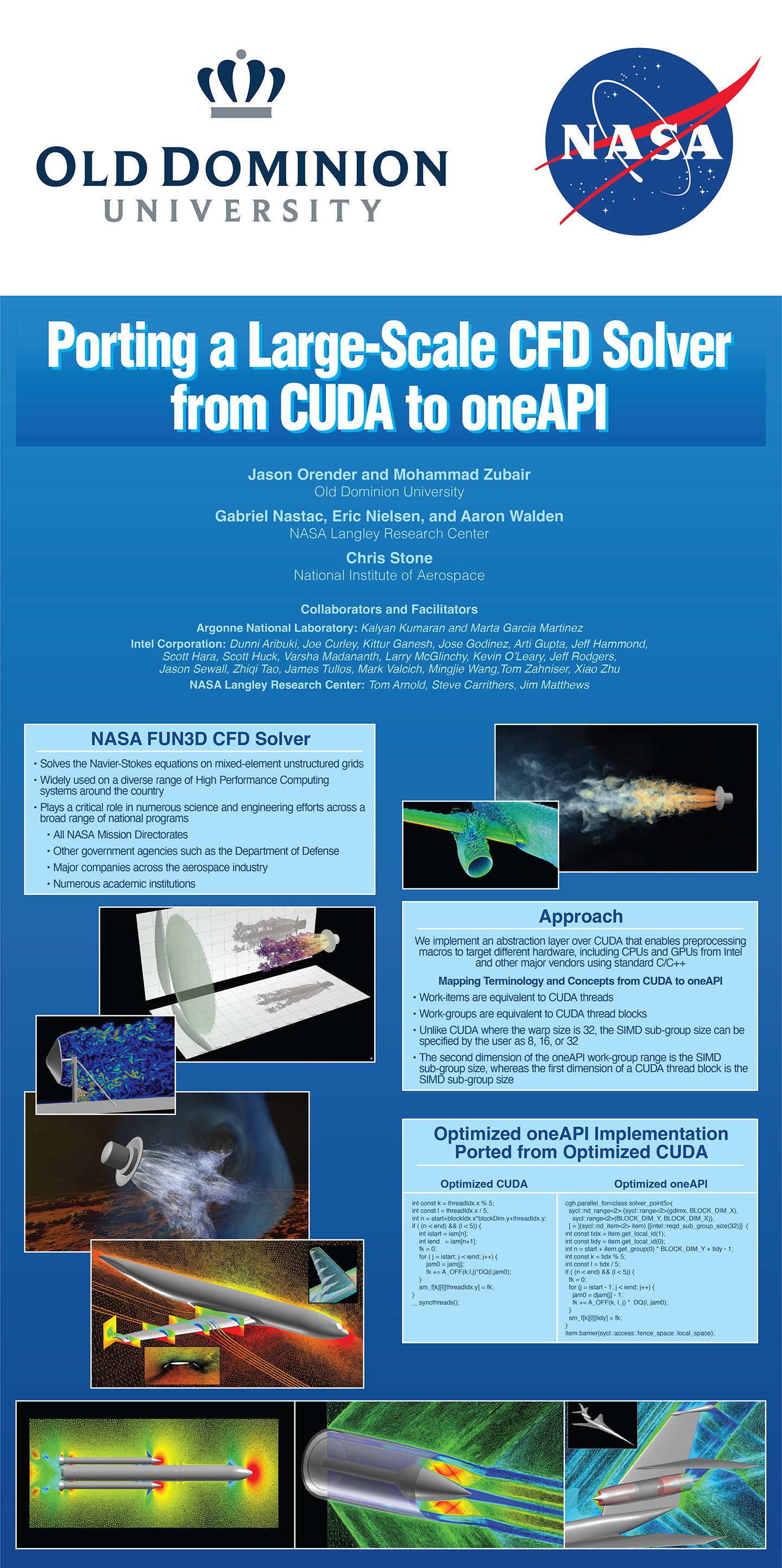
Rescale Accelerates NASA FUN3D CFD Simulations While Reducing Costs with NVIDIA GPUs for the Next Generation of U.S. Aerospace Innovation, Kevin Cangemi, Rescale Blog, August 23, 2022.
Landing Patterns, ASCR Discovery, June 2022. With Summit supercomputer power, a NASA team parses approaches to putting people on Mars.
Do Even More with Your CFD Workloads in the Cloud, engineering.com, Feb 07, 2022.
Refining Challenge Goals to Make Realistic Progress, Reynaldo J. Gomez III, Andrew W. Cary and Eric Nielsen, 2021 Year in Review, Aerospace America, December 2021.
Software Releases, a Corporate Acquisition and Advances in Simulation Propel Meshing Forward, Romain Aubry and David McDaniel, 2021 Year in Review, Aerospace America, December 2021.
Experiences in Moving CUDA-Optimized Kernels to Intel GPUs using oneAPI, Mohammad Zubair, Chris Stone, Aaron Walden, Eric Nielsen, SC21, November 2021. (PDF Video)
Visualizing the Flow Physics of Human-Scale Mars Entry, Patrick Moran, Gabriel Nastac, Paul Kolano, Eric Nielsen, NASA@SC21. (Link)
CFD Analysis of Mars Retrorocket Wind Tunnel Models, Karl Edquist, NASA@SC21. (Link)
Flight Readiness Simulations for Artemis, Derek Dalle, Stuart Rogers, Guy Schauerhamer, Jamie Meeroff, NASA@SC21. (Link)
ODU Establishes oneAPI Center of Excellence to Optimize NASA Research, News@ODU, November 2021. (Link)
CFD at NASA Promo, Intel Innovation Conference, November 2021. (Video)
Implicit Thermochemical Nonequilibrium Flow Simulations on Unstructured Grids using GPUs, Gabriel Nastac, Aaron Walden, Eric Nielsen, Bill Jones, Li Wang, Pat Moran, Paul Kolano, Mohammad Zubair, Justin Luitjens, SIAM Conference on Computational Science and Engineering, March 2021. (PDF)
Implicit Thermochemical Nonequilibrium Flow Simulations on Unstructured Grids using GPUs, Gabriel Nastac, Aaron Walden, Eric Nielsen, Abdelkader Frendi, AIAA SciTech 2021 Forum, January 2021. (PDF Video )
Progress Toward the 2030 Vision of CFD , Reynold J. Gomez III AND Andrew W. Cary, 2020 Year in Review, Aerospace America, December 2020.
Evaluation of CFD for Testing at High Supersonic Speeds, November 2020. AETC Unitary Plan Wind Tunnel CFD assessment supported by FUN3D and Refine2.
Episode 48: Mars Landing Retropropulsion Simulation, NASA Podcast, November 2020. The episode is being promoted on social media at the following links: Twitter , Facebook , LinkedIn , YouTube .
Recent Developments for Computational Fluid Dynamics on Unstructured Meshes Using GPUs, Gabriel Nastac, Eric Nielsen, Aaron Walden, Li Wang, Boris Diskin, Justin Luitjens, Sean Stephens, Mohammad Zubair, Bob Tramel, SC20 NVIDIA Theater, November 2020. (Video)
Sharing “my” NASA Mars Lander Unstructured-Mesh Data Set , Ingo’s Blog, October 2020.
NASA Team Releases Mars Landing Simulation Data to Encourage New Research into Space Descent Technologies , Oak Ridge National Laboratory News, October 2020. The data sets are available to the community in the FUN3D Retropropulsion Data Portal.
Recent Developments for Computational Fluid Dynamics on Unstructured Meshes Using GPUs, Gabriel Nastac, Eric Nielsen, Aaron Walden, Li Wang, Boris Diskin, Justin Luitjens, Sean Stephens, Mohammad Zubair, Bob Tramel, GTC Fall 2020 conference, October 2020. (Video)
An Overview of High Performance Computing and Computational Fluid Dynamics at NASA, Eric Nielsen, E4S Forum, EuroMPI/USA 2020, September 2020. (Video)
Performance Portability Issues for a Large-Scale Computational Fluid Dynamics Application on Emerging High-Performance Architectures, Aaron Walden, Mohammad Zubair, Eric Nielsen (presenter), Performance, Portability, and Productivity in HPC Workshop, September 2020. (Video)
Visualizing 150TB of Data , ISC 2020 Demo, June 2020. Mars lander simulation created using FUN3D.
Visualizing 150TB of Data , GTC 2020 Demo, March 2020. Mars lander simulation created using FUN3D.
High Performance Computing’s Impact on Aerospace Prediction, Eric Nielsen, AIAA SciTech 2020 Forum 360 on High Performance Computing’s Impact on Aerospace Prediction, January 2020. (Video)
Enabling Scientific Research for HPC Developers , January 2020. Mars lander simulation created using FUN3D.
NVIDIA CEO Jensen Huang keynote address at GTC China 2019 , December 2019. Mars lander simulation created using FUN3D.
NVIDIA CEO: Our business has benefited from a ‘perfect storm’ in 2018 , November 2019, Mars lander simulation created using FUN3D.
SC19: NVIDIA CEO Jensen Huang on the Expanding Universe of HPC , SC19 November 2019. Mars lander simulation created using FUN3D.
How NASA Is Helping Humans Reach the Red Planet, Using GPUs and 3D Visualization , Work2.0 Blog, November 2019.
How NASA Is Helping Humans Reach the Red Planet, Using GPUs and 3D Visualization , NVIDIA Blog, November 2019.
Landing on Mars: Petascale Unstructured-Grid CFD Simulations on Summit, Ashley Korzun, Eric Nielsen, Aaron Walden, Bill Jones, Jan-Renee Carlson, Pat Moran, Chris Henze, Tim Sandstrom, Mohammad Zubair, and Justin Luitjens, GTC On-Demand Conference, November 2019. (Video Link PDF)
Visualizing Supersonic Retropropulsion for Mars: The Summit Early Science Results, Patrick Moran, Timothy Sandstrom, Ashley Korzun, Eric Nielsen, and Aaron Walden, Scientific Visualization & Data Analytics Showcase, Supercomputing 2019. (Video Link Video)
Building Booster Separation Aerodynamic Databases for Artemis II, Jamie Meeroff and Derek Dalle, Demo for NASA booth at Supercomputing 2019. (Demo Overview Poster)
Summit simulates how humans will ‘brake’ during Mars landing , Oak Ridge National Laboratory News, October 2019.
Summit Simulates Braking—on Mars , HPCwire News, October 2019.
Enabling Human Exploration of the Red Planet, Bill Jones, Ashley Korzun, Eric Nielsen, Aaron Walden, Chris Henze, Pat Moran, Tim Sandstrom, Justin Luitjens, and Mohammad Zubair, GTC On-Demand Conference, March 2019. (PDF)
Multidisciplinary Design Optimization Framework for Rotorcraft Applications, Li Wang, Presentation for Laurence D. Leavitt Lecture, March 7, 2019. (PDF)
Aerodynamic Databases for the Space Launch System, Henry Lee and Stuart Rogers, Demo for NASA booth at Supercomputing 2018. (Demo Overview Poster)
Preparing the FUN3D CFD Solver for the Exascale Era, Eric Nielsen and Aaron Walden, Demo for NASA booth at Supercomputing 2018. (Demo Overview Poster)
Unstructured-Grid CFD Algorithms on Many-Core Architectures, Aaron Walden, Eric Nielsen, Mohammad Zubair, Jason Orender, Justin Luitjens, John Wohlbier, John Linford, Izaak Beekman, Sam Khuvis, and Sameer S. Shende, SIAM Parallel Processing for Scientific Computing 2018, March 2018. (PDF)
Unstructured-Grid CFD Algorithms on the NVIDIA Pascal and Volta Architectures, Eric Nielsen, Aaron Walden, Mohammad Zubair, Jason Orender, Justin Luitjens, John Wohlbier, and John Linford, GTC On-Demand Conference, January 2018. (Link)
Algorithm Development for a Many-Core HPC Landscape, Aaron Walden and Mohammad Zubair, Demo for NASA booth at Supercomputing 2017. (Demo Overview Poster)
Building Aerodynamic Databases for the SLS Design Process, Henry Lee and Stuart Rogers, Demo for NASA booth at Supercomputing 2017. (Demo Overview Poster)
Assessing and Analyzing Energy Usage of NASA Workloads on HPC Systems, Robert Hood and Henry Jin, Demo for NASA booth at Supercomputing 2017. (Demo Overview Poster)
An Optimized Multicolor Point-Implicit Solver for Unstructured Grid Applications on GPUs, Mohammad Zubair and Eric Nielsen, Demo for NASA booth at Supercomputing 2016. (Demo Overview)
Performance Engineering FUN3D at Scale with TAU Commander, John Linford, Srinath Vadlamani, Sameer Shende, Allen Malony, William Jones, William Kyle Anderson, and Eric Nielsen, Technical Program Poster, Supercomputing 2016. (Link Poster Abstract )
Building CFD-Based Aerodynamic Databases for the Space Launch System, Henry Lee, Stuart Rogers, and Stuart Rogers, Demo for NASA booth at Supercomputing 2016. (Demo Overview)
Improving Prediction of Buffet Forces for Design of the Space Launch System, William Jones and Craig L. Streett, Demo for NASA booth at Supercomputing 2016. (Demo Overview)
Accelerating Codes at University of Delaware Hackathon, Article summarizing GPU hackathon held at the University of Delaware during May 2016 and sponsored by Oak Ridge National Laboratory. (Article )
Built For Science, Diane Kukich, Video and article summarizing GPU hackathon held at the University of Delaware during May 2016 and sponsored by Oak Ridge National Laboratory. (Hackathon Overview )
Ensuring Safe Passage of the Space Launch System Through the Speed of Sound, Stephen J. Alter and Gregory J. Brauckmann, Demo for NASA booth at Supercomputing 2015. (Demo Overview Demo 14.3 MB PDF Poster )
High-Fidelity Physics-Based Analysis and Design of Complex Configurations, Kyle Anderson and Eric Nielsen, Demo for NASA booth at Supercomputing 2015. (Demo Overview Demo 0.5 MB PDF Poster )
Sensitivity Analysis for Chaotic Fluid Simulations, Eric Nielsen, Qiqi Wang, Patrick Blonigan, and Boris Diskin, Demo for NASA booth at Supercomputing 2015. (Demo Overview Demo 0.4 MB PDF Poster )
Challenges in Adjoint-Based Aerodynamic Design for Unsteady Flows, Eric J. Nielsen, 13th US National Congress on Computational Mechanics, July 2015. ( Video )
Coupled Aerodynamics and Dynamics of Bluff Bodies, Daniel Prosser, Poster presented at the 71st Annual AHS Forum and Technology Display, Virginia Beach, VA, May 5-7, 2015. (1.1 MB PDF)
Transformative Modeling and Physics of Free and Tethered Bluff and Blunt Bodies, Daniel Prosser, Albane Lorieau, James Clinton, Siva Movva, and Terry Ma, Poster presented at the 71st Annual AHS Forum and Technology Display, Virginia Beach, VA, May 5-7, 2015. (0.7 MB PDF)
Advances in Computational Algorithms for Complex Physics, Rajiv Shenoy, Joachim Hodara, Philip Cross, and Amanda Grubb, Poster presented at the 71st Annual AHS Forum and Technology Display, Virginia Beach, VA, May 5-7, 2015. (0.5 MB PDF)
Analysis of Aeroelastic Rotors Using Hybrid CFD Techniques, Marilyn Smith, Poster presented at the 71st Annual AHS Forum and Technology Display, Virginia Beach, VA, May 5-7, 2015. (0.4 MB PDF)
NASA Exploring Half-Million Dollar Fast Computing Challenge, Michael Cooney, Network World, April 2015. ( Link )
NASA Langley Research Center: Revolutionizing Vertical Flight Since 1920, Video montage assembled for celebration of NASA Langley being named a Vertical Flight Heritage Site by the American Helicopter Society (AHS) in May 2015. ( Link 0.8 MB PDF Program )
Overview of GPU Suitability and Progress of CFD Applications, Stan Posey, Applied Modeling and Simulation Seminar Series, April 21, 2015. ( Link )
Evaluation of Linear, Inviscid, Viscous, and Reduced-Order Modeling Aeroelastic Solutions of the AGARD 445.6 Wing Using Root Locus Analysis, Walter A. Silva, Applied Modeling and Simulation Seminar Series, April 14, 2015. ( Link )
Recent Applications and Algorithm Development Using FUN3D, Eric J. Nielsen, Aerospace and Ocean Engineering seminar at Virginia Tech, March 2015. ( Flash )
Strategies for Modularization and Integration of OVERFLOW and FUN3D into CREATE-AV Helios and its Applications, Rohit Jain, Applied Modeling and Simulation Seminar Series, March 12, 2015. ( Link )
Challenges in Adjoint-Based Aerodynamic Design for Unsteady Flows, Eric J. Nielsen, Boris Diskin, Patrick J. Blonigan, and Qiqi Wang, Oral presentation at SIAM Computational Science and Engineering, March 2015. ( Flash )
Recent Developments in FUN3D: Entropy Stable DG-FEM, Mark Carpenter, Eric Nielsen, and Matteo Parsani, Oral presentation at AIAA SciTech 2015. ( Flash )
Adjoint Methods in Computational Science, Engineering, and Finance. Summary report from Dagstuhl Seminar 14371, September 2014. ( 1.2 MB PDF )
Wanted: More Focus on CFD, Keith Button, Aerospace America, January 2015. ( 1.1 MB PDF )
Entropy Stable Wall Boundary Conditions for the Compressible Navier-Stokes Equations, Matteo Parsani, NIA CFD Seminar, December 2, 2014. (Video PDF )
High-Fidelity Analysis and Design for Complex Aerospace Configurations, Eric Nielsen, Demo for NASA booth at Supercomputing 2014. (Demo Overview Flash Demo 3.9 MB PDF Poster )
Flying Fast, Flying Quiet, NASA.gov video on YouTube, September 2014. CFD images of F-15 simulations performed using FUN3D. ( Link )
Towards Robust, High Order, and Entropy Stable Algorithms for the Compressible Navier-Stokes Equations on Unstructured Grids, Matteo Parsani, Mark H. Carpenter, and Eric J. Nielsen, presentation at ECCOMAS 2014, Barcelona, Spain, July 2014. ( 0.1 MB Abstract PDF 2.1 MB Slides PDF )
Seeking Reality in the Future of Aeronautical Simulation, article in ScienceDaily, June 2014. ( Link 3.0 MB PDF )
Bearing Heavy Loads, Engineering Notebook article in Aerospace America, June 2014. ( 0.3 MB PDF )
Evaluation of Multigrid Solutions for Turbulent Flows, Boris Diskin, NIA CFD Seminar, February 18, 2014. (Video PowerPoint )
NASA X television program focusing on Environmentally Responsible Aviation project. Featured CFD simulations were performed using FUN3D. February 2014. (ERA Project )
Efficient Physics-Based Analysis and Design for Complex Aerospace Configurations, Eric Nielsen and Dana Hammond, Demo for NASA booth at Supercomputing 2013. (Demo Overview Flash Demo 0.6 MB PDF Poster )
In-Situ Exploration of Large Scale CFD with FUN3D and VisIt, Bill Jones and Eric Nielsen, Invited Presentation at 50th HPC User Forum, Boston, September 2013. (Flash)
Adjoint-Based Optimization of Flapping Wing Flows, Martin Jones and Nail Yamaleev, NIA CFD Seminar, June 2013. ( Flash )
CFL3D and FUN3D Analysis of HiLiftPW-2 Workshop Cases, Elizabeth M. Lee-Rausch and Christopher L. Rumsey, June 2013. ( 3.3 MB PDF Talk )
Adjoint-Based Optimization of Unsteady Turbulent Flows: Recent Advances and Current Challenges, Boris Diskin, NIA CFD Seminar, April 16, 2013. (Video PDF )
Recent Advances in Agglomerated MultiGrid. Hiroaki Nishikawa, Boris Diskin, James L. Thomas, and Dana P. Hammmond. AIAA Aerospace Sciences Meeting, January 9, 2013, Grapevine, TX. ( 7.6 MB PDF Talk )
Recent Algorithm Development and Application Efforts Using FUN3D, Eric Nielsen, Seminar at University of Louisville, November 30, 2012. (Flash)
Adjoint-Based Design for Complex Aerospace Configurations, Eric Nielsen and Boris Diskin, Demo for NASA booth at Supercomputing 2012. (Media Sheet Demo Overview Flash Demo 12.6 MB PDF Poster )
From a Roar to a Whisper: Making Modern Aircraft Quieter, Mehdi Khorrami, Demo for NASA booth at Supercomputing 2012. (Demo Overview 12.7 MB PDF Poster )
Supersonic Retropropulsion for Mars Entry, Michael Wright and Guy Schauerhamer, Demo for NASA booth at Supercomputing 2012. (Demo Overview 12.3 MB PDF Poster )
Discrete Adjoint-Based Design for Unsteady Turbulent Flows On Dynamic Overset Mixed-Element Grids, Eric J. Nielsen and Boris Diskin, 11th Symposium on Overset Composite Grids and Solution Technology, Dayton, OH, October 2012. (Flash)
Sensitivity Analysis for Chaotic Turbulent Flows, Patrick Blonigan, LARSS Final Presentation, August 2012. ( 5.6 MB PDF Talk )
Recent Algorithm Development and Application Efforts Using FUN3D, Eric Nielsen, Seminar at North Carolina A&T State University, July 19, 2012. (Flash)
Adjoint-Based Optimization of the Flapping Wing Performance, Martin Jones and Nail Yamaleev, 7th International Conference on Computational Fluid Dynamics (ICCFD7), Hawaii, 9-13 July 2012. (Flash)
Drag Prediction Workshop-V, Nick Powell, 5th AIAA CFD Drag Prediction Workshop, New Orleans, LA, 23-24 June 2012. ( 4.2 MB PDF Talk )
FUN3D and CFL3D Calculations for the Fifth AIAA Drag Prediction Workshop, Mike Park, 5th AIAA CFD Drag Prediction Workshop, New Orleans, LA, 23-24 June 2012. ( 5.5 MB PDF Talk )
Adjoint-Based Optimization of Flapping-Wing Flows, Nail Yamaleev, NIA CFD Seminar, June 19, 2012. (Video PDF )
Application of Adaptive Gridding in FUN3D for Simulation of Flow over a Nose Landing Gear. Veer N. Vatsa, Mehdi R. Khorrami, and David P. Lockard. BANC II Workshop 7-8 June 2012, Colorado Springs, CO. ( 5.3 MB PDF Talk )
Multidisciplinary Design Optimization: What Remains to Be Done, Natalia Alexandrov, Keynote presentation at 8th AIAA Multidisciplinary Design Optimization Specialist Conference, Honolulu, April 2012. (Flash)
Recent Algorithm Development and Application Efforts Using FUN3D, Eric Nielsen, Presentation for Air Force Research Laboratory, Dayton, March 2012. (Flash)
Overview of Recent FUN3D Code Development and Applications for the Subsonic Rotary Wing Project, Eric Nielsen, Bob Biedron, Dana Hammond, Bill Jones, Beth Lee-Rausch, Mike Park, and Jim Thomas, Presentation for Subsonic Rotary Wing Project at 2012 Annual Fundamental Aeronautics Meeting, Cleveland, March 2012. (Flash)
Hypersonic Flow Simulations on Tetrahedral Grids Using FUN3D, Peter Gnoffo and William Wood, Presentation for Hypersonics Project at 2012 Annual Fundamental Aeronautics Meeting, Cleveland, March 2012. (Flash)
Adjoint-Based Algorithms for Complex Aerodynamic Flows in Large-Scale Computational Environments, Eric Nielsen, Michael Park, and Dana Hammond, presented in minisymposium “Challenges in Massively Parallel Simulations Using Unstructured Meshes” at 14th SIAM Conference on Parallel Processing for Scientific Computing, Savannah, February 2012. (Flash)
Challenges in Boundary-Layer Stability Analysis Based On Unstructured Grid Solutions, Wei Liao, NIA CFD Seminar, February 14, 2012. ( PDF )
East Bound and Down, Loaded Up and Truckin’ , Jon Riley, Article in Digital Manufacturing Report, February 6, 2012.
Coupled CFD/Sonic Boom Adjoint Methodology and its Application to Aircraft Design, Sriram Rallabhandi, NIA CFD Seminar, January 31, 2012. ( PDF )
The Effect of a Gust on the Flapping Wing Performance, Martin Jones and Nail Yamaleev, AIAA-2012-1080, Nashville, January 2012. (Flash)
Exploration of the Physics of Hub Drag, Vrishank Raghav, Rajiv Shenoy, Felipe T. Ortega, Narayanan Komerath, and Marilyn Smith, AIAA-2012-1070, Nashville, January 2012. (Flash)
Continuing Validation of Computational Fluid Dynamics For Supersonic Retropropulsion, Daniel G. Schauerhamer, Kerry A. Trumble, Bil Kleb, Jan-Renee Carlson, and Karl T. Edquist, AIAA-2012-0864, Nashville, January 2012. (Flash)
Discrete Adjoint-Based Design for Unsteady Turbulent Flows on Dynamic Overset Unstructured Grids, Eric Nielsen, AIAA-2012-0554, Nashville, January 2012. (Flash)
Simulation of Jet Plumes for Orion Launch Abort, Jan-Renee Carlson, FUN3D demo for NASA booth at Supercomputing 2011. ( Demo Overview 700 KB PDF Poster )
UH-60A Blackhawk Helicopter Aerodynamics, Beth Lee-Rausch and Bob Biedron, FUN3D demo for NASA booth at Supercomputing 2011. ( Demo Overview 600 KB PDF Poster )
Supersonic Retropropulsion for Mars Entry, Kerry Trumble, Demo for NASA booth at Supercomputing 2011. ( Demo Overview )
Mesh Effects on Accuracy of Finite-Volume Discretization Schemes, Boris Diskin, NIA CFD Seminar, October 18, 2011. ( PDF )
Aerodynamic Design Optimization for Unsteady Flows and Dynamic Geometries Using Discrete Adjoint Methods, Eric Nielsen, ACDL Seminar Presentation at MIT, Cambridge, September 2011. (Flash)
Adjoint-Based Design Optimization Using FUN3D and Sculptor, Joint webinar with Optimal Solutions, August 10, 2011. (Archived WebEx Recording) (6.9 MB PDF)
Libmo – Software Library for Motion Simulation, Poster presented at 2011 DoD High Performance Computing Modernization Program Users Group Conference by Nathan Prewitt, June 2011. (1 MB jpg)
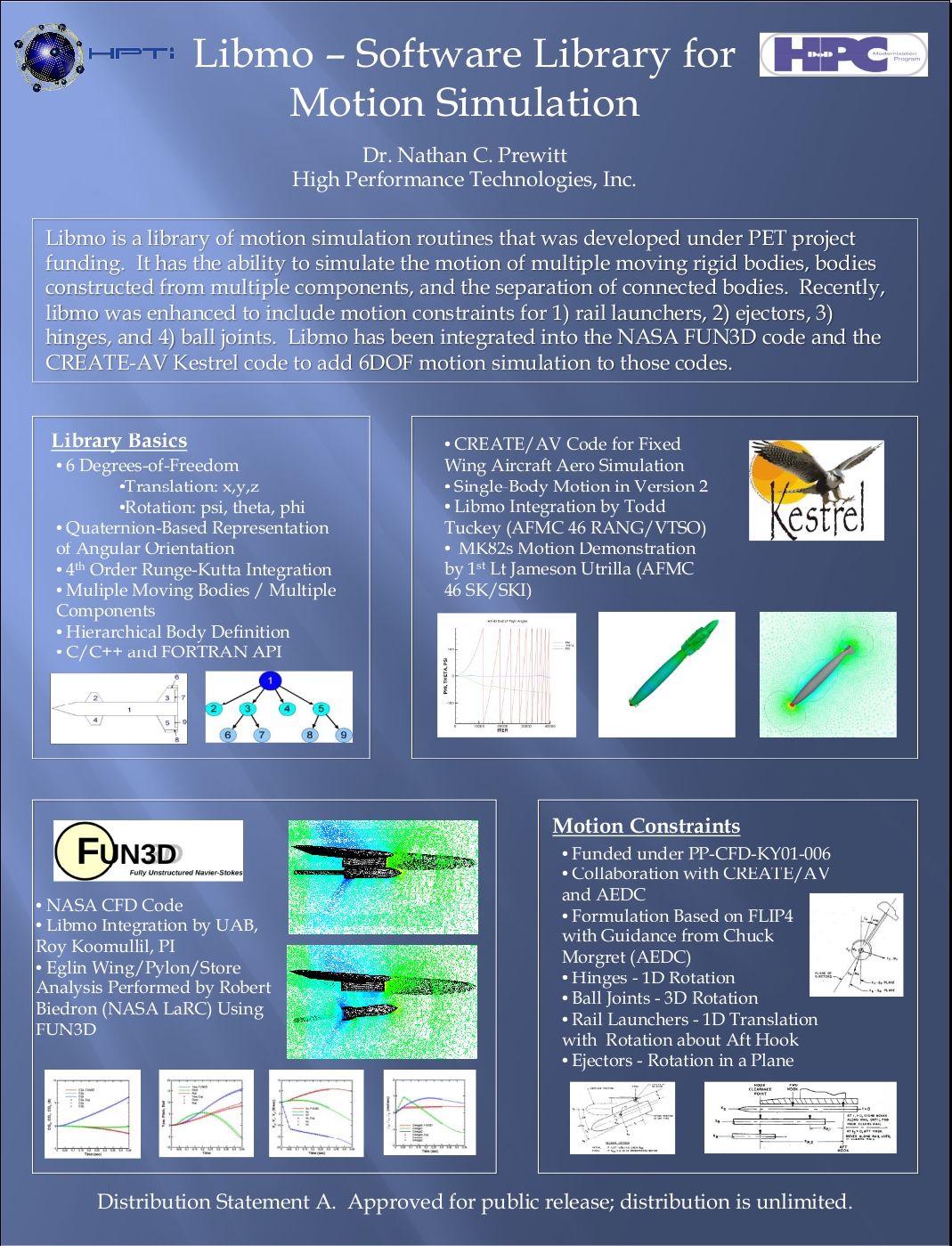
High-Fidelity Simulation of Landing Gear Noise , HPCSource Newsletter, April 2011.
BMI Uses Jaguar to Overhaul Long-Haul Trucks , Oak Ridge Leadership Computing Facility, March 2, 2011.
Supercomputer Helps Make Energy Efficient Trucks , WBIR-TV 10 local news report, NBC affiliate in Knoxville, TN, March 2011.
Overview of Recent FUN3D Code Developments and Applications, Beth Lee-Rausch, Presentation for Subsonic Rotary Wing Project at 2011 Annual Fundamental Aeronautics Meeting, Cleveland, March 2011. (Flash)
FUN3D General Overview: Research Areas and Applications, Eric Nielsen, Presentation for Sandia National Labs, Albuquerque, March 2011. (Flash)
Pointwise, Gridgen Streamline Ducted Fan, Stator Design, Featured in Focal Point, The Newsletter for Pointwise Users, Volume 14, Issue 2, Winter 2010. (830 KB PDF)
High-Fidelity Simulations of Landing Gear Noise, Mehdi Khorrami, Demo for NASA booth at Supercomputing 2010. ( Media Sheet 6 MB PDF Poster 200 KB PDF Handout )
Computational Scaling for an Unstructured-Grid CFD Solver, Eric Nielsen, FUN3D demo for NASA booth at Supercomputing 2010. (Flash 9.2 MB PDF Poster 200 KB PDF Handout )
Designing a Smart Truck with the Power of Jaguar, Brochure and video produced by Oak Ridge National Laboratory for Supercomputing 2010. (1.1 MB PDF)
Not Your Father’s Hybrid Code: Advancements in CFD-Based Hybrid Methods for a New Millennium, Eliot Quon, Poster presented at the 10th Symposium on Overset Composite Grids and Solution Technology, NASA Ames Research Center, September 20-23, 2010. (2.1 MB PDF)
An Adaptive Mesh Refinement (AMR) Strategy for Static and Dynamic Overset Unstructured Meshes, Rajiv Shenoy, Poster presented at the 10th Symposium on Overset Composite Grids and Solution Technology, NASA Ames Research Center, September 20-23, 2010. (1.5 MB PDF)
Applications and Research Efforts Using FUN3D in HPC Environments, Eric Nielsen and Dana Hammond, Invited Presentation at 37th HPC User Forum, Seattle, September 2010. (Flash)
CFD Code Acceleration on Hybrid Many-Core Architectures, Austen C. Duffy. (2.0 MB PDF)
Output-Based Grid Adaptation Applied to the HiLiftPW-1, Mike Park, Presented at the 1st AIAA CFD High Lift Prediction Workshop, Chicago, June 2010. (3.7 MB PDF)
CFL3D and FUN3D Analysis of HiLiftPW-1 Workshop Cases, Elizabeth M. Lee-Rausch and Christopher L. Rumsey, Presented at the 1st AIAA CFD High Lift Prediction Workshop, Chicago, June 2010. (1.2 MB PDF)
FUN3D Solutions for Nose Landing Gear, Veer N. Vatsa, David P. Lockard, and Mehdi R. Khorrami, Presented at the AIAA Workshop on Benchmark Problems for Airframe Noise Computations (BANC), Stockholm, Sweden, June 7-9, 2010. (3.9 MB PDF)
FUN3D Solutions for Tandem Cylinders, Veer N. Vatsa and David P. Lockard, Presented at the AIAA Workshop on Benchmark Problems for Airframe Noise Computations (BANC), Stockholm, Sweden, June 7-9, 2010. (2.3 MB PDF)
Unstructured CFD for Wind Turbine Analysis, C. Eric Lynch and Marilyn Smith, Presented at the US-Egypt Workshop on Wind Energy Development, Cairo, Egypt, March 22-24, 2010. (5.5 MB PDF)
Overview of NSF Energy for Sustainability Program, highlighting wind turbine analysis, 2009. (3.9 MB PDF)
Adjoint-Based Design Optimization Using FUN3D, Eric Nielsen, Presentation for Subsonic Rotary Wing Project at 2009 Annual Fundamental Aeronautics Meeting, Atlanta, September 2009. (Flash)
Adjoint-Based Design Optimization of Unsteady Turbulent Flows on Dynamic Unstructured Grids, Eric Nielsen, Presentation for Supersonics Project at 2009 Annual Fundamental Aeronautics Meeting, Atlanta, September 2009. (Flash)
In the Wind, Barbara Jewett, NCSA Access Magazine, Summer 2009. (0.3 MB PDF)
Ongoing Research Into Numerical Simulation of Fluid Flows Utilizing Software Development Practices, Michael A. Park, Seminar given at the MIT Aerospace Computational Design Lab (ACDL), Cambridge, Massachusetts, September 2004. (1.7 MB PDF Presentation, 78 KB PDF Handout)
Aerodynamic Design Optimization Using the Navier-Stokes Equations, Eric J. Nielsen, Overview talk given at 18th International Symposium on Mathematical Programming, Copenhagen, Denmark, August 2003. (10.9 MB PDF)
Achieving High Sustained Performance in an Unstructured Mesh CFD Application, Kyle Anderson, William Gropp, Dinesh Kaushik, David Keyes, and Barry Smith, Gordon Bell Prize at Supercomputing 1999. ( 1.7 MB PDF Presentation, 37 KB PDF Argonne News Brief, 25 KB PDF ODU News Brief, 11 KB PDF Lawrence Livermore News Brief, 1999 Gordon Bell Honorees at Lawrence Livermore )
2.3. Development Team
NASA Contributors
W. Kyle Anderson

Kyle is back at Langley after a decade and a half hiatus. He was responsible for laying the foundations of the FUN2D/3D effort.
- Developed initial versions of FUN2D and FUN3D in the late 1980s as testbeds for unstructured mesh research at NASA Langley.
- Formulated and implemented design methodology using both continuous and discrete adjoint formulations in 2D. Discrete formulation later extended to 3D.
- In conjunction with researchers at Mississippi State University, developed complex variable approach for computing sensitivity derivatives for multidisciplinary applications
- Parallelization of 2D and 3D flow solvers
- PhD adviser to Eric Nielsen
Ponnampalam (Bala) Balakumar

Flow Physics and Control Branch, NASA Langley
- Transonic turbulence models, especially Reynolds-stress modeling.
- Repaired SST model
Karen Bibb
Aerothermodynamics Branch, NASA Langley
- CAD-based mesh adaption, both adjoint and feature based, for hypersonic aerodynamics
- Inviscid hypersonic aerodynamics applications, primarily with FELISA code
Bob Biedron
Computational Aerosciences Branch, NASA Langley
- Formerly a primary developer of CFL3D
- Implemented mixed-element infrastructure throughout FUN3D framework
- Current research aimed at mixed-element algorithms, computational stability and control, and moving-mesh applications
Jan Carlson

Computational Aerosciences Branch, NASA Langley
- User/Developer
Mark Carpenter
Computational Aerosciences Branch, NASA Langley
- Developed and verified time-accurate capabilities
- Newton-Krylov relaxation
Joe Derlaga

Joe is a former NASA Pathways student. His doctorate research at Virginia Tech is on output-based grid adaptation and error estimation techniques.
Peter Gnoffo

Aerothermodynamics Branch, NASA Langley
- Developer of LAURA external hypersonics flow solver
- Implemented real-gas physical and turbulence models of LAURA and VULCAN into FUN3D framework
- Current research aimed at accurate hypersonic predictions using pure-tetrahedral unstructured grids
Dana Hammond
Advanced Engineering Environments Branch, NASA Langley
- Expert on distributed computing, grid computing, and client-server applications
- Developed distributed version of FUN3D preprocessor
- Resident computer science expert
Bill Jones
Advanced Engineering Environments Branch, NASA Langley
- Principle author of GridEx, a CAD-based interactive software system for the generation of unstructured grids
- Resident expert for computational geometry and CAD-based mesh adaption
Bil Kleb

Aerothermodynamics Branch, NASA Langley
- Developed automated complex-variable form of source code with Ruby
- Develops various CASE and refactoring tools.
- Usually serves as Scrum master
- Implemented AUFS and HLLC flux functions
- Constantly pushes team to seek more effective software development practices (XP level 0, CMMI level 5 behavior)
Beth Lee-Rausch

Computational Aerosciences Branch, NASA Langley
- Applications expert
- Expanding the boundaries of problem size and complexity
Eric Nielsen

Computational Aerosciences Branch, NASA Langley
- Performed full linearization of flow solver and built framework for 3D design
- Extended complete 3D design effort to parallel environment
- Current research aimed at advanced solution algorithms and 3D design studies
- All-around code guru.
Hiroaki Nishikawa

National Institute of Aerospace, NASA Langley
- Implemented grid agglomeration for multigrid
- Expert on the analysis of discretizations
- Proponent of all things hyperbolic
Mike Park
Computational Aerosciences Branch, NASA Langley
- Implemented MPI communication infrastructure
- 3D adjoint-based error estimation and distributed grid adaptation connected directly to CAD
- Cut-cell discretization
Chris Rumsey

Computational Aerosciences Branch, NASA Langley
Jim Thomas
Computational Aerosciences Branch, NASA Langley
- Original CFL3D developer
- Performed system-level verification via novel application of the Method of Manufactured Solutions
- Current research aimed at multigrid and relaxation strategies as well as mixed-element discretizations.
Kyle Thompson

Aerothermodynamics Branch, NASA Langley
- Developer and maintainer of the LAURA CFD solver.
- Previous maintainer of the FUN3D high-energy generic gas path.
- Past research focused on adjoint-based methods and loosely-coupled multispecies solvers for high-energy flows.
- Current research aimed a developing novel algorithms targeting accurate surface heat-transfer using fully simplex meshes.
Veer Vatsa
Computational Aerosciences Branch, NASA Langley
- Wall-function turbulence models
- Time-accurate capability
- CLV applications.
Jeff White
Computational Aerosciences Branch, NASA Langley
- Expert on internal hypersonic flows, developer of VULCAN solver
- Implemented advanced turbulence models of VULCAN into FUN3D framework
- Working blunt-body hypersonic stagnation region flows and improving modularity of code architecture
Other Developers
Alejandro Campos
Alejandro is a Ph.D. student in the Department of Aeronautics and Astronautics at Stanford University where he implemented the Algebraic Structure-Based Model (ASBM) in FUN3D.
Rajiv Shenoy

Rajiv is currently an MS student at Georgia Tech under Prof. Marilyn Smith’s direction.
- Extended grid adaptation to overset grids
- Interested in feature and adjoint-based adaptation methodologies for time-dependent flows
- Applications of interest include high fidelity Rotor-Fuselage and Wind Turbine Interactions
Marilyn Smith

School of Aerospace Engineering, Georgia Institute of Technology
Marilyn is an associate professor at Georgia Tech working in the area of unsteady aerodynamics and aeroelasticity, including rotorcraft, propulsion and fixed-wing applications. For more details, please visit her webpage.
Interns
Past Contributors
Natalia Alexandrov
Multidisciplinary Tools and Methods Branch, NASA Langley
- Optimization methods for simulation-based design
- Design methods for complex adaptive systems
Harold Atkins
Computational Aerosciences Branch, NASA Langley
- Resident Discontinuous Galerkin expert
- Implemented non-uniform boundary conditions
- Circulation control applications
Austen Duffy

Austin is a NIA visiting researcher from Florida State University investigating code speed up using the Compute Unified Device Architecture (CUDA) parallel programming language and Graphics Processing Units (GPU). He is finishing his Ph.D. in applied and computational mathematics.
Clara Helm
Clara is a 2010 LARSS intern who graduated from Clarkson University in 2010 and is heading to Maryland University in the Fall of 2010. She is improving parallel visualization technology in FUN3D.
Chris Cordell

Chris is a 2009 LARSS intern from the Georgia Institute of Technology who is using FUN3D to investigate supersonic retropropulsion for atmospheric reentry.
Hicham Alkandry

Hicham is a 2009 and 2010 LARSS intern from the University of Michigan who is applying FUN3D to Orion aftbody hypersonic flows with active RCS jets and supersonic retropropulsion concepts.
Julie Andren

Julie is a 2009 LARSS intern from the Massachusetts Institute of Technology who is verifying the accuracy of FUN3D for laminar and turbulent boundary layers with uniformly refined and adapted grids.
Shelly Jiang

Shelly is a 2009 LARSS intern from the University of Michigan who is researching active flow control using FUN3D and CFL3D for circulation control of airfoils.
Eric Lynch
Eric finished his PhD at Georgia Tech in 2011 under the direction of Prof. Marilyn Smith, funded by the National Science Foundation.
- Implemented the HRLES turbulence model
- Improved performance of the unsteady actuator blade model
- Implemented tight CFD/CSD coupling between FUN3D and Dymore
Jennifer Abras
Jennifer completed her PhD at Georgia Tech in 2009 under Prof. Marilyn Smith’s direction, funded by the U.S. Army Vertical Lift Research Center of Excellence.
- Implemented rotor articulation routines
- Added unsteady LMP and artificial compressibility terms for use in unsteady rotorcraft applications
- Teamed with Bob Biedron and Beth Lee-Rausch to add elastic beam coupling for rotorcraft (DYMORE Solver)
Nicholas Burgess

Nick is working towards his MSAE at Georgia Tech (2007) under Prof. Marilyn Smith’s direction, funded by the U.S. Army Vertical Lift Research Center of Excellence.
- Implementing advanced turbulence models and transition capabilities
Dave O’Brien
Aeromechanics Division, Aviation Engineering Directorate, U.S. Army
Dave finished his PhD dissertation at Georgia Tech in ‘06, under Prof. Marilyn Smith’s direction, funded by the U.S. Army Rotorcraft Center of Excellence.
- Implemented actuator disk for rotorcraft applications
- Hooked FUN3D to DiRTlib and SUGGAR libraries to address rotor-fuselage interaction
Tommy Lambert
Tommy is a 2009 LARSS intern from the Carnegie Mellon University who is researching viscous overset meshes for hypersonic flows with FUN3D, SUGGAR, and DiRTLib.
Ved Vyas
Ved is a 2009 LARSS intern from the Carnegie Mellon University who is researching automated, grid metric tensor-based grid generation driven by FUN3D.
Shatra Reehal
Shatra is a 2007 Undergraduate Student Research Program (USRP) intern from University of Central Florida who worked on hierarchical partitioning schemes for multicore processors.
Kan Yang
Kan is a 2007 Undergraduate Student Research Program (USRP) intern from University of Michigan who worked on improving the LDFSS flux linearization for convergence acceleration.
Andrew Sweeney

Andrew is a 2007 LARSS intern from George Washington University who worked on a RESTful interface for CFD
Brad Neff

Brad is a 2007 LARSS intern from Wofford College who worked on a RESTful interface for CFD
Genny Pang
Genny Pang was a fall 2005 USRP intern from UCLA where she was working on her BS in Mechanical Engineering.
- Developed a CAD model for an RCS jet for the MSL aeroshell using Pro/E, generated grids by using GridEx, and tweaked FUN3D so it could run an under-expanded jet in a supersonic crossflow.
Gregory Bluvshteyn

Gregory was a 2005 LARSS intern from New York City College of Technology.
- Implemented database portion of continuous build automation system.
- Developed ruby scripts that served as an interface between business layer and presentation layer.
Dan Gerstenhaber

Dan was a 2005 LARSS intern from Indiana University.
- Implemented RSS feed portion of continuous build automation system.
- Developed parser for the build logs generated by FUN3D during the past few years.
Geoff Parsons

Geoff was a 2005 LARSS intern from Old Dominion University where he was working on his MS in Computer Science.
- Developed an interface to version control systems (both CVS and SVN) for the automated build system.
Rena Rudavsky
Rena was a 2005 LARSS intern from Columbia University where she was working on her BS in History and Mechanical Engineering, with an emphasis on fluid mechanics.
- Developed a parametric CAD model for a tethered ballute configuration by using Pro/E, and performed hypersonic computations for Titan-like entry conditions
2.4. F95 Coding Standard
Style
- Free format with no character past column 80
- Indentation: begin in first column and recursively indent all subsequent blocks by two spaces.
- Start all comments within body of code in first column.
- Use all lowercase characters; however, mixed-case should be used in comments and strings.
- Align trailing continuation ampersands within code blocks.
- No tab characters.
- Name
ends.
Comments
- For cryptic variable names, state description in a comment immediately preceding declaration or on end of the declaration line.
- For subroutines, functions, and modules, insert a contiguous comment block immediately preceding declaration containing a brief overview followed by an optional detailed description.
Variable Declarations
- Do not use Fortran intrinsic function names.
- Avoid multi-line variable declarations.
- Declare
intenton all dummy arguments. - Declare the kind for all reals, including literal constants, by using a kind definition module.
- Declare
dimensionattribute for all non-scalars. - Line up attributes within variable declaration blocks.
- Any scalars used to define extent must be declared prior to use.
- Declare a variable name only once in a scope, including
use modulestatements.
Module Headers
- Declare
implicit none. - Include a public character parameter containing the CVS
\$Id\$tag. - Include a
privatestatement and explicitly declare public attributes.
Subroutines and Functions
- The first executable line should be
continue. - Use the
onlyattribute on allusestatements. - Keep
usestatements local, i.e., not in the module header. - Group all dummy argument declarations first, followed by local variable declarations.
- All subroutines and functions must be contained within a module.
- To avoid null or undefined pointers, pointers passed through an argument list must be allocated.
Control Constructs
- Name control constructs (e.g.,
do,if,case) which span a significant number of lines or form nested code blocks. - No numbered do-loops.
- Name loops that contain
cycleorexitstatements. - Use
cycleorexitrather thangoto. - Use case statements with case defaults rather than if-constructs wherever possible.
- Use F90-style relational symbols, e.g.,
>=rather than.ge..
Miscellaneous
- In the interest of efficient execution, consider avoiding:
- assumed-shape arrays
- derived types in low-level computationally intensive numerics
usemodules for large segments of data
- Remove unused variables.
- Do not use common blocks or includes.
- Name files the same as the module they contain.
- Have only one module per file—-except for
visit, which has a module plus subroutines in the global namespace.
Illustrative Example
! Define kinds to use for reals in one place

module kind_defs

  implicit none

  character (len=*), parameter :: kind_defs_cvs_id = &
    '$Id$'

  integer, parameter :: sp=selected_real_kind(P=6)  ! single precision
  integer, parameter :: dp=selected_real_kind(P=15) ! double precision

end module kind_defs

! A token module for demonstration purposes

module some_other_module

  implicit none

  character (len=*), parameter :: some_other_module_cvs_id = &
    '$Id$'

  integer, parameter :: some_variable = 1

end module some_other_module

! A collection of transformations which includes
! stretches, rotations, and shearing.  This comment
! block will be associated with the module declaration
! immediately following.

module transformations

  implicit none

  character (len=*), parameter :: transformations_module_cvs_id = &
    '$Id$'

contains

! Computes a stretching transformation.\label{comment}
!
! This stretching is accomplished by moving
! things around and going into a lot of other details
! which would be described here and possibly even
! another "paragraph" following this.
!
! This contiguous comment block will be associated with the
! subroutine or function declaration immediately following.
! It is intended to contain an initial section which gives
! a one or two sentence overview followed by one or more
! "paragraphs" which give a more detailed description.

  subroutine stretch ( points, x, y, z )

    use kind_defs
    use some_other_module, only: a_variable

    integer,                      intent(in)  :: points

!   component to be transformed
    real(dp), dimension(points), intent(in)  :: x, y
    real(dp), dimension(points), intent(out) :: z ! transformation result

    external positive
    integer :: i

    continue

    i = 0

    if ( x(1) > 0.0_dp ) then
      call positive ( points, x, y, z )
    else
      do i = 1, points
          z(i) = x(i)*x(i) + 1.5_dp * ( real(i) + x(i) )**i &
               + ( y(i) * real(i) ) * ( x(i)**i + 2.0_dp )  &
               + 2.5_dp * real(i) + 148.2_dp * a_variable
      enddo
    endif

  end subroutine stretch

end module transformations
2.5. Hypersonic Benchmarks
When presenting results of a computation made with a finite volume, cell-centered algorithm, one must decide whether to present solutions at the dependent variable location (averaged independent variables from cell corners) or at the independent variable location (averaged dependent variables from cell centers). The second approach is used here. All of the LAURA benchmarks use a plotting convention in which the average value of dependent variables at surrounding cell centers are plotted at the independent variable (x,y,z) mesh point location. Boundaries shared by two blocks are also averaged using the same algorithm as interior points. Dependent variables at other boundary points away from corners are injected with the averaged values of the nearest cell centers above the respective mesh point. Dependent variables at corners not shared by multiple blocks are injected from the nearest cell center.
This convention enables smooth contours across block boundaries and exact preservation of grid files. However, this convention also makes shocks appear to be smeared over more mesh points then actually occurs in the solution and may distort the profiles appearance at a boundary where the averaging algorithm changes abruptly. These effects are symptoms of the plotting algorithm – not of the actual solution. Furthermore, in the case of surface quantities, the actual face centered value on the surface that was used in the finite volume flux computation is presented.
LAURA Algorithm
Laura was created by Peter Gnoffo of the Aerothermodynamics Branch at NASA Langley.
NASA’s interest in viscous, hypersonic flow field simulation has grown in recent years in anticipation of the design needs for space transportation and exploration over the next three decades. Proposed aero-assisted space transfer vehicles will use the upper layers of planetary atmospheres in hypersonic aerobraking maneuvers. Supersonic combustion ramjet engines are being designed to propel vehicles at hypersonic speeds through the Earth’s atmosphere to orbit. Various concepts for a SSTO vehicle are now being considered. The external flow field surrounding such vehicles, as well as the internal flow field through the scramjet engine and nozzle, can be significantly influenced by thermochemical non-equilibrium processes in the flow. Accurate simulations of these phenomena would provide designers valuable information concerning the aerodynamic and aerothermodynamic character of these vehicles.
Two major challenges exist to the simulation of flow fields in thermochemical non-equilibrium around vehicles traveling at hypersonic velocities through the atmosphere. First, these simulations require modeling of the non-equilibrium processes in the flow; these processes frequently occur at energies in which the models currently lack sufficient experimental or analytic validation. Second, because of the large number of unknowns associated with chemical species and energy modes and because of disparate time scales within the flow field, these simulations require algorithmic innovations to maintain numerical stability and fully exploit supercomputer resources.
Non-equilibrium processes occur in a flow when the time required for a process to accommodate itself to local conditions within some region is of the same order as the transit time across the region. The equations and the models used in this manual for non-equilibrium flow have been documented, and they were substantially derived from the work of Park and Lee. Calibration and validation of the physical models intrinsic to this code have been documented. Other code development and calibration programs (e.g. GASP, Candler, Candler and MacCormack, Park and Yoon, Netterfield, and Coquel et.~al) are now in progress within the area of viscous, hypersonic, reacting gas flow field simulations.
Numerical stability is maintained through an implicit treatment of the governing equations. A great variety of implicit treatments is possible. For problems in which only the steady-state solution is required, one is free to evaluate any element of the difference stencil at any iteration (pseudo-time) level which facilitates the relaxation process. In the most rigorous implicit treatment, all variables in all cells are simultaneously solved at an advanced iteration level, thus requiring the solution of a linearized equation set involving (n x I x J x K) equations where n is the number of unknowns at a cell and I, J, and K are the number of computational cells in the three respective coordinate directions. The various forms of factored implicit schemes and line relaxation methods sequentially solve equation sets involving (n x I), (n x J), and/or (n x K) variables. The point-implicit schemes, as utilized in the present work, sequentially solve equation sets involving n simultaneous, linearized equations. Further simplification is possible in chemical kinetic problems by linearizing contributions to the residual from only the source terms to alleviate problems of disparate chemical time scales, thus resulting in methods which involve no matrix operations.
The essence of the point-implicit strategy is to treat the variables at the cell center of interest implicitly at the advanced iteration level and to use the latest available data from neighbor cells in defining the “left-hand-side” numerics. The success of this approach is made possible by the robust stability characteristics of the underlying upwind difference scheme. Even simulations of thermochemical non-equilibrium flows in a near-equilibrium state can be handled by this approach. The algorithm requires only a single pseudo-time level of storage and is efficiently implemented on vector or parallel processors. Details of the relaxation algorithm, including effects of a gas in thermal and chemical non-equilibrium, are presented herein.
As noted above, there is no requirement to synchronize the evolution of the solution at neighboring points in the single-level-storage point-implicit relaxation strategy. Consequently, algorithm parallelization can be implemented on a subroutine level across several domains without the need to synchronize tasks or restrict parallel code to a “do loop” level. Scalar code and conditional logic do not inhibit parallel efficiency. Dynamic allocation of resources to domains that are slow to converge is enabled in this environment. These capabilities are exploited on CRAY class computers and are discussed in greater detail within this manual.
The code and the user interface are structured to make liberal use of Fortran “include” statements that tailor the resource requirements for each case to a minimum. System requirements vary from standard workstations for many perfect-gas applications to 128 Mw(megaword) in-core memory, 128 Mw of “fast disk” (SSD) memory, and more than 100 CPU hours to obtain a converged solution on a YMP for thermochemical non-equilibrium flow (seven species) over the Space Shuttle with the thin-layer Navier-Stokes equations using a grid of 150×109 x 60.
Cylinder
Benchmarks in this section examine the hypersonic, viscous flow over a cylinder at a single freestream condition using two thermochemical models: calorically and thermally perfect air and a five-species air model. For the perfect gas case LAURA results are also compared with FUN2D results. These test cases document run time, memory requirements, convergence characteristics, shock-layer/boundary-layer profiles, and surface distributions. All cases were initialized with uniform flow at freestream conditions. The grids used for the runs are available.
Grids
A structured grid was constructed for this case using the self-start capability within LAURA. The align-shock option within LAURA was employed to align the outer (inflow) boundary with the captured bow shock and also optimize the distribution of points in the near-wall (boundary-layer) region. A separate grid was generated for the perfect gas case and the 5-species air case since the shock stand-off distance varies considerably between the two. For each case, the adapted grid was used as the starting point for a flow field initialized to freestream conditions, i.e., the grid-forming runs were discarded.
; "Bow-shock aligned grid for 5-species, non-equilibrium air case.")
For the 1-meter radius cylinder, the z-axis originates from the stagnation point and is normal to the body, in a direction opposed to the oncoming flow (w_inf = -1) while the x-axis is perpendicular to the z-axis and the solution is generated in the y=0 plane.
The structured grids have 64 cells (65 points) normal to the body. There are 30 equally spaced cells (31 points) along the semi circle from the stagnation point to 90 deg around the cylinder, yielding 60 equally spaced cells on the complete semi-circle forebody surface.
Note: while this flow could have been computed using only half of this domain, this is the default grid topology generated by LAURA. In addition, by using the full domain, solution contamination associated with an axis-singularity boundary condition are avoided.
An unstructured grid was obtained from the structured grid by
merely bisecting each of the quadrilaterals using the program
p3d2fun.f (available upon request).
No attempt was made to alternate the diagonal directions or
produce a symmetrical grid.
; "Bow-shock aligned grid for perfect gas case with half depicting the triangulated FUN2D grid and the other half showing the structured LAURA grid.")
Download cylinder_pg.g: Plot3D grid file
used for LAURA perfect gas solution using unformatted (Fortran),
multi-block, 3d-whole options. [ieee binary]
Download cylinder_pg.fun: FUN2D grid
file used for the FUN2D perfect gas solution. [ASCII text]
Download cylinder_5s.g: Plot3D grid file
used for LAURA 5-species air solution using unformatted (Fortran),
multi-block, 3d-whole options. [ieee binary]
Flow Conditions
The freestream conditions are as follows:
| V_inf: | 5000 m/s |
| rho_inf: | .001 kg/m3^ |
| T_inf: | 200 K |
| T_wall: | 500 K |
| Mach Number: | 17.605 |
| Reynolds Number: | 376,930 /m |
LAURA Modus Operandi
Both cases were run using both point-implicit and line-implicit (new to LAURA.4.7.1) relaxation strategies. In the point-implicit strategy, the solution is marched in alternating k-directions (normal to body) using latest available data from neighboring k-planes (a la Gauss-Seidel). All equations at a point are implicitly coupled using a Jacobian matrix (e.g., a 5×5 matrix for a 3D perfect gas case), enabling unlimited Courant number. The line-implicit strategy fully couples all cells along k-lines using block tri-diagonal relaxation while marching in alternating i-directions (along the body). Convergence histories versus iteration count and CPU time (SGI INDIGO2 R10000) are available for both cases.
After the initial grid was created as a completely separate step described in the Grid section, the flow was initialized to freestream conditions on the aligned grid.
The line-implicit strategy was not sufficiently robust to work from a “cold” start (uniform flow initial conditions). Consequently, the point-implicit strategy was used for the first 500 relaxation sweeps before continuing with either the point-implicit strategy or the line-implicit strategy.
For the first 500 iterations LAURA was run with default values with the exception of using second-order spatial accuracy (the default is first-order) and freezing the flux Jacobians for 10 iterations at a time (the default is unfrozen). During these first 500 iterations, the grid automatically doubles, and then doubles again to the full 64 cells normal to the body according to the value of the L_2 error norm.
For the next 2500 iterations (for a total of 3000 iterations), the code was run with point-implicit relaxation and with line-implicit relaxation to compare convergence rates of the two strategies.
FUN2D Modus Operandi
FUN2D was run using the following options/modifications:
- Roe’s Flux Difference Splitting
- Eigenvalue smoothing a la LAURA [added]
- Venkat’s flux limiter (K=0, e.g., minmod)
- Hard-wired extrapolation boundary condition [added]
The code was run with first-order reconstruction for the fluxes for the first 1000 iterations ramping the CFL number from 1 to 10 in the first 100 iteration. Next, second-order fluxes were invoked while the CFL number remained at 10. Due to the minmod flux limiting which is active even in smooth regions of the flow, the L_2 error norm “hangs” after only a few orders of magnitude reduction. Convergence was judged by monitoring skin friction.
Perfect Gas Air Numerical Results
; "Pressure Contours, Perfect Gas Air")
laura executable: 3.4 Mb
fun2d executable: 9.5 Mb
Convergence Histories
;)
;)
Contour Plots
;)
Stagnation Streamline Plots
;)
;)
;)
Boundary Layer Profiles at Stagnation Point
;)
;)
Boundary Layer Velocity Profiles
;)
;)
;)
;)
Surface Plots
;)
;)
;)
5-Species Air Numerical Results
; "Pressure Contours, 5-Species Non-equilibrium Air")
laura executable: 6.7 Mb
The bow shock sits closer to the body because heat of formation of non-equilibrium gas constituents takes up a fraction of the freestream kinetic energy, effectively cooling the shock layer and raising its density.
Convergence Histories
;)
;)
Contour Plots
;)
Stagnation Streamline Plots
;)
;)
;)
;)
;)
;)
Boundary Layer Profiles at Stagnation Point
;)
;)
;)
;)
;)
Surface Plots
;)
;)
;)
Sphere
Benchmarks in this section examine the hypersonic, viscous flow over a sphere at a single freestream condition using various thermochemical models. These test cases document run time, memory requirements, convergence characteristics, shock-layer and boundary-layer profiles, and surface distributions. A grid file is available for downloading. All cases were initialized with uniform flow at freestream conditions unless otherwise noted.
Grid
; "Mesh over sphere")
The grid was constructed using the self-start capability in LAURA. The outer (inflow) boundary was aligned with the captured bow shock and the near wall distribution was adapted using the align-shock option in LAURA. The grid was adapted to the perfect gas case which provides for the largest shock standoff distance and enables the same grid to be used for all test cases. There are 30 equally spaced cells (31 points) along the body from the stagnation point to 90 deg around the sphere. The finest grid has 128 cells (129 points) normal to the body. Axisymmetric and two-dimensional flow in LAURA is accommodated using three-dimensional cells in which the side wall boundary conditions are defined using the appropriate constant or periodic specifications of dependent variables. In the case of two-dimensional flow, side walls are parallel. In the case of axisymmetric flow, side walls form a 5 deg wedge emanating from the axis when viewed from above the stagnation point. The z-axis originates from the stagnation point and is normal to the body, in a direction opposed to the oncoming flow (w_inf = -1). The x-axis is in the radial direction from the axis of symmetry. The solution is generated in the y =0 plane.
Download sphere3.g: Plot3D grid file used for
all LAURA solutions using unformatted, multi-block, 3d-whole options.
Download readgrid.f: Fortran 77 source code
to read sphere3.g and write sphere2.g: a two-dimensional cut through the
y=0 plane.
Flow Conditions
| V_inf | 5000 m/s |
| rho_inf | .001 kg/m3 |
| T_inf | 200 K |
| T_wall | 500 K |
| Mach Number | 17.6 |
| Reynolds Number | 376,930 / m |
Perfect Gas
These cases were converged using both the point-implicit and line-implicit (New to LAURA.4.7.1) relaxation strategies. In the point-implicit strategy, the solution is marched in alternating k-directions (normal to body) using latest available data (Gauss – Seidel) from neighboring k-planes. All equations at a point are implicitly coupled using a 5×5 Jacobian matrix (for 3D perfect gas), enabling unlimited Courant number. The line-implicit strategy fully couples all cells along k-lines using block tri-diagonal relaxation while marching in alternating i-directions (around body). Convergence histories versus iteration count and CPU time (SGI INDIGO2 R10000) are available for all cases. Details of profiles from the coarse and baseline grids are presented in the fine grid section where results from three grid levels are compared.
Coarse Grid – 30×32
; "Pressure Contours, Perfect Gas, Coarse Grid.")
Memory required for laura executable: 1.2 Mb
The line-implicit strategy was not sufficiently robust to work from a “cold” start (uniform flow initial conditions). Consequently, the point-implicit strategy was used for the first 500 relaxation sweeps (25 CPU s) before continuing with the line-implicit strategy.
Convergence History:
;)
;)
Contour Plot:
;)
Surface Distributions with Comparison to Other Grid Results:
- View surface pressure distribution
- View surface heating distribution
- View surface skin friction coefficient distribution
;)
;)
;)
Shock Layer Profiles Across Stagnation Streamline with Comparison to Other Grid Results:
- View detail temperature profile
- View pressure profile
- View detail pressure profile
- View density profile
- View detail density profile
;)
;)
;)
;)
;)
Boundary Layer Profiles at Stagnation Point with Comparison to Other Grid Results:
;)
;)
Baseline Grid – 30×64
; "Pressure Contours, Perfect Gas, Baseline Grid.")
Memory required for laura executable: 2.1 Mb
This case was initialized by injecting the 30×32 cell coarse grid solution into the 30×64 cell file. Convergence history shows point- and line implicit results but only the line-implicit solutions with error norm less than 10(-9) are presented.
Convergence History:
;)
;)
Contour Plot:
;)
Surface Distributions with Comparison to Other Grid Results:
- View surface pressure distribution
- View surface heating distribution
- View surface skin friction coefficient distribution
;)
;)
;)
Shock Layer Profiles Across Stagnation Streamline with Comparison to Other Grid Results:
- View detail temperature profile
- View pressure profile
- View detail pressure profile
- View density profile
- View detail density profile
;)
;)
;)
;)
;)
Boundary Layer Profiles at Stagnation Point with Comparison to Other Grid Results:
;)
;)
Perfect Gas (Fine Grid – 30×128)
; "Pressure Contours, Perfect Gas, Fine Grid.")
Memory required for laura executable: 3.8 Mb
Memory required for laura executable: 2.4 Mb (Point-implicit option
only—Does not include memory for off-diagonal Jacobians)
This case was initialized by injecting the 30×64 baseline grid solution into the 30×128 cell file. Convergence history shows point- and line implicit results but only the line-implicit solutions with error norm less than 10(-9) are presented.
Convergence History:
;)
;)
Contour Plot:
;)
Surface Distributions with Comparison to Other Grid Results:
- View surface pressure distribution
- View surface heating distribution
- View surface skin friction coefficient distribution
;)
;)
;)
Shock Layer Profiles Across Stagnation Streamline with Comparison to Other Grid Results:
- View detail temperature profile
- View pressure profile
- View detail pressure profile
- View density profile
- View detail density profile
;)
;)
;)
;)
;)
Boundary Layer Profiles at Stagnation Point with Comparison to Other Grid Results:
;)
;)
Comparison of Point-Implicit Solution after 950 s with Line-Implicit Solution after 650 s (fully converged):
- View surface pressure distribution
- View surface heating distribution
- View skin friction coefficient distribution
;)
;)
;)
Equilibrium Air (Baseline Grid – 30×64)
; "Pressure Contours, Equilibrium Gas, Baseline Grid, Tannehill Model.")
Memory required for laura executable: 2.5 Mb
This case was initialized from freestream conditions. Point-implicit relaxation was used for the first 500 iterations because the line-implicit method is not sufficiently robust to work from cold start. However, line-implicit was used to get faster convergence once the shock layer structure started to take shape. Two sets of curve fits for thermodynamic properties referred to as Tannehill and Vinokur are tested. The Vinokur solution started from a converged Tannehill solution. The bow shock sits closer to the body because heat of formation of equilibrium gas constituents takes up a fraction of the freestream kinetic energy, effectively cooling the shock layer and raising its density. A slight oscillation in pressure at the boundary-layer edge is evident in both solutions. It appears to be related to the behavior of the heat capacity of the gas at conditions encountered at the boundary-layer edge which is also manifested in the plot of effective gamma. Effective gamma is defined here as the equilibrium sound speed squared multiplied by the ratio of local density to pressure.
Convergence History:
;)
;)
Contour Plot:
;)
Surface Distributions:
- View surface pressure distribution
- View surface heating distribution
- View surface skin friction coefficient distribution
;)
;)
;)
Shock Layer Profiles Across Stagnation Streamline:
- View detail temperature profile
- View pressure profile
- View detail pressure profile
- View density profile
- View detail density profile
- View Mach number profile
- View effective gamma profile
;)
;)
;)
;)
;)
;)
;)
Boundary Layer Profiles at Stagnation Point:
- View pressure profile
- View temperature profile
- View density profile
- View Mach number profile
- View effective gamma profile
;)
;)
;)
;)
;)
7-Species Non-equilibrium Air (Baseline Grid – 30×64)
; "Pressure Contours, 7 Species Non-equilibrium Gas, Baseline Grid.")
Memory required for laura executable: 5.6 Mb
This case was initialized from freestream conditions. Point-implicit relaxation was used for the first 1500 iterations because the line-implicit method is not sufficiently robust to work from cold start. However, line-implicit was used to get faster convergence once the shock layer structure started to take shape. The bow shock sits closer to the body because heat of formation of non-equilibrium gas constituents takes up a fraction of the freestream kinetic energy, effectively cooling the shock layer and raising its density. Still, the shock standoff distance is slightly larger than for the equilibrium air case because full equilibration of all 7 species has not occurred. A slight oscillation in pressure at the boundary-layer edge in the equilibrium case is not evident in the non-equilibrium case. The abrupt oscillation observed in the effective gamma for equilibrium does not manifest itself in the non-equilibrium case because of longer accommodation time. Only a slight change in curvature in the non-equilibrium distribution is observed. Effective gamma is defined here in two ways; (1) as the frozen sound speed squared multiplied by the ratio of local density to pressure, and (2) as the ratio of enthalpy to internal energy. These quantities are compared to the corresponding definition of effective gamma for equilibrium flow, based on equilibrium sound speed. Differences in the sound speed arise from the differences in the way pressure and energy perturbations are accommodated in the gas. The LAURA code uses frozen sound speed as a reference because that is the quantity which is derived from the eigenvalues of the flux Jacobian.
Convergence History:
;)
;)
Contour Plot:
;)
;)
Surface Distributions:
- View surface pressure distribution
- View surface heating distribution
- View surface skin friction coefficient distribution
;)
;)
;)
Shock Layer Profiles Across Stagnation Streamline:
- View detail temperature profiles
- View pressure profile
- View detail density profile
- View Mach number profile
- View effective gamma profile
- Mass fraction profiles
- Mass fraction profiles
- Electron number density profile
;)
;)
;)
;)
;)
;)
;)
;)
Boundary Layer Profiles at Stagnation Point:
- View pressure profile
- View temperature profile
- View density profile
- View Mach number profile
- View effective gamma profile
;)
;)
;)
;)
;)
7-Species Non-equilibrium Air—Non-Catalytic Wall (Baseline Grid – 30×64)
This case was initialized from the converged, fully catalytic case described above. Point-implicit relaxation was used for the entire run. The implicit boundary condition for the line-implicit solver is not sufficiently robust. The zero gradient condition for mole fraction converges slowly – even using line relaxation. Note the slow asymptotic convergence of the heating rate still evident when the error norms are of order 10**-7. In the non-catalytic case, the atomic oxygen mass fraction is nearly constant across the boundary layer. The atomic nitrogen still shows significant reduction from boundary-layer edge values. Shuffle reactions in the cooling layer between N and O2 to form NO and O and between N and NO to form O and N2 tend to deplete atomic nitrogen and promote production of atomic oxygen and nitric oxide. Three body collisions required to deplete atomic oxygen are relatively slow. In the fully catalytic case recombination of atomic oxygen at the surface raises the surface heating rate relative to the non-catalytic case. The energy flux is associated with the heat of formation of atomic oxygen which is released back into the system on recombination. The source of atomic oxygen to the surface in the fully catalytic case is driven by diffusion of O from the boundary-layer edge.
Convergence History:
- View convergence history versus iteration count
- View convergence history versus CPU time
- View convergence history of stagnation point heating versus CPU time
;)
;)
;)
Surface Distributions:
- View surface pressure distribution
- View surface heating distribution
- View surface skin friction coefficient distribution
;)
;)
;)
Boundary-Layer Profiles Across Stagnation Streamline:
- Mass fraction profiles
- Mass fraction profiles
- Electron number density profile
- View pressure profile
- View temperature profile
- View density profile
- View effective gamma profile
;)
;)
;)
;)
;)
;)
;)
7-Species Non-equilibrium Air—Dunn and Kang Kinetics (Baseline Grid – 30×64)
This case was initialized from the converged, fully catalytic case described previously. Line-implicit relaxation was used for the entire run. This option is engaged by LOCALIZING the file “gas_model_vars.strt” and setting “kmodel = 5”. Differences between the baseline kinetic model of Park (“kmodel = 3”) and this one are very small for these test conditions, with modest changes in temperature and species mass fractions across the inviscid portion of the shock layer.
Convergence History:
;)
;)
Surface Distributions:
- View surface pressure distribution
- View surface heating distribution
- View surface skin friction coefficient distribution
;)
;)
;)
Profiles Across Stagnation Streamline:
- Mass fraction profiles
- Mass fraction profiles
- Electron number density profile
- View pressure profile
- View density profile
- View temperature profile
- Boundary layer density profile
- Boundary layer temperature profile
;)
;)
;)
;)
;)
;)
;)
;)
5-Species Non-equilibrium Air—Park Kinetics (Baseline Grid – 30×64)
Memory required for laura executable: 4.4 Mb
This case was initialized from the converged, fully catalytic case described previously. The subroutine blkout.F was modified to save only the first 5 species of the 7-species solution. The deletion of NO+ and electrons is the only difference with the baseline, non-equilibrium solution. Line-implicit relaxation was used for the entire run. Differences between the 5- and 7-species model can only be seen in trace species concentration; the energy taken up by ionization is small. The 7-species model would only be needed if electron number density were required.
Convergence History:
;)
;)
Surface Distributions:
;)
Profiles Across Stagnation Streamline:
;)
;)
2.6. Obsolete Online Manual
During the FUN3D 12.4 release cycle (summer of 2014) the on-line manual was removed now that a PDF version of the manual has been formally released as a NASA TM. While the use of older versions of FUN3D is strongly discouraged, PDF versions of the on-line manual are provided for reference.
( Obsolete Chapter 2: Installation )
( Obsolete Chapter 3: Grid Generation )
( Obsolete Chapter 4: Boundary Conditions )
( Obsolete Chapter 5: Pre- and Post-Processing )
( Obsolete Chapter 6: Analysis )
NASA Official: David P. Lockard
Contact: FUN3D-support@lists.nasa.gov
Page Last Modified: 2024-05-02 17:12:16 -0400
NASA Privacy Statement
Accessibility
This material is declared a work of the U.S. Government and is not subject to copyright protection in the United States.